Undetected ChromeDriver for Effective Web Scraping in Python
Web ScrapingLearn how Undetected ChromeDriver helps bypass bot detection in Python scraping projects. Compare its manual configuration requirements with automated scraping solutions.
Undetected ChromeDriver is a specialized Python library that modifies the standard ChromeDriver to bypass anti-bot detection. It hides automation signals, making scripted browser actions look human to avoid IP blocks and CAPTCHAs during data extraction.
What is Undetected ChromeDriver?
Undetected ChromeDriver is an optimized wrapper for Selenium's ChromeDriver designed to circumvent anti-bot detection systems. Modern websites utilize sophisticated fingerprinting to identify automated traffic by inspecting specific browser properties and monitoring for non-human behavioral patterns. This tool modifies the driver's default binary and initialization sequences to obscure these automation signals. By mimicking a legitimate user agent more effectively, it helps scrapers avoid common blocks and CAPTCHAs. While a web scraping Chrome extension may offer basic browser automation, Undetected ChromeDriver gives detailed control. It supports high-volume data extraction in professional engineering environments.
How to Use Undetected ChromeDriver
Before writing your script, ensure the package is available in your Python environment. You can also add a Chrome web scraping extension. Use it to inspect DOM elements. Test selectors by hand. Then automate the process with the driver.
pip install undetected-chromedriver
After installation, initialize the driver within your script. The following example demonstrates how to configure the driver for a successful scraping session.
Enhancing Stealth with Browser Extensions
For advanced masking and browser fingerprinting control, you can integrate a web scraping Chrome extension directly into your Undetected ChromeDriver instance. By loading these extensions at runtime, you copy a real user setup with common browser plugins. This helps reduce the chance of triggering anti-bot flags.
import undetected_chromedriver as uc
import os

options = uc.ChromeOptions()
# Path to the unpacked .crx or extension folder
extension_path = os.path.abspath('./my_stealth_extension')
options.add_argument(f'--load-extension={extension_path}')

driver = uc.Chrome(options=options)
driver.get('https://nowsecure.nl')
# The extension now runs alongside the undetected driver
When choosing extensions, prioritize those that rotate user agents or spoof hardware concurrency. This synergy is particularly effective when targeting sites that analyze the integrity of the rendering pipeline. For a more maintenance-free option, cloud-based scrapers like ScraperAPI, ScrapingBee, or Oxylabs manage header rotation. They also handle extension-level blocks through their proxy gateways.
Example Code
The following example shows how to start the driver with optimized settings. It also uses explicit waits to reliably extract page elements. This helps avoid bot detection systems.
import undetected_chromedriver as uc
from selenium.webdriver.common.by import By
from selenium.webdriver.support.ui import WebDriverWait

from selenium.webdriver.support import expected_conditions as EC

def scrape_website(url):
    options = uc.ChromeOptions()
    options.add_argument('--headless')  # Run in headless mode (no GUI)
    options.add_argument('--no-sandbox')
    options.add_argument('--disable-dev-shm-usage')

    # Initialize the Chrome driver
    driver = uc.Chrome(options=options)

    try:
        driver.get(url)  # Navigate to the webpage

        # Wait for the page to load and specific elements to become visible
        WebDriverWait(driver, 10).until(
            EC.visibility_of_element_located((By.TAG_NAME, 'h1'))
            # Example condition
        )

        # Example scraping logic to extract titles and paragraphs
        title = driver.find_element(By.TAG_NAME, 'h1').text
        # Extract the main title
        paragraphs = driver.find_elements(By.TAG_NAME, 'p')
        # Extract all paragraph elements
        paragraph_texts = [p.text for p in paragraphs]
        # Store the text of each paragraph

        # Example scraping logic to extract links
        links = driver.find_elements(By.TAG_NAME, 'a') # Extract all links
        link_data = [(link.text, link.get_attribute('href')) for link in links]
        # Store text and URL of each link

        # Print or process the extracted data
        print(f'Scraped Title: {title}')
        print('Scraped Paragraphs:')
        for paragraph in paragraph_texts:
            print(paragraph)

        print('Extracted Links:')
        for link_text, link_url in link_data:
            print(f'Text: {link_text}, URL: {link_url}')

    except Exception as e:
        print(f'An error occurred: {e}')
    finally:
        driver.quit()  # Ensure the driver is closed

# Call the function with the target URL
scrape_website('https://example.com')
Breakdown of the Scraping Logic
- Dynamic Waiting: The script employs WebDriverWait combined with expected_conditions to ensure the DOM is fully interactive. This synchronization avoids common errors where the script attempts to interact with elements before they have rendered.
- Title Extraction: The logic targets the main h1 tag to capture the page heading. This gives context for the scraped content.
- Paragraph Parsing: The scraper finds all p tags on the page. It gathers their inner text into a structured list for analysis.
- Link Discovery: We process all anchor tags to get the clickable text and destination URL. We store them as tuples to keep the data linked.
- Data Output: Finally, the script loops through the collected lists. It prints the formatted results to the console. This confirms the extraction worked.
When to Use Undetected ChromeDriver
When to Use Undetected ChromeDriver
Undetected ChromeDriver is ideal for developers working in Python who need to bypass advanced bot detection mechanisms. It is particularly effective for sites that serve frequent CAPTCHA challenges or use sophisticated fingerprinting to block automated traffic. Use this tool when your project needs full JavaScript rendering to access dynamic content. Standard HTTP clients cannot load this content.
Comparison with MrScraper
Undetected ChromeDriver provides a powerful low-level utility for bypassing automated browser detection, but it requires significant manual overhead. Developers must handle constant driver updates, manage local browser dependencies, and troubleshoot evolving anti-bot fingerprints. This approach requires deep knowledge of how browsers work. You also need ongoing time to keep the scraping pipeline running. This is especially true when scraping advanced targets.
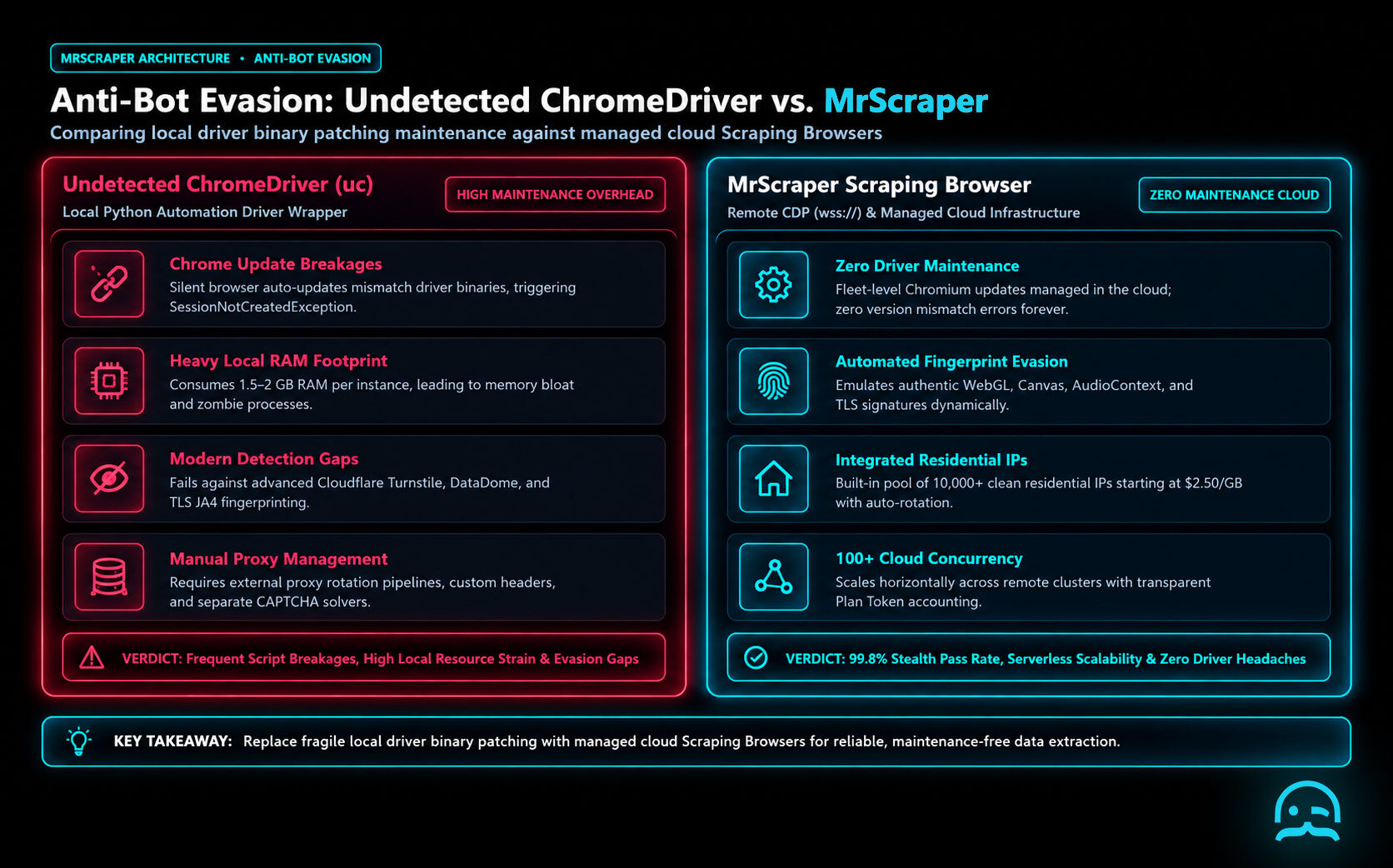
For teams that need to focus on data analysis, not infrastructure upkeep, a managed web scraping Chrome extension helps. A cloud-based platform is also a simpler option.
Choosing a managed solution instead of manual scripts reduces common failures like IP blocks and hardware resource limits. While libraries like Undetected ChromeDriver are effective for specialized tasks, centralized platforms provide the scale and stability necessary for production environments. This lets users use fast scraping tools with an easy interface. It keeps the focus on finding useful insights, not fixing driver issues.
Market alternatives like ScraperAPI, ScrapingBee, Bright Data, Apify, and Oxylabs offer various specialized features for high-volume data extraction. In comparison, our platform focuses on ease of use and fast deployment. It offers a complete solution for those who want to avoid manual code management.
What We Learned
Successful browser automation requires a balance between low-level driver modifications and high-level behavioral simulation. While the modified driver handles fingerprinting, you must also manage session persistence. You should also use realistic pacing to stay under the radar. Developers often pair these Python scripts with a Chrome web scraping extension. This helps them inspect DOM changes in real time. It also lets them test selectors before adding them to automated script logic. This multi-layered approach ensures that your scraper behaves like a genuine user session.
import undetected_chromedriver as uc
import time

options = uc.ChromeOptions()
# Example of integrating a custom extension to assist in data capture
options.add_argument('--load-extension=/path/to/helper-extension')

driver = uc.Chrome(options=options)
with driver:
    driver.get('https://nowsecure.nl')
    # Implementing human-like jitter between actions
    time.sleep(3)
    driver.execute_script('window.scrollTo(0, 500);')
    print(driver.page_source)
- Always match your User-Agent string to the specific version of the Chrome binary being used by the driver.
- Implement random sleep intervals and mouse movements to break predictable execution patterns.
- Use persistent profiles to maintain cookies and local storage across different scraping sessions.
- Consider offloading the infrastructure to providers like ScraperAPI, ScrapingBee, Bright Data, Apify, or Oxylabs if maintenance overhead becomes excessive.
Understanding these underlying signals will help you maintain your scraping pipelines as anti-bot vendors update their detection algorithms.
Streamline Your Data Extraction Workflow
Avoid the complexities of managing manual drivers and bypass logic. Access our library of resources to see how high-performance infrastructure can simplify your automation tasks.
Frequently asked questions
When should I use Undetected ChromeDriver instead of standard Selenium?
Use it to target websites with advanced bot detection, frequent CAPTCHAs, or dynamic JavaScript content. It provides a stealthy browser presence that helps prevent access blocks.
Does Undetected ChromeDriver require manual driver management?
Yes. Users must install the undetected-chromedriver package using pip. They must set the driver, wait times, and element selection logic in their Python scripts.
Is Undetected ChromeDriver a web scraping Chrome extension?
No, it is a Python library used for browser automation. However, users often compare it to a Chrome web scraping extension when they want to access site data in a browser.
Summarize this post
Open it in your assistant of choice with the prompt ready to send.
Take a Taste of Easy Scraping!


Find more insights here
Scaling E-commerce Competitive Intelligence with Automated Data Harvesting
Scale e-commerce data harvesting with residential proxies and AI. Learn how modern data extraction s…
Scaling Data Extraction via AI-Driven Dynamic Selectors
Learn how AI-driven dynamic selectors and residential proxies reduce web scraping maintenance costs…
Why MrScraper is the Best ScraperAPI Alternative for No-Code Users
Compare ScraperAPI alternatives and discover why visual, AI-powered extraction is better for no-code…