How to Scrape Multiple Pages With a Scraping API
Web ScrapingLearn how to scrape multiple pages with a web scraping API, handling URL, offset, cursor and JavaScript pagination in Python with working code examples.
Page one sits fetched at the lower left while a followed chain of pages rises to the upper right.
To scrape many pages, first find how the site paginates. Check for page numbers in the URL. Look for offset and limit parameters. Find next-page links in the HTML. Check for API cursor tokens. Watch for JavaScript infinite scroll. Each needs different code. Then loop through pages, extracting records from each, and stop when a page returns zero records or no next link exists.
You have built a scraper that pulls data from a single page (product listings, job postings, research results) and it works. Then you realize the site has 47 pages of results and your scraper only got page one. Handling pagination is the step that turns a proof of concept into a complete data extraction pipeline.
This guide covers five pagination patterns with working Python code. It also covers two topics most tutorials miss. You will learn how to handle rate limits during long runs. You will also learn how to resume without starting over.
What Is Multi-Page Scraping?
Multi-page scraping is the automated collection of data from many pages on a website. It follows the site’s pagination to retrieve records spread across pages, not all at once.
Most sites that display lists of items (products, jobs, articles, listings) paginate their results. Rather than loading all 10,000 records in one page response, they load 20 or 50 at a time. They also provide a way to move to the next batch. A scraper that only requests the first page collects only the first batch, missing everything else. Multi-page scraping automates the navigation through all subsequent pages until the full dataset has been collected.
The challenge is that pagination is not standardized. Different sites implement it in meaningfully different ways, and the code that handles one implementation often fails on another. URL page settings need one kind of scraper handling. Offset and limit query strings need a different kind of handling. Next-page links in HTML need their own handling. API cursor tokens need different handling too. Infinite scroll also needs a different approach.
How Pagination Works Across Different Sites
Understanding how a site implements pagination tells you exactly which pattern your scraper needs to handle.
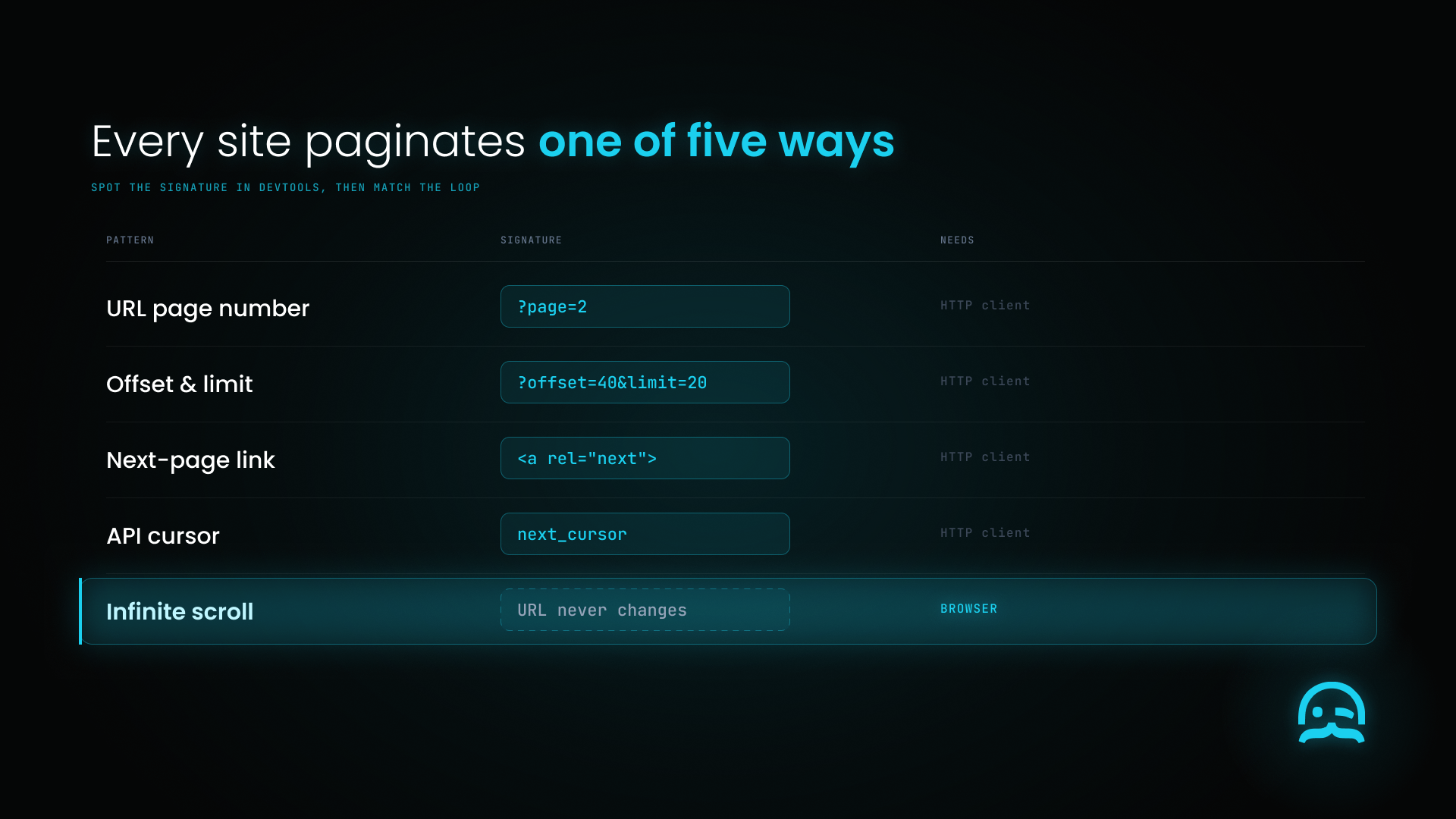
Five pagination patterns with the signature to spot for each; infinite scroll needs a browser.
URL-based page numbers are the most common pattern. The page number shows in the URL as a query parameter (?page=2) or a path segment (/listings/page/2/). Each page number maps to a unique URL, so it is easy to build and request each page URL in order.
Offset and limit parameters are common on sites with API-style URL structures. Rather than a page number, the URL includes ?offset=20&limit=20, meaning skip the first 20 and return the next 20. To reach the third page you would use ?offset=40&limit=20. Common in e-commerce and database-backed listing sites.
The link has an href that points to the next page URL. Rather than constructing the next URL yourself, you extract it from the current page's HTML and follow it.
API cursor tokens appear in JSON APIs where the response includes a cursor, next_token or after field that you pass with your next request to retrieve the following batch. Pagination that cannot be reduced to page numbers, because the underlying data can change between requests, often uses cursors.
JavaScript-based infinite scroll and load-more buttons load more content when users interact, without changing the URL. This requires a browser automation tool rather than a plain HTTP client.
Step-by-Step Guide: Handling Each Pagination Pattern
Step 0: Shared setup
Every example below uses these three pieces. Defining them once keeps the snippets runnable rather than illustrative.
import random
import time
from urllib.parse import urljoin

import requests
from bs4 import BeautifulSoup

HEADERS = {
    "User-Agent": (
        "Mozilla/5.0 (Windows NT 10.0; Win64; x64) "
        "AppleWebKit/537.36 (KHTML, like Gecko) "
        "Chrome/124.0.0.0 Safari/537.36"
    )
}

def extract_records(soup: BeautifulSoup, selector: str = "div.listing-item") -> list[dict]:
    """
    Replace this with extraction logic for your target site.
    Returning an empty list is the signal every loop below uses
    to detect the end of pagination, so make sure a genuinely
    empty page returns [] rather than raising.
    """
    return [
        {"text": node.get_text(strip=True)}
        for node in soup.select(selector)
    ]
Step 1: Identify the Pagination Pattern
Before writing any scraping code, determine which pattern the target site uses. Open the browser developer tools and watch the URL bar and Network tab as you navigate to the next page:
- URL changes to
?page=2: URL-based pagination - URL changes to
?offset=20: offset-based - URL stays the same but the Network tab shows a new XHR request: JavaScript or API pagination
- A Load More button exists: button-triggered dynamic loading
You can also inspect the current page's HTML source for links containing page=2, next or similar.
Step 2: Handle URL-Based Page Number Pagination
The simplest pattern. Construct each page URL and collect data from all pages:
BASE_URL = "https://example-site.com/listings"

def scrape_all_pages_by_number(base_url: str,
                               page_param: str = "page",
                               max_pages: int = 50) -> list[dict]:
    """Scrape all pages of a site using URL page number parameters."""
    all_records = []

    for page_num in range(1, max_pages + 1):
        url = f"{base_url}?{page_param}={page_num}"
        response = requests.get(url, headers=HEADERS, timeout=15)
        response.raise_for_status()

        soup = BeautifulSoup(response.text, "html.parser")
        records = extract_records(soup)

        if not records:
            print(f"No records on page {page_num}. Reached end of results.")
            break

        all_records.extend(records)
        print(f"Page {page_num}: {len(records)} records collected.")
        time.sleep(random.uniform(1.5, 3.0))

    return all_records
The empty-results check (if not records: break) is how you detect the last page without knowing in advance how many pages exist. It is more reliable than assuming the page count.
Step 3: Handle Offset-Based Pagination
Same principle, but computing the offset instead of incrementing a page number:
def scrape_all_pages_by_offset(base_url: str,
                               limit: int = 20,
                               max_records: int = 5000) -> list[dict]:
    """Scrape all records using offset and limit pagination."""
    all_records = []
    offset = 0

    while offset < max_records:
        url = f"{base_url}?offset={offset}&limit={limit}"
        response = requests.get(url, headers=HEADERS, timeout=15)
        response.raise_for_status()

        soup = BeautifulSoup(response.text, "html.parser")
        records = extract_records(soup)

        if not records:
            break

        all_records.extend(records)
        print(f"Offset {offset}: {len(records)} records collected.")

        if len(records) < limit:
            break  # Fewer records than requested means this was the last page

        offset += limit
        time.sleep(random.uniform(1.0, 2.5))

    return all_records
Receiving fewer records than the requested limit catches a common edge case. The last page often returns a partial batch, which is a cleaner signal than getting zero records.
Step 4: Follow Next-Page Links From HTML
For sites where the next page URL cannot be constructed from a pattern, extract it from the current page.
One thing to get right here. The selector a:contains("Next") appears in a lot of scraping tutorials and it is not valid CSS. It is jQuery syntax. Passing it to BeautifulSoup's select_one() raises an error on current versions of Soup Sieve, so match on attributes first and fall back to link text using find():
NEXT_TEXT = {"next", "next page", "next >", "›", "»"}

def find_next_link(soup: BeautifulSoup):
    """Locate a next-page link by attribute, then by visible text."""
    link = soup.select_one('a[rel="next"], a.pagination-next, li.next > a')
    if link is not None:
        return link
    # Fall back to link text. Note this is find(), not select_one():
    # CSS has no text-matching selector.
    return soup.find(
        "a",
        string=lambda s: s is not None and s.strip().lower() in NEXT_TEXT,
    )

def scrape_following_next_links(start_url: str, max_pages: int = 500) -> list[dict]:
    """Follow next-page links from each page until no next link exists."""
    all_records = []
    current_url = start_url
    seen_urls = set()

    for _ in range(max_pages):
        if not current_url or current_url in seen_urls:
            break  # Guard against pagination loops
        seen_urls.add(current_url)

        response = requests.get(current_url, headers=HEADERS, timeout=15)
        response.raise_for_status()

        soup = BeautifulSoup(response.text, "html.parser")
        records = extract_records(soup)
        all_records.extend(records)
        print(f"Collected {len(records)} records from {current_url}")

        next_link = find_next_link(soup)
        if next_link and next_link.get("href"):
            # urljoin handles both relative and absolute hrefs correctly
            current_url = urljoin(current_url, next_link["href"])
        else:
            current_url = None

        time.sleep(random.uniform(1.5, 3.0))

    return all_records
The seen_urls guard matters more than it looks. Some sites render a Next link on the final page that points back to page one, which turns a clean loop into an infinite one.
Step 5: Handle API Cursor Pagination
Cursor pagination cannot run in parallel. Each request needs the token from the previous one. So the loop must run in order, one request at a time:
def scrape_all_pages_by_cursor(api_url: str,
                               page_size: int = 50,
                               max_pages: int = 200) -> list[dict]:
    """Walk a cursor-paginated JSON API until no cursor is returned."""
    all_records = []
    cursor = None

    for page_num in range(max_pages):
        params = {"limit": page_size}
        if cursor:
            params["cursor"] = cursor

        response = requests.get(api_url, headers=HEADERS, params=params, timeout=15)
        response.raise_for_status()
        payload = response.json()

        # Field names vary by API. Check the docs for yours.
        batch = payload.get("data") or payload.get("results") or []
        if not batch:
            break

        all_records.extend(batch)
        print(f"Cursor page {page_num}: {len(batch)} records.")

        cursor = (
            payload.get("next_cursor")
            or payload.get("cursor")
            or payload.get("after")
        )
        if not cursor:
            break  # No further cursor means the sequence is complete

        time.sleep(random.uniform(1.0, 2.0))

    return all_records
Two cursor-specific gotchas. Cursors usually expire, so a run that pauses for hours may find its token rejected on resume. Since a cursor points to a location in a live dataset, not a fixed page, it can shift during a run. Records added while the process is running may be missed. They may also be processed more than once. Deduplicate on a stable record ID rather than trusting the sequence.
Step 6: Handle JavaScript-Based Pagination With Playwright
For infinite scroll, load-more buttons, or any pagination that requires browser interaction, an HTTP client cannot help. You need browser automation:
from playwright.sync_api import sync_playwright

def scrape_with_load_more_button(url: str,
                                 load_more_selector: str = "button.load-more",
                                 max_clicks: int = 20) -> str:
    """Click a Load More button until it disappears, then return the full HTML."""
    with sync_playwright() as pw:
        browser = pw.chromium.launch(headless=True)
        page = browser.new_page()
        page.goto(url, wait_until="domcontentloaded", timeout=30_000)

        for click_count in range(max_clicks):
            load_more = page.query_selector(load_more_selector)
            if not load_more or not load_more.is_visible():
                print(f"No Load More button after {click_count} clicks.")
                break

            load_more.click()
            page.wait_for_load_state("networkidle", timeout=10_000)
            page.wait_for_timeout(1_000)

        full_html = page.content()
        browser.close()

    return full_html

def scrape_infinite_scroll(url: str, scroll_count: int = 15) -> str:
    """Scroll repeatedly to trigger infinite scroll loading."""
    with sync_playwright() as pw:
        browser = pw.chromium.launch(headless=True)
        page = browser.new_page()
        page.goto(url, wait_until="domcontentloaded", timeout=30_000)

        previous_height = 0
        for _ in range(scroll_count):
            page.evaluate("window.scrollTo(0, document.body.scrollHeight)")
            page.wait_for_timeout(2_000)

            current_height = page.evaluate("document.body.scrollHeight")
            if current_height == previous_height:
                print("Page height stopped growing. All content loaded.")
                break
            previous_height = current_height

        html = page.content()
        browser.close()

    return html
A note on wait_until. Using networkidle on goto() frequently times out on pages with analytics beacons or open websockets, which never go idle. Use domcontentloaded for navigation, then networkidle after each interaction.
If your targets are behind anti-bot protection and JavaScript, self-managed Playwright adds extra work. You must handle fingerprint patching and proxy rotation, along with pagination logic. MrScraper's Scraping Browser runs JavaScript through an API call. It handles scroll-loaded content and button clicks. You no longer need to maintain the browser layer.
Step 7: Combine and Export the Full Dataset
After collecting records from all pages, combine and export:
import csv
from datetime import datetime

def export_all_pages(records: list[dict],
                     filename: str | None = None) -> str:
    """Export the combined multi-page dataset to CSV."""
    if not records:
        print("No records to export.")
        return ""

    filename = filename or f"scraped_data_{datetime.now():%Y%m%d_%H%M%S}.csv"

    # Union the keys across all records so rows with extra fields
    # do not raise ValueError on write
    fieldnames = list({key: None for record in records for key in record})

    with open(filename, "w", newline="", encoding="utf-8") as f:
        writer = csv.DictWriter(f, fieldnames=fieldnames, restval="")
        writer.writeheader()
        writer.writerows(records)

    print(f"Exported {len(records)} total records to {filename}")
    return filename
Using the union of keys rather than records[0].keys() matters. The single-record version breaks when one page returns a record with an extra field. This is common when listings mix sponsored and organic results.
Surviving Rate Limits Mid-Run
Deep pagination means many requests to one domain in one session, so 429 Too Many Requests is a matter of when, not if. Retrying right away makes it worse. Retrying after a fixed delay is only slightly better. Each worker retries at the same time. The server then sees the same traffic spike, just later. This is the thundering herd problem.
The fix is exponential backoff with full jitter. Double the wait after each failure. Then pick a random delay between zero and the new limit. The canonical treatment is Marc Brooker’s Exponential Backoff And Jitter on the AWS Architecture Blog. His conclusion is blunt. The answer is not to remove backoff. It is to add jitter. AWS says this pattern has been a key part of building resilient client libraries for eight years. Most AWS SDKs now support it natively.
RETRYABLE = {429, 500, 502, 503, 504}

def get_with_retries(url: str,
                     params: dict | None = None,
                     max_retries: int = 5,
                     base_delay: float = 1.0,
                     max_delay: float = 30.0) -> requests.Response:
    """GET with exponential backoff and full jitter on transient failures."""
    for attempt in range(max_retries):
        response = requests.get(url, headers=HEADERS, params=params, timeout=30)

        if response.ok:
            return response

        if response.status_code in RETRYABLE:
            retry_after = response.headers.get("Retry-After", "")
            if retry_after.isdigit():
                delay = float(retry_after)   # Always prefer the server's own answer
            else:
                ceiling = min(max_delay, base_delay * (2 ** attempt))
                delay = random.uniform(0, ceiling)
            print(f"HTTP {response.status_code}. Backing off {delay:.1f}s.")
            time.sleep(delay)
            continue

        # 401, 403, 404 and friends will not succeed on retry. Fail fast.
        response.raise_for_status()

    raise RuntimeError(f"Gave up on {url} after {max_retries} attempts.")
Two details worth keeping. Retry-After takes precedence over your own arithmetic whenever the server sends it, because the server knows when it will be ready and you are guessing. And non-retryable 4xx errors must escape the loop rather than being caught alongside transient failures. A wrapper that retries a 401 five times is just a slower way to fail.
Swap requests.get(...) for get_with_retries(...) in any of the loops above and a mid-run rate limit becomes a pause instead of a crash.
Making Long Runs Resumable
A 400-page run that dies on page 380 should not start over. Checkpoint after each page, and write atomically so a crash mid-write cannot leave you with a truncated checkpoint file:
import json
import os

CHECKPOINT = "pagination_state.json"

def load_state() -> dict:
    if os.path.exists(CHECKPOINT):
        with open(CHECKPOINT, encoding="utf-8") as f:
            return json.load(f)
    return {"next_page": 1, "records": []}

def save_state(state: dict) -> None:
    tmp = f"{CHECKPOINT}.tmp"
    with open(tmp, "w", encoding="utf-8") as f:
        json.dump(state, f)
    os.replace(tmp, CHECKPOINT)   # Atomic on POSIX and Windows

def scrape_resumable(base_url: str, max_pages: int = 500) -> list[dict]:
    state = load_state()
    print(f"Resuming from page {state['next_page']}")

    for page_num in range(state["next_page"], max_pages + 1):
        response = get_with_retries(f"{base_url}?page={page_num}")
        soup = BeautifulSoup(response.text, "html.parser")
        records = extract_records(soup)

        if not records:
            break

        state["records"].extend(records)
        state["next_page"] = page_num + 1
        save_state(state)

        time.sleep(random.uniform(1.5, 3.0))

    return state["records"]
Using os.replace() rather than a plain write is the part that matters. It swaps the file in a single filesystem operation, so the checkpoint on disk is always a complete one.
Best Tools for Multi-Page Scraping
Python with requests and BeautifulSoup. The standard stack for URL-based, offset-based and cursor pagination on static HTML and JSON APIs. Zero licensing cost, maximum flexibility. Use this for any target that does not require browser rendering.
Playwright (Python). Handles JavaScript-based pagination, infinite scroll and load-more patterns that HTTP clients cannot reach. Required wherever pagination depends on user interaction.
Scrapy. Python's purpose-built scraping framework, with built-in link following and pagination support. CrawlSpider with Rule objects handles many common patterns without custom loop logic. Documentation at docs.scrapy.org. Best for large-scale crawling where framework-level pipeline management earns its keep.
**MrScraper Web Scraper API.** Two things are relevant to pagination specifically. Requests can use residential IPs with a matching country. This helps prevent IP reputation buildup caused by deep pagination. And the listing agent handles discovery and pagination itself, which is the only option here that removes the loop from your code rather than making it more robust. See the comparison against every major scraping tool for how that lines up against the alternatives.
Free vs. Paid: What Each Approach Supports
Free Python tooling (requests, BeautifulSoup, Playwright) handles every pagination pattern at no licensing cost. Infrastructure costs are real but modest for most operations. This is the best starting point for developers who know Python, and for targets that do not resist you.
Managed scraping APIs add per-request cost and remove the rendering and anti-bot layers from your codebase. The trade becomes worthwhile when you maintain fingerprint patches and a proxy pool to reach page 200. At that point, you are not working on what the data is for.
Managed hosting platforms such as Scrapy Cloud provide scheduling and uptime for spiders you have already written. Relevant for production runs that need to happen on a cron without you owning a server.
Key Features to Look For in a Multi-Page Scraping Tool
- Pagination pattern support. Does it handle URL-based, offset, next-link, cursor and JavaScript-driven pagination, or only a subset?
- JavaScript rendering. Infinite scroll and load-more require a browser execution layer. Confirm it exists rather than assuming.
- Request pacing and rate control. Multi-page runs generate many requests to one domain. Configurable delays and concurrency caps are not optional.
- Backoff behaviour on 429. Ask specifically whether retries use jitter. Fixed-delay retries across concurrent workers reproduce the thundering herd the retry was meant to prevent.
- Failure recovery and resumability. Can a run resume from the last successful page, or does it restart from page one?
- Duplicate detection. Live inventory changes order between requests, so the same record can appear on two pages. Deduplication on a stable ID is the fix.
- Aggregated structured output. Does it combine all pages into one dataset, or leave you merging page-level files afterwards?
When Should You Build a Multi-Page Scraping Pipeline?
Build a multi-page pipeline when:
- The dataset spans multiple pages and you need complete coverage. A partial first-page extraction is insufficient for the use case.
- The target has stable pagination that will not need frequent structural updates.
- Your analysis requires data from across the archive rather than a sample of the most recent items.
A single-page approach is sufficient when:
- You only need the most recent or featured items, which appear on page one anyway.
- You are testing extraction logic or exploring the data schema before committing.
- The site publishes a downloadable export or a public API that delivers the full dataset more efficiently than pagination.
Common Challenges and Limitations
Detecting the last page requires a stopping condition. Not all sites signal the end clearly. The most reliable condition is to stop when a page returns zero records. A secondary check, stopping when a page returns a partial batch, catches the final page. Without either, your scraper keeps requesting pages that do not exist until it hits whatever maximum you configured.
Pagination structures change without notice. A site using ?page=2 today may switch to ?p=2 or a cursor after a redesign. A sudden drop to zero records per page usually means the structure changed, not that the site ran out of data. Alert on it rather than discovering it in a stale dataset.
Bot detection intensifies on deep pagination. The deeper you go, and the more requests you make to one domain in a session, the faster signals build up. This happens faster than with single-page access. Paced delays, jittered backoff and fresh IPs across the sequence all extend how far you get. For a fuller treatment of what the detection layers actually inspect, see how to bypass Cloudflare when web scraping.
JavaScript infinite scroll has no natural end signal. Unlike next-link pagination, where the absence of a link ends the sequence, infinite scroll requires inferring completeness. Comparing scroll height between iterations is the standard approach. But on a slow-loading page, the height may not change. This can happen because your script runs faster than the server. Raise the wait rather than trusting the first match.
Sites serve degraded pages rather than blocking. A protected site may return HTTP 200 with a valid-looking page but no records. Every loop above reads this as the end of pagination. If a run finishes suspiciously early, check whether page two was empty or was a challenge page.
Conclusion
Multi-page scraping is the step that makes web scraping useful at scale. A first-page collection is rarely complete enough for real analysis. Automating pagination turns a single extraction into a full dataset. The right pattern depends on how the target handles pagination. It may use URL parameters, offsets, next-page links, API cursors, or JavaScript. Each method has a matching Python approach.
Start by finding the pattern in DevTools. Match it to the code above. Add empty-results detection as your termination condition. Then add two things that turn a script into a pipeline. Use jittered backoff so a rate limit pauses, not crashes. Use checkpointing so a failure on page 380 does not lose pages 1 through 379.
Building the pagination loop is the easy part. Keeping it running against a site that does not want to be read is the part that consumes engineering time. If that is where your time is going, try MrScraper free. No credit card is needed. You can also compare the managed options side by side. Do that before you commit an engineer.
A deep stack of paginated pages resolves into a single dataset above a projector pad.
What We Learned
- Identify the pagination pattern first. URL-based, offset, next-link, cursor and JavaScript pagination each need different code. The wrong approach fails silently or collects page one only.
- Empty-results detection is the most reliable stopping condition. More robust than a total page count, which most sites do not expose.
- The selector
a:contains("Next")is jQuery, not CSS. It raises an error in BeautifulSoup. Match onrel="next"and class names, then fall back tofind()on link text. - JavaScript pagination needs browser automation. Infinite scroll and load-more only work in a browser context.
- Backoff needs jitter. Fixed-delay retries across concurrent workers recreate the traffic spike the retry was supposed to smooth.
- Checkpoint atomically. Write to a temp file and use
os.replace()so the checkpoint on disk is always complete. - Deduplicate on a stable ID. Live datasets reorder between requests, so the same record can appear twice and another can be skipped entirely.
Frequently asked questions
How do I know when a multi-page scraper should stop?
The most reliable stopping condition is detecting an empty results page. You can also monitor for a next-page link that no longer appears in the HTML, or check whether the number of returned records is smaller than your requested limit. Guard against sites whose last page links back to page one by tracking URLs you have already visited.
Can I scrape infinite scroll pages with standard HTTP clients?
No. Infinite scroll and load-more buttons require JavaScript execution to trigger new content. You need a browser automation tool such as Playwright, or a managed scraping API that handles dynamic rendering.
How do I prevent being blocked while scraping hundreds of pages?
Pace your requests with delays between pages, rotate IP addresses through residential proxies, and send realistic headers. Add exponential backoff with jitter so a rate limit becomes a pause rather than a failure. Managed APIs automate several of these layers.
What is the difference between page-based and offset-based pagination?
Page-based pagination uses a simple counter such as page=1, page=2. Offset-based pagination skips a specific number of records, such as offset=20 then offset=40, to reach the next batch. They are functionally equivalent, but offset requires computing the value yourself as page size multiplied by page index.
Why does my scraper get blocked on page 40 but not page 1?
Detection signals accumulate across a session. Forty requests to one domain in a few minutes is not human behavior. Datacenter IPs start with a poor reputation before anything else is checked. Paced delays, jittered backoff and rotating residential IPs across the sequence all extend the depth you reach.
How do I resume a multi-page scrape that failed halfway?
Persist the next page number and collected records after each successful page, and read that state at startup. Write the checkpoint to a temp file and rename it with os.replace() so a crash during the write cannot corrupt it. Cursor pagination is the exception, because tokens usually expire and a long pause may require restarting the sequence.
Web scraping shouldn't stop every time a website changes or blocks your requests.
MrScraper helps you collect reliable web data, even from challenging websites, with 24/7 support when you need it.
Get 1,000 free tokens to test MrScraper here.
Summarize this post
Open it in your assistant of choice with the prompt ready to send.
Take a Taste of Easy Scraping!

Find more insights here

Claude Code Competitor Pricing Research
Use Claude Code and MrScraper MCP to refresh public competitor pricing, normalize billing periods an…

Use MrScraper MCP to Compare Public SaaS Pricing and Plan Limits
Build a source-backed SaaS plan comparison using MrScraper MCP. Preserve prices, quotas, billing ter…

Build a Product Attribute Classifier with LangChain and MrScraper
Build a LangChain workflow that extracts product evidence with MrScraper, normalizes attributes and…