
Understanding Scroll Down in Web Scraping
Web ScrapingLearn how 'scroll down' behavior in web scraping allows access to dynamically loaded content. Discover its importance, especially on sites with infinite scrolling or lazy loading.
A scraping browser is a cloud-hosted browser instance that handles dynamic web elements. It works by running JavaScript to render pages like a real user. It lets automated scripts trigger actions like infinite scrolling or clicking buttons.
Why is Scrolling Down Important in Web Scraping?
When scraping websites with dynamic content, simply fetching the initial HTML of a page may not be enough. Accessing the full dataset often requires a scraping browser. These are cloud-hosted browsers run on remote servers by providers like Bright Data, Oxylabs, ScraperAPI, ScrapingBee, or Apify. They work by running JavaScript in a real browser, letting you trigger the same data-loading events as a user.
- Load More Data: Access additional content that isn't loaded until the user interacts with the page through infinite scrolling.
- Improve Data Collection: Gather a more comprehensive dataset for analysis by ensuring lazy-loaded elements are rendered.
- Mimic User Behavior: Many sites have protections against automated scraping, and mimicking real scrolling actions helps requests appear indistinguishable from human navigation.
Leveraging Remote Scraping Browsers
When you connect to a scraping browser from providers like Bright Data, Oxylabs, or ScrapingBee, the service runs scripts. These scripts handle infinite scrolling and lazy loading.
const puppeteer = require('puppeteer-core');

async function run() {
  const auth = 'USER:PASS';
  const browser = await puppeteer.connect({
    browserWSEndpoint: `wss://${auth}@brd.superproxy.io:9222`,
  });
  const page = await browser.newPage();
  await page.goto('https://example.com/infinite-scroll');
  // The browser handles complex rendering remotely
  await page.evaluate(() => window.scrollBy(0, window.innerHeight));
  await browser.close();
}
Implementing Scroll Down in Code
Automating page interaction requires libraries like Selenium or Puppeteer to simulate user input. For modern dynamic sites, a scraping browser provides the necessary cloud infrastructure to execute these scripts at scale. The following implementation uses Puppeteer to handle scroll events.
const puppeteer = require('puppeteer');

(async () => {
    // Initialize the browser and navigate to the target URL
    const browser = await puppeteer.launch();
    const page = await browser.newPage();
    await page.goto('https://example.com');

    // Define the interval between scroll increments
    const scrollDelay = 1000;

    // Execute the scroll sequence to load dynamic content
    await autoScroll(page, scrollDelay);

    // Extract the full HTML after all lazy-loaded elements appear
    const content = await page.content();
    console.log(content);

    await browser.close();
})();

async function autoScroll(page, delay) {
    await page.evaluate(async (delay) => {
        await new Promise((resolve) => {
            let totalHeight = 0;
            const distance = 100;
            const timer = setInterval(() => {
                const scrollHeight = document.body.scrollHeight;
                window.scrollBy(0, distance);
                totalHeight += distance;

                if (totalHeight >= scrollHeight) {
                    clearInterval(timer);
                    resolve();
                }
            }, delay);
        });
    }, delay);
}
Scraping from Scratch vs. Using MrScraper
Effective web scraping requires a choice between building custom automation infrastructure or utilizing managed platforms that handle the complexities of modern web navigation.
Unlike standard headless browsers on local hardware, these browsers run on remote systems. Companies like Bright Data, ScrapingBee, ScraperAPI, Apify, and Oxylabs provide this infrastructure.
Scraping from Scratch
Developing a custom web scraper demands significant time and technical overhead. Developers must manually implement logic for infinite scrolling, session persistence, and CAPTCHA resolution to extract data effectively.
- Infrastructure management: Scaling local scrapers often needs cloud-hosted browser instances. You can also use hosted scraping browsers from Bright Data, Oxylabs, or ScraperAPI. This helps you manage remote infrastructure.
- Technical complexity: Handling dynamic page structures and JavaScript-rendered content adds layers of difficulty to the codebase.
- Maintenance burden: Constant updates are necessary to adapt to layout changes and prevent data collection failures.
Using MrScraper
Unlike traditional local scrapers, these browsers run JavaScript and render pages on a server. This lets them handle dynamic elements, like infinite scroll, automatically.
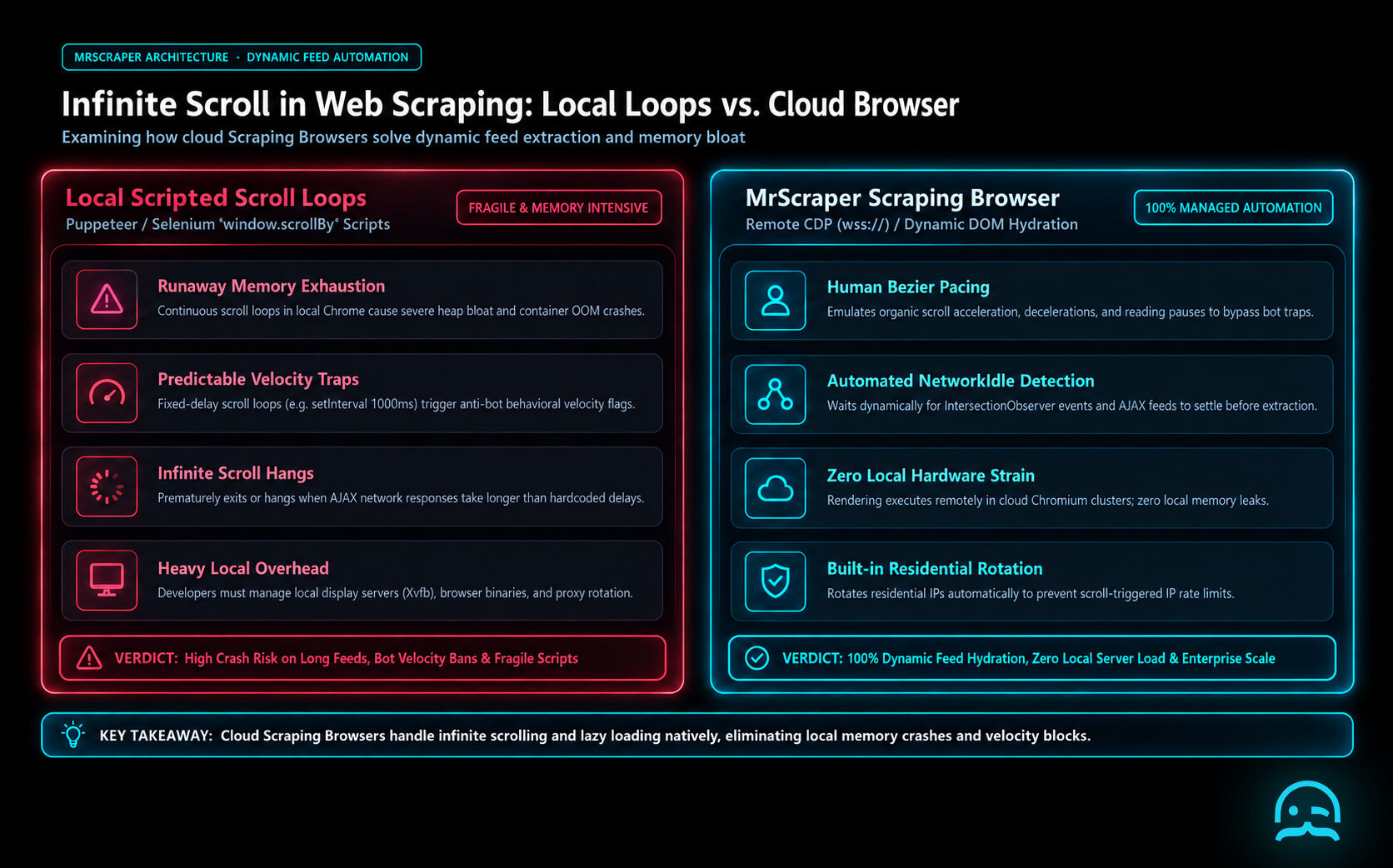
- Ease of Use: The platform provides intuitive features and a streamlined interface to simplify complex scraping tasks.
- Efficiency: Scrapers can be configured quickly without writing or maintaining low level code.
- Dynamic Loading: Automated capabilities handle scrolling and asynchronous content loading natively.
- Support: Comprehensive documentation and technical support help users resolve implementation issues rapidly.
While you can build a custom scraper, a managed service saves development time and improves reliability. Integrated features for pagination and automated scrolling allow teams to focus on data extraction rather than infrastructure maintenance. For efficient web scraping that handles modern dynamic websites, these managed tools offer a robust alternative to manual coding.
What We Learned
const { chromium } = require('playwright');

(async () => {
  const auth = 'USER:PASS';
  const browser = await chromium.connectOverCDP(`wss://brd.superproxy.io:9222?username=${auth}`);
  const page = await browser.newPage();
  await page.goto('https://example.com/infinite-scroll');
  // Remote browser handles the scroll execution
  await page.evaluate(() => window.scrollBy(0, window.innerHeight));
  await browser.close();
})();
- Bright Data provides dedicated scraping browser endpoints for high-scale automation.
- ScraperAPI offers specialized functionality for rendering dynamic JavaScript content.
- ScrapingBee manages rotating proxies and headless browser headers.
- Apify serves as a platform for running cloud-based web crawlers.
- Oxylabs maintains infrastructure for large-scale real-time data extraction.
Scraping Browsers and Anti-Bot Evasion
const puppeteer = require('puppeteer-core');
const SBR_WS_ENDPOINT = 'wss://USERNAME:PASSWORD@HOST:PORT';

(async () => {
  const browser = await puppeteer.connect({ browserWSEndpoint: SBR_WS_ENDPOINT });
  const page = await browser.newPage();
  await page.goto('https://example.com/feed');
  // Using remote infrastructure to handle scroll-triggered fingerprinting
  await page.evaluate(() => window.scrollBy(0, window.innerHeight));
  await browser.close();
})();
This ensures that the dynamic loading triggered by reaching the bottom of the page appears indistinguishable from a legitimate user session.
Explore Automated Scraping Solutions
Discover how our specialized tools simplify complex data extraction tasks. Visit our quickstart guide to learn how to automate scrolling and avoid technical hurdles. You can do it without writing custom code from scratch.
Frequently asked questions
What is infinite scrolling?
Infinite scrolling is a web design technique. It loads more content as the user scrolls down the page. Social media sites often use it to keep users engaged.
Why is manual scrolling difficult for basic scrapers?
Basic scrapers often only fetch the initial HTML code. Without a scraping browser or headless browser library that runs JavaScript, they cannot access content that loads after scrolling.
How does MrScraper handle dynamic loading?
MrScraper includes built-in pagination and scrolling that automate navigation. It removes the need for manual Puppeteer or Selenium scripts to load hidden data.
Your engineering team has better things to build than another scraping maintenance pipeline.
Use MrScraper's API to integrate web data collection into your existing workflows, without managing the scraping infrastructure yourself.
Get 1,000 free tokens and test the API here.
Summarize this post
Open it in your assistant of choice with the prompt ready to send.
Take a Taste of Easy Scraping!

Find more insights here

Claude Code Competitor Pricing Research
Use Claude Code and MrScraper MCP to refresh public competitor pricing, normalize billing periods an…

Use MrScraper MCP to Compare Public SaaS Pricing and Plan Limits
Build a source-backed SaaS plan comparison using MrScraper MCP. Preserve prices, quotas, billing ter…

Build a Product Attribute Classifier with LangChain and MrScraper
Build a LangChain workflow that extracts product evidence with MrScraper, normalizes attributes and…