Fast Web Scraper: Web Crawling vs Web Scraping Explained
Web ScrapingLearn how a fast web scraper differs from web crawling, when to use each, and how crawling can discover pages before scraping extracts structured data.
A fast web scraper extracts targeted data from known pages, while web crawling discovers and follows pages. Use crawling to find URLs, scraping to collect structured information, or combine both for broader data collection workflows.
What Is Web Crawling?
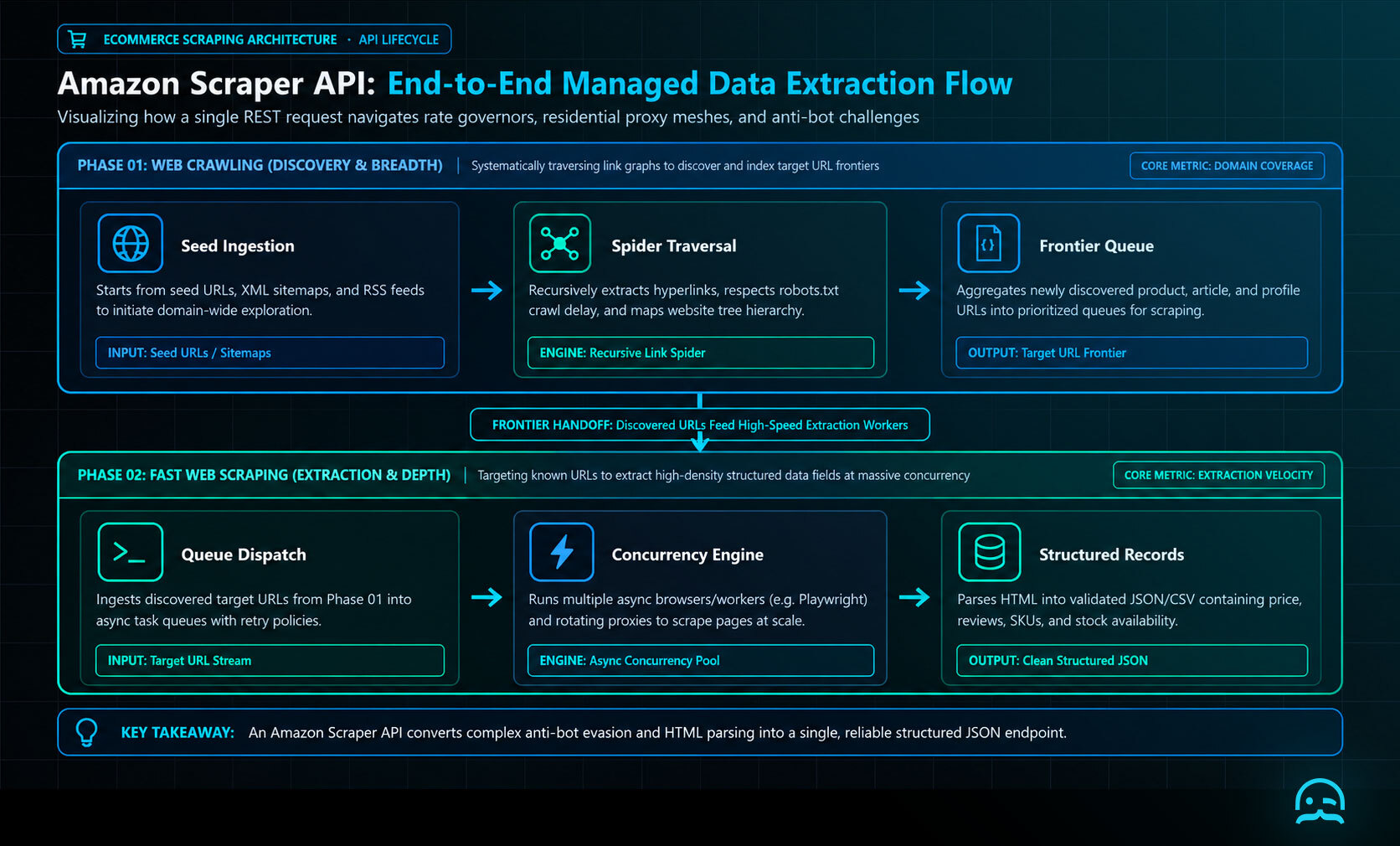
Web crawling is the process of systematically browsing the web to discover and index pages. It’s how search engines like Google find new or updated content.
A web crawler (also called a spider or bot) starts from a list of URLs, fetches the pages, extracts the links from them, and visits those links recursively.
Key features:
- Discovers and indexes web pages
- Follows hyperlinks to explore more content
- Builds a map of a website or a network of websites
Web crawling is like exploring the internet to catalog what's available.
What Is Web Scraping?
Web scraping, on the other hand, is the process of extracting specific information from web pages. It doesn’t just find URLs. It pulls out structured data like prices, reviews, job titles, and other relevant information.
Key features:
- Extracts targeted data from known web pages
- Parses HTML or APIs to collect content
- Outputs structured data formats like JSON or CSV
Web scraping focuses on gathering useful content from existing pages.
The Core Differences
Here’s a side-by-side comparison of web crawling vs web scraping:
| Feature | Web Crawling | Web Scraping |
|---|---|---|
| Purpose | Discover and index pages | Extract specific data |
| Output | URLs, website structure | Data tables, structured content |
| Common Use Case | Search engine indexing | Price monitoring, lead generation |
| Example Tool | Scrapy (crawler mode), Heritrix | MrScraper, BeautifulSoup, Puppeteer |
| Typical Input | A list of seed URLs | Specific webpage or HTML element |
| Focus | Breadth (coverage) | Depth (detail) |
When to Use Each
Use web crawling when you need to discover multiple pages across a domain or website. This approach suits sitemap generation, SEO audits, and identifying product URLs before extraction. Use web scraping when you already know where the data is and need to extract it. A fast web scraper is useful for collecting pricing, reviews, and other details from product or content pages.
Building a Fast Web Scraper
import asyncio
import os
import aiohttp

URLS = [
    "https://example.com/",
    "https://example.org/",
]
PROXIES = [p for p in os.getenv("SCRAPER_PROXIES", "").split(",") if p]
CONCURRENCY = 5

async def fetch(session, url, index, semaphore):
    proxy = PROXIES[index % len(PROXIES)] if PROXIES else None
    async with semaphore:
        async with session.get(url, proxy=proxy, timeout=20) as response:
            return url, response.status, await response.text()

async def main():
    semaphore = asyncio.Semaphore(CONCURRENCY)
    async with aiohttp.ClientSession() as session:
        jobs = [fetch(session, url, i, semaphore) for i, url in enumerate(URLS)]
        for task in asyncio.as_completed(jobs):
            url, status, html = await task
            print(url, status, len(html))

asyncio.run(main())
Combining Both for Maximum Impact
In real-world workflows, web crawling and web scraping often work together. A fast web scraper can follow this sequence:
- Crawl a site to discover article or product URLs.
- Scrape those URLs for headlines, prices, or contact information.
Some platforms combine crawling and scraping in one workflow, rather than requiring separate tools.
Conclusion
Understanding the difference between web crawling and web scraping is critical to building efficient and scalable data workflows. Crawling helps you discover content, while scraping helps you collect the data that matters most.
If you need a smart solution for both, MrScraper is a fast, flexible tool. It can power your data collection efforts.
What We Learned
A fast web scraper works best when page targets are known and you need structured data. A crawler is a better start when URLs are still unknown. A three-question filter keeps the roles clear: Do you need to find pages, extract fields, or do both in sequence?
- Choose crawling for discovery, indexing, and mapping links across a site.
- Choose scraping for extracting defined fields such as prices, reviews, or titles.
- When the workflow requires both, crawl first and scrape the resulting pages.
Your engineering team has better things to build than another scraping maintenance pipeline.
Use MrScraper's API to integrate web data collection into your existing workflows, without managing the scraping infrastructure yourself.
Get 1,000 free tokens and test the API here.
Summarize this post
Open it in your assistant of choice with the prompt ready to send.
Take a Taste of Easy Scraping!

Find more insights here

Claude Code Competitor Pricing Research
Use Claude Code and MrScraper MCP to refresh public competitor pricing, normalize billing periods an…

Use MrScraper MCP to Compare Public SaaS Pricing and Plan Limits
Build a source-backed SaaS plan comparison using MrScraper MCP. Preserve prices, quotas, billing ter…

Build a Product Attribute Classifier with LangChain and MrScraper
Build a LangChain workflow that extracts product evidence with MrScraper, normalizes attributes and…