522 Error: Cloudflare Connection Timed Out Explained
Web ScrapingCloudflare error 522 means the origin server did not respond in time. Learn what triggers it and how to fix or work around it.
Error code 522 is a Cloudflare-specific error. It means Cloudflare received the visitor's request but could not open a TCP connection to the origin server within the allowed time. This is almost always a problem at the origin server, not with the visitor. If you are seeing a 522 error, there is nothing wrong with your browser or connection.
This article covers what the error means, every cause, the exact commands to fix it, and what to do if you are a visitor or developer hitting it programmatically.
What error code 522 actually means
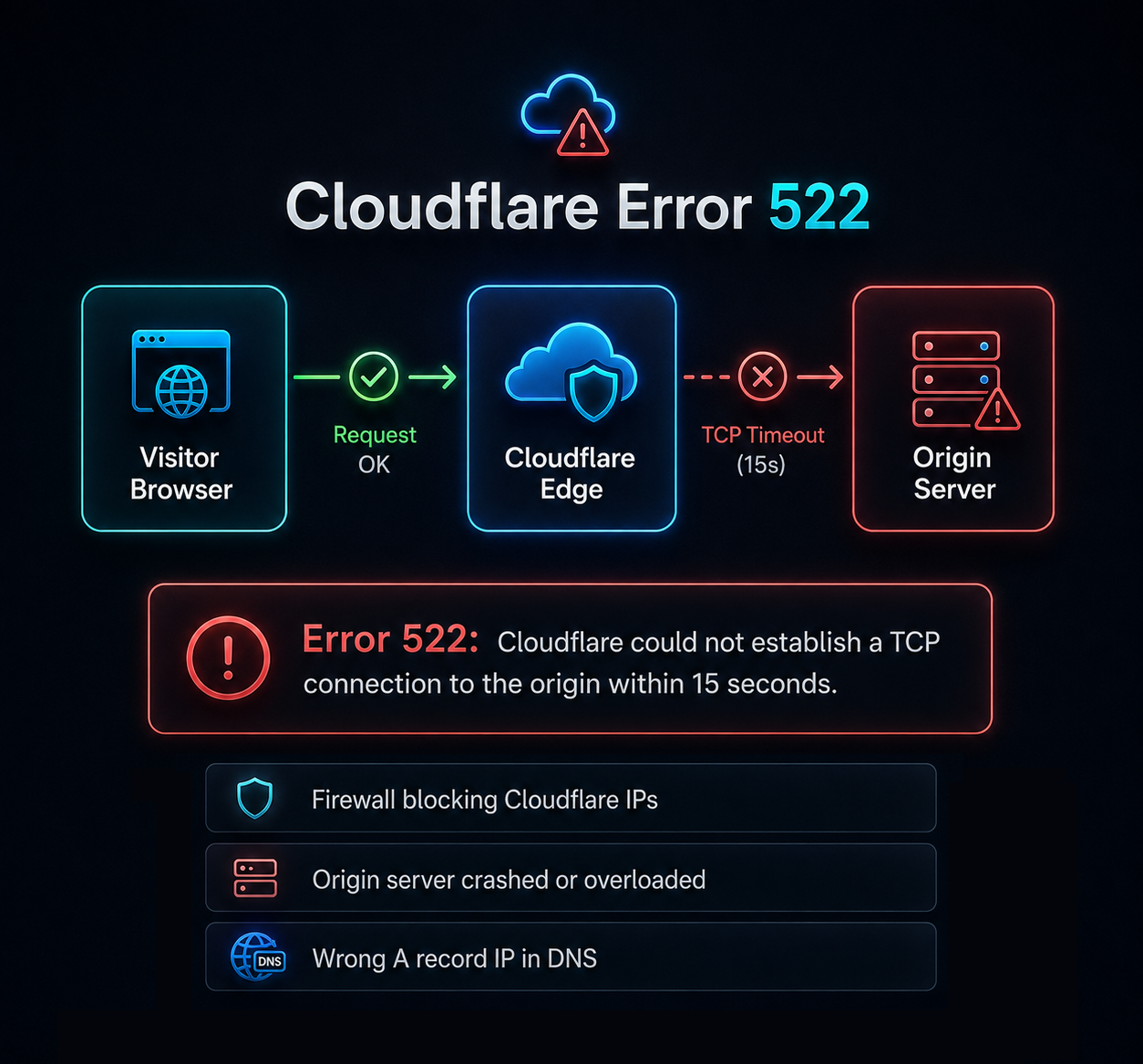
The request flows through three hops: visitor → Cloudflare edge (CDN and reverse proxy) → origin server. A Cloudflare 522 happens when Cloudflare sends a TCP SYN packet to the origin and the handshake never completes within roughly 15 seconds. The origin simply did not answer.
522 is not a standard HTTP status code. It will not appear in the HTTP spec or on MDN. It is one of Cloudflare's own 5xx codes, part of the 52x range for origin connectivity issues alongside Cloudflare Error 520, 521, 523, and 524. See Cloudflare's official Error 522 support documentation for their canonical reference.
The key distinction:
- 521: the origin actively refused the connection (TCP RST).
- 522: the origin never answered; the connection timed out.
- 524: the connection succeeded, but the origin took too long to respond.
What the 522 error page looks like
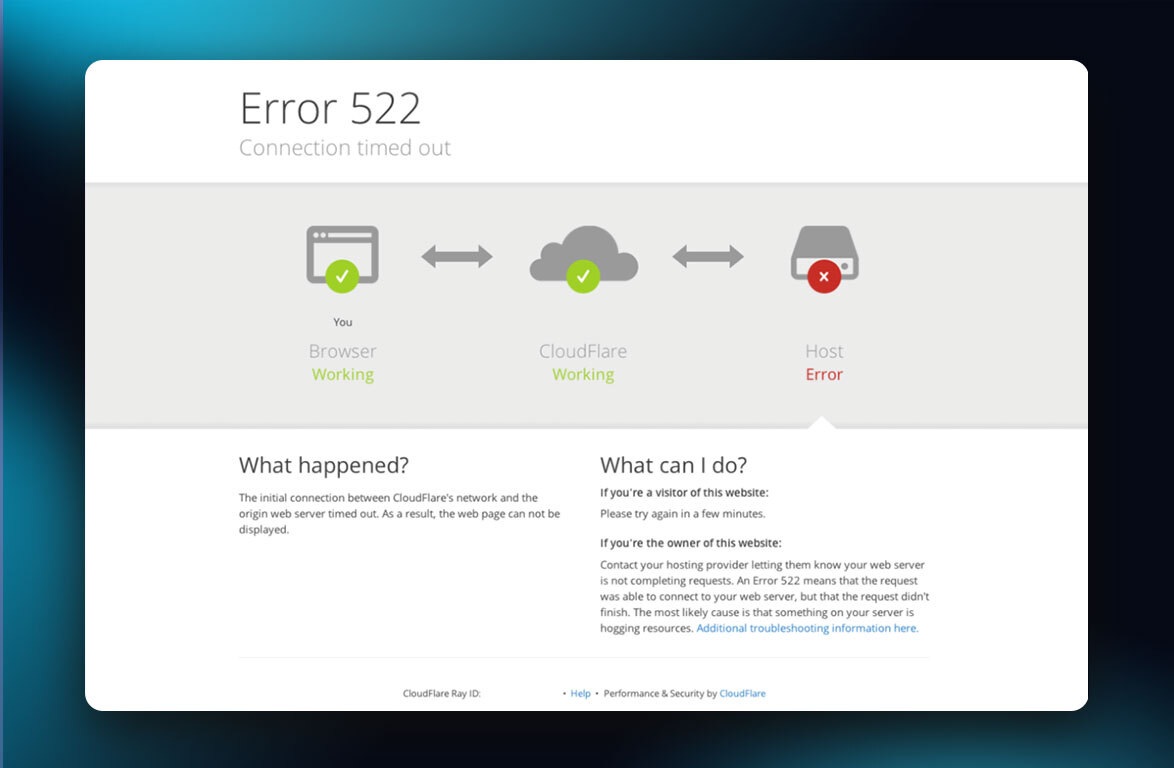
Cloudflare shows a branded page with "Error 522: Connection timed out" as the heading, a three-box diagram ("You" → "Cloudflare" → "Host") with green checks or a red error icon, a Ray ID at the bottom, and the origin IP.
The red-labeled box tells you exactly which hop failed. People search for this as: Error 522, error code 522, HTTP error 522, Cloudflare error 522, and "connection timed out 522."
What causes a 522 error?
The origin server is down or overloaded
The web server process crashed, the machine is out of memory, or CPU is at 100%.
How to check: systemctl status nginx and top.
Cloudflare's IP ranges are blocked by your firewall
The single most common cause. The origin firewall, a cloud security group, or a security plugin is dropping Cloudflare's IPs. Cloudflare publishes its ranges at cloudflare.com/ips. Every range must be allowed.
How to check: sudo iptables -L -n | grep -i drop, sudo ufw status verbose, or review your cloud provider's security group rules.
The origin IP in your DNS record is wrong
The A record in Cloudflare points at an old server after a migration, or at a private IP like 10.x.x.x.
How to check: compare the IP in DNS → Records against curl ifconfig.me on the server.
The origin is not listening on the expected port
Cloudflare connects on ports 80, 8080, 8880, 2052, 2082, 2086, 2095 (HTTP) and 443, 2053, 2083, 2087, 2096, 8443 (HTTPS).
How to check: sudo ss -tlnp.
Server resources exhausted
PHP-FPM or your worker pool is full, the connection limit is reached, and the kernel's TCP backlog is saturated. Too many keep-alive connections held open can also exhaust capacity. New SYN packets sit unanswered.
How to check: ss -s and your pm.max_children setting.
Rate limiting or DDoS protection at the origin
All traffic arrives from a small set of Cloudflare IPs, so fail2ban or a cloud WAF can mistake it for an attack.
How to check: sudo fail2ban-client status.
Network or routing problems
Packet loss or an upstream provider outage can prevent the TCP handshake.
How to check: mtr or traceroute from the origin to a Cloudflare IP.
Hosting provider blocking or suspension
Shared hosts throttle or suspend accounts that exceed limits. The account looks "online" but inbound connections are dropped.
How to check: contact your host and check for suspension notices.
How to fix a 522 error (site owners)
Follow this checklist in order:
Confirm the origin is running:
bashsystemctl status nginx # or apache2, httpd, caddyTest the origin directly, bypassing Cloudflare:
bashcurl -I http://YOUR_ORIGIN_IP curl -Iv https://yourdomain.com --resolve yourdomain.com:443:YOUR_ORIGIN_IPAllow Cloudflare's IP ranges in your firewall (full list):
bashfor ip in $(curl -s https://www.cloudflare.com/ips-v4); do sudo ufw allow from $ip to any port 443 done sudo ufw reloadVerify your A record IP in Cloudflare DNS → Records matches your server.
Confirm the server listens on the right ports:
bashsudo ss -tlnp | grep -E ':(80|443)\s'Check resource usage:
bashtop -bn1 | head -20 free -m ss -sCheck origin logs for the exact error time. If nothing appears, the request never reached your server (firewall or network issue).
Temporarily set DNS to "DNS only" (grey cloud) by clicking the orange cloud icon to toggle it grey, bypassing Cloudflare. If the site loads, the problem is between Cloudflare and your origin. Revert afterwards since grey-cloud exposes your origin IP.
Note the Ray ID from the error page before contacting Cloudflare Support or your host.
What to do if you are just a visitor
There is very little you can do. The 522 error is a server-side problem between Cloudflare and the origin. Your connection is fine.
- Wait 60 seconds and reload. The origin may have recovered.
- Clear your browser cache (Ctrl+Shift+Delete).
- Try a different network or device to rule out a routing issue.
- Check a status tool like downdetector.com to confirm it is down for everyone.
If the site matters to you, report the problem to the site owner with the Ray ID from the error page.
How to handle 522 errors when scraping
A 522 usually means the target site is genuinely struggling, not that you are blocked. Treat it as retryable with caution.
Back off hard. Use exponential backoff with jitter, cap retries at 3–5, then revisit later.
import time, random

def retry_with_backoff(func, max_retries=4):
    for attempt in range(max_retries):
        result = func()
        if result.status_code != 522:
            return result
        sleep_time = random.uniform(0, min(60, 2 ** attempt))
        time.sleep(sleep_time)
    return result
Log the response body. A Cloudflare 522 page contains cf-error-code in the HTML, making it easy to distinguish from other errors. If you see 522 only at high concurrency, the origin may be rate limiting traffic from your range. Slow down and rotate.
A managed scraping API such as MrScraper's Web Unblocker detects Cloudflare error pages and handles retries automatically.
How to prevent 522 errors on your own site
- Keep Cloudflare's IP ranges allowlisted and review after any firewall or security group change.
- Set up independent uptime monitoring that connects directly to your origin IP, so you catch failures before Cloudflare reports them.
- Set alerts on connection counts and CPU. A spike in
SYN_RECVoften precedes 522s. - Size your server for peak traffic. Check
pm.max_children, worker limits, and connection limits. - Enable Cloudflare's Always Online so cached pages serve during origin outages.
- Consider Cloudflare Tunnel to eliminate inbound firewall requirements entirely.
Cloudflare 5xx errors compared: 520, 521, 522, 523, 524
| Code | What it means | Most likely cause | First thing to check |
|---|---|---|---|
| 520 | Cloudflare Error 520: unexpected response | Empty or malformed origin response | Origin error logs |
| 521 | Web server is down: connection refused | Web server not running | systemctl status nginx |
| 522 | Connection timed out: no TCP handshake | Firewall blocking Cloudflare IPs | Firewall rules and IP allowlist |
| 523 | Origin unreachable: DNS failed | A record points to wrong IP | DNS records in dashboard |
| 524 | Timeout: origin connected but too slow | Slow app processing | App logs, 504 Gateway Timeout |
522 vs standard HTTP errors
Standard 5xx codes are defined in the HTTP spec and come from any web server. The 52x codes are Cloudflare-specific and only appear on Cloudflare-proxied sites.
| Code | Source | What it signals |
|---|---|---|
| 502 Bad Gateway | Standard HTTP | Proxy got an invalid upstream response |
| 503 Service Unavailable | Standard HTTP | Server temporarily cannot handle requests |
| 504 Gateway Timeout | Standard HTTP | Proxy did not get a timely upstream response |
| 522 Connection Timed Out | Cloudflare only | TCP connection to origin never completed |
Frequently asked questions
How do I fix error 522?
Confirm the origin is running, allow Cloudflare's IP ranges in your firewall, verify the DNS A record points to the correct server IP, and check that the server listens on port 443 or 80. Follow the numbered checklist above.
What does error 522 mean?
Error 522 means Cloudflare could not establish a TCP connection to the origin server within approximately 15 seconds. It is a Cloudflare-specific code, not a standard HTTP status.
Is error 522 permanent?
No. It persists only while the cause exists. Once you fix the firewall, restart the server, or correct the DNS record, the error resolves immediately.
Is a 522 error always the origin server's fault?
Almost always, yes. Rare exceptions include Cloudflare infrastructure issues, which are reported on cloudflarestatus.com.
How long does a 522 error last?
It depends on the cause. A reboot takes minutes. A firewall fix is instant. An overloaded server may recover on its own once traffic drops.
Can I fix a 522 error as a visitor?
No. You can reload, clear cache, or try a different network, but the fix is on the server side. Report the Ray ID to the site owner.
What is the difference between 521 and 522?
A 521 means the origin refused the connection (server process not running). A 522 means the origin never responded (firewall block or overload).
Key takeaways:
- Error 522 is Cloudflare-specific, not a standard HTTP code. It means the origin never completed a TCP handshake.
- The most common cause is a firewall blocking Cloudflare's IPs. Allowlist Cloudflare's IP ranges.
- Test your origin directly with
curlbefore assuming Cloudflare is at fault. - Visitors cannot fix it. Wait and report the Ray ID to the site owner.
- For scraping, treat 522 as retryable with aggressive backoff.
Tired of blocked requests, broken scrapers, or inconsistent data collection?
MrScraper is built to handle challenging websites, so you can spend less time troubleshooting and more time working with your data.
Get 1,000 free tokens to test it here.
Summarize this post
Open it in your assistant of choice with the prompt ready to send.
Take a Taste of Easy Scraping!

Find more insights here

Claude Code Competitor Pricing Research
Use Claude Code and MrScraper MCP to refresh public competitor pricing, normalize billing periods an…

Use MrScraper MCP to Compare Public SaaS Pricing and Plan Limits
Build a source-backed SaaS plan comparison using MrScraper MCP. Preserve prices, quotas, billing ter…

Build a Product Attribute Classifier with LangChain and MrScraper
Build a LangChain workflow that extracts product evidence with MrScraper, normalizes attributes and…