
What Is Jev? A Practical Guide for Web Data Teams
GuideLearn what Jev does, how Choice, Score and Noul work, and where structured web data fits into classification, scoring and research workflows.
Jev is a System One decision model from TypeSafe AI. You send it text, called state, plus typed questions. It returns typed answers your code can use right away: a pick from your options, a position on your scale, or a yes probability. It does not write text, browse the web, or scrape pages.
TL;DR
- Jev decides, it does not write. Every answer is a Choice, a Score, or a Noul, limited to the options you define.
- Jev needs clean input. It only judges the text or JSON you send, so a tool like the MrScraper API handles collection first.
- Test before you trust it. Build a small labeled set from your own data and check results before you automate anything. With web data, the hard part often comes after extraction. You have thousands of clean records, and someone has to decide which companies fit your market, which products belong in which category, and which articles matter.
This guide explains what Jev is, how its three question types work, and where it fits next to a web data API like MrScraper.
What is Jev and what does it return?
Jev is a model that returns structured decisions instead of text. TypeSafe AI released it in early access in September 2026. You give it a state and a set of questions, and it sends back one typed answer per question.
TypeSafe, System One and typed decisions
TypeSafe calls Jev its first System One model. The name comes from the idea of fast, gut-check thinking. A System One question is one a knowledgeable person could answer in a few seconds, like "Does this message express urgency?"
Most teams use large language models (LLMs) for these jobs today. They ask for JSON, then parse the reply and hope it matches the schema. Jev skips that step. TypeSafe's docs say every answer is limited to the options or levels you supplied, so your code never has to pull a value out of prose.
A few practical facts from the Models page (current release jev-1.13.0):
- Input is text only: a string, a JSON object, or an array of text values.
- A request can hold up to 64k tokens in total.
- English is the main training language. Test other languages on your own data first.
- You call it at
POST https://api.typesafe.ai/v1/systemone, or through the Python and JavaScript SDKs.
How do Choice, Score and Noul differ?
Choice picks one option from a list, Score places the input on an ordered scale, and Noul gives the probability that a yes/no statement is true. You can mix all three in one request. TypeSafe evaluates each question on its own, in parallel, against the same state.
Match categories, ordered rubrics and yes/no properties
| Choice | Score | Noul | |
|---|---|---|---|
| Question it answers | Which of these options? | Which level on this scale? | Is this statement true? |
| You define | Up to 255 named options | 2 to 10 ordered level descriptions | One yes/no statement |
| Returns | choice, probabilities, confidence |
score, legend, probabilities, confidence |
noul (a number from 0 to 1) |
| Web data example | Product category | Company fit | Article relevance |
| Typical code use | switch on the value |
Threshold or sort | if with a threshold |
Two details matter in practice. First, a Score can land between levels, such as 1.4 on a 0 to 2 scale. Second, a Noul has no separate confidence field. The number itself carries the certainty. A Noul of 0.5 means "unsure," not "medium," so use a Score when the answer is about degree.
Where does Jev fit in a web data workflow?
Jev sits after extraction and validation. MrScraper collects pages and returns structured records. Your code checks those records. Then Jev answers your questions about each record, and your code acts on the answers.
MrScraper extraction → validated records → Jev decisions
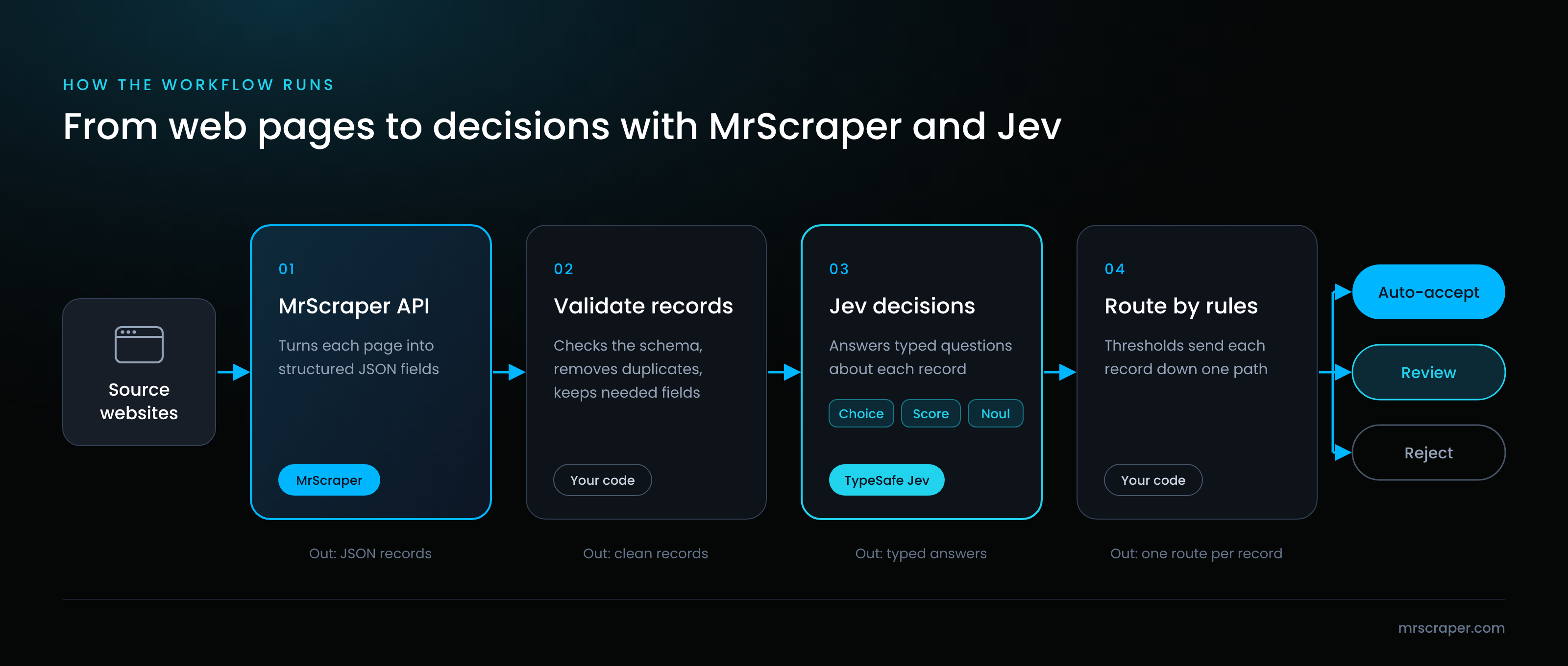
Each step has one job. The MrScraper API turns pages into JSON fields using a plain-English prompt or a workflow you build. You can send results to your own code with webhooks, a database integration, or the Python and Node.js SDKs.
The validation step matters more than it looks. TypeSafe's Jev 1.13 notes say accuracy drops when the state is full of unrelated detail. So trim each record to the fields a question needs before you send it.
Here is a short Python sketch of the Jev step. The MrScraper step is shown as a file load, since it depends on how you deliver results.
import json
from typesafe_sdk import Choice, Noul, TypeSafeClient

# Records delivered by MrScraper (webhook, database or export)
with open("products.json") as f:
    records = json.load(f)

questions = {
    "category": Choice(
        instructions="Which category best fits `title` and `description`?",
        criteria={
            "electronics": "Devices, gadgets and their accessories",
            "home_kitchen": "Furniture, cookware and home goods",
            "apparel": "Clothing, shoes and fashion accessories",
            "other": "None of the categories above",
        },
    ),
    "is_refurbished": Noul(
        instructions="Is the product sold as refurbished or used?",
    ),
}

with TypeSafeClient() as client:
    for record in records:
        state = {"title": record["title"], "description": record["description"]}
        answers = client.system_one(state=state, questions=questions).answers
        print(record["url"], answers["category"].choice, answers["is_refurbished"].noul)
For the full version with validation and evidence storage, see our Python tutorial on Jev web data classification.
Which web data tasks are a good fit?
Jev fits tasks where the answer is a fixed category, a level on a rubric you can describe, or a clear yes/no. Company fit, product categories and content relevance are strong starting points.
Company fit, product categories and relevance
The three examples below are proposed. They show the request shape and the kind of answer Jev returns. The output values are illustrative, not results from a test run.
Example 1: Company fit (Score)
Input: a company record from a scraped "About" page.
{
  "state": {
    "company_name": "Northwind Logistics",
    "about": "We help mid-size retailers manage warehouse inventory with cloud software and barcode scanners."
  },
  "questions": {
    "fit": {
      "type": "score",
      "instructions": "How well does this company match a buyer of B2B inventory software?",
      "criteria": [
        "Unrelated industry, no inventory needs",
        "Adjacent industry, possible inventory needs",
        "Clear inventory needs, not a software seller",
        "Sells inventory software, likely a competitor"
      ]
    }
  }
}
Illustrative output: "score": 2.1 with most probability on level 2. Here the rubric keeps competitors separate from good-fit buyers.
Example 2: Product category (Choice)
Input: a product title and description from a store listing. Question: pick one category from your own taxonomy, with an other option for items that fit nothing.
Illustrative output: "choice": "electronics" plus a probability for every option and a confidence value. Low confidence is a signal to send the item for review.
Example 3: Relevance (Noul)
Input: a news article headline and first paragraph. Question: "Does this article report a funding round for a company?"
Illustrative output: "noul": 0.93. Your code might accept values above 0.8, reject values below 0.2, and send the rest to a person.
When should you use an LLM instead?
Use an LLM when you need words, reasoning across many steps, or an answer you cannot list in advance. Jev handles narrow judgments. TypeSafe says plainly that Jev is not a chat or code-writing model.
Open-ended writing, reasoning and ambiguous inputs
| Task | Better tool |
|---|---|
| Write product descriptions or summaries | LLM |
| Explain why a decision was made | LLM |
| Answer a question with many steps of logic | LLM, or split into small Jev questions |
| Pick a category from a fixed list | Jev |
| Rate against a rubric you can describe | Jev |
| Check a yes/no property on every record | Jev |
| Count, do math or compare dates | Your own code |
The last row comes from TypeSafe's known limitations. The docs say Jev 1.13 does not count reliably and reads dates as text. They also note that Jev reads instructions literally, can lean toward the first Choice option, and can be swayed by text written to steer it. Scraped pages can contain that kind of text, so test with messy real data.
Many teams will use both. Jev sorts and filters the easy majority. An LLM or a person handles the hard cases.
How do you evaluate a Jev workflow?
Start with labeled examples from your own data, measure where Jev agrees with them, and study every miss. Then set thresholds that send unsure answers to review. Do not rely on vendor benchmarks for your use case.
Labeled examples, error analysis and review rules
- Build a labeled set. Pull 100 to 200 real records from your MrScraper output. Have a person label each one with the right answer.
- Run your questions. Pin a model version such as
jev-1.13.0so results stay stable while you tune. Thejev-latestalias can move when a new release ships. - Read the errors. For each miss, ask why. Often the instruction was vague. TypeSafe's advice is that your explanation of what you meant is the missing part of the instruction.
- Shuffle Choice options. Run a sample again with the options reordered, and check the answers stay the same.
- Set review rules. Use confidence (Choice and Score) or a middle band (Noul) to decide what runs automatically and what goes to a person.
- Recheck on a schedule. Websites change, and so does your data. Run the labeled set again after model updates. Keep the whole process in code. When results drift, you change a threshold or a level description, not a long prompt.
Frequently asked questions
What is Jev?
Jev is a System One model made by TypeSafe AI and released in early access in September 2026. It reads text you send and answers typed questions with a choice, a score, or a yes probability. Developers use it for routing, classification, and checks where code needs a value, not a paragraph.
Does Jev scrape websites?
No. Jev only judges the text or JSON you send in a request. It cannot open URLs, render pages, or collect data. You need a separate collection step, such as the MrScraper API, to turn web pages into clean records. Jev then answers questions about each record.
Can Jev generate text?
No. TypeSafe built Jev to return decisions, not prose. Every answer is limited to the options, levels, or yes/no question you define. TypeSafe's docs say forcing it to generate text works poorly. Use an LLM for summaries, emails, or product descriptions, and use Jev to classify or check them.
What do Choice, Score and Noul return?
Choice returns the picked option, a probability for each option, and a confidence value. Score returns a position on your ordered levels, a legend, level probabilities, and confidence. Noul returns one number from 0 to 1, the probability that the answer is yes. Noul has no separate confidence field.
Can I use Jev with MrScraper?
Yes, by connecting the two APIs in your own code. A common pattern is to collect structured JSON with the MrScraper API, validate it, then send each record to the TypeSafe API with your questions. Test this workflow on labeled examples from your own data before you rely on it.
Start with clean web data
Jev is only as good as the records you give it. MrScraper is a developer-focused web data API that turns pages into structured JSON you can validate and pass to the next step. Read the docs or start for free.
You have the websites. We help you get the data.
Skip the complicated setup and start extracting the information you need with MrScraper.
Get 1,000 free tokens and start collecting data here.
Facts about Jev were checked against TypeSafe's official documentation on October 12, 2026. Jev is in early access, and its API and limits may change.
Summarize this post
Open it in your assistant of choice with the prompt ready to send.
Take a Taste of Easy Scraping!

Find more insights here

Claude Code Competitor Pricing Research
Use Claude Code and MrScraper MCP to refresh public competitor pricing, normalize billing periods an…

Use MrScraper MCP to Compare Public SaaS Pricing and Plan Limits
Build a source-backed SaaS plan comparison using MrScraper MCP. Preserve prices, quotas, billing ter…

Build a Product Attribute Classifier with LangChain and MrScraper
Build a LangChain workflow that extracts product evidence with MrScraper, normalizes attributes and…