RAG Pipeline Guide: Feeding LLMs Live Web Data
AI & Machine LearningBuild a retrieval-augmented generation pipeline that pulls fresh data from the web. Ingestion, chunking, embedding, retrieval, reranking and staying current.
Building a basic rag pipeline over static PDFs is simple, but pushing that system into production with live web content introduces severe technical challenges. If your application relies on real-time documentation, market pricing, or news feeds, static vector indexes decay within days.
Most tutorials assume your corpus is pre-cleaned text and static. In reality, modern web pages are dynamic JavaScript applications filled with HTML boilerplate, cookie banners, and navigation links. When raw HTML noise reaches your vector store, cosine similarity breaks, context windows fill with junk headers, and LLMs hallucinate inaccurate answers.
This guide walks you through building a production-grade retrieval augmented generation pipeline for dynamic web content. You will learn how to extract clean text from web pages, implement intelligent chunking strategies, set up hybrid vector retrieval, debug bad chunk retrieval, and maintain an automated incremental indexing system that keeps your data fresh on day 30 without exploding embedding costs.
Production RAG Architecture Overview
A production rag architecture for live web content differs from static document retrieval. Your system must operate as a continuous pipeline: ingesting web pages, parsing DOM structures, partitioning text into semantically cohesive blocks, embedding into vector spaces, and updating changed vectors dynamically.
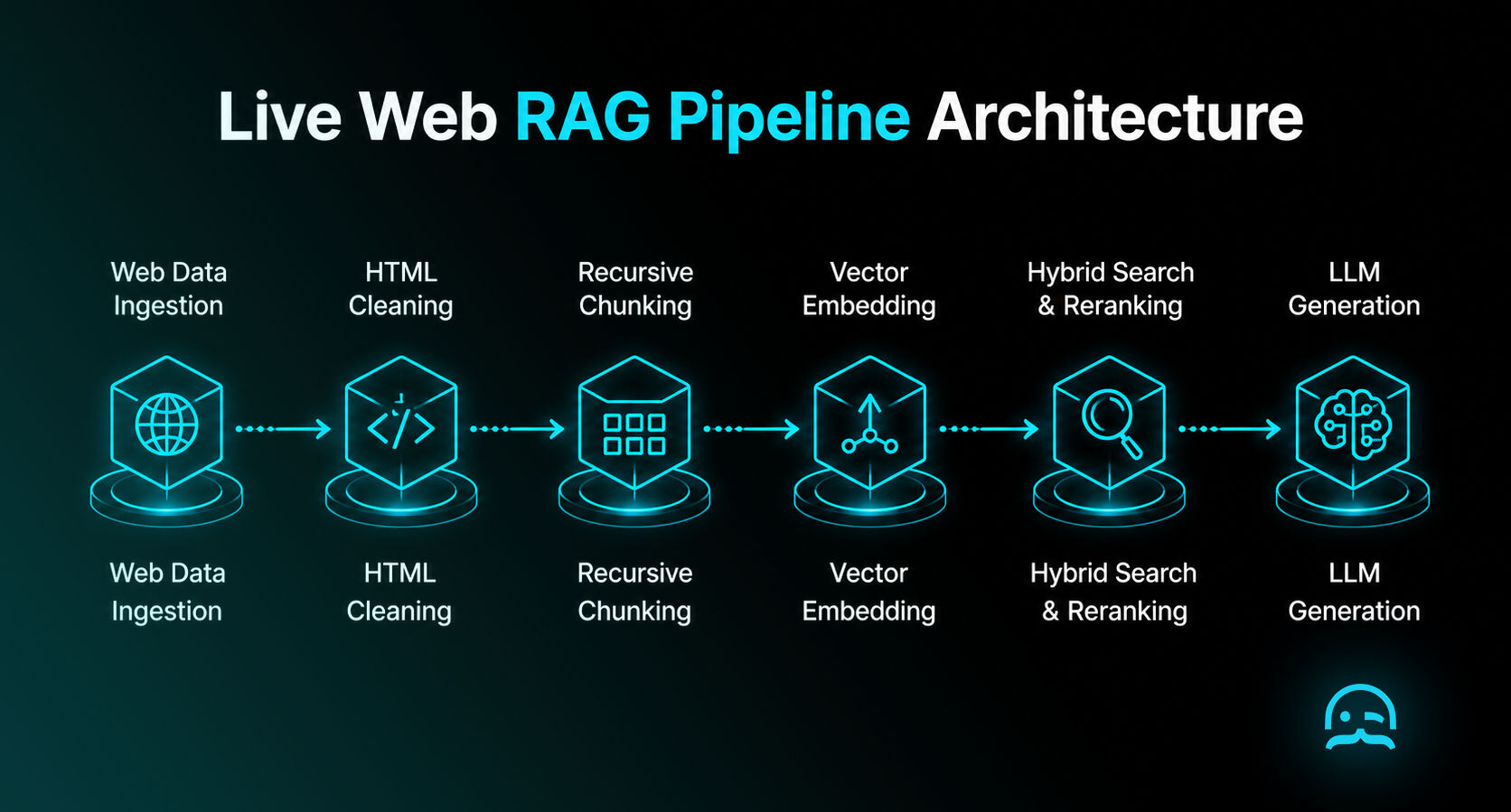
A resilient web RAG system requires decoupling data ingestion from query execution to maintain low retrieval latency and prevent stale context.
The workflow consists of sequential stages: Ingestion, Cleaning, Chunking, Embedding, Indexing, Retrieval, Reranking, and Generation.
Ingestion: Extracting Clean Text from Live Web Pages
Your rag data ingestion quality sets the upper bound of output accuracy. If your scraper feeds raw HTML with nested <div> and <footer> tags into your system, your vector store indexes boilerplate text instead of core content.
Getting clean text out of live web pages is where most RAG pipelines lose quality. MrScraper's Web Scraper API returns structured content instead of raw HTML, so navigation, ads and cookie banners never reach your chunks.
Client-side rendering presents a challenge for custom crawlers. Standard GET requests with requests return empty root elements (<div id="app"></div>).
import requests
from bs4 import BeautifulSoup

def fetch_raw_page(url: str) -> str:
    res = requests.get(url, headers={"User-Agent": "Mozilla/5.0"}, timeout=10)
    soup = BeautifulSoup(res.text, "html.parser")
    for el in soup(["script", "style", "nav", "footer"]):
        el.decompose()
    return soup.get_text(separator=" ", strip=True)
To extract content from dynamic sites, your crawler must execute JavaScript using headless browsers like Playwright or Puppeteer. Read our guide on JavaScript crawling for web scrapers.
Cleaning: Stripping HTML Noise and Normalizing Text
After fetching HTML, clean and normalize text before running your chunking strategy rag processor. Raw text with repeated whitespace and inline code dilutes vector embeddings.
Clean markdown structure preserves heading hierarchy, which dramatically improves retrieval precision for dense vector models.
Cleaning enforces non-content element removal, HTML-to-Markdown conversion, whitespace normalization, and SHA-256 metadata hash calculation.
import re, hashlib, html2text

def clean_html_to_markdown(html_content: str, source_url: str) -> dict:
    h = html2text.HTML2Text()
    h.ignore_links, h.ignore_images, h.body_width = False, True, 0
    cleaned = re.sub(r'\n{3,}', '\n\n', h.handle(html_content)).strip()
    return {"content": cleaned, "source_url": source_url, "hash": hashlib.sha256(cleaned.encode()).hexdigest()}
Chunking: Recursive Character Splitting and Token Bounds
Chunking splits web documents for LLM context windows. Fixed-size chunking cuts text at static character limits, often breaking sentences mid-word.
Recursive character splitting preserves semantic paragraph boundaries by attempting to split at double newlines, single newlines, spaces, and characters in sequence.
from langchain_text_splitters import RecursiveCharacterTextSplitter

def generate_semantic_chunks(text: str, chunk_size: int = 1000, chunk_overlap: int = 100) -> list[str]:
    return RecursiveCharacterTextSplitter(chunk_size=chunk_size, chunk_overlap=chunk_overlap).split_text(text)
Setting chunk parameters requires numeric boundaries:
- Chunk Size: Target 1,000 characters (~250 tokens) for technical docs, or 2,000 characters (~500 tokens) for editorial content.
- Chunk Overlap: Maintain a 10% overlap ratio (100 characters overlap for 1,000 character chunk size) to prevent chunk boundary loss.
- Token Safety: Ensure chunks stay within limits.
text-embedding-3-smallcaps inputs at 8,191 tokens, but retrieval accuracy drops when chunk size exceeds 512 tokens.
Frameworks like LangChain, LlamaIndex, Haystack, and LangGraph support parent-document retrieval: indexing child chunks (200 tokens) for vector matching, while fetching larger parent documents (1,000 tokens) for generation.
Embedding: Generating Dense Vectors with text-embedding-3-small
Embedding converts text chunks into dense vectors where similar concepts sit close together.
OpenAI's text-embedding-3-small model generates 1,536-dimensional embeddings at $0.02 per 1 million tokens. text-embedding-3-large generates 3,072 dimensions at $0.13 per 1 million tokens.
from openai import OpenAI
import os

client = OpenAI(api_key=os.getenv("OPENAI_API_KEY"))

def batch_embed_chunks(chunks: list[str]) -> list[list[float]]:
    res = client.embeddings.create(input=chunks, model="text-embedding-3-small")
    return [d.embedding for d in res.data]
When building rag with web data, generate embeddings in batch payloads (e.g., 64 or 128 chunks per API call). Batching reduces network latency by over 80%.
Indexing: Vector Stores, Metadata Payloads, and Upserts
Once generated, write vectors to a vector database with metadata payloads. Read our guides on the complete vector database guide and ranking the best vector databases to select a vector database.
Metadata payload design is critical for live web RAG because metadata filtering enables fast document deletion, payload filtering, and incremental updates.
import chromadb

def initialize_vector_index(collection_name: str = "web_rag_index"):
    return chromadb.Client().get_or_create_collection(name=collection_name, metadata={"hnsw:space": "cosine"})

def upsert_chunks_to_index(collection, chunks: list[str], embeddings: list[list[float]], metadata_list: list[dict]):
    ids = [f"{meta['source_url']}#chunk-{idx}" for idx, meta in enumerate(metadata_list)]
    collection.upsert(documents=chunks, embeddings=embeddings, metadatas=metadata_list, ids=ids)
    return len(ids)
Each vector record in your index must store four metadata attributes: source_url, content_hash, last_updated (ISO-8601 timestamp), and chunk_index.
Retrieval: Dense Vector Similarity vs Hybrid BM25 Search
Naive vector retrieval uses cosine similarity to match query embeddings. While dense retrieval captures intent, it fails on exact keyword matches or proper nouns.
Production systems implement hybrid search, combining dense vector cosine similarity with sparse BM25 keyword matching using Reciprocal Rank Fusion (RRF).
def reciprocal_rank_fusion(dense_ranks: list[str], sparse_ranks: list[str], k: int = 60) -> list[tuple[str, float]]:
    scores = {}
    for rank, doc_id in enumerate(dense_ranks):
        scores[doc_id] = scores.get(doc_id, 0.0) + 1.0 / (k + rank + 1)
    for rank, doc_id in enumerate(sparse_ranks):
        scores[doc_id] = scores.get(doc_id, 0.0) + 1.0 / (k + rank + 1)
    return sorted(scores.items(), key=lambda x: x[1], reverse=True)
Set top-k = 10 for candidate retrieval and filter out chunks below a similarity threshold of 0.75. For autonomous query generation, explore our guide on building agentic search pipelines.
Reranking: Filtering Top-k Results with Cross-Encoders
Dense retrieval fetches candidates by vector distance, but dot products miss token-level interactions.
Cross-encoder reranking feeds the query and candidate chunk together into a joint attention model, scoring true contextual relevance with extreme precision.
import cohere, os

co_client = cohere.Client(os.getenv("COHERE_API_KEY"))

def rerank_candidate_chunks(query: str, chunks: list[str], top_n: int = 3) -> list[str]:
    res = co_client.rerank(model="rerank-english-v3.0", query=query, documents=chunks, top_n=top_n)
    return [chunks[r.index] for r in res.results]
Reranking with Cohere Rerank (rerank-english-v3.0) or open-source cross-encoders (bge-reranker-large) improves precision. Reranking shrinks a noisy candidate set of top-k = 10 down to top-n = 3 highly relevant chunks, cutting token usage while eliminating noise.
Generation: Augmenting LLM Context Windows Cleanly
The final stage is response generation. Your system formats reranked text chunks into a structured context window and prompts an LLM (such as OpenAI GPT-4o-mini or Anthropic Claude 3.5 Sonnet) to generate an answer grounded in the retrieved context.
def generate_grounded_answer(query: str, retrieved_chunks: list[str]) -> str:
    context_str = "\n\n---\n\n".join(retrieved_chunks)
    prompt = f"Context:\n{context_str}\n\nQuestion: {query}\nAnswer:"
    res = client.chat.completions.create(
        model="gpt-4o-mini",
        messages=[{"role": "system", "content": "Answer strictly based on context."}, {"role": "user", "content": prompt}],
        temperature=0.0
    )
    return res.choices[0].message.content
Setting temperature = 0.0 ensures deterministic outputs, preventing hallucination and context window overflow.
Retrieval Debugging: Diagnosing and Fixing Irrelevant Chunks
When RAG systems fail, the issue is rarely the LLM generation model. In 90% of cases, failure occurs during retrieval.
To debug a failing setup, print and inspect raw retrieved chunks before passing them to the LLM.
Concrete Failure Scenario
Consider a query: "What is the rate limit for the API on the Pro Plan?"
Naive vector retrieval (top-k = 3) returns bad output:
[
  "Chunk 1 (Score: 0.81): Home Pricing Docs API Blog Login Sign Up. All rights reserved.",
  "Chunk 2 (Score: 0.79): Web scraping tools for developers, AI data collection, and web unblocking.",
  "Chunk 3 (Score: 0.76): FAQ: How do I upgrade my plan? Answer: Navigate to billing settings."
]
Root Cause Diagnosis
- HTML Noise Poisoning: Chunk 1 consists of navigation boilerplate that was not stripped during ingestion.
- Dense Vector Over-Matching: Chunk 2 matched generic concepts because "rate limit" was absent from the chunk.
- Chunk Boundary Loss: Fixed-size chunking split the rate limit table header from numerical values.
The Step-by-Step Fix
- Re-run ingestion with HTML-to-Markdown conversion to strip footers.
- Expand retrieval to top-k = 10 using hybrid search (BM25 + dense vectors).
- Apply cross-encoder reranking (
rerank-english-v3.0) to select top-n = 3 chunks.
Fixed output:
[
  "Chunk 1 (Rerank Score: 0.98): ## Pro Plan Rate Limits. Permits 100 concurrent requests and 200,000 Plan Tokens per month.",
  "Chunk 2 (Rerank Score: 0.84): ### Rate Limit Headers. Responses include `x-rate-limit-remaining` and `retry-after`.",
  "Chunk 3 (Rerank Score: 0.71): Enterprise plans support custom concurrency limits exceeding 100 requests."
]
Adding cross-encoder reranking eliminates boilerplate and passes factual data to the LLM.
Keeping RAG Data Fresh: Change Detection and Incremental Indexing
Standard guides treat knowledge bases as static, but live web pages change constantly. Learn how to keep rag data fresh efficiently.
Incremental indexing uses SHA-256 content hashing to re-embed only pages that have actually changed, cutting vector API costs by up to 95%.
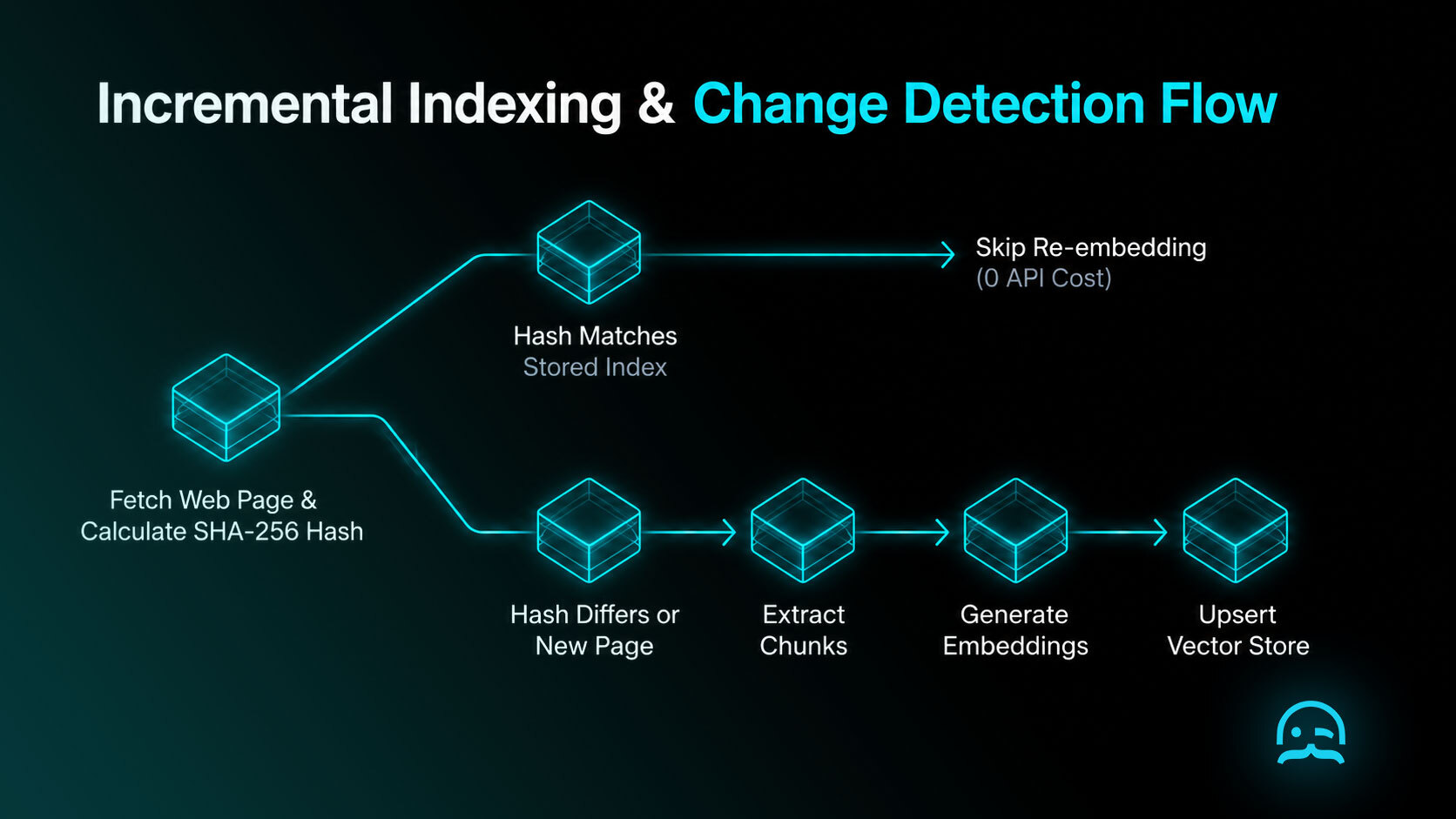
1. Change Detection via Content Hashing
Before calling embedding APIs, calculate a SHA-256 hash of cleaned text. If hashes match, skip embedding entirely.
2. Incremental Vector Upserts
When a page hash changes:
- Delete existing vector chunks for that
source_url(collection.delete(where={"source_url": url})). - Generate new chunks and embeddings for updated text.
- Upsert new vector records into your vector store.
3. Crawl Cadence and 429 Errors
Establish tiered crawl cadences:
- High-Frequency Pages (News, pricing): Re-check every 1 to 4 hours.
- Low-Frequency Pages (Documentation): Re-check every 24 to 72 hours.
High-frequency crawling can trigger rate limits. Read our guide on handling 429 Too Many Requests rate limits.
4. Cost Analysis: Weekly vs Daily Re-Embedding
For a corpus of 10,000 pages averaging 2,000 words per page (20 million tokens):
| Strategy | Monthly API Cost (text-embedding-3-small) | Vector DB Compute | Index Staleness |
|---|---|---|---|
| Full Daily Re-embed | $12.00 / month | High (Rebuilds 10k vectors/day) | < 24 Hours |
| Full Weekly Re-embed | $1.71 / month | Medium (Rebuilds 10k vectors/week) | < 7 Days |
| Incremental Hashing (5% daily churn) | $0.60 / month | Low (Updates 500 vectors/day) | Real-Time (< 1 Hour) |
Incremental indexing provides real-time freshness while costing 95% less than brute-force daily re-embedding.
Evaluation: Measuring Groundedness and Recall@k with RAGAS
Benchmark retrieval precision and generation quality using automated evaluation frameworks like RAGAS (Retrieval Augmented Generation Assessment).
Key metrics:
- Recall@k: Proportion of relevant context chunks fetched in top-k candidate set.
- Precision: Ratio of retrieved chunks containing factual information relevant to the query.
- Faithfulness: Measures whether the LLM answer is strictly derived from retrieved context.
- Groundedness: Verifies every assertion traces back to an explicit source chunk.
Building a Production RAG Pipeline Python Engine
Below is a complete script demonstrating how to build a rag pipeline in a clean rag pipeline python setup—from web ingestion and cleaning to chunking, vector embedding, reranking, and generation.
import os, re, hashlib, requests, html2text
from langchain_text_splitters import RecursiveCharacterTextSplitter
from openai import OpenAI
import chromadb, cohere

client = OpenAI(api_key=os.getenv("OPENAI_API_KEY"))
cohere_client = cohere.Client(os.getenv("COHERE_API_KEY"))

def fetch_and_clean(url: str) -> dict:
    res = requests.get(url, headers={"User-Agent": "Mozilla/5.0"}, timeout=15)
    text = re.sub(r'\n{3,}', '\n\n', html2text.HTML2Text().handle(res.text)).strip()
    return {"url": url, "content": text, "hash": hashlib.sha256(text.encode()).hexdigest()}

def chunk_doc(doc: dict) -> list[dict]:
    chunks = RecursiveCharacterTextSplitter(chunk_size=1000, chunk_overlap=100).split_text(doc["content"])
    return [{"id": f"{doc['url']}#{i}", "text": t, "metadata": {"source_url": doc["url"], "hash": doc["hash"]}} for i, t in enumerate(chunks)]

def index_chunks(collection, chunks: list[dict]):
    texts = [c["text"] for c in chunks]
    emb = client.embeddings.create(input=texts, model="text-embedding-3-small").data
    collection.upsert(ids=[c["id"] for c in chunks], documents=texts, embeddings=[e.embedding for e in emb], metadatas=[c["metadata"] for c in chunks])

def retrieve_and_rerank(collection, query: str) -> list[str]:
    q_emb = client.embeddings.create(input=[query], model="text-embedding-3-small").data[0].embedding
    candidates = collection.query(query_embeddings=[q_emb], n_results=10)["documents"][0]
    reranked = cohere_client.rerank(model="rerank-english-v3.0", query=query, documents=candidates, top_n=3)
    return [candidates[r.index] for r in reranked.results]

def generate_answer(query: str, chunks: list[str]) -> str:
    prompt = f"Context:\n{'\n\n'.join(chunks)}\n\nQuestion: {query}\nAnswer:"
    res = client.chat.completions.create(model="gpt-4o-mini", messages=[{"role": "system", "content": "Answer based on context."}, {"role": "user", "content": prompt}], temperature=0.0)
    return res.choices[0].message.content

if __name__ == "__main__":
    col = chromadb.Client().get_or_create_collection(name="demo_rag")
    doc = fetch_and_clean("https://example.com/docs")
    index_chunks(col, chunk_doc(doc))
    print(generate_answer("What endpoints exist?", retrieve_and_rerank(col, "What endpoints exist?")))
Comparison: Static PDF RAG vs Naive Web RAG vs Production Web RAG
Compare the architectural capabilities of each implementation approach:
| Capability / Feature | Static PDF RAG | Naive Web Scraping RAG | Production Web RAG Pipeline |
|---|---|---|---|
| Data Ingestion | Read local PDF files | Raw requests + BeautifulSoup |
Clean Markdown conversion & headless rendering |
| DOM Boilerplate Handling | None (Static text) | Poor (Indexes headers & footers) | High (Strips navigation nodes & normalizes markup) |
| Retrieval Strategy | Dense vector similarity | Dense vector similarity | Hybrid Search (BM25 + Cosine + Reranking) |
| Retrieval Precision | Moderate | Low (Poisoned by HTML noise) | Extreme (Cross-encoder reranks top-k candidates) |
| Data Freshness | None (Manual file updates) | Manual full re-indexing | Automated (SHA-256 change detection & upserts) |
| Embedding Efficiency | Low | Low (Re-embeds unchanged pages) | High (Re-embeds only modified content diffs) |
Frequently Asked Questions
What does RAG stand for?
RAG stands for Retrieval-Augmented Generation. It enhances LLM responses by retrieving relevant factual documents from a vector store or database before generating answers.
What does RAG mean in LLMs?
In LLMs, RAG connects generative models to real-time datasets. Instead of relying on frozen training data, the LLM uses retrieved context chunks to generate grounded responses without retraining.
What is an example of a RAG system?
An example of a RAG system is a support chatbot that crawls documentation URLs, indexes chunks in Pinecone, retrieves relevant setup steps for user queries, and uses GPT-4o to generate answers.
Is ChatGPT a RAG system?
Yes, ChatGPT functions as a RAG system when using web search or document uploads. It retrieves real-time web pages or file context to synthesize answers rather than relying on base training memory.
What is the best chunk size for RAG?
The optimal chunk size for technical documentation is 512 to 1,000 characters (~128 to 250 tokens) with 10% overlap. For long-form content, 1,500 to 2,000 characters works best paired with cross-encoder reranking.
How do I keep RAG data up to date?
Keep RAG data fresh by calculating SHA-256 content hashes during crawls. Compare hashes against stored metadata and re-embed only updated documents using incremental upserts to minimize embedding costs.
Why is my RAG pipeline returning irrelevant results?
RAG pipelines return irrelevant results when HTML boilerplate poisons embeddings, chunking splits key phrases, or dense vector search over-matches keywords. Fix this by converting HTML to Markdown and adding reranking.
Do I need a vector database for RAG?
You do not need a vector database for datasets under 1,000 documents; keyword search or pgvector works fine. However, vector databases like Qdrant and Pinecone are essential for scaling vector search across millions of records.
How much does a RAG pipeline cost to run?
A production web RAG pipeline indexing 10,000 pages costs ~$0.60/month for text-embedding-3-small embeddings with incremental hashing, plus $20-$70/month for hosted vector storage and cross-encoder reranking.
Build Your Production RAG Pipeline
Moving from static PDF prototypes to production-grade web RAG requires managing HTML noise, retrieval quality, and automated data freshness. By decoupling data ingestion from query execution, converting HTML into clean Markdown, enforcing hybrid search with cross-encoder reranking, and indexing incrementally via content hashing, your system delivers accurate, hallucination-free answers at scale.
- Audit your ingestion pipeline to strip navigation footers before chunking.
- Add cross-encoder reranking to shrink candidate retrieval from top-k = 10 to top-n = 3.
- Implement SHA-256 change detection to re-embed updated web pages incrementally.
You have the websites. We help you get the data.
Skip the complicated setup and start extracting the information you need with MrScraper.
Get 1,000 free tokens and start collecting data here.
Summarize this post
Open it in your assistant of choice with the prompt ready to send.
Take a Taste of Easy Scraping!

Find more insights here

Claude Code Competitor Pricing Research
Use Claude Code and MrScraper MCP to refresh public competitor pricing, normalize billing periods an…

Use MrScraper MCP to Compare Public SaaS Pricing and Plan Limits
Build a source-backed SaaS plan comparison using MrScraper MCP. Preserve prices, quotas, billing ter…

Build a Product Attribute Classifier with LangChain and MrScraper
Build a LangChain workflow that extracts product evidence with MrScraper, normalizes attributes and…