429 Too Many Requests: Retry-After, Backoff and Request Budgets
Web ScrapingHTTP 429 means you have hit a rate limit. Learn how rate limiting works, how to fix 429 errors, and how to avoid them at scale.
A 429 error means that your client has sent more HTTP requests than a web server is willing to accept in a given timeframe. Receiving an HTTP 429 Too Many Requests response indicates that the target server is functioning normally, but it is deliberately throttling your connection to protect its computing resources and enforce fair usage.
A 429 response is not a hostile barrier or a permanent ban. It is a contractual flow-control signal between client and server. The server is communicating that your request rate exceeds the allowed capacity, and it expects your client to back off, respect the cooldown period, and adjust its throughput.
Building reliable client applications and automated data collection workflows requires moving past brittle retry loops. Production-ready systems manage this contract using three complementary disciplines: parsing the Retry-After header, implementing bounded exponential backoff with full jitter, and enforcing client-side request budgets and concurrency limits before requests ever leave your application.
What a 429 error means
A 429 error is an HTTP client-side status code belonging to the 4xx class of response codes. This designation means that the origin server parsed your HTTP request successfully, but refused execution because your request frequency exceeded the established rate limit policy.
The 429 status code was officially introduced in RFC 6585 (Additional HTTP Status Codes) to standardize rate limiting across web applications. It has since been fully integrated into modern HTTP protocol specifications under RFC 9110. For detailed browser and server status code specifications, refer to the MDN Web Docs 429 Too Many Requests reference guide.
Note
A 429 response is a polite flow-control directive, not an absolute ban. The server is asking your client to pause execution temporarily, and it typically provides exact instructions on how many seconds to wait before attempting another request.
Understanding the 429 too many requests meaning requires distinguishing it from other common HTTP status codes:
- 429 Too Many Requests: You are authenticated and allowed access, but you are sending requests too quickly. The server asks you to pause and retry after a cooldown window.
- 403 Forbidden error: The server understands your identity, but permanently refuses authorization for the resource regardless of your request rate.
- 401 Unauthorized: Authentication credentials are missing, invalid, or expired.
- 503 Service Unavailable: The server cannot handle your request because it is experiencing an internal outage, capacity exhaustion, or active maintenance.
How a 429 error shows up
Depending on the web framework, API gateway, or reverse proxy issuing the response, an error 429 too many requests manifests in several standard text formats:
429 Too Many Requests: The standard raw HTTP status line returned by compliant web servers and reverse proxies.HTTP Error 429: Common client-side browser error wording when a web page fetch fails due to throttling.Rate limit exceeded: Standard JSON error payload returned by REST APIs (such as GitHub, Stripe, or Reddit).Quota exceeded: Status message returned by cloud platforms (like OpenAI, Anthropic, or Google Cloud API) when per-minute or monthly token budgets are exhausted.Too Many Requests (RFC 6585): Standard error message emitted by modern API gateways such as Kong, Envoy, and AWS API Gateway.
Identifying which layer of the target infrastructure returned the status code helps you locate the exact rate limit policy being enforced.
How rate limiting actually works
To write client code that operates smoothly within server constraints, you must understand how backend servers measure request flow. Modern infrastructure relies on four core rate-limiting algorithms to track request volume.
The basic decision flow of any rate limiter follows a simple check:
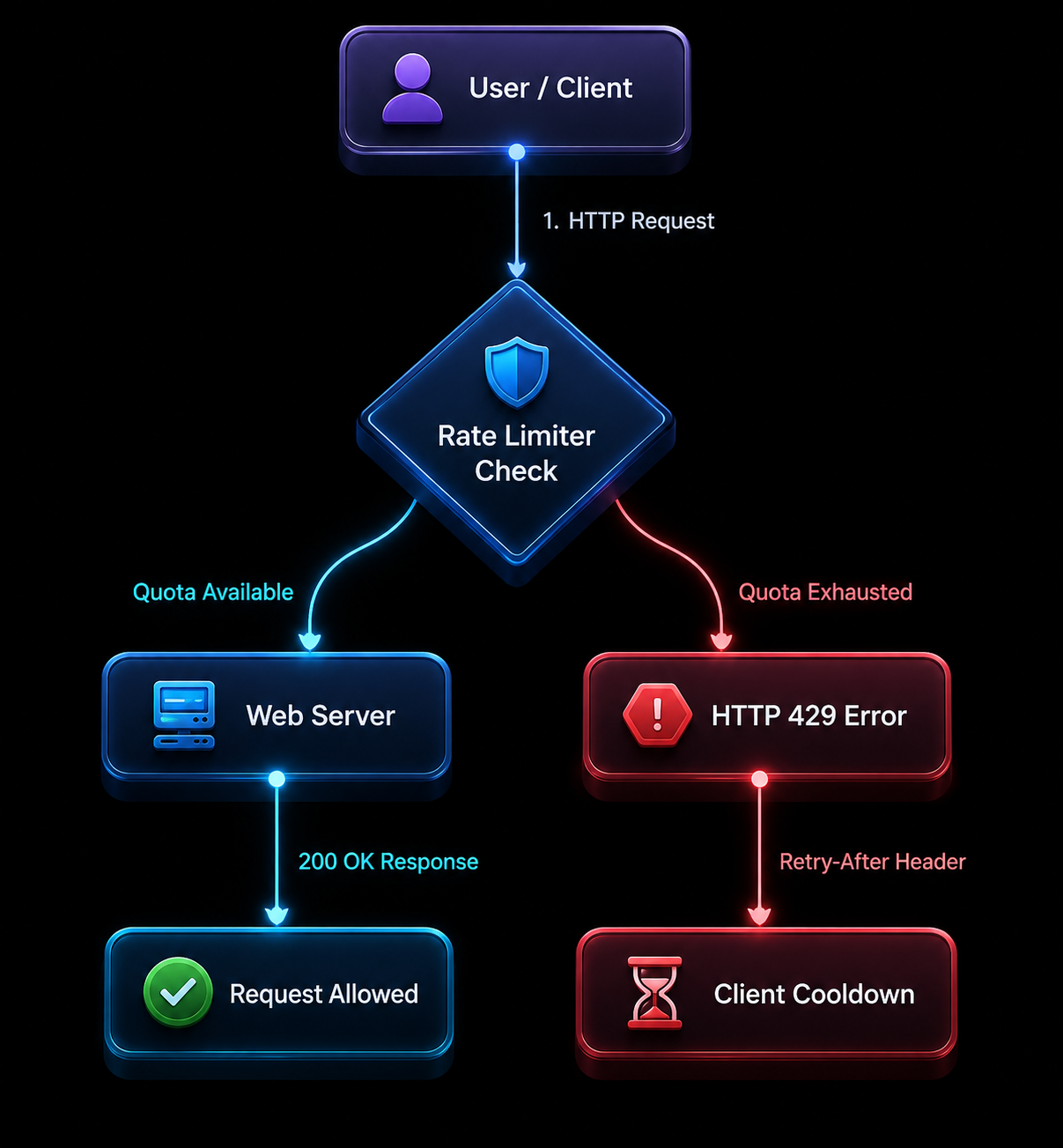
Fixed window
A fixed window algorithm divides time into static atomic blocks (such as 60-second intervals). The server maintains a counter for each client key. Every incoming request increments the counter. If the counter exceeds the threshold (e.g., 100 requests per minute), subsequent calls receive a 429 error until the clock ticks over to the next minute boundary (e.g., 12:01:00), resetting the counter to zero.
The primary drawback of fixed windows is boundary burst traffic. A client could send 100 requests at 12:00:59 and another 100 requests at 12:01:01, effectively firing 200 requests within two seconds without tripping the rate limit.
Sliding window
A sliding window algorithm evaluates request volume over a rolling time frame rather than rigid clock intervals. The server stores timestamped logs of recent requests or computes a weighted average between the current window and the preceding window.
If you dispatch a request at 12:01:30, a 60-second sliding window evaluates all requests received between 12:00:30 and 12:01:30. This approach eliminates the boundary burst problem and ensures consistent request smoothing.
Token bucket and leaky bucket
The token bucket algorithm is the industry standard for production REST APIs (used by AWS, Stripe, and OpenAI). The server assigns a bucket to each client key that holds a maximum capacity of tokens (e.g., 50 tokens).
- Tokens are continuously added to the bucket at a steady fill rate (e.g., 5 tokens per second).
- Each HTTP request consumes one or more tokens based on complexity.
- If tokens are available, the request executes immediately.
- If the bucket is empty, the server returns an HTTP 429 response until tokens refill.
The token bucket model allows applications to absorb brief bursts of traffic (up to the bucket capacity) while maintaining a strict, predictable average load over time.
Concurrency limits
Unlike time-based rates (requests per minute), concurrency limits restrict how many HTTP requests your client can execute at the exact same moment. Even if an API permits 1,000 requests per hour, a concurrency limit might cap your active parallel connections at 5. Sending 20 parallel HTTP requests over async threads will instantly trigger 429 errors on the 6th through 20th requests.
Rate limit keys
Servers evaluate these algorithms against a specific identification key:
- API Key / User Account: Standard for authenticated developer APIs.
- IP Address: Common for public web pages and unauthenticated endpoints.
- Session Cookie / OAuth Token: Typical for SaaS web applications.
- Organization / Tenant ID: Used in multi-tenant enterprise platforms to enforce billing tiers.
The response headers you need to read
When an origin server returns a 429 status code, it almost always includes HTTP response headers that state your current quota and retry instructions.
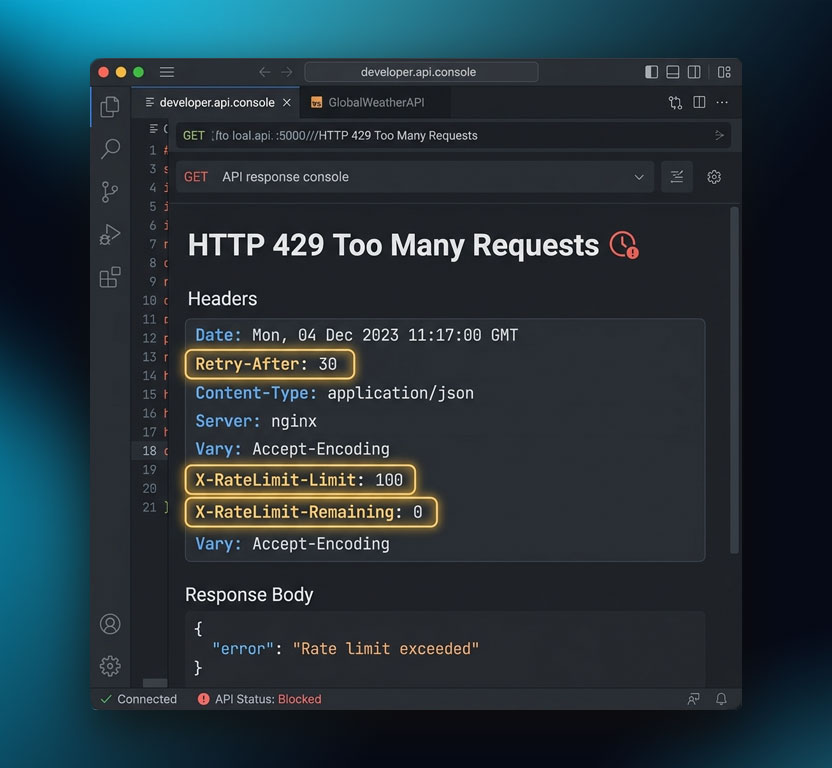
Below is an authentic raw HTTP 429 response:
HTTP/1.1 429 Too Many Requests
Date: Tue, 11 Aug 2026 09:30:00 GMT
Content-Type: application/json
Retry-After: 30
X-RateLimit-Limit: 100
X-RateLimit-Remaining: 0
X-RateLimit-Reset: 1770715830
Connection: close

{
  "error": {
    "code": 429,
    "message": "Rate limit exceeded. Please wait 30 seconds before retrying.",
    "type": "requests_exceeded"
  }
}
Essential response headers
Retry-After: The most critical header in a 429 response (see MDN Retry-After Header). It specifies how long your client must wait before sending another request. It appears in one of two formats:- An integer representing seconds to wait (e.g.,
Retry-After: 30). - An HTTP-date string specifying the exact UTC time when access resumes (e.g.,
Retry-After: Tue, 11 Aug 2026 09:30:30 GMT).
- An integer representing seconds to wait (e.g.,
X-RateLimit-Limit: The maximum number of requests allowed within the current window.X-RateLimit-Remaining: The number of requests remaining in your budget for the current window. Monitoring this header allows your client to slow down before triggering a rate limit error.X-RateLimit-Reset: The Unix epoch timestamp (in seconds) indicating when the current window resets.RateLimit-Limit/RateLimit-Remaining/RateLimit-Reset: The modern IETF standard variants (defined in the IETF RateLimit Header Fields draft) that replace olderX-prefixed headers.
Parsing Retry-After in Python
The following Python function demonstrates how to parse both integer and HTTP-date formats from the Retry-After header to ensure your application pauses for the exact required duration:
import email.utils
from datetime import datetime, timezone
import requests

def parse_retry_after(response: requests.Response, default_delay: float = 5.0) -> float:
    """
    Extracts and parses the Retry-After header from an HTTP response compliant with RFC 9110.
    Supports both integer delta-seconds and IMF-fixdate HTTP UTC timestamps.
    """
    retry_header = response.headers.get("Retry-After")
    if not retry_header:
        return default_delay

    # Case 1: Header is an integer representing seconds
    if retry_header.isdigit():
        return float(retry_header)

    # Case 2: Header is an HTTP UTC date string (IMF-fixdate)
    try:
        target_date = email.utils.parsedate_to_datetime(retry_header)
        now_utc = datetime.now(timezone.utc)
        delay = (target_date - now_utc).total_seconds()
        return max(delay, 0.0)
    except Exception:
        return default_delay
What causes 429 errors?
Diagnosing why your application receives 429 errors requires identifying the specific bottleneck in your client request pipeline.
Sending requests faster than the published limit
The most common cause of a 429 error is executing requests at a frequency higher than an API's documented throughput. For example, if an API permits 60 requests per minute and your script fires 100 requests in a tight loop without delay, the server's rate limiter will trigger on the 61st request.
Too many concurrent connections
Executing multiple parallel threads or async workers can trip concurrency limits even if your overall hourly request volume remains low. If an API restricts your account to 5 concurrent connections and your application initializes a thread pool of 20 workers, 15 workers will immediately receive 429 responses.
Retrying immediately without backoff
The most damaging engineering mistake when handling 429 errors is executing immediate retries inside a tight while True loop. When a server returns a 429 status code because it is overloaded, firing another request immediately amplifies server stress, risks triggering an escalation ban, and prolongs the cooldown period.
Uncoordinated distributed workers
When multiple worker nodes, microservices, or serverless functions query the same API using a single API key without a shared rate limiter, individual workers remain unaware of total cluster throughput. While each worker may adhere to local limits, aggregate traffic easily blows past the organization's global quota.
Shared IP bottlenecks on corporate NATs
If your application operates from an office network, shared cloud runner, or continuous integration (CI) pipeline where multiple instances share an egress IP address, external services that rate limit by IP will aggregate all outbound requests together. Unrelated traffic from colleagues or parallel CI jobs can exhaust the shared IP budget.
How to fix a 429 error as a user
If you are an everyday web user encountering a 429 Too Many Requests page while browsing a website, follow these simple troubleshooting steps:
- Wait for the cooldown window: Pause for 1 to 5 minutes before reloading the page. Most basic website rate limiters reset after a brief cooldown period.
- Stop refreshing repeatedly: Avoid hitting
F5or clicking reload in rapid succession, as each refresh registers as another HTTP request and resets the lockout timer. - Clear browser cookies and cache: Stale session cookies or corrupted tracking tokens can trigger rate limit flags on web servers. Clear your cookies and restart your session.
- Disable high-frequency browser extensions: Extensions that automate price tracking, page monitoring, or aggressive tab prefetching can exhaust your rate limit budget in the background.
- Log in to your account: Authenticated user accounts often receive significantly higher request allowances compared to anonymous visitors.
How to handle 429 errors in your code: backoff and request budgets
Resolving a 429 error programmatically requires moving away from reactive retries and adopting proactive traffic shaping. The core pattern combines three components:
- Respecting
Retry-After - Bounded exponential backoff with full jitter
- Client-side request budgeting and concurrency control
1. Read Retry-After and wait exactly that long
Always inspect incoming response headers for Retry-After. If the server provides an explicit retry delay, your code must suspend execution for that exact duration. Never shorten or override the server's requested cooldown.
2. Use bounded exponential backoff with full jitter
When the server does not supply a Retry-After header, apply exponential backoff. Exponential backoff progressively doubles the wait time after each consecutive attempt:
Wait = BaseDelay * 2^attempt
However, if multiple client workers get throttled at the same time, plain exponential backoff causes all workers to retry at the exact same millisecond. This synchronizes their requests into repeated spikes, overwhelming the server in what is known as the thundering herd problem.
To solve this, introduce full jitter. Full jitter randomizes the sleep interval uniformly between 0 and the calculated exponential ceiling:
$$\text{Sleep Time} = \text{random}(0, \min(\text{MaxSleep}, \text{Base} \times 2^{\text{attempt}}))$$
Always set a hard ceiling (MaxSleep, e.g., 60 seconds) so that backoff times do not escalate into hours.
3. Cap your retries
Never allow retry loops to run indefinitely. Configure a maximum retry limit (typically 3 to 5 attempts). If a request fails after reaching the cap, log the exception, trigger an alert, and fail gracefully.
4. Enforce client-side request budgets (Token Bucket)
Do not rely on the server to tell you when you are sending too many requests. Implement a client-side token bucket or rate limiter that paces outbound requests against your known quota before the request hits the network.
5. Limit concurrency with semaphores
Restrict parallel requests using semaphores or worker pools. If an API supports 5 concurrent requests, your client application should never permit more than 5 in-flight HTTP requests simultaneously.
6. Cache responses and batch requests
Store API responses in a local cache (such as Redis or an in-memory dictionary) for frequently accessed data to eliminate redundant network round-trips. Where APIs offer bulk endpoints, batch multiple operations into a single call.
Python implementation: Bounded backoff and client request budget
The production-grade Python script below demonstrates both bounded exponential backoff with full jitter and a client-side token bucket that enforces your request budget locally:
import email.utils
import random
import threading
import time
from datetime import datetime, timezone
from typing import Optional
import requests
from requests.exceptions import RequestException

class ClientTokenBucket:
    """
    Client-side token bucket rate limiter to enforce request budgets locally
    and eliminate 429 errors before requests leave your server.
    """
    def __init__(self, capacity: int, refill_rate_per_second: float):
        self.capacity = capacity
        self.refill_rate = refill_rate_per_second
        self.tokens = float(capacity)
        self.last_refill = time.monotonic()
        self.lock = threading.Lock()

    def acquire(self, tokens_needed: int = 1) -> None:
        """Blocks until sufficient tokens are available in the budget."""
        while True:
            with self.lock:
                now = time.monotonic()
                elapsed = now - self.last_refill
                self.last_refill = now
                self.tokens = min(self.capacity, self.tokens + elapsed * self.refill_rate)

                if self.tokens >= tokens_needed:
                    self.tokens -= tokens_needed
                    return

                sleep_time = (tokens_needed - self.tokens) / self.refill_rate

            time.sleep(sleep_time)


def parse_retry_after(response: requests.Response, default_delay: float = 5.0) -> float:
    """Parses Retry-After header compliant with RFC 9110 (seconds or HTTP-Date)."""
    header_val = response.headers.get("Retry-After")
    if not header_val:
        return default_delay

    if header_val.isdigit():
        return float(header_val)

    try:
        target_timestamp = email.utils.parsedate_to_datetime(header_val)
        now_utc = datetime.now(timezone.utc)
        delay = (target_timestamp - now_utc).total_seconds()
        return max(delay, 0.0)
    except Exception:
        return default_delay


def execute_request_with_backoff(
    url: str,
    rate_limiter: Optional[ClientTokenBucket] = None,
    max_retries: int = 5,
    base_delay: float = 1.0,
    max_backoff: float = 60.0
) -> Optional[requests.Response]:
    """
    Executes an HTTP GET request respecting client budgets,
    Retry-After headers, and bounded exponential backoff with full jitter.
    """
    session = requests.Session()
    headers = {
        "User-Agent": "DataPipeline/2.0 (+https://example.com/bot; bot@example.com)",
        "Accept": "application/json"
    }

    for attempt in range(max_retries):
        # 1. Enforce local request budget before dispatching
        if rate_limiter:
            rate_limiter.acquire(1)

        try:
            response = session.get(url, headers=headers, timeout=10)

            # Return immediately if successful or non-rate-limited
            if response.status_code != 429:
                response.raise_for_status()
                return response

            # 2. Server returned 429 Too Many Requests: determine wait time
            if "Retry-After" in response.headers:
                sleep_seconds = parse_retry_after(response, default_delay=base_delay)
                print(f"[Attempt {attempt + 1}] 429 received. Respecting Retry-After: {sleep_seconds:.2f}s")
            else:
                # Bounded Exponential Backoff with Full Jitter
                calculated_backoff = min(max_backoff, base_delay * (2 ** attempt))
                sleep_seconds = random.uniform(0, calculated_backoff)
                print(f"[Attempt {attempt + 1}] 429 received. Backing off with jitter: {sleep_seconds:.2f}s")

            time.sleep(sleep_seconds)

        except RequestException as err:
            print(f"[Attempt {attempt + 1}] Network transport error: {err}")
            if attempt == max_retries - 1:
                raise

    raise RuntimeError(f"Exhausted {max_retries} retries for {url} without receiving 200 OK.")


if __name__ == "__main__":
    # Allow 10 requests burst, refilling at 2 requests per second
    budget_limiter = ClientTokenBucket(capacity=10, refill_rate_per_second=2.0)
    target_url = "https://httpbin.org/status/200"

    print("Executing request with budget enforcement...")
    res = execute_request_with_backoff(target_url, rate_limiter=budget_limiter)
    print("Response status:", res.status_code)
Node.js async implementation: Concurrency control and bounded backoff
In Node.js, concurrency management is critical because asynchronous I/O makes it easy to fire hundreds of requests at once without realizing it. The script below limits concurrent connections with a lightweight semaphore and applies bounded backoff:
const axios = require('axios');

class ConcurrencySemaphore {
    constructor(maxConcurrent) {
        this.maxConcurrent = maxConcurrent;
        this.activeCount = 0;
        this.queue = [];
    }

    async acquire() {
        if (this.activeCount < this.maxConcurrent) {
            this.activeCount++;
            return;
        }
        await new Promise(resolve => this.queue.push(resolve));
    }

    release() {
        this.activeCount--;
        if (this.queue.length > 0) {
            this.activeCount++;
            const nextResolve = this.queue.shift();
            nextResolve();
        }
    }
}

async function fetchWithRespectfulRetry(url, semaphore, maxRetries = 4, baseDelayMs = 1000, maxBackoffMs = 30000) {
    await semaphore.acquire();
    try {
        for (let attempt = 0; attempt < maxRetries; attempt++) {
            try {
                const response = await axios.get(url, {
                    headers: { 'User-Agent': 'ClientService/1.0' },
                    timeout: 8000
                });
                return response.data;
            } catch (error) {
                if (error.response && error.response.status === 429) {
                    const retryAfter = error.response.headers['retry-after'];
                    let delayMs;

                    if (retryAfter && !isNaN(retryAfter)) {
                        delayMs = parseInt(retryAfter, 10) * 1000;
                    } else {
                        // Bounded exponential backoff with full jitter
                        const backoffCeiling = Math.min(maxBackoffMs, baseDelayMs * Math.pow(2, attempt));
                        delayMs = Math.random() * backoffCeiling;
                    }

                    console.log(`[Attempt ${attempt + 1}] 429 received on ${url}. Waiting ${(delayMs / 1000).toFixed(2)}s...`);
                    await new Promise(res => setTimeout(res, delayMs));
                } else {
                    throw error;
                }
            }
        }
        throw new Error(`Exceeded maximum retries (${maxRetries}) for ${url}`);
    } finally {
        semaphore.release();
    }
}

(async () => {
    // Bound parallel concurrency to 3 simultaneous connections
    const semaphore = new ConcurrencySemaphore(3);
    const urls = [
        'https://httpbin.org/status/200',
        'https://httpbin.org/delay/1',
        'https://httpbin.org/status/429'
    ];

    console.log("Starting batch with bounded concurrency...");
    const tasks = urls.map(u => fetchWithRespectfulRetry(u, semaphore).catch(e => e.message));
    const results = await Promise.all(tasks);
    console.log("Completed batch jobs:", results.length);
})();
Respectful scraping: managing request budgets at scale
When running large-scale web scraping or recurring data collection jobs, avoiding 429 rate limits is not about tricking the server. It is about engineering a respectful extraction architecture that operates harmoniously within server capacity:
- Adhere to
robots.txtandCrawl-delay: Always parse the target domain'srobots.txtfile and observe anyCrawl-delaydirectives. - Smooth requests over time: Avoid spikes where thousands of URLs are requested within minutes. Use message queues (such as Celery, BullMQ, or RabbitMQ) with rate limiters to distribute request volume evenly over 24 hours.
- Set strict per-domain concurrency bounds: Never allocate your entire concurrency pool to a single target domain. Restrict workers to 2–5 parallel connections per host.
- Monitor 429 rates as a primary system health metric: Track HTTP status codes in your monitoring dashboard. An uptick in 429 responses is an immediate warning signal to reduce your worker concurrency and increase delays.
- Deduplicate queries and cache static assets: Eliminate redundant fetches. If page content has not changed, serve it from your local database instead of refetching.
Managing request budgets with MrScraper
Building and maintaining custom token bucket queues, distributed redis rate limiters, and exponential backoff retry meshes across large worker fleets requires substantial engineering overhead.
Managed extraction platforms like MrScraper simplify this architecture by handling flow control and concurrency management out of the box:
- Built-in concurrency controls: Plans include strict, predictable concurrency caps (10 concurrent streams on Free, 100 on Pro) to prevent overwhelming target hosts.
- Transparent token-based request budgets: Requests consume tokens according to transparent resource metrics (
token_usage: 2), making it easy to budget and forecast data pipelines. - Automated request smoothing: MrScraper manages request pacing and queue scheduling automatically, eliminating thundering herd problems.
- Clean structured output: AI and manual extractors return clean structured JSON directly, eliminating redundant requests spent refetching broken selector trees.
Explore transparent MrScraper pricing to learn how managed concurrency and token budgets fit into your data pipeline.
How to set up rate limiting on your own API
If you are a backend engineer designing a REST API, implementing respectful, standardized rate limiting protects your database from overloads and ensures equitable resource distribution among tenants:
- Always include the
Retry-Afterheader: Never return a bare 429 response. Give the client exact instructions on how long to wait. - Provide standard rate limit headers: Include
RateLimit-Limit,RateLimit-Remaining, andRateLimit-Reset(or legacyX-RateLimit-*headers) so clients can pace themselves proactively before tripping errors. - Return clear, structured JSON error bodies: Explain why the request was throttled and what action the client should take.
- Document rate limits publicly: State your quotas and concurrency limits clearly in your API reference documentation (e.g., "60 requests per minute, 5 concurrent connections").
- Implement tiered plans: Assign larger request budgets to authenticated or enterprise tiers to support legitimate high-volume business needs.
429 vs 403 vs 503 — what is the difference?
The table below summarizes the key differences between common HTTP error status codes to help you diagnose request issues accurately:
| Status Code | What It Means | Cause | Recommended Action |
|---|---|---|---|
| 429 Too Many Requests | Request rate exceeded the server's quota threshold. | Client sending too fast | Read Retry-After, apply bounded exponential backoff with jitter, and reduce concurrency. |
| 403 Forbidden | Server understands identity but refuses access. | Permission or access restriction | Verify API credentials, permissions, and IP allowlists. |
| 401 Unauthorized | Authentication credentials are missing or invalid. | Missing / expired authentication | Provide valid Bearer tokens, API keys, or session cookies. |
| 503 Service Unavailable | Server is temporarily overloaded or down for maintenance. | Server capacity issue | Pause execution, check server status pages, and retry with backoff. |
| 502 Bad Gateway | Upstream server returned an invalid response to the proxy. | Server / gateway failure | Retry with backoff and verify upstream server stability. |
Frequently asked questions
How can I fix a 429 error?
To fix a 429 error, pause execution and wait for the duration specified in the Retry-After response header. If writing code, implement bounded exponential backoff with full jitter, reduce concurrent worker threads, and enforce client-side token bucket budgets before sending requests.
How long should I wait after a 429 error?
Wait for the exact duration indicated by the server in the Retry-After HTTP header. If no header is provided, start with a 1-second delay and double the wait time after each subsequent failure using exponential backoff with random jitter, capped at a reasonable ceiling (e.g., 30–60 seconds).
What is the difference between exponential backoff and jitter?
Exponential backoff doubles the wait time after each consecutive failure (1s, 2s, 4s, 8s). Full jitter adds a random factor to that delay (e.g., sleeping a random duration between 0 and 4s). Jitter prevents synchronized workers from retrying at the exact same millisecond and triggering another 429 spike.
What is a client-side request budget?
A client-side request budget is a rate-limiting mechanism (such as a token bucket or leaky bucket) maintained by the client application. It throttles outbound requests locally to stay within the API provider's published limits, preventing 429 responses before requests ever reach the network.
Does a 429 error mean my IP is banned?
No. A 429 error is a temporary flow-control notice asking your client to slow down. It is not a permanent IP ban. Once your cooldown period expires or the rate limit window resets, access resumes normally.
Why should applications respect server rate limits instead of forcing requests?
Rate limits are designed to protect infrastructure stability and ensure equal availability for all consumers. Respecting server rate limits keeps your data pipelines reliable, avoids triggering hard 403 blocks or terms-of-service violations, and builds sustainable, production-grade integrations.
Tired of blocked requests, broken scrapers, or inconsistent data collection?
MrScraper is built to handle challenging websites, so you can spend less time troubleshooting and more time working with your data.
Get 1,000 free tokens to test it here.
Summarize this post
Open it in your assistant of choice with the prompt ready to send.
Take a Taste of Easy Scraping!

Find more insights here

Claude Code Competitor Pricing Research
Use Claude Code and MrScraper MCP to refresh public competitor pricing, normalize billing periods an…

Use MrScraper MCP to Compare Public SaaS Pricing and Plan Limits
Build a source-backed SaaS plan comparison using MrScraper MCP. Preserve prices, quotas, billing ter…

Build a Product Attribute Classifier with LangChain and MrScraper
Build a LangChain workflow that extracts product evidence with MrScraper, normalizes attributes and…