401 Unauthorized vs 403 Forbidden: What Is the Difference?
Web Scraping401 Unauthorized means authentication failed or is missing. Learn how it differs from 403, what causes it, and how to fix it.
A 401 Unauthorized error indicates that an HTTP request failed due to missing or invalid authentication credentials. When building APIs or debugging requests, understanding how a 401 status code differs from a 403 status code is essential for proper security implementation.
401 Unauthorized means "I do not know who you are." 403 Forbidden means "I know who you are, and you are still not allowed."
Despite its name, 401 Unauthorized is about authentication (identity), not authorization (permissions). This guide details RFC specs, analyzes 8 causes of a 401 unauthorized error, and outlines fixes for developers and site visitors.
The short answer: 401 vs 403 in one table
The comparison table below outlines the core differences between 401 and 403:
| Comparison Metric | 401 Unauthorized | 403 Forbidden |
|---|---|---|
| What it means | Missing or invalid identity credentials. | Identity recognized, but access is refused. |
| Are you logged in? | No, or session/token is invalid or expired. | Yes, you are authenticated successfully. |
| Will logging in help? | Yes, providing valid credentials solves the error. | No, authenticating again yields the same error. |
| Required response header | Must include a WWW-Authenticate header. |
No specific authentication header is required. |
| Typical cause | Missing Bearer token, expired JWT, or bad API key. | Insufficient user role, IP block, or WAF rule. |
| Typical fix | Authenticate with a valid token or refresh session. | Request higher role permissions or unblock IP. |
What 401 Unauthorized actually means
An HTTP 401 status code indicates a server requires authentication credentials. Per MDN 401 Unauthorized and RFC 9110 Section 15.5.2, a 401 response triggers when credentials are missing or invalid.
The Spec Requirement
According to RFC 9110, an origin server returning a 401 status code MUST include a WWW-Authenticate header specifying how the client should authenticate (such as Bearer or Basic schemes).
Omitting WWW-Authenticate breaks compliant API clients. "Unauthorized" is a historical misnomer: security standards separate authentication (who you are) from authorization (what you can do). RFC 9110 acknowledges 401 means unauthenticated.
Below is a raw HTTP 401 response:
GET /api/v1/user/profile HTTP/1.1
Host: api.example.com

HTTP/1.1 401 Unauthorized
WWW-Authenticate: Bearer realm="api", error="invalid_token"

{
  "error": "unauthorized",
  "message": "Authentication token expired."
}
What 403 Forbidden actually means
A 403 status code means the server verified your identity but refuses execution. Re-authenticating will not solve a 403 error because your account lacks permission.
As detailed in MDN 403 Forbidden and our guide on the 403 Forbidden status code, common triggers include user role restrictions, IP blocks, WAF rules like 403 Forbidden in Nginx, and file permissions (chmod 600). Servers may also return 403 (or 404) to conceal resource existence.
Below is a raw HTTP 403 response:
DELETE /api/v1/billing/sub_9981 HTTP/1.1
Host: api.example.com
Authorization: Bearer eyJhbGciOiJIUzI1Ni...

HTTP/1.1 403 Forbidden

{
  "error": "forbidden",
  "message": "User role 'member' lacks permission."
}
The rule for choosing between them
When building APIs, choose between HTTP 401 and HTTP 403 using this decision flow:
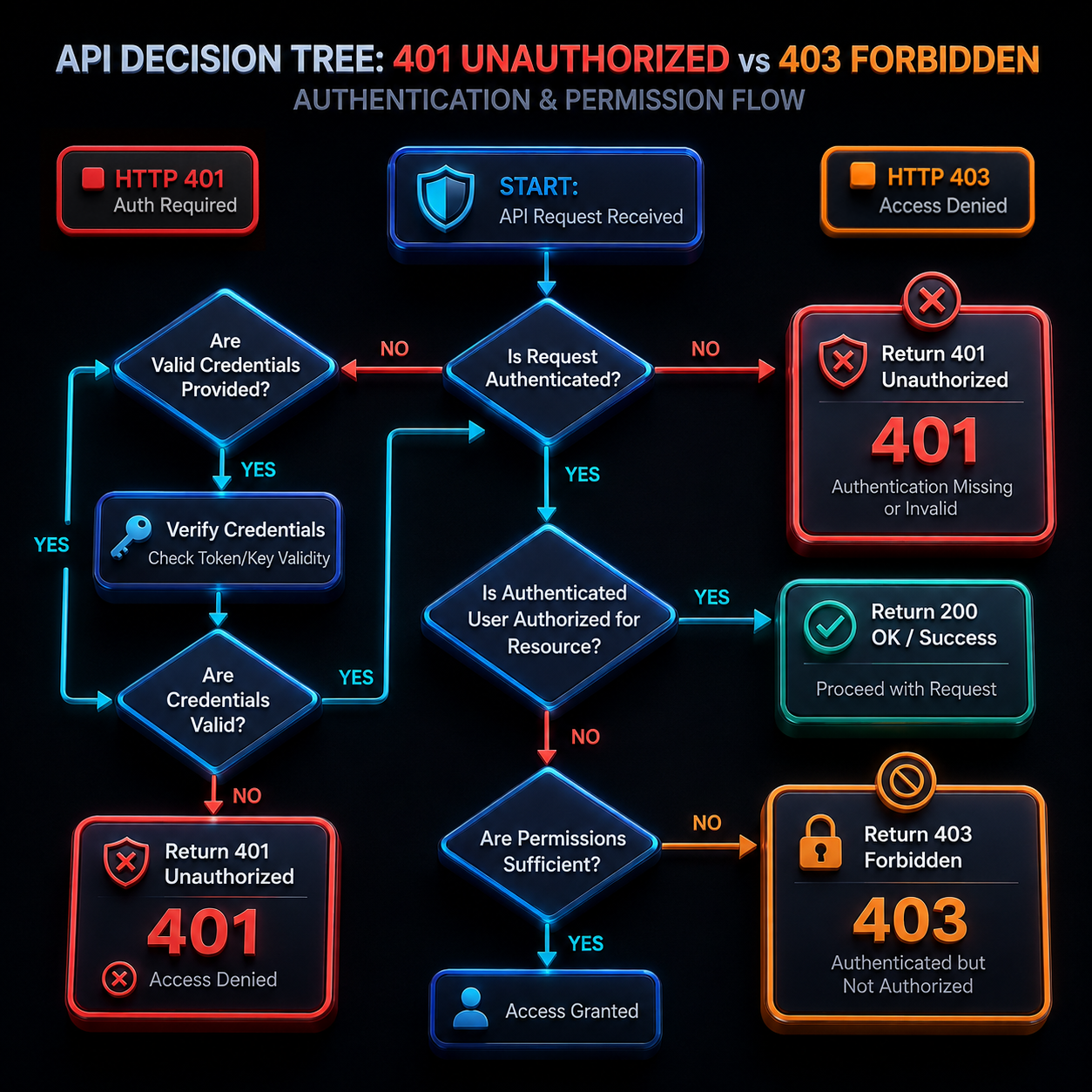
- No credentials sent → Return 401 Unauthorized (include
WWW-Authenticate). - Credentials sent but wrong, expired, or malformed → Return 401 Unauthorized.
- Credentials valid, but user lacks permission → Return 403 Forbidden.
- Valid user, but blocked by IP, region, or rate policy → Return 403 Forbidden.
- Conceal resource existence for security → Return 404 Not Found (or 403 Forbidden).
While specs define strict boundaries, real APIs sometimes return 403 for all failures or 401 for permission denials. The distinction matters because frontend clients use status codes to trigger re-login prompts (401) versus access denied warnings (403).
What causes a 401 Unauthorized error?
Diagnosing a 401 unauthorized error involves checking eight primary causes:
Missing or malformed Authorization header
Forgetting Bearer before a token, extra spaces, or lowercase header names cause authentication parsers to fail.
How to check this: Print outgoing HTTP headers or run curl -v to confirm Authorization: Bearer <token> is present.
Expired token or session
JWTs and OAuth tokens contain an exp claim. Once past this timestamp, signature checks fail with a 401 error.
How to check this: Decode your JWT string to compare exp against current UTC time.
Wrong or revoked API key
Using a sandbox key against production—or a key revoked in your dashboard—returns a 401 status code.
How to check this: Cross-reference active dashboard API keys against environment variables loaded by your script.
Wrong credentials in HTTP Basic Auth
Basic Auth passes username:password encoded in base64. Incorrect passwords or broken encoding trigger a 401 response.
Tip
Basic Auth base64 strings are encoded, not encrypted. Always send Basic Auth over HTTPS connections.
How to check this: Verify encoding with echo -n "user:pass" | base64 and confirm HTTPS usage.
Clock skew
Servers check token nbf and iat timestamps against system clocks. Un-synced server clocks reject valid tokens.
How to check this: Check system clock accuracy with timedatectl or query an external NTP service.
CORS and preflight problems
Cross-origin AJAX calls trigger OPTIONS preflights. If backend CORS headers omit Authorization, browsers strip credentials.
How to check this: Inspect browser Developer Tools for preflight OPTIONS responses allowing Authorization.
Server or CDN configuration
Intermediate proxies like Nginx or Cloudflare can strip auth headers before reaching your app if pass-through rules are unconfigured.
How to check this: Log raw incoming headers at the application layer to verify proxy pass-through.
Automated traffic being challenged
Security gateways issue 401 status codes to unauthenticated bot traffic lacking browser fingerprints.
How to check this: Attach realistic User-Agent headers and session cookies to test response changes.
How to fix a 401 Unauthorized error
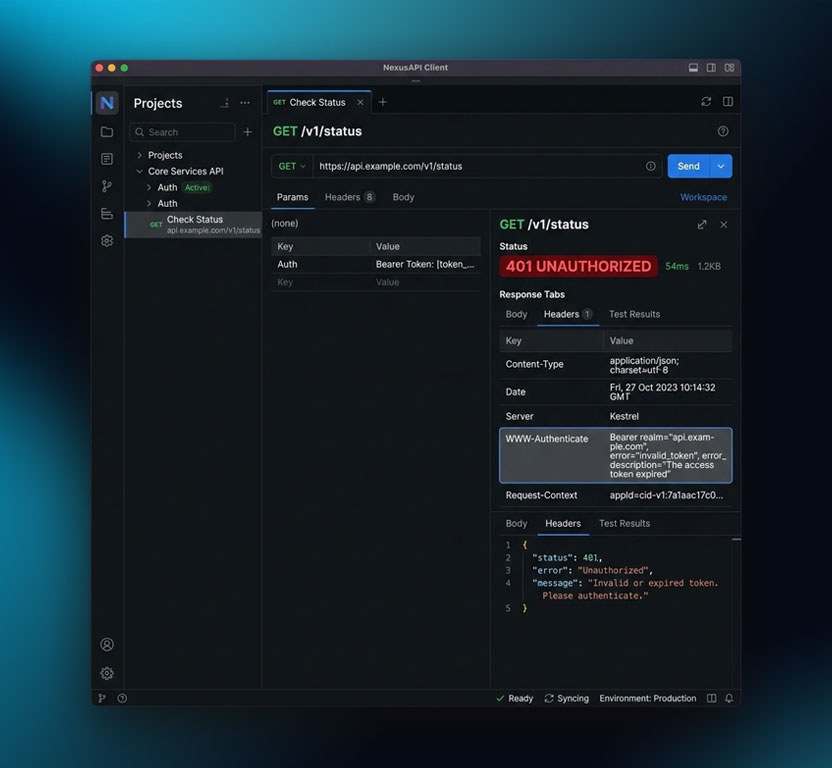
Follow these steps to resolve a 401 unauthorized error as a visitor or developer.
As a website visitor
- Log in again: Refresh expired session cookies by logging out and back in.
- Clear cookies and cache: Remove stale tokens stored in your browser cache.
- Verify the URL: Check for typos in administrative or restricted web paths.
- Use Incognito mode: Test the page without browser extension interference.
- Contact support: Reach out to site administrators if valid logins continue failing.
As a developer
Debug 401 issues with this sequence:
- Inspect request headers: Run
curl -v -H "Authorization: Bearer TOKEN" https://api.example.comto verify headers. - Check
WWW-Authenticateheader: Inspect response details (e.g.,error="invalid_token"). - Decode token claims: Verify JWT
exp,iss, andaudvalues against current time. - Match environments: Ensure API keys match target environment servers.
- Sync server clocks: Synchronize system time using
timedatectland NTP. - Implement token refresh: Intercept 401 responses to refresh tokens automatically.
Below is a Python snippet showing automatic token refresh upon encountering a 401 error:
import requests

def fetch_data_with_refresh(url: str, token_url: str, api_key: str) -> dict:
    """Fetches API resource, automatically refreshing token on 401 error."""
    token = requests.post(token_url, json={"api_key": api_key}).json()["access_token"]
    headers = {"Authorization": f"Bearer {token}"}

    res = requests.get(url, headers=headers)
    if res.status_code == 401:
        token = requests.post(token_url, json={"api_key": api_key}).json()["access_token"]
        headers["Authorization"] = f"Bearer {token}"
        res = requests.get(url, headers=headers)

    res.raise_for_status()
    return res.json()
Handling 401s when scraping or integrating APIs
When extracting data or integrating APIs, store credentials in environment variables. Upon receiving an http 401 response, attempt a single token refresh. Never retry 401 requests in a loop—unlike 429 Too Many Requests or 503 Service Unavailable errors, unauthenticated requests will not resolve without new credentials. If working requests suddenly return 401, check cookies and headers. Using a managed solution like MrScraper's Web Unblocker automates header management, cookie persistence, and proxy rotation behind a single endpoint.
401 vs 403 vs 407 vs 419 — the full comparison
This table compares 401 to related HTTP status codes:
| HTTP Status Code | Status Name | What it means | Whose fault | Recommended Action |
|---|---|---|---|---|
| 401 Unauthorized | Unauthorized (Unauthenticated) | Missing or invalid identity credentials. | Client | Attach valid Authorization header or log in. |
| 403 Forbidden | Forbidden | Authenticated client lacks permission. | Client | Request higher role permissions or unblock IP. |
| 407 Proxy Authentication Required | Proxy Auth Required | Client must authenticate with an intermediate proxy. | Client | Send Proxy-Authorization header to proxy. |
| 419 Page Expired | Page Expired (Laravel CSRF) | Missing or expired CSRF token. | Client | Refresh web page form to get fresh CSRF token. |
| 429 Too Many Requests | Rate Limit Exceeded | Request frequency quota exceeded. | Client | Parse Retry-After header and apply backoff. |
Frequently asked questions
What is the difference between 401 Unauthorized and 403 Forbidden?
401 Unauthorized means authentication is missing or invalid ("who are you?"), while 403 Forbidden means identity is verified but access is refused due to permissions ("you are not allowed"). Logging in fixes a 401 error, but does not fix a 403 error.
How do I fix a 401 Unauthorized error?
Fix a 401 error by attaching a valid Authorization header (such as Bearer <token>). If your token expired, refresh credentials. For web browsers, clear cache and cookies or log in again.
What does 401 Unauthorized mean in simple terms?
In simple terms, 401 unauthorized meaning means a server does not know who you are. It requires you to log in or present valid API credentials before viewing the resource.
Should a failed login return 401 or 403?
A failed login attempt should return 401 Unauthorized because credentials were invalid. Returning 403 is non-standard because 403 indicates identity was verified successfully.
Does a 401 error mean my account is blocked?
No. A 401 error indicates missing or expired credentials, not an account block. Account suspensions or IP bans return a 403 Forbidden status code.
What is the WWW-Authenticate header?
The WWW-Authenticate header is a mandatory response header required by RFC 9110 Section 15.5.2 on 401 responses. It specifies the authentication scheme required to access the resource.
Understanding the difference between 401 Unauthorized ("who are you?") and 403 Forbidden ("you are not allowed") helps developers build compliant APIs and troubleshoot request failures. When returning 401 status codes, include the mandatory WWW-Authenticate header to guide client authentication. For authorization details, read our guide on the 403 Forbidden error.
Tired of blocked requests, broken scrapers, or inconsistent data collection?
MrScraper is built to handle challenging websites, so you can spend less time troubleshooting and more time working with your data.
Get 1,000 free tokens to test it here.
Summarize this post
Open it in your assistant of choice with the prompt ready to send.
Take a Taste of Easy Scraping!

Find more insights here

Claude Code Competitor Pricing Research
Use Claude Code and MrScraper MCP to refresh public competitor pricing, normalize billing periods an…

Use MrScraper MCP to Compare Public SaaS Pricing and Plan Limits
Build a source-backed SaaS plan comparison using MrScraper MCP. Preserve prices, quotas, billing ter…

Build a Product Attribute Classifier with LangChain and MrScraper
Build a LangChain workflow that extracts product evidence with MrScraper, normalizes attributes and…