What Is a Vector Database? Embeddings and AI Search
AI & Machine LearningA vector database stores embeddings so AI can search by meaning instead of keywords. How they work, when you actually need one, and the real trade-offs.
A vector database is a storage engine designed to store, index, and query high-dimensional vector embeddings so AI applications can search data by semantic meaning rather than exact keyword matches.
Traditional relational databases excel at finding exact text strings, like looking up a user by an email address or filtering orders by status code. However, when a user queries a search bar for "how to fix sign-in troubles," a standard SQL database running full-text search will fail to match a document titled "Resetting multi-factor authentication credentials" because none of the exact words overlap.
A vector database solves this fundamental limitation. By representing unstructured data like text, images, and audio as mathematical arrays in vector space, it allows algorithms to measure numerical distance and return results based on conceptual similarity.
What is a vector database?
To understand what is a vector database, you must first understand the three core building blocks that power modern AI retrieval systems: vectors, embeddings, and vector space.
An embedding is a numerical representation of unstructured content created by a neural network model, such as OpenAI's text-embedding-3-small or Google's BERT. When text passes through an embedding model, the network translates word meaning into an array of floating-point numbers.
A vector is that array of numbers, such as [0.012, -0.451, 0.889, ..., 0.104]. Each position represents a specific mathematical dimension captured by the neural network. Modern embedding models generate high-dimensional vectors: text-embedding-3-small uses 1,536 dimensions, while text-embedding-3-large uses 3,072 dimensions.
A vector space is the multi-dimensional geometric space where these vectors reside. Concepts with similar meanings sit physically close to one another, regardless of vocabulary.
An embeddings database (or vector db) organizes billions of these points using specialized indexes like HNSW (Hierarchical Navigable Small World) to perform approximate nearest neighbour (ANN) searches in milliseconds.
Vector embeddings explained with a worked example
To see how vector embeddings explained in practice bridge the gap between human language and mathematical search, let's follow a single customer support dataset through the entire process.
Imagine we run a software platform and want to index three help articles:
- Document A: "How do I reset my account password?"
- Document B: "Steps to update your login credentials."
- Document C: "Enterprise billing plans and annual invoicing."
Step 1: Converting text to high-dimensional vectors
When these three documents pass through an embedding model like sentence-transformers or text-embedding-3-small, the model maps concepts to numeric coordinates. To visualize this in a 3-dimensional vector space, suppose the model assigns coordinates based on three latent concepts: [Security/Auth, Account Management, Financial Billing]:
- Document A vector:
[0.85, 0.12, 0.02] - Document B vector:
[0.81, 0.15, 0.04] - Document C vector:
[0.03, 0.08, 0.94]
Notice how Document A and Document B share almost identical numerical values in the first coordinate (0.85 and 0.81) because both deal with authentication. Document C sits far away on the third axis (0.94) because it pertains to financial billing.
Step 2: Processing the user search query
Now a user enters a search query into your application: "I forgot my secret code to log in."
Notice that the query contains neither the word "password" nor the word "credentials." A traditional keyword search using BM25 or SQL LIKE %password% returns zero matches.
However, when the query passes through the exact same embedding model, it produces a query vector:
- Query vector:
[0.83, 0.14, 0.03]
Step 3: Calculating similarity search distance
The vector database calculates the distance between the query vector and every stored document vector. The most common distance metric used for text search is cosine similarity, which measures the cosine of the angle between two vectors in vector space.
Cosine similarity produces a score between -1.0 and 1.0, where 1.0 indicates identical direction:
Cosine Similarity = (Dot Product of Vector A and Vector B) / (Magnitude of Vector A × Magnitude of Vector B)
Because cosine similarity measures spatial orientation rather than vector length, it prevents longer documents from biasing search results. Other common distance metrics include dot product (used when vectors are pre-normalized) and Euclidean distance (also called L2 distance, which measures straight-line point distance).
Running the query vector against our database yields:
- Similarity to Document A: 0.998 (Near perfect match)
- Similarity to Document B: 0.994 (High semantic match)
- Similarity to Document C: 0.081 (Unrelated)
The vector database returns Document A and Document B as the top nearest neighbour results, completing a successful semantic search.
How does a vector database work under the hood?
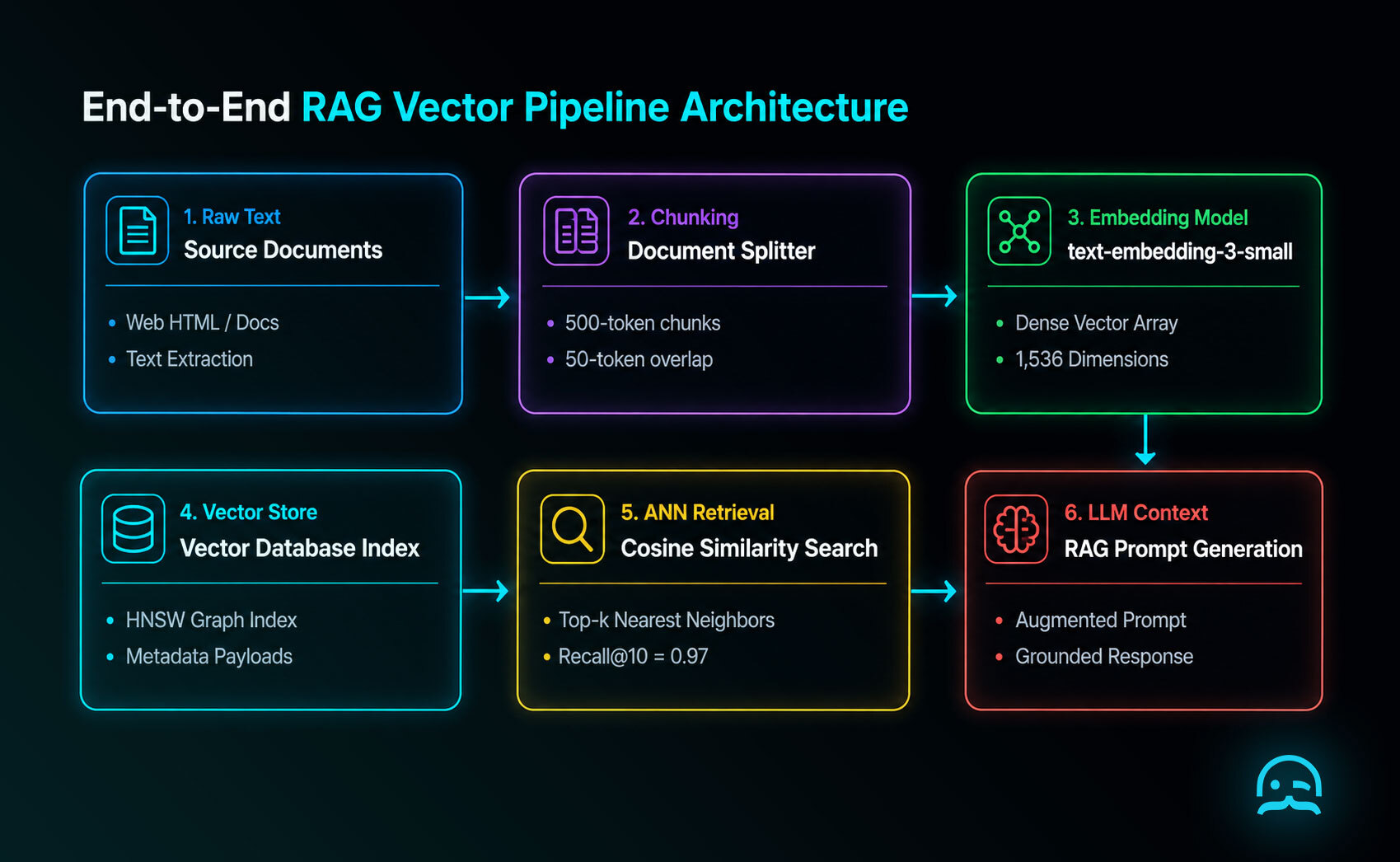
Understanding how does a vector database work requires looking at the full Retrieval-Augmented Generation (RAG) data pipeline, from raw source collection to final LLM generation.
1. Data collection and cleaning
Before anything is embedded it has to be collected and cleaned. When the source is the live web, MrScraper's Web Scraper API returns structured content rather than raw HTML, which keeps navigation and boilerplate out of your chunks.
If your scraping pipeline captures raw boilerplate like navigation headers, cookie banners, or inline scripts, those irrelevant tokens get embedded alongside your core content, polluting your vector space and degrading retrieval accuracy. For complex single-page apps, ensure your scraper handles rendering cleanly; see our technical guide on JavaScript crawling.
2. Document chunking
Large documents cannot be converted into a single vector without losing granular detail. Chunking is the process of breaking long text documents into smaller, coherent passages (typically 250 to 500 tokens).
Common chunking strategies include fixed-size sliding windows with overlap (e.g., 500-token chunks with 50-token overlap) and sentence-boundary splitting. Poor chunking is the single most common reason RAG applications fail in production—if a chunk splits a question from its answer, the embedding model cannot represent the relationship.
3. Vector indexing algorithms
If a vector database had to calculate the exact distance between a query vector and 10 million stored vectors line-by-line (a flat index brute-force scan), a single query would take seconds.
To achieve sub-10ms response times, vector databases construct an approximate nearest neighbour (ANN) index. ANN indexes trade a tiny fraction of accuracy (typically less than 1% recall@10) for exponential gains in search speed.
The two dominant indexing algorithms used today are:
- HNSW (Hierarchical Navigable Small World): A multi-layer graph structure where top layers contain long-range links for fast routing, while lower layers contain dense, localized connections. HNSW provides the fastest query latency and highest recall, but requires storing the graph structure in memory.
- IVF (Inverted File Index): Divides vector space into Voronoi cells using k-means clustering. During search, the database evaluates only the vectors inside the closest centroid cells, reducing search comparisons significantly.
To manage RAM consumption on large datasets, databases apply quantization (such as Scalar Quantization SQ8 or Product Quantization PQ). Quantization compresses 32-bit floating-point numbers into 8-bit integers, reducing memory footprint by up to 75% while preserving query performance.
Vector database vs traditional database
Understanding the structural differences in a vector database vs traditional database comparison helps explain why specialized vector engines exist alongside traditional database systems.
| Feature | Relational Database (SQL) | NoSQL Database | Vector Database |
|---|---|---|---|
| Primary Data Type | Structured rows, tables, foreign keys | Unstructured JSON, key-value pairs | High-dimensional dense vector arrays |
| Index Structure | B-Tree, Hash Index | LSM-Tree, Inverted Index | HNSW Graph, IVF, Flat ANN Index |
| Search Paradigm | Exact match (WHERE id = 10) |
Key lookup, range queries | Nearest neighbour similarity (cosine, L2) |
| Query Flexibility | Exact filtering, joins, aggregations | Flexible schema document queries | Semantic concept matching + metadata filtering |
| Query Results | Deterministic (exact records) | Deterministic (exact records) | Probabilistic (approximate closest matches) |
| Scaling Metric | Storage gigabytes, IOPS | Horizontal partitioning, throughput | RAM footprint, index build time, QPS |
While traditional databases use B-Tree indexes to jump to exact scalar values, a vector database navigates multi-dimensional spatial graphs.
Many enterprise architectures now implement hybrid search, combining keyword search (BM25) with dense vector search using reciprocal rank fusion (RRF). This ensures search systems catch exact part numbers (via BM25) and broader conceptual questions (via vector search).
Vector database vs vector search library
A common point of confusion for developers building their first AI feature is the distinction between a standalone vector db and a vector search library.
A vector search library (such as Meta's FAISS, Spotify's Annoy, or NMSLIB) is an in-memory software library that executes ANN algorithms on local vector arrays.
- Pros: Extremely fast, lightweight, zero network latency, free to embed in Python scripts.
- Cons: No native disk persistence, no real-time metadata CRUD operations, no network API layer, no horizontal sharding or replication. If your server process restarts, your index is lost unless manually serialized to disk.
A vector database (such as Pinecone, Qdrant, Weaviate, Milvus, or Chroma) is a full-fledged database management system built around an ANN library core.
- Features: Provides HTTP/gRPC APIs, persistent storage engines, multi-tenant security, automated back-ups, live CRUD record updates, dynamic metadata filtering, and cluster replication.
If you are writing a standalone Python script to cluster 5,000 local PDF embeddings once, a library like FAISS is sufficient. If you are building a production SaaS app serving concurrent users, you need a vector database.
Do I need a vector database?
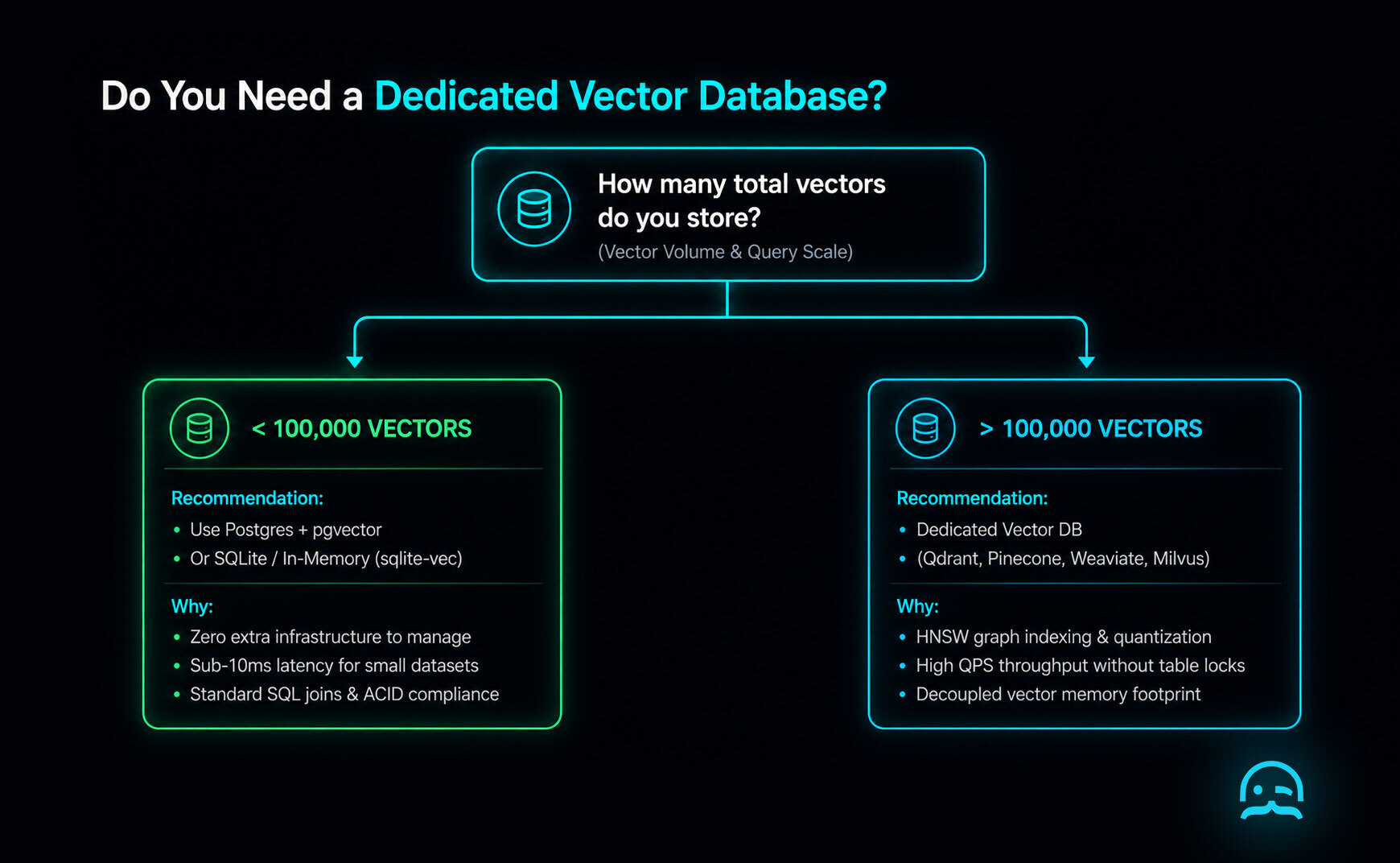
When deciding do i need a vector database, engineers should evaluate their vector count, query latency requirements, and existing infrastructure.
Because dedicated vector infrastructure adds operational overhead and subscription costs, you should not add one until your scale demands it.
Scale decision thresholds
- Under 10,000 vectors: You do not need a vector database. Store embeddings in an in-memory NumPy array or local SQLite database (
sqlite-vec). Flat cosine distance search completes in under 5ms. - 10,000 to 100,000 vectors: Use PostgreSQL with
pgvectoror Redis vector search. If you run Postgres in production, addingpgvectorlets you store embeddings in standard tables without managing new infrastructure. - 100,000 to 1,000,000+ vectors: A dedicated vector database becomes essential. At this scale, memory management, HNSW graph indexing, scalar quantization, and sub-10ms ANN response times earn their keep.
For a detailed benchmark breakdown of latency, recall metrics, and cloud pricing across leading vendors, read our comprehensive guide on the best vector database implementations. For context on how AI agents consume this data, see our breakdown of agentic search and building a production RAG pipeline with web data.
Core applications of vector databases
While Retrieval-Augmented Generation is the most popular use case today, vector databases power several critical machine learning workflows:
- Retrieval-Augmented Generation (RAG): Supplying relevant internal document passages to Large Language Models (LLMs) to eliminate hallucinations and provide up-to-date domain context.
- Recommendation Systems: Converting user interaction histories and product attributes into vector embeddings. Recommending items is simply querying for the nearest neighbour vectors to a user's recent activity vector.
- Multimodal and Image Search: Embedding images and text into a shared vector space (using models like CLIP). Users can search for "red vintage leather jacket" and retrieve matching images directly.
- Deduplication and Anomaly Detection: Identifying near-duplicate documents across millions of web pages, or flagging fraudulent financial transactions whose vector embeddings sit far away from normal cluster centroids.
Frequently asked questions
Is SQL a vector database?
SQL itself is a query language, not a vector database. However, traditional relational SQL databases like PostgreSQL can function as vector databases when configured with vector extensions like pgvector. This allows developers to execute vector similarity queries directly within standard SQL statements.
Is a vector database SQL or NoSQL?
A vector database is neither a traditional SQL relational database nor a simple NoSQL key-value store. It represents a distinct category of database optimized for multi-dimensional spatial index structures like HNSW. Most vector databases expose JSON document APIs similar to NoSQL, while supporting specialized similarity query syntax.
What is replacing vector databases?
General-purpose databases adding vector capabilities (such as Postgres with pgvector, Redis, and Elasticsearch) are replacing dedicated vector databases for small-to-medium projects. Additionally, expanding LLM context windows reduce the need for vector retrieval in small document tasks, though vector search remains necessary for enterprise scale.
What are the top vector databases?
The top dedicated vector databases in 2026 include Pinecone (fully managed serverless), Qdrant (open-source Rust engine), Weaviate (open-source hybrid search engine), and Milvus (cloud-native distributed cluster). PostgreSQL with pgvector is the leading extension-based alternative.
Do I need a vector database for my project?
You only need a vector database if your project performs semantic search or RAG across more than 100,000 documents. For smaller datasets under 100,000 vectors, using PostgreSQL with pgvector or an in-memory vector search library is faster to implement and avoids extra operational overhead.
What is the difference between a vector database and a vector search library?
A vector search library (like FAISS) is an in-memory algorithm wrapper with no network API, disk persistence, or multi-user security. A vector database is a full management system providing data persistence, live CRUD updates, dynamic metadata filtering, HTTP APIs, and horizontal cluster scaling.
How many vectors before I need a dedicated database?
You generally need a dedicated vector database when your index exceeds 100,000 to 1,000,000 high-dimensional vectors, or when your application requires high concurrent query throughput (over 500 QPS) with sub-10ms p95 latency and dynamic metadata filtering.
Can I use Postgres as a vector database?
Yes, you can use Postgres as a vector database by installing the open-source pgvector extension. pgvector adds a vector data type, HNSW and IVFFlat index structures, and cosine/Euclidean distance operators directly to your existing PostgreSQL database.
Tired of blocked requests, broken scrapers, or inconsistent data collection?
MrScraper is built to handle challenging websites, so you can spend less time troubleshooting and more time working with your data.
Get 1,000 free tokens to test it here.
Summarize this post
Open it in your assistant of choice with the prompt ready to send.
Take a Taste of Easy Scraping!

Find more insights here

Claude Code Competitor Pricing Research
Use Claude Code and MrScraper MCP to refresh public competitor pricing, normalize billing periods an…

Use MrScraper MCP to Compare Public SaaS Pricing and Plan Limits
Build a source-backed SaaS plan comparison using MrScraper MCP. Preserve prices, quotas, billing ter…

Build a Product Attribute Classifier with LangChain and MrScraper
Build a LangChain workflow that extracts product evidence with MrScraper, normalizes attributes and…