
Converting cURL Commands to Python for Web Scraping
Web ScrapingLearn how to convert cURL commands to Python using requests, headers, POST data, error handling, and practical web scraping techniques.
Converting cURL commands to Python means translating methods, URLs, headers, and data into Python code. You can use libraries like requests.
Basics of cURL and How It Works
cURL, which stands for "Client URL," is a command-line tool that supports various protocols, including HTTP, HTTPS, FTP, and more. It is widely used for testing APIs, downloading files, and performing HTTP requests. A basic cURL command looks like this:
curl https://docs.mrscraper.com/docs/api/overview
This command sends a GET request to the specified URL. cURL also supports other HTTP methods like POST, PUT, DELETE, and allows adding headers, data, and authentication.
Example of a POST request with cURL:
curl -X POST https://docs.mrscraper.com/docs/api/overview -H "Content-Type: application/json" -d '{"key":"value"}'
This command sends a POST request with a JSON payload.
Advantages of Using Python for Web Scraping
While cURL is great for quick tests and simple requests, Python has several benefits for complex web scraping tasks:
- Libraries and Frameworks:
Python has powerful libraries like requests, BeautifulSoup, and Scrapy that simplify web scraping. These libraries help with web scraping. They make HTTP requests, parse HTML, and manage cookies and sessions.
- Code Readability and Maintenance:
Python code is often more readable and maintainable than equivalent shell scripts using cURL. Python’s syntax is clean and expressive, making it easier to write and debug web scraping scripts.
- Automation and Integration:
Python can easily integrate with other tools and libraries, allowing for automation and more complex data processing workflows. For example, you can use Python to scrape data and then directly analyze it using libraries like pandas.
Step-by-Step Guide: Converting cURL to Python
The following examples translate common cURL commands into Python with the requests library.
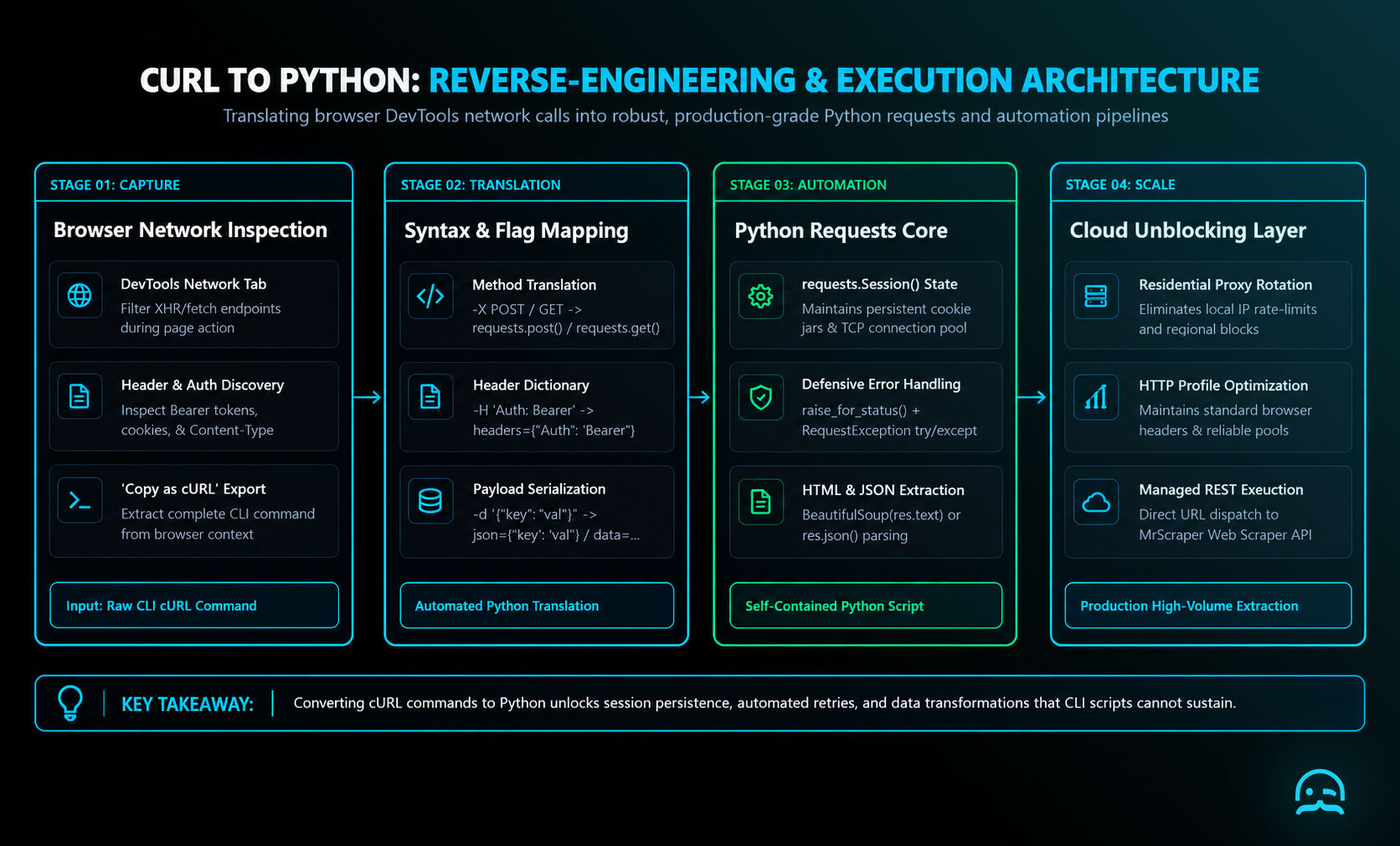
Simple GET Request
cURL:
curl https://docs.mrscraper.com/docs/api/overview
Python:
import requests

response = requests.get('https://docs.mrscraper.com/docs/api/overview')

print(response.text)
GET Request with Headers
cURL:
curl -H "Authorization: Bearer your_token" https://docs.mrscraper.com/docs/api/overview
Python:
import requests

headers = {
    'Authorization': 'Bearer your_token'
}

response = requests.get('https://docs.mrscraper.com/docs/api/overview', headers=headers)

print(response.text)
POST Request with Data
cURL:
curl -X POST https://docs.mrscraper.com/docs/api/overview -H "Content-Type: application/json" -d '{"key":"value"}'
Python:
import requests
import json

url = 'https://docs.mrscraper.com/docs/api/overview'
headers = { 'Content-Type': 'application/json' }
data = { 'key': 'value' }

response = requests.post(url, headers=headers, data=json.dumps(data))

print(response.text)
Tips and Best Practices
Add robust error handling to each request so unexpected responses and network failures do not stop a scraper silently. Wrap requests calls in try-except blocks, validate HTTP status with raise_for_status, and catch RequestException. Respect each site's robots.txt rules and avoid sending too many requests in a short period. When necessary, add a delay between requests. Use a browser-style User-Agent in request headers, alongside any other headers required by the endpoint.
import requests

try:
    response = requests.get("https://docs.mrscraper.com/docs/api/overview")
    response.raise_for_status()  # Raises HTTPError for bad responses.
    print(response.text)
except requests.exceptions.RequestException as error:
    print(f"An error occurred: {error}")
import requests

headers = {"User-Agent": "Mozilla/5.0 (Windows NT 10.0; Win64; x64) AppleWebKit/537.36 (KHTML, like Gecko) Chrome/91.0.4472.124 Safari/537.36"}
response = requests.get("https://docs.mrscraper.com/docs/api/overview", headers=headers)
Using Python for Web Scraping
First thing first, specify the website you want to scrape. This can be one of the examples.
Step 1. You will need to import requests, json, BeautifulSoup.
import requests
import json
from bs4 import BeautifulSoup
Step 2. Create a variable for the URL of the website you want to scrape.
url = 'https://docs.mrscraper.com/docs/api/overview'
Step 3. Create a variable for the headers.
headers = {
    'User-Agent': 'Mozilla/5.0 (Windows NT 10.0; Win64; x64) AppleWebKit/537.36 (KHTML, like Gecko) Chrome/91.0.4472.124 Safari/537.36'
}
Step 4. Make the request using requests.
try:
    response = requests.get(url, headers=headers)
    response.raise_for_status()  # Raises an HTTPError for bad responses
    print(response.text)

except requests.exceptions.RequestException as e:
    print(f"An error occurred: {e}")
Step 5. Create a BeautifulSoup object. It is for parsing HTML and extracting data.
soup = BeautifulSoup(response.text, 'html.parser')
Step 6. Then, you will need to look into the website, find which part of the website you want to scrape, and get the selector. You can get the selector by inspecting the page (Right click on the page -> Inspect).
For example, you want to get all the section titles (Introduction, Authenticating requests, Account, …). You can click a section title. You can find the selector on the right side. You can also see it in a tooltip when you hover over the title.
As you can see, the section titles are h1 elements inside a div that has content class.
Step 7. So you can get the div element first
div_element = soup.find('div', class_='content')
Step 8. Get the section titles.
section_titles = div_element.findAll('h1')
for section_title in section_titles:
    print(section_title.text)
Here is the complete Python script:
import requests
import json
from bs4 import BeautifulSoup

url = 'https://docs.mrscraper.com/docs/api/overview'
headers = {
    'User-Agent': 'Mozilla/5.0 (Windows NT 10.0; Win64; x64) AppleWebKit/537.36 (KHTML, like Gecko) Chrome/91.0.4472.124 Safari/537.36'
}

try:
    response = requests.get(url, headers=headers)
    response.raise_for_status()  # Raises an HTTPError for bad responses
    print(response.text)
except requests.exceptions.RequestException as e:
    print(f"An error occurred: {e}")

soup = BeautifulSoup(response.text, 'html.parser')
div_element = soup.find('div', class_='content')
section_titles = div_element.findAll('h1')
for section_title in section_titles:
    print(section_title.text)
Converting cURL commands to Python can significantly enhance your web scraping capabilities. Python's rich ecosystem of libraries, readability, and ease of integration make it a powerful tool for web scraping tasks. By following the steps and best practices in this article, you can quickly convert cURL to Python. You can also build strong web scraping scripts.
So now you can create your own web scraper from scratch! What do you think about it? It’s quite challenging, isn’t it? Especially if you are not familiar with the libraries and the language. But don’t worry! MrScraper will help you to easily do scraping. You can go here to read the features. Happy scraping!
What We Learned
- cURL is useful for quick tests, simple requests, API testing, and file transfers, while Python is better suited to more complex scraping tasks.
- Python’s requests, BeautifulSoup, and Scrapy libraries support HTTP requests, HTML parsing, cookies, sessions, and broader scraping workflows.
- Converting cURL commands to Python involves translating methods, headers, and request data into requests-based code.
- Readable, maintainable Python can be integrated with automation and data-processing tools such as pandas.
- Effective scraping scripts should handle errors, respect website policies, avoid overloading servers, and use appropriate headers.
Explore a managed scraping workflow
When you are ready to simplify web data extraction, explore our AI-powered scraper with built-in unblocking tools.
Summarize this post
Open it in your assistant of choice with the prompt ready to send.
Take a Taste of Easy Scraping!

Find more insights here

Return Verbatim Evidence Highlights in Web Research Answers
Build an evidence step that picks supporting passages, checks every quote against the source page, a…

Build an AI Agent That Finds Contradictions Across Website Pages
Build a workflow that pulls pricing, plan and policy claims from your own website, flags pages that…
Benchmark Heading-Aware and Semantic Chunking for Web Documentation
Run a fair test of heading-aware and semantic chunking on the same documentation pages, with a retri…