Data Scraping: What It Is, How It Works, and Why It Matters
Web ScrapingLearn what data scraping is, how it works, the main types and use cases, and the technical, legal, and ethical considerations involved in extracting structured data.
Data scraping is the automated extraction, parsing, organization, and storage of information from digital sources such as websites, APIs, documents, and databases.
What Is Data Scraping?
Data scraping is an automated process. It extracts information from digital sources, like websites, files, APIs, or databases. Software collects the data, then parses and organizes it into a structured format.
The term is often used interchangeably with "web scraping," but they're not quite the same thing. Web scraping is the practice of extracting data from web pages. It is the most common type, and most people picture it. Data scraping is a broad term. It covers automated extraction from any digital source. This can include a PDF report or a spreadsheet. It can also include an API endpoint. It may also include a desktop app interface or a database. Every web scraper is a data scraper; not every data scraper is a web scraper.
The main output of data scraping is structured data. It is information set in rows, columns, fields, and values. You can store it in a database, analyze it in a spreadsheet, or send it to another app. The source material may be unstructured, like raw HTML, a PDF with no tables, or a document. It may also be semi-structured, like an HTML page with consistent formatting. The scraper’s job is to extract meaningful values. It then delivers them in a predictable format.
Data scraping has been part of computing almost as long as the internet itself. As the web expanded in the late 1990s and early 2000s, public digital information grew fast. Automated data extraction became more useful too. Today, data scraping powers price comparison engines and market research platforms. It also supports AI training datasets, academic research, and financial analysis tools. Many other applications use it across every industry.
How Data Scraping Works
Think of data scraping like a research assistant. It can read thousands of documents at once. It pulls out the exact information you specify. It organizes that data into a spreadsheet. It does not get tired. It does not lose track. It does not make transcription errors. The difference is that instead of a human assistant reading with their eyes, a software program reads with code.
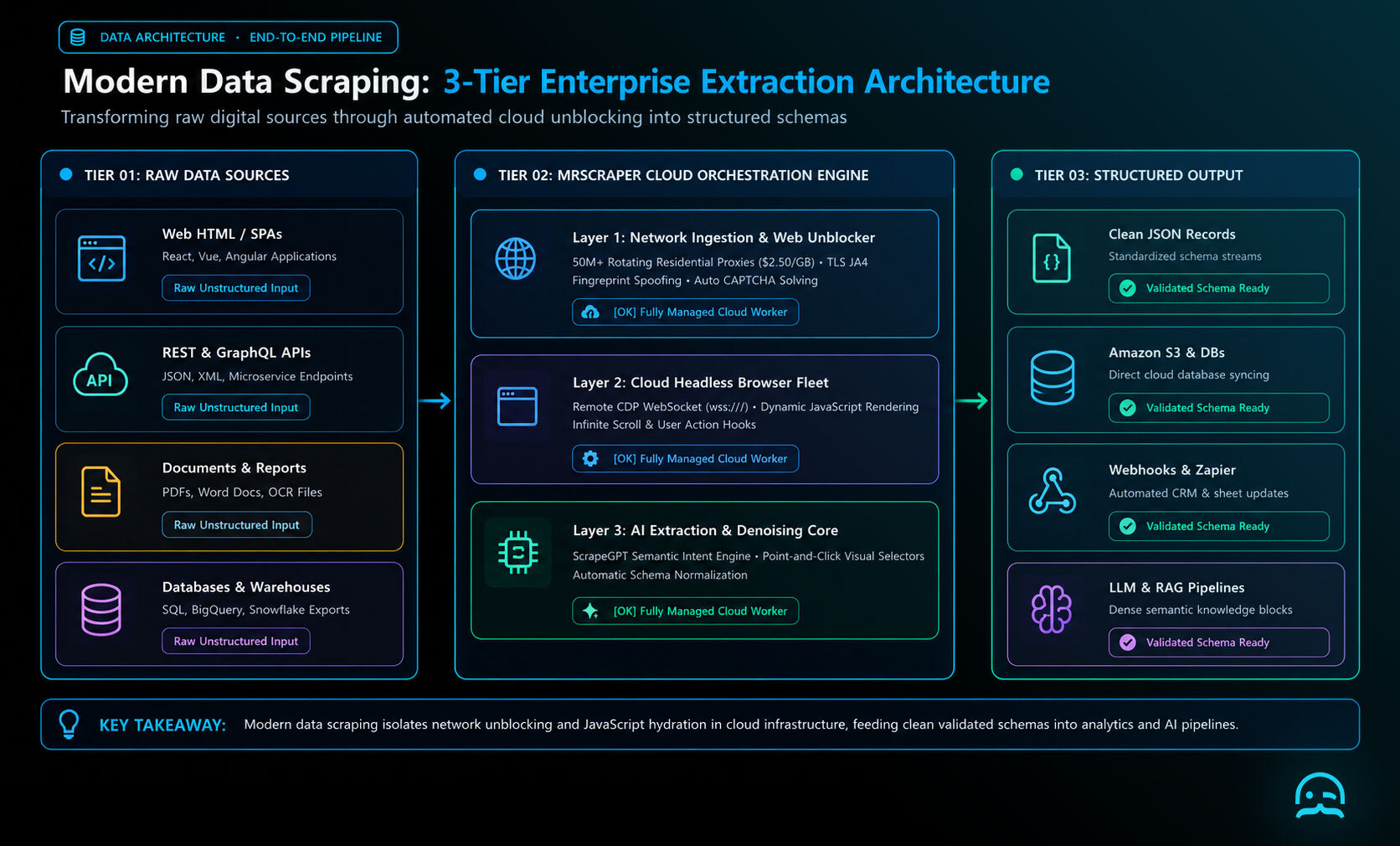
At a high level, every data scraping operation follows the same steps. Access the source, parse the content, extract the target data, structure it, and store it. What changes across different scraping approaches is how each step is executed.
Access. The scraper sends a request to a data source: an HTTP GET request to a web page, an API call, a file read operation. The source responds with content: HTML markup, JSON from an API, text from a document, pixel data from a screen.
Parse. The raw content is parsed to create a navigable structure. For HTML, this means converting markup into a document tree. In this tree, elements like headings, paragraphs, tables, and links are easy to find. You can identify and address them by type or attributes. For JSON, it means deserializing the text representation into a data structure. For a PDF, it means extracting the text layer.
Extract. Using selectors, patterns, or logic, the scraper finds the exact data it needs. It can capture prices in a specific element. It can also find article headlines that match a set format. It can also collect table rows within a specific <table>. This is where the "what data you actually want" instruction lives in the code.
Structure and store. The extracted values are put into records. These records can be database rows, JSON entries, or CSV rows. They are saved for later use. This is the finished product: clean, organized data ready for analysis, application integration, or delivery to another system.
Types of Data Scraping
Data scraping isn't one technique: it's a category covering several distinct approaches, each suited to different data sources:
Web scraping extracts data from web pages by requesting the page's HTML and parsing it to find target elements. It's the most common type and ranges from simple single-page extraction to complex multi-page crawlers.
API data extraction collects data using an API's structured interface. It calls documented endpoints that return clean, consistent data formats, usually JSON or XML. APIs are often more reliable than HTML scraping. Their structure is made for code to use. But they are only available if a platform provides them.
Document scraping extracts text and data from files like PDFs, Word documents, or spreadsheets. It parses the file format to access the underlying content, not the rendered view.
Screen scraping reads what an app shows on the screen. It was first used to pull data from legacy systems without APIs. Today, it is also used in some browser automation tasks. The scraper reads what's displayed on screen rather than accessing underlying data directly.
Database scraping pulls data from databases using query tools or exported files. It converts stored data into a format other apps can use.
Step-by-Step Guide: How Data Scraping Is Done
Here is how a typical web data scraping process is built in practice, using Python. Python is the most used language for scraping work. This example extracts article headlines from a simple news-style page.
Step 1: Identify Your Data Source and What You Need
Before you write any code, be clear about two things: the URL or source you will target. Also list the exact data fields you need. "I want to scrape a news site" isn't actionable. "I want to collect the headline, author, and publication date from each article on example-news.com/latest" is.
Being specific about target fields helps you know what to find in the parsed content. It also prevents you from building a scraper that collects more than you need.
Step 2: Make the Request to the Source
For a static web page (one that serves its content in the initial HTML response), Python's requests library is the simplest starting point:
import requests

url = "https://example-news.com/latest"
headers = {
    "User-Agent": (
        "Mozilla/5.0 (Windows NT 10.0; Win64; x64) "
        "AppleWebKit/537.36 (KHTML, like Gecko) "
        "Chrome/124.0.0.0 Safari/537.36"
    )
}

response = requests.get(url, headers=headers, timeout=15)
response.raise_for_status()  # Raises an error if the request failed
html_content = response.text
According to the requests library documentation, setting a meaningful User-Agent header is standard practice that identifies your client to the server: similar to how a browser identifies itself. raise_for_status() ensures your code fails visibly on HTTP errors rather than silently processing an error page as if it were valid content.
Step 3: Parse the HTML and Navigate to Your Target Data
Use BeautifulSoup in a scraping workflow to turn raw HTML into a Python object you can navigate. Select elements by tag, class, ID, or other attributes.
from bs4 import BeautifulSoup

def extract_articles(html_content, card_selector="article.news-card", headline_selector="h2.headline", author_selector="span.author-name", date_selector="time"):
    soup = BeautifulSoup(html_content, "html.parser")
    article_cards = soup.select(card_selector)
    for card in article_cards:
        headline = card.select_one(headline_selector)
        author = card.select_one(author_selector)
        date = card.select_one(date_selector)
        print({
            "headline": headline.get_text(strip=True) if headline else None,
            "author": author.get_text(strip=True) if author else None,
            "date": date.get("datetime") if date else None,
        })
CSS selectors tell BeautifulSoup which elements contain the target data. Inspect the page using your browser’s DevTools. Right-click the element you want. Find its key attributes. Then update the selector arguments for the site.
Step 4: Clean and Normalize the Extracted Data
Raw extracted values often need cleaning before they're useful. Numbers may include currency symbols, dates may be in inconsistent formats, text may have extra whitespace. Add a normalization step:
import re
from datetime import datetime

def clean_headline(text: str | None) -> str | None:
    if not text:
        return None
    return re.sub(r"\s+", " ", text).strip()

def parse_date(date_str: str | None) -> str | None:
    if not date_str:
        return None
    try:
        return datetime.fromisoformat(date_str).date().isoformat()
    except ValueError:
        return date_str  # Return as-is if parsing fails
Step 5: Store the Structured Data
Write the cleaned records to your target output format:
import csv
from datetime import datetime

def save_to_csv(records: list[dict], filename: str = "articles.csv"):
    if not records:
        return
    with open(filename, "w", newline="", encoding="utf-8") as f:
        writer = csv.DictWriter(f, fieldnames=records[0].keys())
        writer.writeheader()
        writer.writerows(records)
    print(f"Saved {len(records)} records to {filename}")
This is the output layer. It is where automated extraction becomes a dataset you can use. You can open it in a spreadsheet, load it into a database, or send it to an analysis tool.
Where Data Scraping Is Used
The applications of automated data collection span virtually every industry where information has analytical or operational value:
Price monitoring and competitive intelligence: Retailers, travel agencies, and ecommerce businesses track competitor prices in real time. They monitor changes across thousands of products or routes that manual checks can’t cover.
Market research and business intelligence: Analysts collect business listings, reviews, job postings, and industry news. They use this data to understand market conditions, spot trends, and track competitors faster than older methods.
Academic and scientific research: Researchers collect datasets from public sources. These include public health records, social media posts for sentiment analysis, and scientific publication databases. Compiling these datasets manually would be too expensive.
Financial data collection: Investors and financial analysts gather earnings releases, regulatory filings, commodity prices, and market data. They use sources across the web and financial data portals.
AI and machine learning training data: Language models, image classifiers, and recommendation systems require enormous training datasets. Scraping web content at scale is a key way to gather data for training modern AI systems.
Real estate and property data is used by investors, agents, and researchers. They collect listing data, price history, and neighborhood details. They get this information from public portals. They use it for market research and investment analysis.
Lead generation and sales intelligence: Sales teams collect public business information. This includes company names, industries, and contact details on company websites. They use it to build targeted prospect lists.
Legal and Ethical Considerations
Data scraping exists in a legal and ethical landscape that is complex. It is worth understanding before building any serious scraping operation.
Publicly visible data is generally not the same as freely usable data. A web page being publicly accessible doesn't automatically make its contents legally scrape-able for any purpose. Website Terms of Service often restrict automated data collection. Courts have reached different conclusions across jurisdictions. A key example is the hiQ Labs v. LinkedIn appeals process about public data. Still, violating a ToS can create real contract risk. This risk exists regardless of the underlying legal question.
Personal data carries specific legal obligations. Data protection regulations: GDPR in Europe, CCPA in California, and equivalent frameworks elsewhere: apply to personal data regardless of whether it's publicly visible. Scraping names, email addresses, phone numbers, or other personal data creates compliance duties. These include a legal basis for collection, limited purpose use, data subject rights, and retention limits. Scraping business information is generally lower risk than scraping personal data; scraping personal data at scale requires privacy counsel.
robots.txt is a request, not a technical barrier. The robots.txt file at the root of a website specifies which parts of the site the owner asks automated crawlers to avoid. It isn't enforced technically: a scraper can read pages that robots.txt disallows: but violating robots.txt directions is widely considered a violation of the spirit of the operator's wishes, and courts have sometimes referenced robots.txt compliance in scraping-related legal cases.
Rate and volume matter. Scraping at a level that slows a server for real users is unethical and more likely to face legal risk. Responsible scraping includes respectful request pacing, honoring rate limits servers communicate through response codes, and avoiding scraping at a scale that functions as a denial-of-service attack on the target's infrastructure.
Common Challenges and Limitations
Data scraping encounters a major limitation when a site relies on dynamic content. Websites built with JavaScript frameworks like React, Vue, or Angular may return an app shell. The initial HTML response may not include the full content. A plain HTTP request can therefore produce little usable data. Browser automation or a scraping service with JavaScript rendering is required to access content populated after page load.
Anti-bot systems can also interrupt automated access. Many commercially valuable websites use bot-detection systems such as Cloudflare, PerimeterX, and similar platforms to evaluate IP reputation, browser fingerprints, and behavioral signals. Suspected automation may receive CAPTCHA challenges or access blocks. Maintaining scraping infrastructure that avoids detection is hard at scale. Managed scraping platforms can provide this infrastructure, so each project does not need to build it alone.
Changes to page structure can silently break selectors. A scraper that works today may return no results tomorrow. A site may rename a CSS class, add a wrapper element, or restructure a table. Production systems should monitor result counts and raise alerts when counts show structural changes. Data gaps should not go unnoticed.
Data quality also requires validation, not just extraction. A successful HTTP response and non-empty results do not guarantee reliable data. Fields can be missing, values can differ between records, and inconsistent formatting can create downstream errors. For production data scraping, cleaning and validation are as important as extracting the records.
Scale introduces additional infrastructure complexity. Fetching one URL once is simple. But collecting data often from 100,000 URLs needs retry logic for failures. It also needs rate control across many target domains. It needs output pipelines that send clean data to databases or downstream systems. At that scale, the work becomes a broader engineering challenge rather than a simple Python script.
Conclusion
Data scraping powers many modern data applications. It supports daily price comparison tools. It also provides datasets that train AI systems. These systems are changing how information is processed. It also fuels market intelligence. This helps guide business decisions at every level. At its core, it is a simple idea. It automates the work of reading and recording information. Otherwise, people would need to do that work for every record. In practice, building it to work reliably at scale takes real engineering work. First, you need to understand the technical, legal, and operational factors involved.
The best starting point is the simplest. Identify a small, specific dataset you would truly use. Build a minimal scraper to collect it. Learn the full pipeline, from access to structured output. From that foundation, everything else: scale, anti-bot handling, data quality, scheduling: is an incremental layer.
What We Learned
- Data scraping is broader than web scraping. It covers automated extraction from any digital source. These sources include web pages, APIs, PDFs, and databases. Web scraping specifically means extracting data from HTML pages.
- The core pipeline stays the same. Access the source and parse the content. Extract the target data. Clean and normalize it. Store the result. Tools and techniques may change, but the sequence is universal.
- JavaScript rendering is the main technical divide. Pages that load content with JavaScript need browser automation or a rendering layer. Plain HTTP requests return empty shells for these targets.
- Legal and ethical considerations are not optional: ToS restrictions, robots.txt Directions and data protection laws (GDPR, CCPA) apply to data scraping. Understand them before you start collecting data.
- Scale changes engineering needs a lot. A one-time extraction is a script. A production data pipeline is infrastructure. It includes scheduling, monitoring, error handling, and maintenance.
- Data quality needs active validation. Successful extraction does not mean the data is accurate. Missing fields, format inconsistencies, and structural changes need clear handling. This helps maintain data quality over time.
Start Building Your Data Extraction Workflow
Explore a practical starting point for automating data collection and organizing extracted information into usable datasets.
Summarize this post
Open it in your assistant of choice with the prompt ready to send.
Take a Taste of Easy Scraping!

Find more insights here
Use MrScraper MCP to Compare Public SaaS Pricing and Plan Limits
Build a source-backed SaaS plan comparison using MrScraper MCP. Preserve prices, quotas, billing ter…
Build a Product Attribute Classifier with LangChain and MrScraper
Build a LangChain workflow that extracts product evidence with MrScraper, normalizes attributes and…
Create a Source-Verified Question-and-Answer Dataset From Web Pages
Build a question-and-answer dataset from your own documentation pages. Every answer is an exact span…