Scraping Tool: How to Choose the Right One
Web ScrapingUnderstand how scraping tools automate data extraction, the differences between browser-based and API solutions, and how to select the right tool for your project.
A scraping browser is an automated tool that renders websites like a real user to extract data. It runs JavaScript. It loads dynamic content. This helps you avoid bot detection. It also helps you collect structured data from complex web pages.
What Is a Scraping Tool?
A scraping tool is software that accesses a web page, or a set of pages. It can automatically extract specific pieces of information. At a basic level, a scraper fetches page content and parses it based on predefined rules. The result is structured data you can analyze, store, or integrate into other applications.
Scraping tools come in many forms. Some are simple browser extensions that copy what you can see on a page. Others are cloud services that can handle dynamic pages, anti-bot defenses, and large-scale data extraction. The right choice depends on what you need to extract and how often.
Core Functions of a Scraping Tool
At its core, a scraping tool performs three main operations:
1. Fetching
The tool sends requests to retrieve HTML, JSON, images, or other content from a website. For dynamic websites, this may include executing JavaScript to render the page fully.
2. Parsing
Once the content loads, the scraper finds the data you want based on the page structure. It looks for HTML tags, classes, IDs, or clear patterns.
3. Extraction and Storage
The extracted data is converted into structured formats like CSV, JSON, or Excel. Some tools also push data directly into databases or cloud storage.
Depending on complexity, scraping tools may also support proxy rotation, CAPTCHA handling, and scheduled runs.
Types of Scraping Tools
Scraping tools come in several forms, each suited to different use cases and experience levels.
Browser-Based Tools
Browser based tools operate by automating a live session or running as extensions within the web browser. They offer a user-friendly way for small tasks or projects where you need to visually confirm extracted data.
Remote Scraping Browsers and CDP Integration
Unlike standard headless setups, these browsers are hosted on remote infrastructure and come pre-integrated with sophisticated bypass technologies.
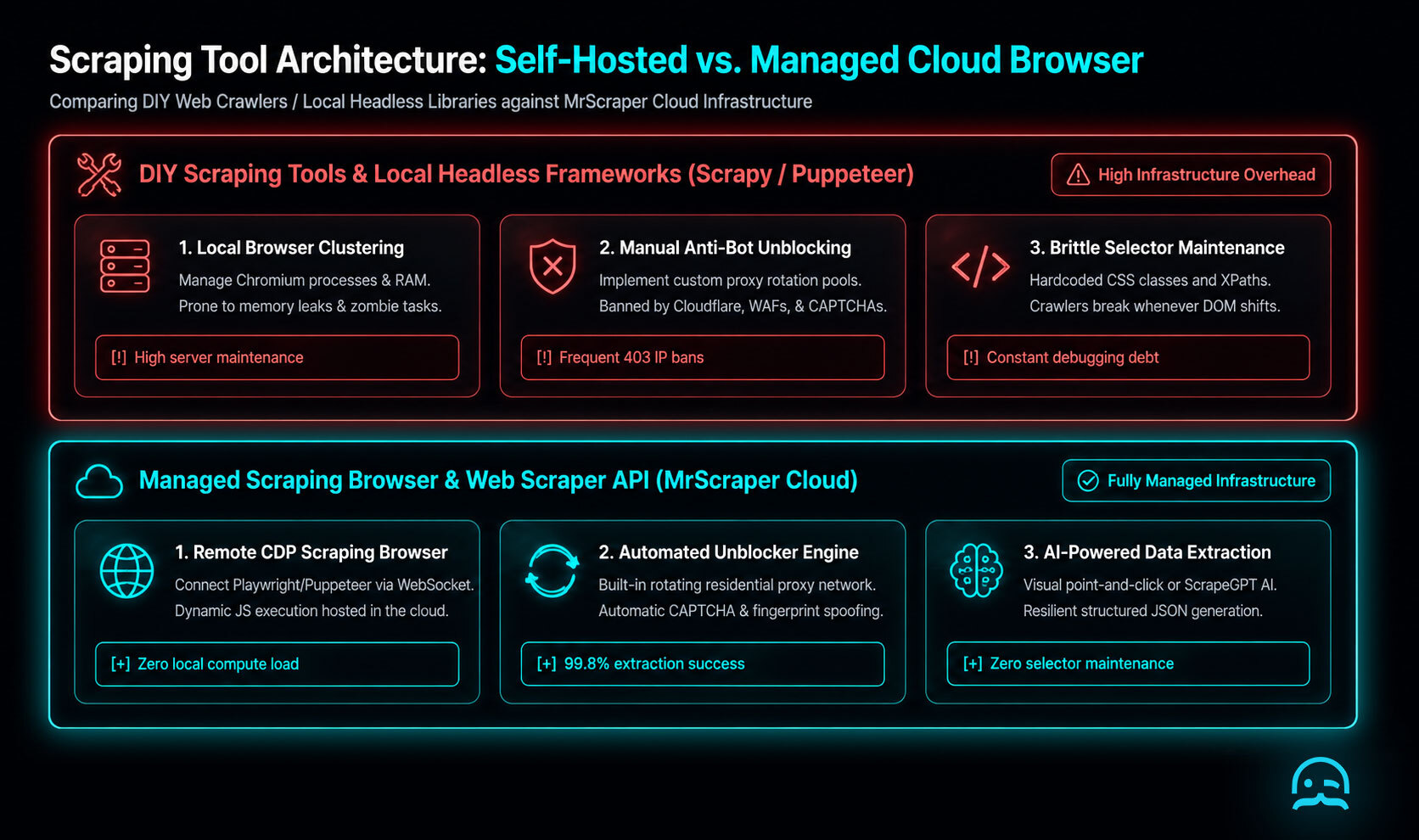
The entire browser session, not just the network request, is managed by the provider. Major providers like Bright Data, Oxylabs, and Apify offer managed browsers. These tools handle browser fingerprinting and CAPTCHA solving automatically.
const puppeteer = require('puppeteer-core');

(async () => {
  const auth = 'USER:PASS';
  const browser = await puppeteer.connect({
    browserWSEndpoint: `wss://${auth}@brd.superproxy.io:9222`,
  });
  const page = await browser.newPage();
  await page.goto('https://example.com');
  const data = await page.content();
  await browser.close();
})();
For a technical deep dive into how browser attributes are used for identification, the research paper Browser Fingerprinting: A Survey by Laperdrix et al. provides essential context on the signals these tools work to mask.
Desktop and Visual Tools
Some tools provide visual interfaces where users click elements on a page to define extraction rules. These are useful for non-technical users or quick setups.
API-Based or Cloud Services
These tools operate on remote servers and often include proxy management, CAPTCHA handling, scheduling, and large-scale parallel extraction. They’re best for production and high-volume workflows.
Frameworks and Libraries
Developer-focused frameworks like Scrapy allow custom scraper development with reusable components. They’re powerful but require programming knowledge.
Comparing Browsers and Headless Libraries
const { chromium } = require('playwright');

(async () => {
  // Connect to a remote scraping browser endpoint
  const browser = await chromium.connectOverCDP('wss://browser.example.com?token=YOUR_API_KEY');
  const page = await browser.newPage();
  await page.goto('https://example.com/dynamic-data');
  const data = await page.innerText('.dynamic-element');
  console.log(data);
  await browser.close();
})();
For a deeper dive into the architecture of these managed environments, the technical documentation from providers like Bright Data, Oxylabs, and Apify provides detailed insights into how Chrome DevTools Protocol sessions are multiplexed at scale. Other services such as ScraperAPI and ScrapingBee offer similar functionality through specialized proxy endpoints that render JavaScript without requiring a persistent socket connection.
Use Cases for Scraping Tools
Scraping tools are widely used across industries:
- Market research: Collect pricing, product details, and reviews.
- Lead generation: Extract business contact information.
- Content aggregation: Centralize job listings, news, or directories.
- SEO monitoring: Track SERPs and page changes over time.
- Academic research: Gather structured datasets for analysis.
The right tool saves time and reduces errors compared to manual data collection.
How to Choose a Scraping Tool
Selecting the right scraping tool depends on several factors:
Data Complexity
Simple HTML pages can be scraped with lightweight tools. JavaScript-heavy sites require rendering support.
Scale
Small projects differ significantly from continuous or large-scale scraping. Cloud-based solutions are more reliable for volume.
Technical Skill
Developers may prefer frameworks, while non-developers benefit from no-code or visual tools.
Anti-Blocking Requirements
Websites utilizing sophisticated anti-bot defenses require scraping solutions that manage proxy rotation, user-agent spoofing, and headless browser orchestration. Scraping tools like Bright Data, ScraperAPI, ScrapingBee, Apify, and Oxylabs automate these bypass mechanisms to minimize maintenance overhead.
Scraping Tool Comparison (2025 Overview)
In 2025, scraping tools offer many options, from simple utilities to full enterprise data platforms.
- Scrapeless: A user-friendly option that includes a free trial for initial testing.
- Diffbot: Focused on automatic extraction to provide structured data outputs without manual rules.
- Octoparse: Features a visual point-and-click interface supported by cloud-based scheduling.
- Scrapy: A powerful open-source framework designed for developers building custom, high-performance crawlers.
Open-source and free tools remain ideal for experimentation and small projects, whereas commercial platforms prioritize high reliability and enterprise-grade automation.
Why Scraping Tools Are Evolving
Modern websites increasingly rely on JavaScript and deploy stronger anti-bot defenses. At the same time, demand for structured web data continues to grow.
This has led to the development of scraping tools. These tools fit into existing workflows. They manage rate limits. They also provide monitoring and automation.
MrScraper: A Scraping Solution to Consider
For projects that require stability and scale, managed solutions can simplify complexity. MrScraper provides:
- Built-in proxy rotation to reduce blocking
- JavaScript rendering for modern websites
- Structured outputs like JSON and CSV
- API access for automation and scheduling
These features help teams focus on insights rather than infrastructure.
Conclusion
A scraping tool is essential for turning web content into structured data. Options range from browser utilities to cloud platforms and developer frameworks. The right choice depends on scale, complexity, and technical requirements.
Whether you’re gathering market intelligence, monitoring competitors, or building analytics pipelines, choosing a reliable scraping tool saves time and delivers consistent results.
What We Learned
By moving away from manual DOM checks and using managed API endpoints, teams can keep business logic separate. This helps avoid issues from changing site layouts and new bot detection.
- Prioritize API-first extraction to minimize bandwidth and compute costs.
- Implement exponential backoff strategies to maintain high success rates under heavy load.
- Transition to managed browser environments only when dynamic JavaScript execution is strictly required for data visibility.
- Decouple parsing logic from fetching logic to allow for easier schema updates without restarting long-running crawls.
For technical implementation, you can use a modular fetcher with a trusted provider like ScraperAPI or ScrapingBee. It might look like the following Python snippet. This approach ensures that proxy rotation and headlessness are handled at the infrastructure layer.
import requests

def fetch_structured_data(target_url, api_key):
    payload = {
        'api_key': api_key,
        'url': target_url,
        'render_js': 'true',
        'proxy_type': 'residential'
    }
    response = requests.get('https://api.scraperapi.com', params=payload)
    return response.json() if response.status_code == 200 else None
For more on these design patterns, the book Web Scraping with Python by Ryan Mitchell offers clear insights. It explains how to build resilient scrapers for the modern web.
Sources
automatically extracts specific pieces of information
retrieve HTML, JSON, images, or other content from a website
structured formats like CSV, JSON, or Excel
visual interfaces where users click elements on a page to define extraction rules
Ready to Simplify Your Data Extraction?
Explore our resources and quickstart guides to learn how to automate scraping workflows. Handle modern web challenges with ease.
Frequently asked questions
What is the difference between a scraping tool and a framework?
A scraping tool is often a full software solution or service, like a browser extension or cloud API. A framework like Scrapy is a set of code libraries. Developers use it to build custom scraping logic.
Do I need coding skills to use a scraping tool?
Not necessarily. While frameworks need programming knowledge, many desktop and visual tools let non-technical users extract data. They use a point-and-click interface.
How do scraping tools handle anti-blocking measures?
Advanced scraping tools use rotating proxies, changing User-Agents, and headless browsers to act human and avoid detection.
Summarize this post
Open it in your assistant of choice with the prompt ready to send.
Take a Taste of Easy Scraping!

Find more insights here

Return Verbatim Evidence Highlights in Web Research Answers
Build an evidence step that picks supporting passages, checks every quote against the source page, a…

Build an AI Agent That Finds Contradictions Across Website Pages
Build a workflow that pulls pricing, plan and policy claims from your own website, flags pages that…
Benchmark Heading-Aware and Semantic Chunking for Web Documentation
Run a fair test of heading-aware and semantic chunking on the same documentation pages, with a retri…