How to Scrape eBay Using Python (2025 Update)
Web ScrapingLearn how to scrape eBay using Python with Requests, BeautifulSoup, and Playwright. Extract product details, handle HTML variants, and review complete code examples.
How to Scrape eBay Using Python (2025 Update) explains how to collect eBay product data using Python. It covers titles, prices, URLs, item condition, seller details, shipping info, images, and units sold.
What Is Web Scraping on eBay?
How to Scrape eBay Using Python (2025 Update) is a technical guide. It explains how to collect data from eBay pages. It covers product pages, search results, and seller listings. It covers updated methods, Playwright techniques, anti-bot strategies, and complete code examples for reliable data extraction. Published December 3, 2025.
Scraping eBay in 2025 is still useful. It helps you collect price data. It lets you track product trends. It also helps you analyze competitors as e-commerce grows. Accurate, timely data can support sellers, analysts, researchers, market research, price tracking, competitor analysis, and product comparison tools.
- Product titles
- Prices
- Item conditions
- Units sold
- Seller ratings
- Shipping information
- Seller locations
- Product images
eBay has also strengthened its anti-bot protections through tighter rate limits, CAPTCHA challenges, and behavior-based detection. A scraper therefore needs more than a simple HTML request and should use modern techniques that account for how pages are delivered and accessed. Python supports this work with Requests and BeautifulSoup for static content. Use Selenium or Playwright for dynamic pages with lots of JavaScript. Rotating user agents, using proxies when needed, and adding random delays can improve stability. Careful request handling also helps reduce unnecessary load. This guide walks through the latest 2025 scraping methods, anti-CAPTCHA strategies, and practical examples step by step.
What Data Can We Extract From eBay?
For How to Scrape eBay Using Python (2025 Update), the most useful data points include product and seller details. They also include image, shipping, and URL details.
1. Product Title
For example, a scraped product title may appear as “Apple iPhone 14 Pro Max 256GB – Deep Purple.”
2. Price
Extract the listed price from each eBay item to support price tracking and competitive analysis.
3. URL
Each eBay product has a unique URL. Store the link with its extracted data to identify and revisit the listing later.
4. Item Condition
Extract each listing’s condition label, including New, Used, Refurbished, and other available values.
5. Seller Rating
Seller rating, such as 98.5% positive feedback, indicates the seller’s customer feedback score.
6. Units Sold
The units-sold field may appear as “1,245 sold,” helping identify top-selling items during product analysis.
7. Seller Location
The seller's location is useful for regional market research and for comparing sellers across geographic markets.
8. Main Image
Extract the main product image URL to help build visual dashboards.
9. Shipping Info
Shipping information may include:
- Free shipping
- $12.99 shipping
- Ships in 2–3 days
eBay Page Structure (2025 Update)
eBay Page Structure (2025 Update)
A standard eBay search result item often uses an s-item list element. The title, price, and item URL are available through these selectors.
<li class="s-item">
  <a class="s-item__link" href="https://www.ebay.com/itm/example">
    <span class="s-item__title">Product Title</span>
    <span class="s-item__price">$499.99</span>
  </a>
</li>
- .s-item__title
- .s-item__price
- .s-item__link
More eBay HTML Variants (2025)
The following examples show additional eBay listing layouts that a scraper may need to handle.
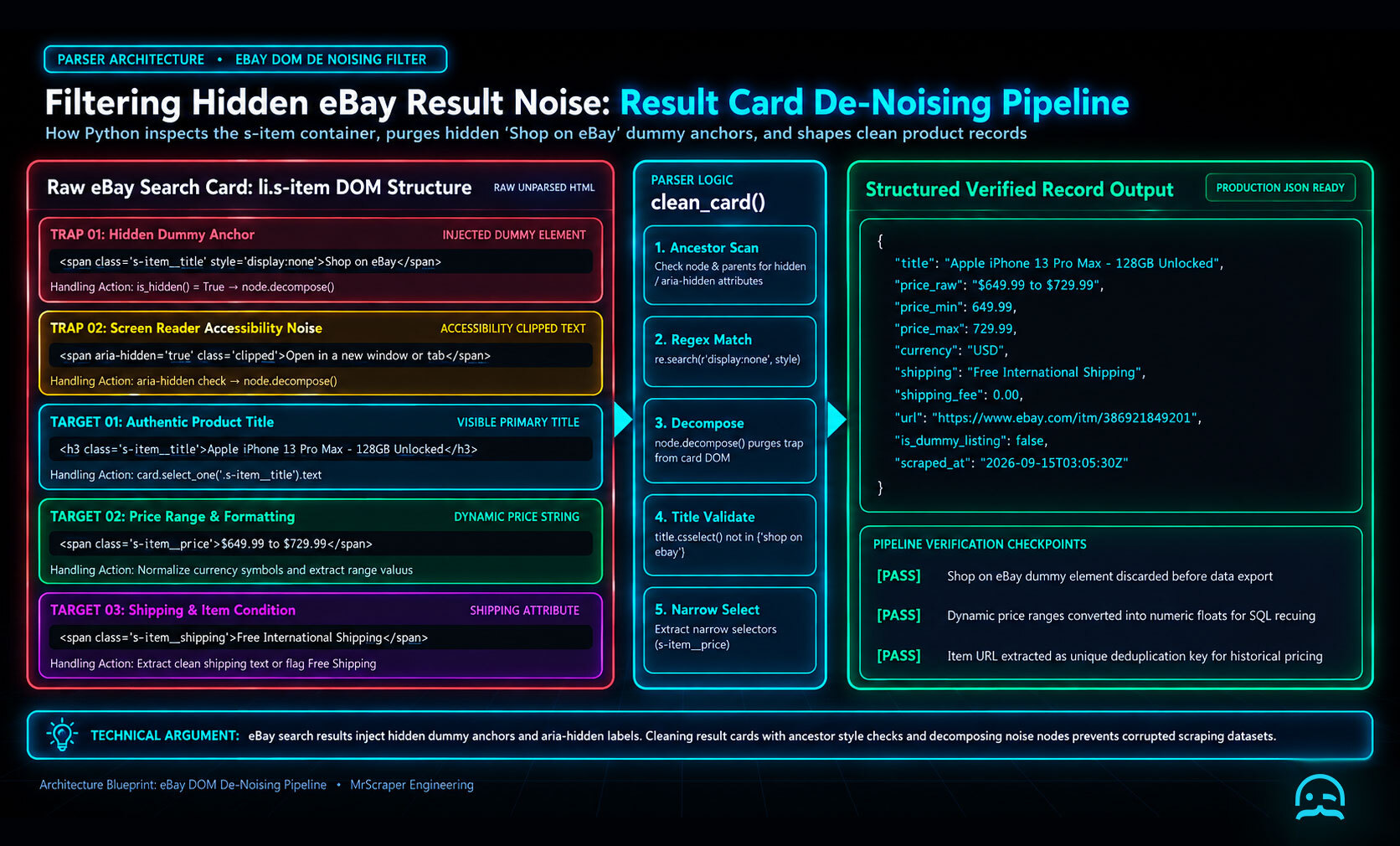
Filtering Hidden eBay Result Noise
The practical answer to How to Scrape eBay Using Python (2025 Update) includes cleaning each rendered result card. Do this before reading its fields.
import re
from bs4 import BeautifulSoup

HIDDEN_STYLE = re.compile(r"(?:display\s*:\s*none|visibility\s*:\s*hidden)", re.I)
NOISE_TEXT = {"shop on ebay", "shop now"}

def is_hidden(node):
    """Return True when a node or one of its parents is hidden."""
    for current in [node, *node.parents]:
        if current.has_attr("hidden"):
            return True
        if current.get("aria-hidden", "").lower() == "true":
            return True
        if HIDDEN_STYLE.search(current.get("style", "")):
            return True
    return False

def clean_result_card(card):
    """Remove presentation-only nodes without changing the source document."""
    for node in list(card.find_all(True)):
        if is_hidden(node):
            node.decompose()
            continue

        if node.name in {"a", "button"}:
            label = node.get_text(" ", strip=True).casefold()
            if label in NOISE_TEXT:
                node.decompose()

def extract_visible_items(html):
    soup = BeautifulSoup(html, "html.parser")
    items = []

    for card in soup.select("li.s-item"):
        clean_result_card(card)
        title_node = card.select_one(".s-item__title")
        price_node = card.select_one(".s-item__price")
        link_node = card.select_one("a.s-item__link")

        title = title_node.get_text(" ", strip=True) if title_node else ""
        price = price_node.get_text(" ", strip=True) if price_node else ""
        url = link_node.get("href", "") if link_node else ""

        if title and title.casefold() not in NOISE_TEXT:
            items.append({"title": title, "price": price, "url": url})

    return items

html = open("ebay-results.html", encoding="utf-8").read()
for item in extract_visible_items(html):
    print(item)
- Check hidden attributes on the node and its ancestors.
- Normalize whitespace and case before comparing control labels.
- Reject empty titles after cleanup.
- Keep the original card selector and field selectors narrow.
Example 1: With Image + Shipping
This example shows an eBay listing with an image and shipping information.
<li class="s-item">
  <div class="s-item__image-section">
    <img class="s-item__image-img" src="image.jpg" />
  </div>
  <a class="s-item__link" href="https://www.ebay.com/itm/abc123">
    <h3 class="s-item__title">Apple iPhone 13 Pro Max</h3>
    <span class="s-item__price">$799.00</span>
    <span class="s-item__shipping">+$12.99 shipping</span>
  </a>
</li>
Example 2: Sponsored Listing
This sponsored listing retains standard title, price, and link fields.
<li class="s-item s-item--sponsored">
  <a class="s-item__link" href="https://www.ebay.com/itm/xyz789">
    <span class="s-item__title">Samsung Galaxy S22 Ultra 5G</span>
    <span class="s-item__price">$999.00</span>
    <span class="s-item__subtitle">Sponsored</span>
  </a>
</li>
Example 3: Dummy Block
<li class="s-item s-item--explore-more">
  <span class="s-item__title">Explore similar items</span>
</li>
Install Requests and Beautiful Soup before running the scraper.
pip install requests beautifulsoup4
Full Python Code
This section provides the full code for How to Scrape eBay Using Python (2025 Update). For JavaScript-heavy or protected pages, install Playwright before using a browser-based version.
import requests
from bs4 import BeautifulSoup
from urllib.parse import quote_plus

def scrape_ebay(query):
    url = f"https://www.ebay.com/sch/i.html?_nkw={quote_plus(query)}"
    headers = {
        "User-Agent": "Mozilla/5.0"
    }

    try:
        response = requests.get(url, headers=headers, timeout=30)
        response.raise_for_status()
    except requests.RequestException as exc:
        raise RuntimeError(f"Could not fetch eBay results: {exc}") from exc

    soup = BeautifulSoup(response.text, "html.parser")
    results = []

    for item in soup.select(".s-item"):
        title = item.select_one(".s-item__title")
        price = item.select_one(".s-item__price")
        link = item.select_one(".s-item__link")
        if not title or not price or not link:
            continue
        results.append({
            "title": title.get_text(strip=True),
            "price": price.get_text(strip=True),
            "url": link.get("href")
        })

    return results

if __name__ == "__main__":
    items = scrape_ebay("iphone 14 pro")
    for item in items[:10]:
        print(item)
Install Playwright and its browser binaries when the target page requires JavaScript rendering.
pip install playwright
playwright install
Full Code
from urllib.parse import quote_plus
from playwright.sync_api import sync_playwright

def scrape_ebay_playwright(
    query,
    card_selector=".s-item",
    title_selector=".s-item__title",
    price_selector=".s-item__price",
    link_selector=".s-item__link",
):
    url = f"https://www.ebay.com/sch/i.html?_nkw={quote_plus(query)}"

    with sync_playwright() as pw:
        browser = pw.chromium.launch(headless=True)
        try:
            page = browser.new_page()
            page.goto(url, wait_until="domcontentloaded")
            page.wait_for_selector(card_selector)
            cards = page.locator(card_selector)
            results = []

            for i in range(cards.count()):
                card = cards.nth(i)
                if not card.locator(title_selector).count():
                    continue
                results.append({
                    "title": card.locator(title_selector).inner_text().strip(),
                    "price": (card.locator(price_selector).inner_text().strip()
                              if card.locator(price_selector).count() else None),
                    "url": card.locator(link_selector).get_attribute("href"),
                })
            return results
        finally:
            browser.close()

items = scrape_ebay_playwright("macbook pro")
for item in items[:10]:
    print(item)
To export the collected listings, install pandas and write the results to a CSV file.
pip install pandas
import pandas as pd

df = pd.DataFrame(items)
df.to_csv("ebay_results.csv", index=False)
eBay API versus web scraping depends on the task and operating requirements.
| Need | Scraping | eBay API |
|---|---|---|
| Quick price research | ✔ | – |
| Daily monitoring | ✔ | ✔ |
| Legal business use | – | ✔ |
| Large-scale data | – | ✔ |
| Easy setup | ✔ | – |
Scraping eBay in 2025 remains useful for gathering current market data and tracking pricing trends. As e-commerce competition rises, accurate and timely insights help sellers and analysts understand the market. eBay’s stronger anti-bot systems mean traditional scraping alone may not be enough. Browser automation, user-agent rotation, proxy use, and realistic behavior patterns are important considerations. Requests, BeautifulSoup, and especially Playwright can support modern Python scrapers that collect structured data. Python provides the building blocks for scalable scraping systems in 2025 and beyond.
Rotating Proxies with Playwright
How to Scrape eBay Using Python (2025 Update) reliably requires controlling request pace and isolating proxy failures. Respect eBay’s terms, robots guidance, and any access restrictions rather than attempting to defeat a CAPTCHA.
import os
import random
import time
from playwright.sync_api import sync_playwright
from playwright_stealth import stealth_sync

SEARCH_URL = "https://www.ebay.com/sch/i.html?_nkw=mechanical+keyboard"
PROXIES = [
    value.strip()
    for value in os.environ.get("EBAY_PROXIES", "").split(",")
    if value.strip()
]

def fetch_results(proxy, attempts=2):
    with sync_playwright() as p:
        for attempt in range(attempts):
            browser = None
            try:
                launch_options = {"headless": True}
                if proxy:
                    launch_options["proxy"] = {"server": proxy}

                browser = p.chromium.launch(**launch_options)
                context = browser.new_context(
                    locale="en-US",
                    user_agent=(
                        "Mozilla/5.0 (Windows NT 10.0; Win64; x64) "
                        "AppleWebKit/537.36 (KHTML, like Gecko) "
                        "Chrome/131.0.0.0 Safari/537.36"
                    ),
                )
                page = context.new_page()
                stealth_sync(page)
                response = page.goto(
                    SEARCH_URL,
                    wait_until="domcontentloaded",
                    timeout=30_000,
                )

                if response is None or response.status >= 400:
                    raise RuntimeError(
                        f"request failed with status {response.status if response else 'unknown'}"
                    )

                page.wait_for_selector(".s-item", timeout=15_000)
                results = []
                for item in page.locator(".s-item").all():
                    title = item.locator(".s-item__title").inner_text().strip()
                    link = item.locator(".s-item__link").get_attribute("href")
                    price_locator = item.locator(".s-item__price")
                    price = (
                        price_locator.inner_text().strip()
                        if price_locator.count()
                        else None
                    )
                    if title and link:
                        results.append(
                            {"title": title, "price": price, "url": link}
                        )
                return results
            except Exception:
                if attempt + 1 == attempts:
                    raise
                time.sleep(2 ** attempt)
            finally:
                if browser:
                    browser.close()

if not PROXIES:
    PROXIES = [None]

proxy = random.choice(PROXIES)
for record in fetch_results(proxy):
    print(record)
The eBay scraper repository from Oxylabs is a useful reference for comparing another project’s structure. This context-per-proxy pattern keeps browser state from leaking between attempts.
What We Learned
How to Scrape eBay Using Python (2025 Update) uses a checkpoint-based workflow. Collect predictable fields. Validate each record. Save progress as you go. This way, interruptions will not erase completed work.
- Prefer stable selectors over fragile positional assumptions.
- Normalize prices, shipping text, and missing values before analysis.
- Store each item’s URL as a deduplication key.
- Respect eBay’s terms, robots guidance, and request limits.
- Review a sample of exported records before relying on results.
Start Building Your eBay Data Workflow
Explore a practical starting point for building an eBay data extraction workflow with Python and applying the techniques covered in this guide.
Summarize this post
Open it in your assistant of choice with the prompt ready to send.
Take a Taste of Easy Scraping!

Find more insights here

HTML to Markdown: Converting Scraped Web Pages for LLM Training
Learn how to convert html to markdown for LLM training. Reduce token usage by 90% and improve RAG ac…
What is Scraping? A Complete Beginner's Guide for 2026
Learn what a web scraper is in 2026 and how AI-powered tools are replacing brittle CSS scripts for r…

The Ultimate Web Crawlers List: 15 Tools for Every Data Need
Compare the best web crawlers for 2026. Learn the difference between open-source, managed APIs, and…