What Is Parsing: A Clear Definition and Practical Understanding
Web ScrapingLearn what parsing is, how tokenization and structure analysis work, and where parsers are used in programming, NLP, browsers, and data extraction.
What is parsing? Parsing examines text, code, or symbol sequences. It then organizes them into meaningful parts using defined rules.
Parsing in Simple Terms
Parsing comes from the Latin word pars, meaning “part,” which reflects its central idea: dividing a whole into parts. In everyday language, parsing might involve analyzing a sentence to identify subjects, verbs, and objects. In computing, it means examining strings of text or tokens to understand their structure. It follows a defined grammar or set of rules.
For example, in the sentence “The quick brown fox jumps,” parsing means finding and labeling each word. You might label “The” as an article, “quick” as an adjective, and “fox” as a noun. You also note how the words relate to each other in grammar.
Parsing in Computer Science
In computing, parsing plays a central role in many technologies and systems:
Language and Compiler Design
After source code is split into tokens, like symbols and keywords, a parser checks the syntax rules. It then builds a parse tree or syntax tree, a structured representation that later compilation or interpretation can process. A clear definition of parsing in compiler design is therefore a syntax check followed by structure building.
| Code |
|---|
| int x = 5 + y; |
The parser verifies that int is a valid data type, that x, 5, and y appear in valid positions, and that the expression follows the language’s grammar. When the input is parsed successfully, the compiler or interpreter can continue without a syntax error.
Natural Language Processing (NLP)
In NLP systems, parsing breaks down sentences to understand structure and meaning. It often creates a parse tree. The tree shows how words relate within a sentence. This helps machines interpret grammar, context, and even semantic meaning for tasks like translation and speech recognition.
How Parsing Works
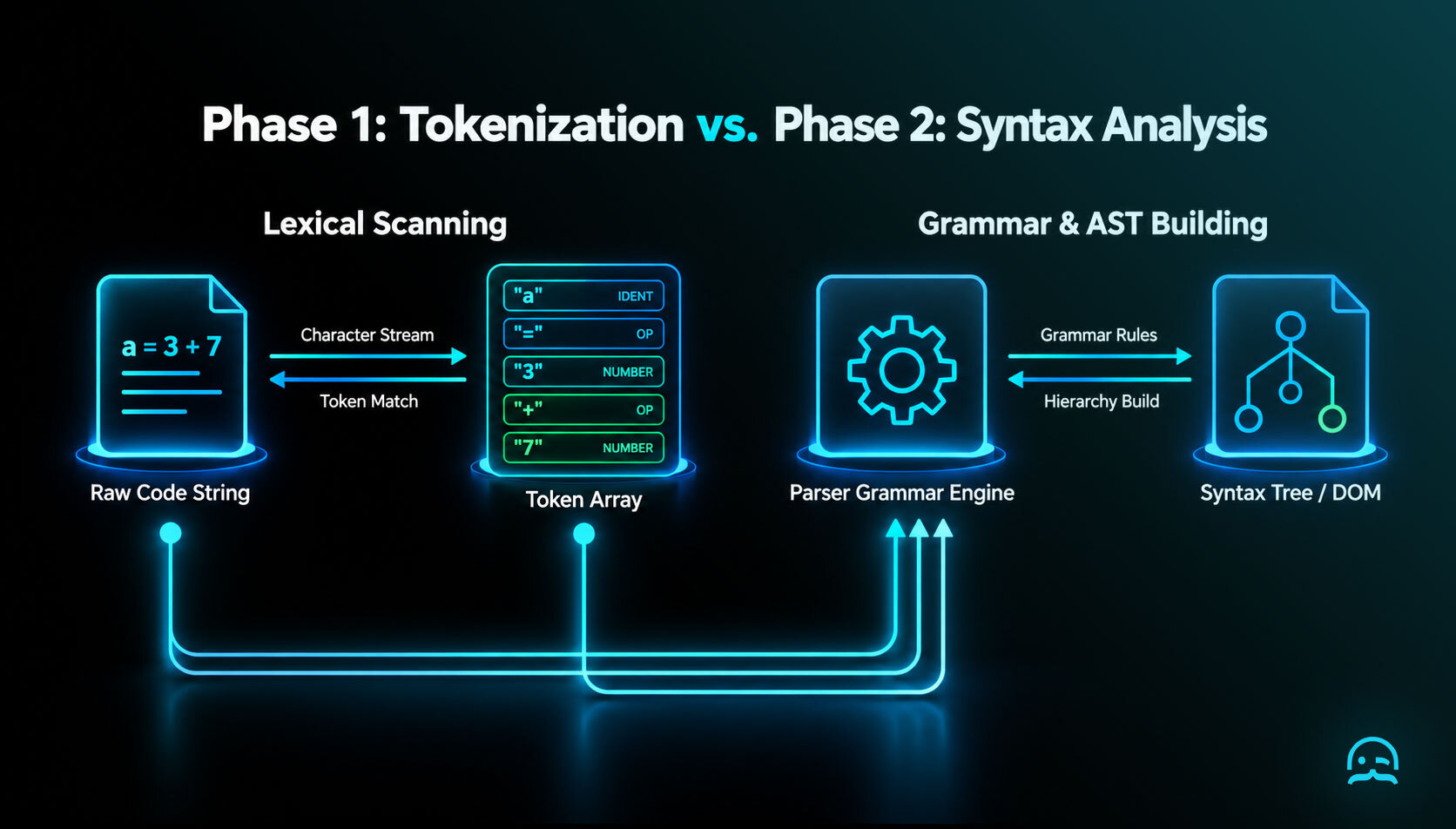
Parsing typically involves two main phases:
Tokenization
Before parsing, the input text is often tokenized. It is broken into smaller elements called tokens, like words, numbers, or operators. For example, "x + y" might be broken into tokens like ["x", "+", "y"].
Structure Analysis
Once tokens are available, the parser uses grammar rules to study their order and how they connect. In programming languages, this often produces a parse tree that represents the input’s syntactic structure. In natural-language parsing, the process may identify parts of speech and their hierarchical relationships. A simplified example shows the result:
| Element | Value |
|---|---|
| Input | a = 3 + 7 |
| Tokens | ["a", "=", "3", "+", "7"] |
| Parser output | `{ |
| type: "assignment", | |
| left: "a", | |
| right: { |
type: "expression",
operator: "+",
operands: ["3", "7"]
} }` |
This output shows how the parser understands the assignment and the expression on the right.
Where Parsing Is Used
Parsing shows up in many practical applications beyond just language and compilers:
- Web Browsers: Browsers parse HTML documents to build the Document Object Model (DOM), which is used to render pages.
- Data Extraction: Tools parse structured documents like JSON, CSV, or XML to extract meaningful data for applications.
- NLP and Text Analytics: Systems parse text to understand grammar and context, powering features like search indexing and translation.
Types of Parsers
Depending on how parsing is implemented, parsers can be categorised by strategy:
- Top-down parsers: These start from the highest level of grammar and work downward, trying to match rules with input.
- Bottom-up parsers: These begin with the input and attempt to build up the parse tree by combining tokens into larger structures.
Both approaches eventually lead to a structured representation of the input that can be meaningfully processed by software.
Why Parsing Matters
Parsing is a foundational process in computing and language understanding. Without parsing:
- Compilers couldn’t verify or translate code into executable programs.
- Browsers couldn’t display structured web content.
- Text analytics systems wouldn’t be able to extract meaning from unstructured text sources.
Ultimately, parsing turns raw input, like code, text, or data, into structured forms. Machines can then reason about it and use it well.
Conclusion
At its core, parsing means analyzing and breaking down text or code into meaningful, structured parts based on defined rules. It is a bridge between unstructured input and structured understanding, making it indispensable across programming languages, compilers, data processing, and natural language technology.
Whether you are fixing a syntax error in code or building a text analytics pipeline, parsing gives structure. This structure makes deeper analysis and computation possible.
What We Learned
- Parsing analyzes text, code, or symbols and breaks them into meaningful, structured parts according to defined rules.
- Input is often tokenized first. Then a parser analyzes relationships among the tokens. It may create a parse tree or a syntax tree.
- Parsing supports compilers, interpreters, web browsers, data extraction, natural language processing, and text analytics.
- By transforming raw input into structured representations, parsing enables machines to process code, content, and data effectively.
Put Parsing Concepts Into Practice
Explore a practical starting point for applying structured data extraction concepts to your workflows.
Summarize this post
Open it in your assistant of choice with the prompt ready to send.
Take a Taste of Easy Scraping!

Find more insights here
Use MrScraper MCP to Compare Public SaaS Pricing and Plan Limits
Build a source-backed SaaS plan comparison using MrScraper MCP. Preserve prices, quotas, billing ter…
Build a Product Attribute Classifier with LangChain and MrScraper
Build a LangChain workflow that extracts product evidence with MrScraper, normalizes attributes and…
Create a Source-Verified Question-and-Answer Dataset From Web Pages
Build a question-and-answer dataset from your own documentation pages. Every answer is an exact span…