
Scraping API: Endpoints, Rate Limits and Retry Logic
Web ScrapingMaster web scraping APIs. Learn how to configure MrScraper endpoints, manage API rate limits (429), and implement exponential backoff with jitter in Python.
A scraping API makes data extraction easier by managing headless browsers, proxy rotation, and anti-detection tools. You can access it through simple REST endpoints. To handle API rate limits (HTTP 429) and server timeouts (5xx), production pipelines should use exponential backoff. They should also use full jitter. Non-retryable client errors (401 Unauthorized, 404 Not Found) fail fast immediately, while transient errors retry using randomized sleep intervals between 0 and min(max_delay, base_delay * 2^attempt).
Building resilient data extraction pipelines requires more than sending HTTP GET requests. When scraping dynamic websites at scale, teams face strict rate limits and sudden 429 Too Many Requests errors. They may also hit anti-bot protections and short server timeouts. A modern scraping API hides infrastructure complexity. It handles headless browser rendering, rotates residential proxies, and manages headers. This helps developers collect clean web data with code.
However, even when using an enterprise scraping API, maximizing throughput and pipeline reliability requires proper client-side architecture. This guide explains MrScraper’s multi-host API endpoints. It covers how resource tokens work. It also includes production-ready Python code. The code uses exponential backoff with full jitter.
What is a web scraping API?
A scraping API acts as an automated gateway between your application and target web servers. Instead of managing local Playwright or Puppeteer browser clusters, purchasing proxy pools, and writing anti-detection code, your application makes a single REST request to the API host. The scraping service starts headless browsers. It runs JavaScript. It rotates browser fingerprints. It returns rendered HTML, clean JSON, or Markdown.
Core responsibilities of a scraping API
- Headless Browser Orchestration: Executing JavaScript rendering and dynamic DOM hydration across millions of pages.
- Anti-Detection & Fingerprint Rotation: Managing TLS fingerprints, HTTP/2 headers, and browser behavioral signatures to ensure seamless request delivery.
- Proxy Pool Management: Automatically rotating residential and datacenter IP addresses to bypass geographic blocks and IP rate limits.
- Structured Data Extraction: Converting raw HTML into LLM-ready Markdown or validated JSON schemas.
MrScraper API host architecture and endpoints
To ensure high uptime and fast, sub-second response times across extraction modes, MrScraper uses specialized API hostnames
| Hostname / Service | Primary Purpose | Authentication Format | Key Endpoints |
|---|---|---|---|
https://api.mrscraper.com |
Web Unblocker & Playground Engine | x-api-token header or ?token= query param |
GET /?url=https://example.com&geoCode=us |
https://api.app.mrscraper.com/api/v1 |
AI Scraper, Manual Scraper & App API | x-api-token header or Bearer token |
POST /scrapers-ai, POST /scrapers-manual |
proxy.mrscraper.com:10000 |
Rotating & Sticky Residential Proxies | Proxy Username/Password | http://user-country-us:pass@proxy.mrscraper.com:10000 |
API authentication
All requests to MrScraper endpoints must include a valid API token in the x-api-token request header. You can generate tokens from the MrScraper Dashboard.
# Example Web Unblocker API Request
curl -X GET "https://api.mrscraper.com?url=https%3A%2F%2Fexample.com&html=true" \
  -H "x-api-token: YOUR_MRSCRAPER_API_TOKEN"
Understanding API rate limits and concurrency
When using a scraping API, rate limits work at two levels. One is target site limits set by external web servers. The other is API concurrency limits set by the scraping provider.
Resource-based token billing and concurrency bounds
MrScraper manages API execution and concurrency bounds using a resource-based token allocation model:
- Scraper Free: $0/mo (1,000 Plan Tokens/month at up to 10 concurrent requests, no credit card required).
- Scraper Pro: $199/mo (200,000 Plan Tokens/month at up to 100 concurrent requests with priority residential proxies and support).
- Scraper Enterprise: Custom plan token allocations and dedicated infrastructure.
Token consumption rules
- Manual Scraper & Web Unblocker: 1 token per 30 seconds of runtime. Add 1 token per 0.2 MB of bandwidth used. We round up to the next whole token.
- AI Scraper pricing: 1 token per 30 seconds of runtime. Add 1 token per about 1,000 input tokens. Add 1 token per about 200 output tokens. Each run also includes 5 fixed trace tokens.
Response header auditability
MrScraper provides full transparency by returning real-time resource metrics in HTTP response headers. This happens for every Manual Scraper and Web Unblocker request
| Header Name | Type | Description |
|---|---|---|
token_usage |
integer |
The exact number of Plan Tokens consumed by the request. |
bandwidth_usage |
float |
The total bandwidth (in MB) used for data transfer. |
runtime |
float |
Processing time (in seconds) spent executing the scrape. |
x-status-code |
integer |
The HTTP status code returned by the target website (e.g., 200, 404, 429). |
HTTP/1.1 200 OK
Content-Type: application/json; charset=utf-8
token_usage: 2
bandwidth_usage: 0.42
runtime: 1.18
x-status-code: 200
Date: Wed, 12 Aug 2026 10:00:00 GMT
Implementing production retry logic with exponential backoff and jitter
When scraping websites at scale, brief failures are unavoidable. These include 429 Too Many Requests, 502 Bad Gateway, and 504 Gateway Timeout. Naive retry strategies, like retrying right away or waiting a fixed 2-second delay, can cause thundering herd issues. Synchronized retries can repeatedly overload and crash target servers.
The mathematics of exponential backoff with full jitter
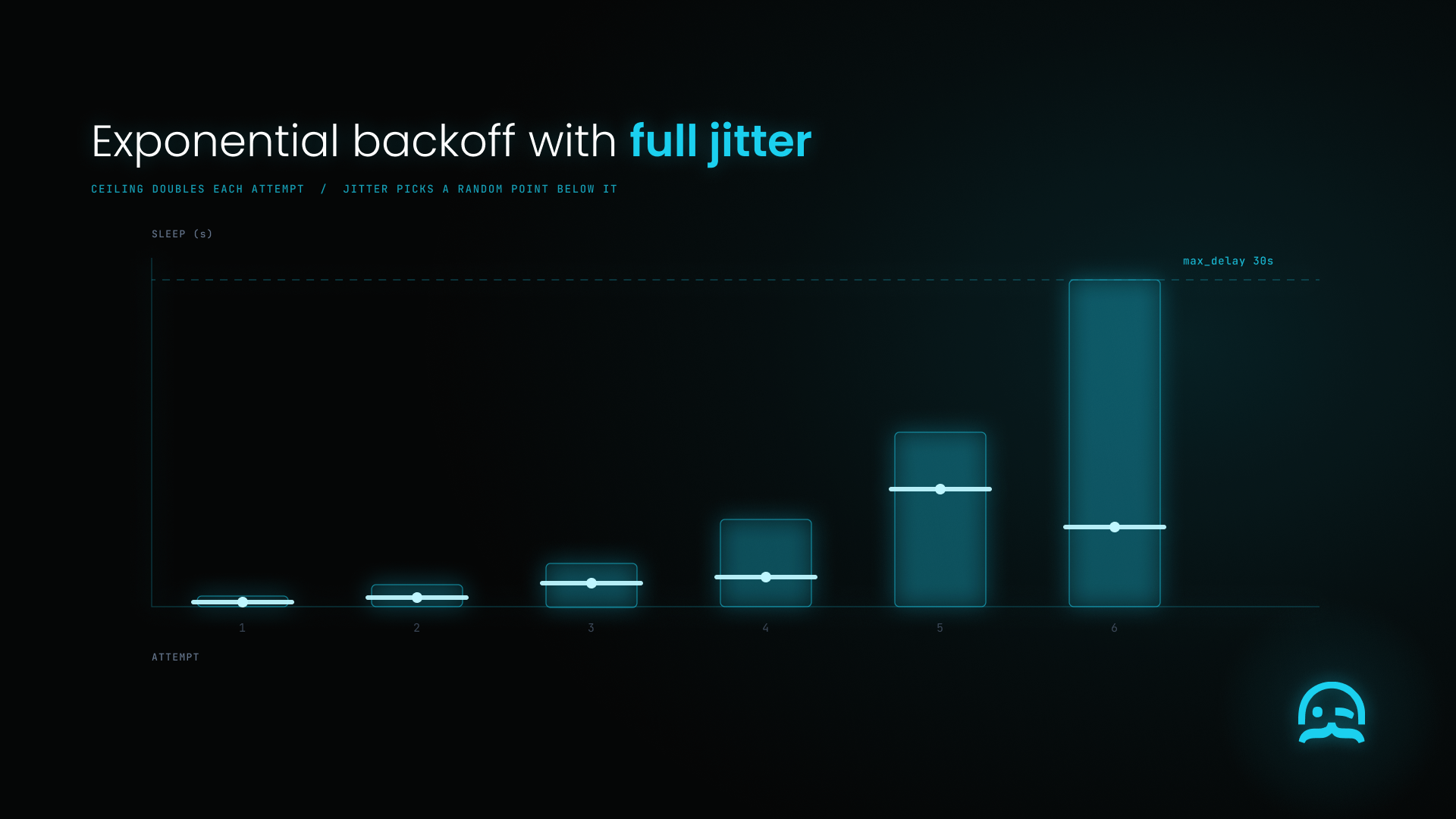
To prevent retry collisions, production systems implement Exponential Backoff with Full Jitter:
The canonical treatment of this problem is Marc Brooker's Exponential Backoff And Jitter on the AWS Architecture Blog. His conclusion is blunt: the answer isn't to remove backoff, it's to add jitter. AWS notes this pattern has been a key part of how Amazon builds resilient remote client libraries for eight years. Most AWS SDKs now use backoff with jitter by default. They use it in standard and adaptive retry modes.
$$ \text{Sleep Time} = \text{random}\left(0, \min\left(\text{Max Delay}, \text{Base Delay} \times 2^\text{attempt}\right)\right) $$
- Exponential Base: The sleep ceiling doubles after each failed attempt (
2^attempt). - Full Jitter: A random uniform delay is selected between
0and the calculated backoff ceiling.
Production Python implementation
It includes strong rate-limit handling, exponential backoff, and full jitter. Non-retryable client errors (400, 401, 403, 404) fail fast without retries. Transient errors (429, 5xx) use backoff and retry.
import os
import time
import random
import requests
from datetime import datetime, timezone
from email.utils import parsedate_to_datetime
from typing import Dict, Any, Optional

def fetch_with_backoff(
    target_url: str,
    max_retries: int = 5,
    base_delay: float = 1.0,
    max_delay: float = 30.0
) -> Optional[Dict[str, Any]]:
    """
    Fetches web data via MrScraper API with Exponential Backoff and Full Jitter.
    Handles HTTP 429 (Rate Limit) and HTTP 5xx (Server Errors) gracefully,
    while failing fast on non-retryable 4xx errors (400, 401, 403, 404).
    """
    api_token = os.getenv("MRSCRAPER_API_TOKEN")
    if not api_token:
        raise ValueError("MRSCRAPER_API_TOKEN environment variable not set.")

    endpoint = "https://api.mrscraper.com"
    headers = {"x-api-token": api_token}
    params = {"url": target_url, "html": "true"}

    for attempt in range(max_retries):
        try:
            response = requests.get(endpoint, headers=headers, params=params, timeout=30)

            # Check response headers for resource usage metrics
            token_usage = response.headers.get("token_usage", "N/A")
            print(f"[Attempt {attempt + 1}] HTTP {response.status_code} | Tokens Used: {token_usage}")

            # 1. Success condition (HTTP 200 OK)
            if response.status_code == 200:
                if "application/json" in response.headers.get("Content-Type", ""):
                    return response.json()
                return {"html": response.text}

            # 2. Non-retryable client errors (400, 401, 403, 404) fail fast immediately
            if response.status_code in (400, 401, 403, 404):
                print(f"Non-retryable status HTTP {response.status_code}: failing fast immediately.")
                return {"error": f"Client Error HTTP {response.status_code}", "status_code": response.status_code}

            # 3. Retryable status codes: 429 (Rate Limit) or 5xx (Server Errors)
            if response.status_code == 429 or response.status_code >= 500:
                retry_after = response.headers.get("Retry-After")
                if retry_after:
                    if retry_after.isdigit():
                        sleep_time = float(retry_after)
                    else:
                        try:
                            target_time = parsedate_to_datetime(retry_after)
                            sleep_time = max(0.0, (target_time - datetime.now(timezone.utc)).total_seconds())
                        except Exception:
                            calculated_backoff = min(max_delay, base_delay * (2 ** attempt))
                            sleep_time = random.uniform(0, calculated_backoff)
                else:
                    calculated_backoff = min(max_delay, base_delay * (2 ** attempt))
                    sleep_time = random.uniform(0, calculated_backoff)

                print(f"  └─ Retryable status ({response.status_code}). Backing off for {sleep_time:.2f}s...")
                time.sleep(sleep_time)
                continue

        except requests.exceptions.RequestException as err:
            # Catch transient network / timeout connection errors and back off
            calculated_backoff = min(max_delay, base_delay * (2 ** attempt))
            sleep_time = random.uniform(0, calculated_backoff)
            print(f"Transient connection exception: {err}. Retrying in {sleep_time:.2f}s...")
            time.sleep(sleep_time)

    print(f"Failed to fetch {target_url} after {max_retries} attempts.")
    return None

if __name__ == "__main__":
    result = fetch_with_backoff("https://scrapethissite.com")
    if result:
        print("Scrape result obtained successfully.")
Feature comparison: DIY API client vs. managed MrScraper API
Building custom rate-limiting and retry wrappers around raw HTTP requests requires significant maintenance. To see full feature details across providers, visit our web scraper comparison hub. Or read our head-to-head MrScraper vs Bright Data comparison. The table below illustrates the operational differences between DIY scraping clients and MrScraper:
| Capability | DIY Custom Script | Managed MrScraper API | Operational Advantage |
|---|---|---|---|
| Rate Limit Handling | Manual sleep timers & custom code | Built-in queueing & automatic backoff | Eliminates 429 crash loops on client applications. |
| Proxy Rotation | Manual third-party proxy integration | Automatic residential IP rotation | Prevents target IP blocks and geo-restrictions. |
| Anti-Bot Unblocking | Custom browser patch maintenance | Automated Web Unblocker layer | Manages headers, fingerprints, and proxy routing natively. |
| Response Auditability | Custom log parsing | Standardized HTTP response headers | Tracks exact token_usage, bandwidth_usage, and runtime. |
| AI Extraction | Custom Regex / BeautifulSoup parsing | Native AI Scraper (Prompt & JSON Schema) | Extracts structured data without CSS selector updates. |
Operational best practices checklist
To ensure maximum throughput and stability when integrating web scraping APIs, follow these engineering guidelines:
- Differentiate 429 errors. Confirm if the HTTP 429 comes from MrScraper API limits or the target site. Check the
x-status-coderesponse header. - Implement Full Jitter: Always add random jitter to exponential backoff. This helps prevent thundering herd collisions across concurrent worker threads.
- Monitor Header Metrics: Track
token_usageandbandwidth_usageheaders in telemetry logs. Use them to audit token use and spot unexpected page bloat. - Use sticky residential proxies for multi-step sessions. When scraping login sessions or paginated lists that need the same IP, add session parameters. Use
user-country-us-sessid-sess1-sesstime-20 as the sessionparameter. Connect throughproxy.mrscraper.com:10000. - Set Realistic Request Timeouts: Always set clear HTTP client timeouts, such as 30 seconds. This helps prevent stuck sockets during network drops. If your pipeline encounters backend gateway timeouts, see our troubleshooting guide on 504 Gateway Timeout.
Frequently asked questions (FAQ)
What HTTP status codes should trigger automatic API retries?
These include 500 Internal Server Error, 502 Bad Gateway, 503 Service Unavailable, and 504 Gateway Timeout. Non-retryable 4xx errors (such as 401 Unauthorized or 404 Not Found) should fail fast.
What is the difference between MrScraper API tokens and Plan Tokens?
An API Token is the secret credential passed in HTTP request headers (x-api-token) to authenticate your account. Plan Tokens track the compute, bandwidth, and AI resources used by your scraping jobs. For example, you may use 1 token per 30 seconds of runtime. You may also use 1 token per 0.2 MB of bandwidth.
How does Full Jitter improve exponential backoff performance?
Exponential backoff increases sleep duration exponentially after each failure. Adding "Full Jitter" randomizes the sleep interval between 0 and the maximum backoff value. This spreads retries evenly across time, preventing concurrent scraping workers from retrying simultaneously and crashing target web servers.
How can I check how many tokens a scraping API request used?
MrScraper returns exact resource metrics directly in HTTP response headers for Manual Scraper and Web Unblocker requests. Inspect the token_usage header to view tokens consumed, bandwidth_usage for megabytes transferred, and runtime for execution time in seconds.
Ready to optimize your data collection pipelines with resilient rate limiting and automated unblocking? Try MrScraper free today. Claim 1,000 free Plan Tokens with no credit card required. You can also schedule a demo to see how MrScraper scales your web scraping.
Summarize this post
Open it in your assistant of choice with the prompt ready to send.
Take a Taste of Easy Scraping!

Find more insights here

Return Verbatim Evidence Highlights in Web Research Answers
Build an evidence step that picks supporting passages, checks every quote against the source page, a…

Build an AI Agent That Finds Contradictions Across Website Pages
Build a workflow that pulls pricing, plan and policy claims from your own website, flags pages that…

Benchmark Heading-Aware and Semantic Chunking for Web Documentation
Run a fair test of heading-aware and semantic chunking on the same documentation pages, with a retri…