Web Scraping Chrome Extension Projects: How Puppeteer Helps
Web ScrapingLearn how Puppeteer supports web scraping Chrome extension projects with JavaScript rendering, browser automation, dynamic content capture, screenshots, PDFs, and device emulation.
For web scraping Chrome extension projects, Puppeteer is a Node.js library for controlling headless Chrome or Chromium, rendering JavaScript, navigating pages, interacting with sites, and extracting dynamic content.
What is Puppeteer?
If you are comparing Puppeteer with a web scraping Chrome extension, Puppeteer is a Node.js library for programmatically controlling Chrome or Chromium through a high-level API. It can automate web browsing in a headless browser. A headless browser runs without a visible interface. It still interacts with pages like a user would.
Use Puppeteer to automate web browsing, navigate sites, extract data from JavaScript-rendered pages, and generate screenshots or PDFs. This makes it useful for scraping content from complex pages that need client-side rendering. It is also useful for automating browser tasks and testing web pages. You can open pages, follow navigation flows, get rendered data, and capture the final page with little code. Because Puppeteer controls a real browser, it can handle page actions. A basic request-and-parse approach cannot replicate these actions. The library provides browser control, while your scripts choose which pages to visit, what data to collect, and what output to save.
Web Scraping Chrome Extension Tradeoffs
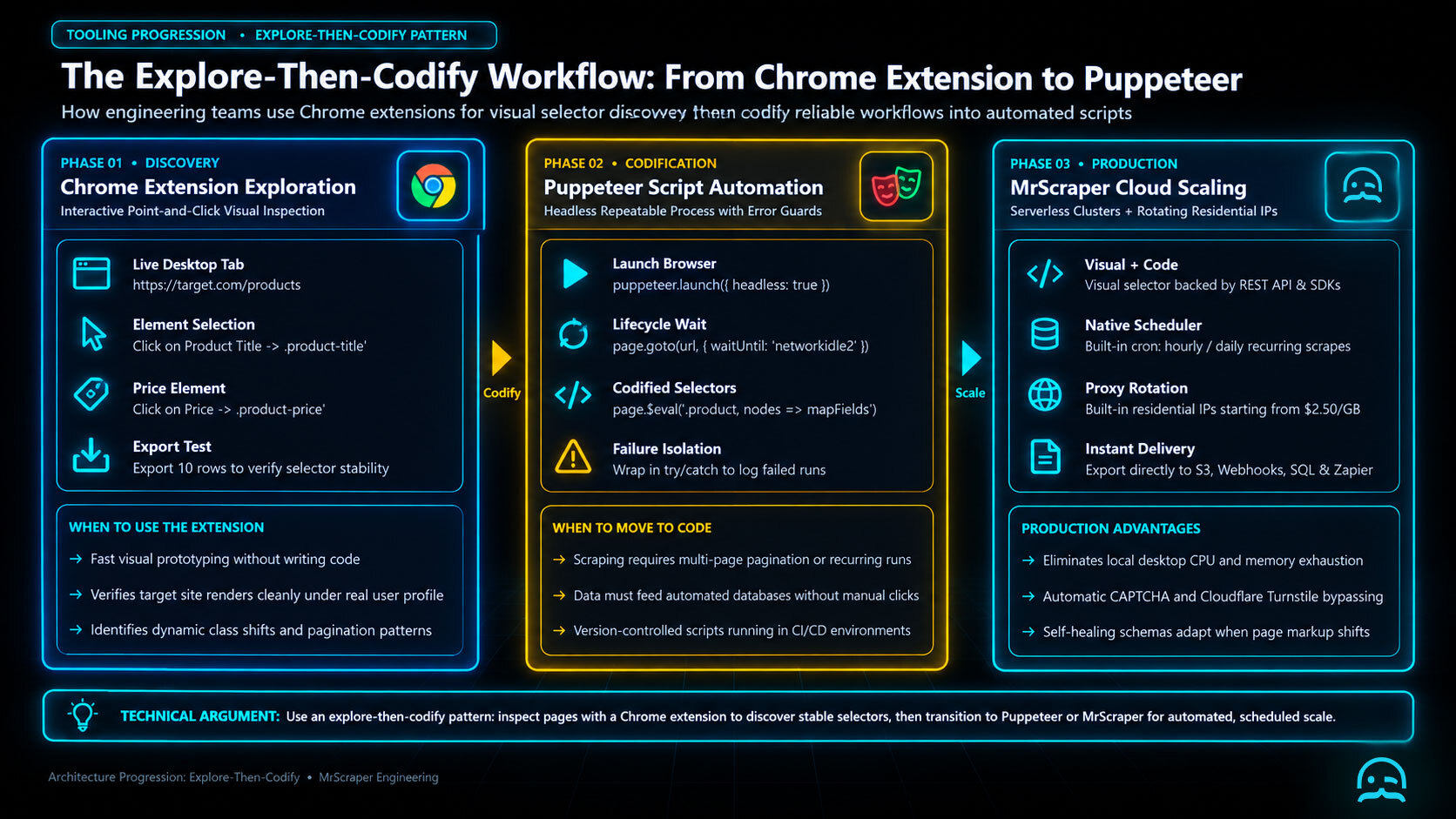
A web scraping Chrome extension suits quick, manual collection from a small number of pages. Puppeteer works best when the same workflow must run repeatedly. It can follow pagination. It also produces consistent output without clicks. Use an explore-then-codify pattern. Inspect the page with an extension. Identify stable selectors. Then move the repeatable workflow into a script.
const puppeteer = require('puppeteer');

(async () => {
  const browser = await puppeteer.launch({headless: true});
  const page = await browser.newPage();
  await page.goto('https://example.com/products', {waitUntil: 'networkidle2'});
  const products = await page.$$eval('.product', nodes => nodes.map(node => ({
    name: node.querySelector('.name')?.textContent.trim(),
    price: node.querySelector('.price')?.textContent.trim()
  })));
  console.log(JSON.stringify(products, null, 2));
  await browser.close();
})();
The extension remains useful for validating selectors and checking results visually. Puppeteer adds a repeatable, reviewable process that can be scheduled, versioned, and extended with custom error handling. Choose the extension for discovery and occasional exports. Choose Puppeteer when reliability and scale matter more than quick setup.
Why Use Puppeteer for Web Scraping?
A web scraping Chrome extension helps with simple tasks. Puppeteer is useful when a project must render JavaScript. It can also perform browser actions. It can navigate several pages. It controls a real browser, so it can handle content and workflows that HTML-only scrapers cannot.
- JavaScript rendering: Many modern websites load content dynamically with JavaScript. Puppeteer waits for and interacts with the rendered page. This lets you extract data that may not appear in the initial HTML response. This makes it suitable for pages whose content depends on client-side execution.
- Browser automation: Puppeteer can click buttons, fill out forms, follow links, and navigate between pages. These actions are useful for workflows that require interaction, including login pages, expandable content, and paginated results.
- Headless or full browser operation: Puppeteer runs in headless mode by default, without displaying a browser user interface. You can also launch it in full browser mode when you need to observe actions during debugging or testing. This supports both production jobs and development work.
- Integration with other tools: Puppeteer works with Node.js and related JavaScript tools. This makes it easy to add browser automation to an existing web scraping project. It can handle one page or manage tasks across many websites, so the workflow can grow with the project.
Key Features of Puppeteer for Scraping
For a web scraping Chrome extension workflow, Puppeteer provides browser automation. It can capture rendered content and interact with client-side pages. It can also preserve visual records and test different device experiences.
- Capture dynamic content. Puppeteer can wait for JavaScript to finish loading before extraction, helping collect current and complete page information.
- Handle single-page applications (SPAs). It can interact with client-side routing and page elements like a real user, making SPA content easier to scrape.
- Generate screenshots and PDFs. Puppeteer can create visual records of the pages being scraped.
- Emulate devices. It can emulate mobile devices and other browsers to test how websites behave across platforms.
How to Use Puppeteer for Web Scraping
To use Puppeteer in a web scraping Chrome extension workflow, install Node.js and the Puppeteer library. The script below launches a headless browser, opens a page, extracts the text of its h1 element, and closes the browser safely. Save it as a Node.js script and run it after installing the dependency.
const puppeteer = require('puppeteer');
async function scrapeData() {
    const browser = await puppeteer.launch();
    try {
        const page = await browser.newPage();
        await page.goto('https://example.com', { waitUntil: 'domcontentloaded' });
        // Extract content from the page.
        const data = await page.$eval('h1', element => element.textContent.trim());
        console.log(data); // Output: the content of the h1 element.
    } finally {
        await browser.close();
    }
}
scrapeData();
You can adapt the selector and extraction logic for more complex pages, including links, images, and complete sections.
Web Scraping Chrome Extension Tests
A web scraping Chrome extension can be tested with Puppeteer by unpacking its .crx archive first. Chrome expects the resulting directory, not the archive, in both extension flags. Restricting the browser with --disable-extensions-except prevents unrelated extensions from affecting the test.
const puppeteer = require("puppeteer");
const path = require("path");

(async () => {
  const extensionDir = path.resolve("extension-unpacked");
  const browser = await puppeteer.launch({
    headless: false,
    args: [
      `--disable-extensions-except=${extensionDir}`,
      `--load-extension=${extensionDir}`
    ]
  });

  const worker = await browser.waitForTarget(
    target => target.type() === "service_worker"
  );
  if (!worker.url().startsWith("chrome-extension://")) {
    throw new Error("Extension service worker did not start");
  }

  const page = await browser.newPage();
  await page.goto("about:blank");
  console.log(`Loaded ${worker.url()}`);
  await browser.close();
})();
Add assertions for the extension’s page changes, messages, or network behavior after the service worker starts. Chrome for Developers provides the named reference Test extensions in Chrome for manifest and loading details.
Best Practices for Using Puppeteer
Best practices for a web scraping Chrome extension built with Puppeteer include respecting site rules. Control request rates and handle failures clearly. Before scraping, review the target website’s terms of service, privacy policy, robots.txt, and any other published guidance. Automated access may be restricted, so proceed only in a way those rules permit. Add rate limiting and throttling to avoid overwhelming the server, and honor stated crawl delays. Puppeteer lets you control the pace of navigation and extraction. Finally, wrap live-site operations in error handling. This ensures unexpected page loads, navigation failures, and network issues get a controlled response. It also prevents the task from ending unexpectedly.
Conclusion
A web scraping Chrome extension helps with simple browser tasks. Puppeteer is a flexible tool for scraping dynamic content and automating a browser. By using browser automation and data extraction, you can build workflows that reduce manual work and save time. This makes Puppeteer useful for projects such as collecting data for analytics, monitoring prices, and automating recurring workflows. A web scraping Chrome extension can handle single tasks. Puppeteer offers programmable scraping and automation for repeatable projects. If you want to grow your web scraping toolkit, Puppeteer can help. It can handle these use cases better. It can also do it more consistently.
What We Learned
A web scraping Chrome extension works well for quick, user-led data collection. Puppeteer is better for repeatable browser tasks that need navigation, JavaScript rendering, or scheduled extraction. Choose the lightest tool that fits the job. Then design the workflow with reliable waits, respectful request pacing, and clear failure handling.
- Use a three-layer handoff: collect page context, validate extracted fields, then store or export the result.
- Treat selectors and timeout values as configuration so changing page layouts does not require rewriting the whole script.
- Keep screenshots or logs for failed runs so extraction errors can be diagnosed instead of silently producing incomplete data.
- Review the Puppeteer API documentation when browser behavior, device emulation, or page lifecycle details require confirmation.
In short, Puppeteer is most valuable when scraping depends on real browser behavior rather than static HTML alone. Start with a narrow extraction goal. Test it on representative pages. Expand only after the workflow gives consistent results.
The best way to evaluate a web scraping solution is to test it on the websites that matter to you.
Try MrScraper with your own URLs and see how it performs before making a commitment.
Get 1,000 tokens to test MrScraper for free here.
Summarize this post
Open it in your assistant of choice with the prompt ready to send.
Take a Taste of Easy Scraping!

Find more insights here

Claude Code Competitor Pricing Research
Use Claude Code and MrScraper MCP to refresh public competitor pricing, normalize billing periods an…

Use MrScraper MCP to Compare Public SaaS Pricing and Plan Limits
Build a source-backed SaaS plan comparison using MrScraper MCP. Preserve prices, quotas, billing ter…

Build a Product Attribute Classifier with LangChain and MrScraper
Build a LangChain workflow that extracts product evidence with MrScraper, normalizes attributes and…