Fast Web Scraper: A Guide to Web Scraping in Python
Web ScrapingLearn how to build a fast web scraper in Python with BeautifulSoup and Playwright, from environment setup and extraction to saving scraped data.
A fast web scraper in Python combines page fetching, HTML parsing, and data extraction. Use BeautifulSoup for standard HTML pages. Use Playwright for JavaScript-driven sites. Save results as CSV, JSON, or other formats.
Introduction
- Engineering
- Published November 26, 2025.
A fast web scraper in Python can automate the collection of information from websites. Instead of copying text by hand or clicking through pages, a Python script can fetch pages. It can parse content, extract the data you need, and save it in a suitable format. This beginner-friendly guide explains how to set up Python. It shows how to use BeautifulSoup and Playwright. It also helps you build practical scraping workflows. Code examples are included. It also covers effective and safe approaches for collecting larger datasets accurately and efficiently.
What Is Web Scraping?
A fast web scraper is a program that automatically extracts information from websites. When written in Python, it:
- Fetches a webpage.
- Reads its HTML structure.
- Extracts selected elements, including text, tables, images, and product data.
Why Use Python for Web Scraping?
Python is a practical base for building a fast web scraper. Its syntax is easy to write and read. Its large library ecosystem supports scraping and browser automation. It also works well with data analysis tools. This makes it useful for collecting research data. It helps monitor market prices. It can also create machine learning datasets. In practice, web scraping in Python can quickly and accurately turn online information into structured data.
Getting Started With Web Scraping in Python
Python is a practical choice for building a fast web scraper. It has simple syntax. It also has many libraries for automation. Follow the steps below to set up your environment before trying the scraping examples in this guide.
1. Install Python
Download Python from the official Python website before building a fast web scraper. During installation, select “Add Python to PATH.” Then open a terminal and confirm that Python is available by running the following command.
python --version
2. Set Up Your Environment
Verify that Python and pip are available before building a fast web scraper. Run both version checks; if they succeed, your environment is ready.
python --version
pip --version
3. Install a Code Editor
- Install a Code Editor
For a fast web scraper, use any code editor. VS Code is recommended because it includes a built-in terminal, useful Python extensions, and a beginner-friendly interface. Download it from the official Visual Studio Code website, then install Microsoft’s Python extension.
Choosing a Python Library for Web Scraping
Choosing a Python Library for Web Scraping
A fast web scraper starts with the right library for the site. Popular choices include Requests for downloading pages, BeautifulSoup for parsing HTML, Playwright for JavaScript-heavy websites, and Selenium for browser automation, though Selenium is heavier. The two most approachable options for beginners are BeautifulSoup and Playwright.
Fast Web Scraper with lxml
python -m pip install requests lxml cssselect
import requests
from lxml import html

response = requests.get(
    "https://example.com/articles",
    timeout=15,
    headers={"User-Agent": "research scraper/1.0"},
)
response.raise_for_status()

document = html.fromstring(response.content)
for card in document.cssselect("article.card"):
    title = card.cssselect("h2")[0].text_content().strip()
    link = card.cssselect("a")[0].get("href")
    print({"title": title, "url": link})
Unlike browser automation, this pattern is appropriate when the required content is present in the returned HTML.
Option 1: BeautifulSoup (Great for Simple Websites)
For a fast web scraper, BeautifulSoup suits pages that load normally without heavy JavaScript. It parses HTML quickly and keeps extraction code simple.
pip install requests beautifulsoup4
Basic BeautifulSoup example:
import requests
from bs4 import BeautifulSoup

url = "https://example.com"
response = requests.get(url)
response.raise_for_status()
soup = BeautifulSoup(response.text, "html.parser")
title = soup.find("h1").get_text(strip=True)
print("Page title:", title)
- Downloads the webpage.
- Parses its HTML.
- Extracts and prints the first
title.
Option 2: Playwright (For Dynamic Websites)
Some websites load data with JavaScript that Requests and BeautifulSoup cannot see. Playwright is useful for fast web scraping when you need rendered content. It loads pages in a browser. It supports clicking, scrolling, waiting, and typing.
pip install playwright
playwright install
from playwright.sync_api import sync_playwright

with sync_playwright() as p:
    browser = p.chromium.launch()
    page = browser.new_page()
    page.goto("https://example.com")
    print("Title:", page.title())
    browser.close()
Building a Fast Web Scraper
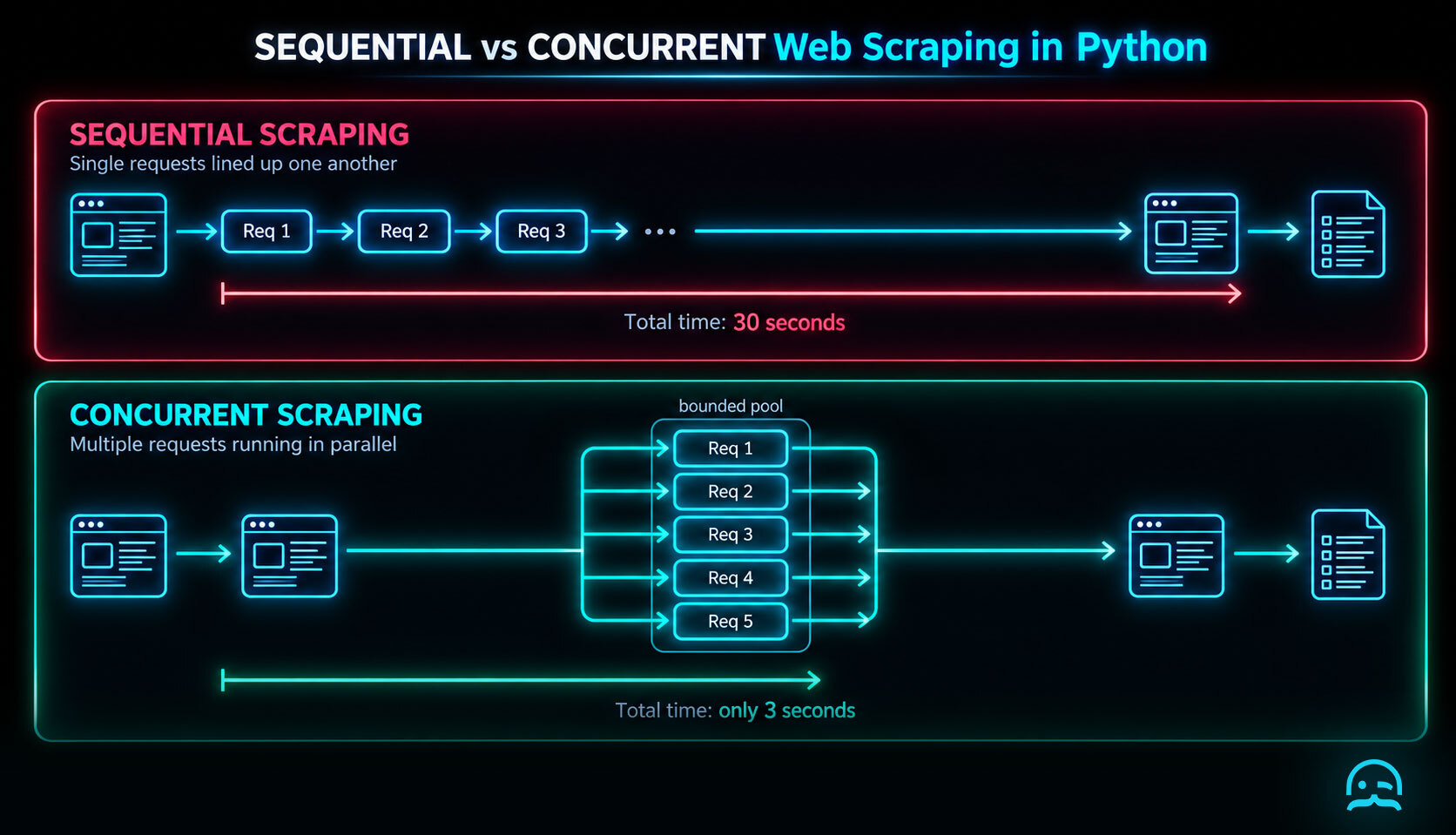
python -m pip install aiohttp
import asyncio
import aiohttp

URLS = [
    "https://example.com/one",
    "https://example.com/two",
    "https://example.com/three",
]

async def fetch(session, url, limit):
    async with limit:
        try:
            async with session.get(url) as response:
                response.raise_for_status()
                return url, await response.text()
        except (aiohttp.ClientError, asyncio.TimeoutError) as error:
            return url, f"Request failed: {error}"

async def main():
    limit = asyncio.Semaphore(5)
    timeout = aiohttp.ClientTimeout(total=20)
    async with aiohttp.ClientSession(timeout=timeout) as session:
        tasks = [fetch(session, url, limit) for url in URLS]
        results = await asyncio.gather(*tasks)

    for url, content in results:
        print(url, len(content))

if __name__ == "__main__":
    asyncio.run(main())
Saving Your Scraped Data
Saving Your Scraped Data
A fast web scraper can save collected data as CSV, JSON, databases, Google Sheets, or Excel. Choose the format that fits your workflow.
- CSV
- JSON
- Databases
- Google Sheets
- Excel
For example, save rows to a CSV file with Python:
import csv

data = [["Title", "URL"], ["Example Website", "https://example.com"]]
with open("output.csv", "w", newline="") as file:
    writer = csv.writer(file)
    writer.writerows(data)
Tips for Better Web Scraping
Build a fast web scraper with a disciplined workflow. Inspect elements and start simple. Control request rates and log errors. Keep your code modular.
- Inspect elements with browser DevTools.
- Start with simple websites.
- Limit requests per second.
- Log errors for debugging.
- Keep fetching, parsing, and storage modular.
Conclusion
Python makes building a fast web scraper approachable, even when web scraping initially seems advanced. BeautifulSoup works well for simple websites. Playwright handles dynamic sites. With a few lines of code, you can collect data from almost any website. Web scraping in Python can save time and support useful insights. After you learn the basics, you can automate repeated online tasks and expand your scripts as your needs grow.
What We Learned
A fast web scraper starts with a clear target. It uses the simplest tool that works. It handles failures. It follows site rules. It saves consistent output for later analysis.
import requests
from bs4 import BeautifulSoup

url = "https://example.com"
response = requests.get(url, timeout=10)
response.raise_for_status()
soup = BeautifulSoup(response.text, "html.parser")
record = {"title": soup.title.get_text(strip=True)}
print(record)
- Use Requests and BeautifulSoup for server-rendered HTML.
- Use Playwright when content depends on browser execution.
- Keep timeouts, error handling, and output validation in every run.
- Read the Python documentation for Requests and Beautiful Soup before extending the scraper.
Start Building Your Scraper
Use our resources to move from Python setup to practical data extraction workflows with a clear starting point.
Summarize this post
Open it in your assistant of choice with the prompt ready to send.
Take a Taste of Easy Scraping!

Find more insights here
HTML to Markdown: Converting Scraped Web Pages for LLM Training
Learn how to convert html to markdown for LLM training. Reduce token usage by 90% and improve RAG ac…
What is Scraping? A Complete Beginner's Guide for 2026
Learn what a web scraper is in 2026 and how AI-powered tools are replacing brittle CSS scripts for r…

The Ultimate Web Crawlers List: 15 Tools for Every Data Need
Compare the best web crawlers for 2026. Learn the difference between open-source, managed APIs, and…