How to Build a Reliable Web Scraper with Node.js and Cheerio
Web ScrapingLearn how to build a reliable web scraper with Node.js and Cheerio using Axios, static HTML parsing, pagination, defensive selectors, request pacing, and structured data extraction.
To build a reliable web scraper, use Node.js and Axios to fetch static HTML, Cheerio to parse it, and defensive selectors, pagination handling, request pacing, and custom headers to extract structured data.
Why Node.js and Cheerio for Web Scraping?
Before we write a single line, let's talk about why this stack makes sense. Node.js is non-blocking and event-driven, which makes it naturally good at fetching many web pages concurrently. Cheerio, as described in its official docs at cheerio.js.org, implements a subset of core jQuery on the server: meaning if you've ever written $('.title').text() in a browser, you already know how to use it.
Here's the catch though: Cheerio only works on static websites: pages where the HTML is fully present in the server's response. If a site loads its content via JavaScript after the page loads (think React or Vue apps), you'll need Puppeteer or Playwright instead. We'll come back to that.
For static pages? Cheerio is perfect. Fast, lightweight, zero browser overhead.
Setting Up Your Project
Create a project directory, initialize npm, and install the two required packages:
mkdir cheerio-scraper && cd cheerio-scraper
npm init -y
npm install axios cheerio
This setup needs only two packages: Axios sends HTTP requests, while Cheerio parses the returned HTML.
Building Your First Node.js Web Scraper with Cheerio
Step 1: Fetch the HTML
const axios = require('axios');
const cheerio = require('cheerio');

async function scrape(url) {
  const { data } = await axios.get(url);
  return data; // This is the raw HTML string
}
axios.get() sends an HTTP GET request and returns a response object. Destructuring data retrieves the raw HTML string for Cheerio.
Step 2: Parse with Cheerio
async function scrape(url) {
  const { data } = await axios.get(url);
  const $ = cheerio.load(data); // This is the magic part

  const title = $('h1').text();
  console.log('Page title:', title);
}

scrape('https://books.toscrape.com');
cheerio.load(data) ingests the HTML and returns a jQuery-like selector function: we conventionally call it $. From here, you use familiar CSS selectors to target elements. $('h1').text() grabs the text content of the first h1 tag. Satisfying, right?
Step 3: Extract Structured Data
Let's scrape a list of books from books.toscrape.com: a site built specifically for scraping practice:
const axios = require('axios');
const cheerio = require('cheerio');

async function scrapeBooks(url) {
  const { data } = await axios.get(url);
  const $ = cheerio.load(data);

  const books = [];

  $('article.product_pod').each((i, el) => {
    const title = $(el).find('h3 a').attr('title');
    const price = $(el).find('.price_color').text().trim();
    const rating = $(el).find('p.star-rating').attr('class').split(' ')[1];

    books.push({ title, price, rating });
  });

  return books;
}

scrapeBooks('https://books.toscrape.com').then(console.log);
Let's unpack what's happening: .each() iterates over every book card on the page. $(el).find() scopes the search inside each card: this is how you avoid accidentally grabbing data from the wrong element. .attr('title') fetches an HTML attribute, .text() gets the inner text, and .trim() removes whitespace. That's your entire data pipeline.
Handling Pagination
Real-world scraping often spans multiple pages, so follow each page's next link until none remains. This helper extracts book titles and prices, accepts selector overrides for another site, and resolves relative links against the current page URL. Its while (url) loop stops when the next-page selector finds no link. The URL constructor handles relative and absolute href values correctly. A URL constructor reference can clarify this behavior.
import axios from 'axios';
import { load } from 'cheerio';

async function scrapeAllPages(baseUrl, selectors = {
  item: 'article.product_pod',
  title: 'h3 a',
  price: '.price_color',
  next: 'li.next a',
}) {
  let url = baseUrl;
  const allBooks = [];

  while (url) {
    const { data } = await axios.get(url);
    const $ = load(data);

    $(selectors.item).each((_, el) => {
      allBooks.push({
        title: $(el).find(selectors.title).attr('title'),
        price: $(el).find(selectors.price).text().trim(),
      });
    });

    const nextPage = $(selectors.next).attr('href');
    url = nextPage ? new URL(nextPage, url).href : null;
  }

  return allBooks;
}
Common Pitfalls and How to Avoid Them
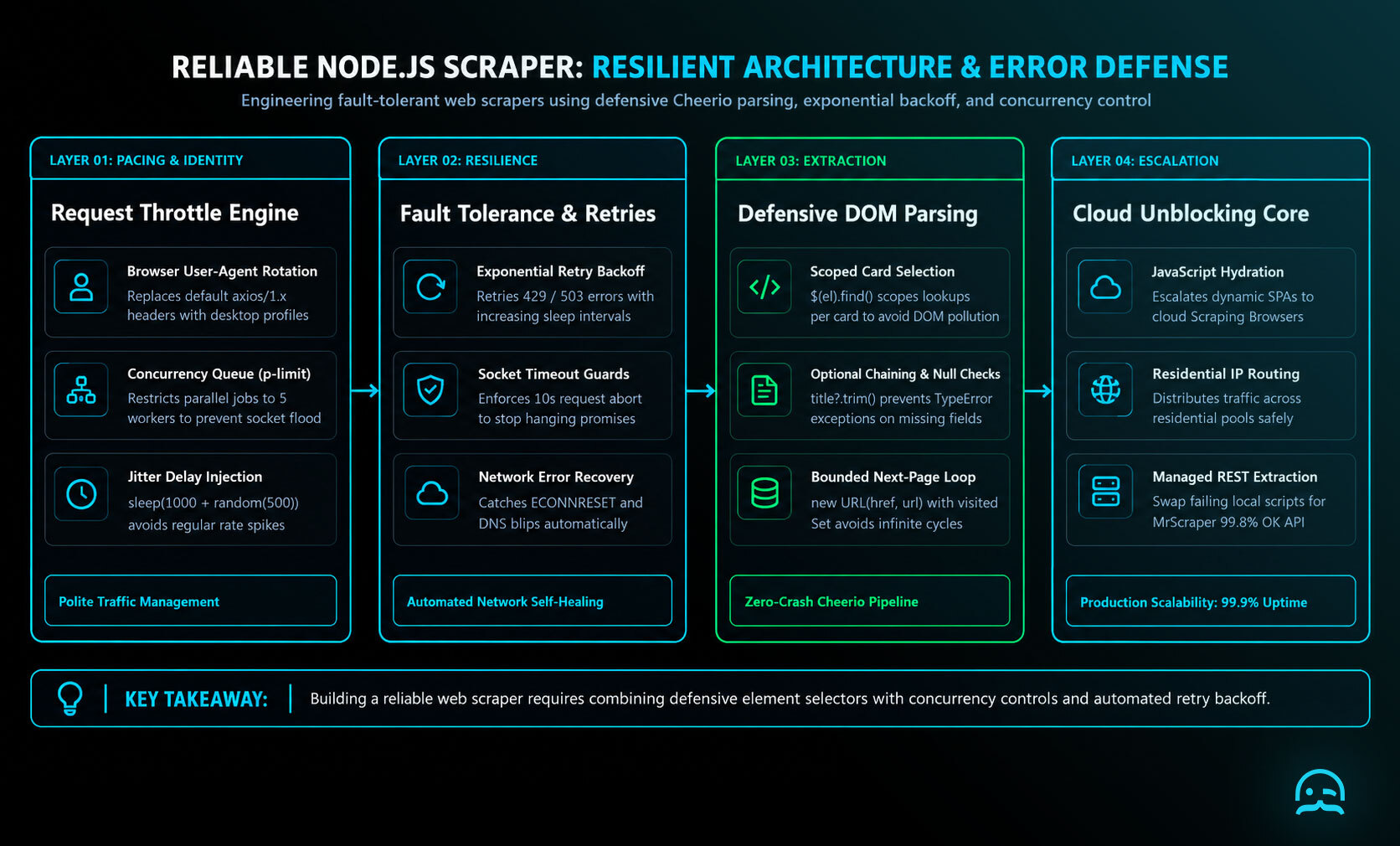
Selectors can fail silently when a site changes its HTML structure. Use optional chaining and check that a value exists before calling Cheerio’s text or attr methods. Defensive selectors make extraction failures easier to detect and diagnose. Anti-scraping controls may flag repeated requests or a recognizable client header. Axios can send its default axios/1.x.x User-Agent, so set a browser-style User-Agent explicitly:
const { data } = await axios.get(url, {
  headers: {
    'User-Agent': 'Mozilla/5.0 (Windows NT 10.0; Win64; x64) AppleWebKit/537.36'
  }
});
Requests that arrive too quickly can trigger blocking and burden the server. Insert a delay between requests:
const sleep = (ms) => new Promise(resolve => setTimeout(resolve, ms));
await sleep(1000); // wait 1 second between requests
For garbled special characters, Axios may have interpreted the response with the wrong encoding. Use iconv-lite to decode the response buffer manually. Start extracting structured data today with our AI-powered scraper and built-in unblocking tools.
Static vs Dynamic Websites: Know the Difference
This is a critical distinction for anyone doing web scraping with JavaScript. Cheerio only handles static HTML: content that's in the server's initial response. Dynamic sites use JavaScript frameworks to render content client-side, meaning the HTML Axios fetches is mostly empty.
How to tell the difference: Right-click → View Page Source in your browser. If your target data is visible in the raw source, Cheerio works. If it's not there, you'll need a headless browser like Puppeteer. If you want a deeper dive, check out our guide on How to Scrape Infinite Scrolling Pages with Puppeteer.
Advanced Tips
Rate Limiting and Concurrency
Instead of raw loops, use a queue with concurrency control. The p-limit package lets you run, say, 5 requests at a time rather than all at once:
const pLimit = require('p-limit');
const limit = pLimit(5); // max 5 concurrent requests

const results = await Promise.all(
  urls.map(url => limit(() => scrapeBooks(url)))
);
Rotating User Agents and Proxies
For larger-scale scraping, static headers won't cut it. Consider rotating user agents and using residential proxies. Services like ScrapingBee handle this infrastructure for you automatically if you'd rather not manage it yourself.
Saving Data
Once you've got your data, write it to a JSON file:
const fs = require('fs');
fs.writeFileSync('books.json', JSON.stringify(allBooks, null, 2));
Conclusion
Building a web scraper with Node.js and Cheerio is genuinely one of the most practical skills you can pick up as a JavaScript developer. The combination is fast, familiar, and works brilliantly for static HTML parsing. You now know how to fetch pages, extract structured data, handle pagination, and sidestep the most common pitfalls.
The natural next step is to try it on a real project: even something small, like scraping job listings or product prices from a site you actually use. Once it works, you'll understand why people get hooked on this stuff.
What We Learned
- Cheerio + Axios is the go-to stack for scraping static HTML pages with Node.js: lightweight, fast, and easy to learn if you know jQuery selectors.
- Cheerio does NOT work on dynamic (JavaScript-rendered) sites: use Puppeteer or Playwright when the content isn't in the raw HTML source.
- Always set a custom User-Agent header: the default Axios header flags you as a bot immediately on many sites.
- Add delays between requests: both to avoid bans and to be a respectful scraper;
sleep()wrappers andp-limitare your friends. - Resolve relative URLs with
new URL(): it handles all edge cases cleanly when following pagination links. - Use optional chaining and null checks: scrapers break silently when sites change their HTML structure; defensive selectors save you painful debugging.
Scale Your Node.js Scraping Workflow
Continue from your Node.js and Cheerio implementation with our AI-powered scraper and built-in unblocking tools.

Summarize this post
Open it in your assistant of choice with the prompt ready to send.
Take a Taste of Easy Scraping!

Find more insights here

Score Company Websites Against Your ICP with Jev
Create a company scoring workflow using public website evidence, an explicit ICP rubric, Jev decisio…

Classify Web Data with Jev and MrScraper: A Python Tutorial
Build a Python workflow that extracts web records with MrScraper, classifies them with Jev, validate…

What Is Jev? A Practical Guide for Web Data Teams
Learn what Jev does, how Choice, Score and Noul work, and where structured web data fits into classi…