How to Extract and Download News Articles Online with MrScraper
Web ScrapingLearn how to extract and download news articles with MrScraper, from choosing a section URL to reviewing and saving results as JSON or CSV.
To extract and download news articles, use MrScraper to target a news section. Configure ScrapeGPT next. Review the extracted results. Save them as JSON or CSV.
Why Download News Articles?
Downloading articles from your favorite news sites can help you:
- Access Articles Offline: Perfect for reading anytime, even without an internet connection.
- Compile Articles for Research: Researchers and analysts often need large data sets for thorough analysis.
- Stay on Top of Trends: Marketers and content creators can track trending topics for better audience insights.
Now, let’s dive into how to extract and download news articles using MrScraper.
Step-by-Step Guide to Extract and Download News Articles Using MrScraper
Follow these easy steps to start downloading articles with MrScraper:
1. Sign Up for MrScraper
If you’re new to MrScraper, start by creating an account on the MrScraper website. The platform is intuitive and straightforward, ideal for extracting data without any coding requirements.
2. Visit the News Website
Next, head to the news website you want to scrape. For example, if you’re interested in technology news, navigate to that section of the site. Copy the URL of the section or page you’d like to scrape, as you’ll need it in the next step.
3. Configure MrScraper for the News Website
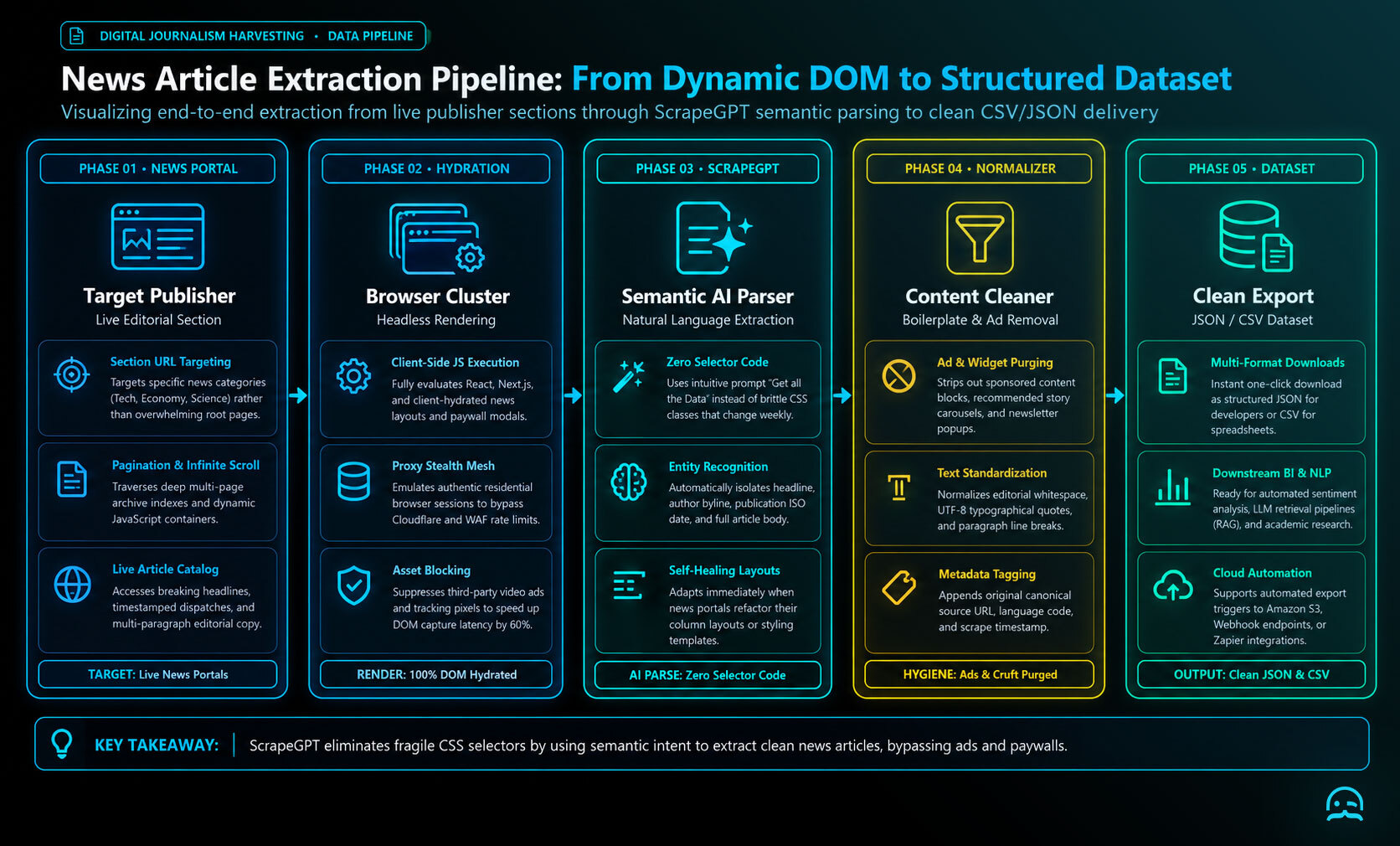
After signing in, open the platform’s home page and create a new scraping project. To extract and download news articles, paste the news website’s URL into the project’s ScrapeGPT feature. This tells the platform where to gather data. Use a URL that points to the exact section you want. For example, link to the site’s international technology section, not the homepage.
4. Allow ScrapeGPT to Load and Enter the Prompt
Once the news site's page has loaded, enter “Get All the Data” in ScrapeGPT. This prompt starts the extraction process and directs it to gather available listings or articles. It includes headlines, publication dates, and article content. This step is central to how to extract and download news articles efficiently.
5. Review and Download Your Data
After extraction finishes, review the results in the scraping interface. Confirm the returned information meets your needs. When the results look correct, download them as either JSON or CSV. Both formats support straightforward analysis, organization, and integration with your existing workflow.
Quick Tips for Optimizing Your Scraping with MrScraper
When planning to extract and download news articles, target specific section URLs. Use technology news or business headlines for more accurate results. Save your scraping configuration so you can repeat the same setup later without rebuilding it.
Start Downloading News Articles Today
Whether you are a researcher, a marketer, or someone who likes to stay informed, you can download news articles online. With the right tools, it is easier than ever. With MrScraper, you can access and save all the latest news in a few clicks. Get started today, and see how MrScraper can simplify your news-gathering process!
What We Learned
- Downloading news articles supports offline access, research, trend analysis, and personal archiving.
- The process includes creating a MrScraper project, adding a news section URL, and using ScrapeGPT. ScrapeGPT gathers listings or articles.
- Review extracted results in MrScraper. Then download them as JSON or CSV. Use them to organize, analyze, or add them to your workflow.
- Specific section URLs can improve accuracy, while saved configurations make recurring scraping easier.
Better decisions start with better data.
Whether you're monitoring competitor prices, tracking products, or analyzing market trends, MrScraper helps you collect the web data you need to stay informed.
Get 1,000 free tokens to try MrScraper here.
Summarize this post
Open it in your assistant of choice with the prompt ready to send.
Take a Taste of Easy Scraping!

Find more insights here
Use MrScraper MCP to Compare Public SaaS Pricing and Plan Limits
Build a source-backed SaaS plan comparison using MrScraper MCP. Preserve prices, quotas, billing ter…
Build a Product Attribute Classifier with LangChain and MrScraper
Build a LangChain workflow that extracts product evidence with MrScraper, normalizes attributes and…
Create a Source-Verified Question-and-Answer Dataset From Web Pages
Build a question-and-answer dataset from your own documentation pages. Every answer is an exact span…