Headless Scraping: Playwright and Puppeteer
Web ScrapingLearn how the Bright Data Scraping Browser compares to Playwright and Puppeteer. Scale your web scraping and data extraction with managed infrastructure.
Building a headless scraper is easy. Keeping it from getting blocked by Cloudflare or DataDome is a full-time job. The choice between Playwright, Puppeteer, and managed browsers determines your weekly workflow. You will either spend your week analyzing data or debugging TLS fingerprints. For scale and high-security targets, managed browsers outperform self-hosted scripts. Utilizing a managed bright data scraping browser allows teams to scale without worrying about infrastructure maintenance. These platforms offload fingerprinting and proxy rotation automatically. While Playwright and Puppeteer are the core open-source contenders, the infrastructure layer is where most scrapers fail.
Playwright vs. Puppeteer: The developer's choice
Playwright is the modern standard for headless automation. When comparing Playwright vs Puppeteer, you may prefer Playwright. It offers native multi-engine support and strong auto-wait features. It allows you to run tests and scrapers against Chromium, Firefox, and WebKit using a single API. This cross-browser capability is essential for dynamic sites. These sites often behave differently across rendering engines (WebKit vs. Chromium). Furthermore, Playwright's built-in selectors and networking capabilities make it much stronger than legacy automation frameworks.
Why Playwright is winning in 2026
Playwright has surpassed Puppeteer in popularity because it handles modern web complexities out of the box. You get better handling of frames, shadow DOMs, and asynchronous events without writing custom retry logic. (This is the primary reason teams are migrating their legacy Selenium suites to Playwright).
The Puppeteer legacy and stealth plugins
Puppeteer remains a popular choice due to its lightweight performance within the Chrome ecosystem. However, it often requires many stealth plugins to avoid detection by modern bot security. While it is excellent for simple browser automation tasks, maintaining these plugins can become a heavy burden. Anti-bot systems evolve constantly. You often find yourself in a game of cat-and-mouse. You must patch signatures to keep your headless browser fleet working.
The infrastructure burden of self-managed scraping
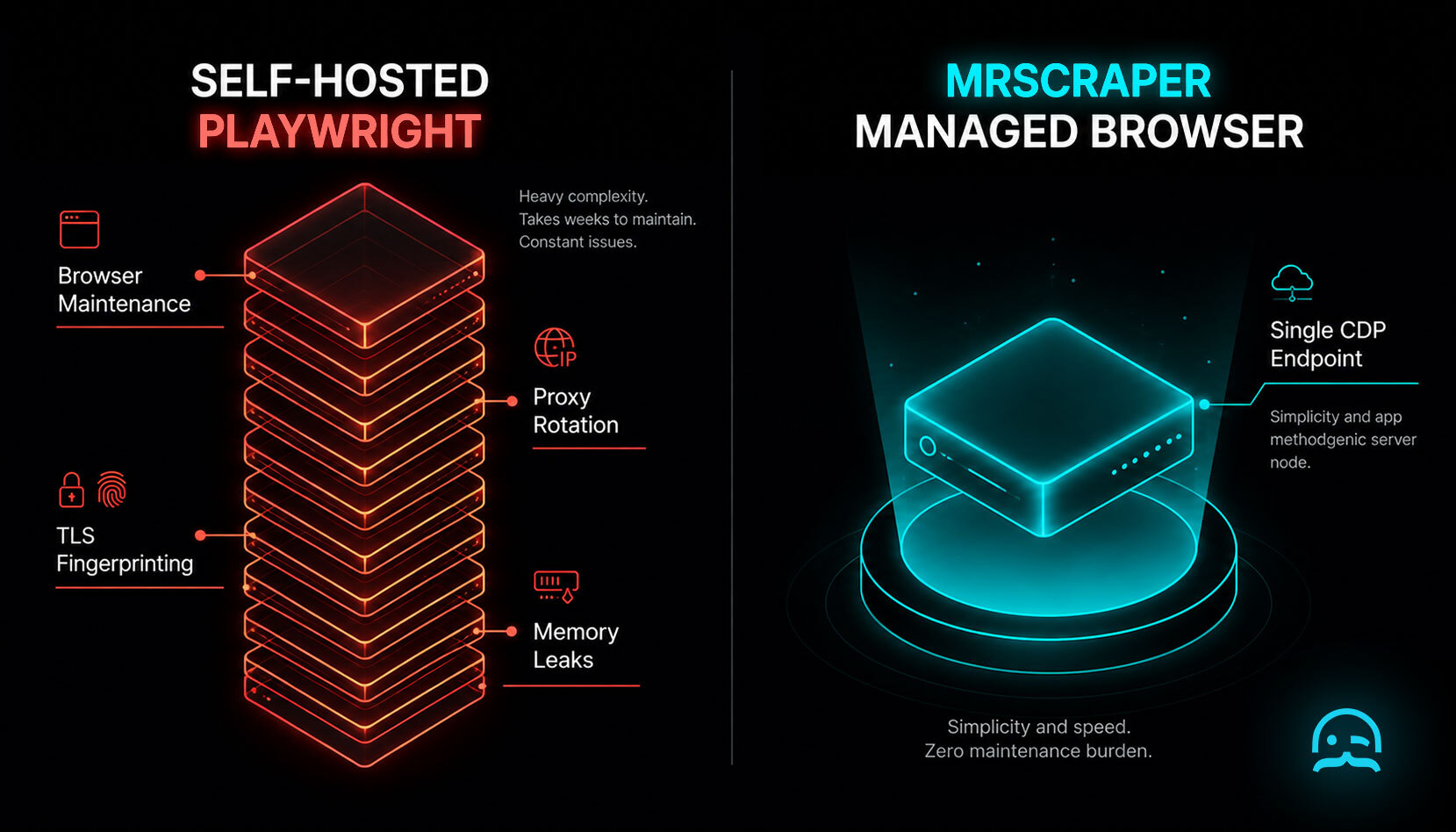
Self-hosting your browser fleet creates high overhead that quickly derails a data project. Consider the following challenges:
- Memory leaks: Headless browsers are notorious for consuming vast amounts of RAM, requiring complex lifecycle management.
- Proxy integration: Manually rotating residential proxies into your browser instances is complex and prone to failure.
- Stealth patching: Keeping browser signatures up to date to bypass TLS fingerprinting is a specialized task.
- Scaling costs: Running hundreds of concurrent browser instances requires significant server resources and orchestration logic.
Managed scraping browsers: A performance comparison
Browser infrastructure comparison
| Feature | Self-hosted | Managed API | Managed browser |
|---|---|---|---|
| Maintenance | High | Low | Minimum |
| Stealth | Manual | Automated | Built-in |
| Cost | Variable | Predictable | Scalable |
Bypassing advanced bot detection at scale
Advanced bot detection systems analyze your TLS handshake and Canvas rendering to identify automated traffic. Managed dynamic scraping browsers handle these signatures automatically. By using a managed browser endpoint, you offload the complexity of fingerprinting to a provider that specializes in stealth. This allows your data extraction tools to focus on the DOM rather than the network layer.
Handling TLS and Canvas fingerprinting
When you connect to a managed service, the provider modifies the underlying browser binaries. This ensures that the WebGL and Canvas signals returned to the target site match those of a legitimate user. (Standard Puppeteer scripts fail here because they often leave identifiable artifacts in the rendering engine).
Residential proxy integration
Integrating residential proxies directly into the browser session is the best way to avoid IP blocks. A managed browser handles this rotation at the infrastructure level. This ensures that each request looks like it comes from a unique, real user. This is very important for high-volume tasks where rate limiting is a constant threat. Developers often find a dedicated scraping API is more reliable than custom-built solutions for high-frequency requests.
const { chromium } = require('playwright');

(async () => {
  // Connect to a managed scraping browser endpoint
  const browser = await chromium.connectOverCDP('wss://api.mrscraper.com/browser');
  const page = await browser.newPage();
  await page.goto('https://example.com');
  const data = await page.innerText('h1');
  console.log(data);
  await browser.close();
})();
Wrapping up: Choosing your stack
Managed browsers are the only viable way to scale production-grade data extraction where reliability is the primary metric. While Playwright is the superior framework, the infrastructure layer is where most scrapers fail. Explore AI-powered extraction like ScrapeGPT to further reduce selector maintenance.
- Analyze your current failure rates. Decide if blocks occur at the IP level or the fingerprint level.
- Test a managed solution against your most difficult targets to benchmark success rates.
- Evaluate the total engineering hours spent on browser maintenance versus the cost of a managed solution.
Frequently asked questions
Is web scraping legal?
Web scraping is generally legal for public data. You should always respect the target site's robots.txt and avoid scraping personal or sensitive information.
How to do web scraping using JavaScript?
You typically use Playwright or Puppeteer. For large-scale production use, connect these frameworks to a managed browser endpoint. This is a best practice for efficient data extraction.
What is web scraping?
Web scraping is the automated collection of data from websites. It involves a request phase, a rendering phase (for dynamic sites), and an extraction phase.
Now that you know how it works, why not try it yourself?
With MrScraper, you can start collecting web data without building or maintaining your own scraping infrastructure. See how easily you can turn websites into usable data.
Get 1,000 free tokens and start scraping here.
Summarize this post
Open it in your assistant of choice with the prompt ready to send.
Take a Taste of Easy Scraping!

Find more insights here

Claude Code Competitor Pricing Research
Use Claude Code and MrScraper MCP to refresh public competitor pricing, normalize billing periods an…

Use MrScraper MCP to Compare Public SaaS Pricing and Plan Limits
Build a source-backed SaaS plan comparison using MrScraper MCP. Preserve prices, quotas, billing ter…

Build a Product Attribute Classifier with LangChain and MrScraper
Build a LangChain workflow that extracts product evidence with MrScraper, normalizes attributes and…