PublicSq Data Extraction: A Beginner's Guide to Using MrScraper
Web ScrapingLearn the basics of PublicSq data extraction with MrScraper, from setup and scraper configuration to selecting fields, troubleshooting, and exporting data.
PublicSq Data Extraction: A Beginner's Guide to Using MrScraper explains how to set up a scraper. It shows how to choose PublicSq pages and fields. It covers common issues and how to fix them. It also explains how to export data for analysis.
Understanding Web Scraping
PublicSq provides user-friendly access to government statistics, public archives, and local business information in one place. Its tools help users find and export specific information based on their needs. This creates helpful opportunities for data analysis and market research.
Web scraping is the automated process of navigating web pages and collecting selected details from them. Although it may seem difficult to beginners, the process becomes manageable with the right tool. A dedicated extraction tool allows people without technical skills to collect PublicSq data without gathering each record manually.
This approach can cut the time and effort needed for collection. It also supports research that relies on organized public information. The next sections explain how to set up the tool, gather the information you need, and fix common issues.
Step-by-Step Tutorial: Setting Up and Using MrScraper
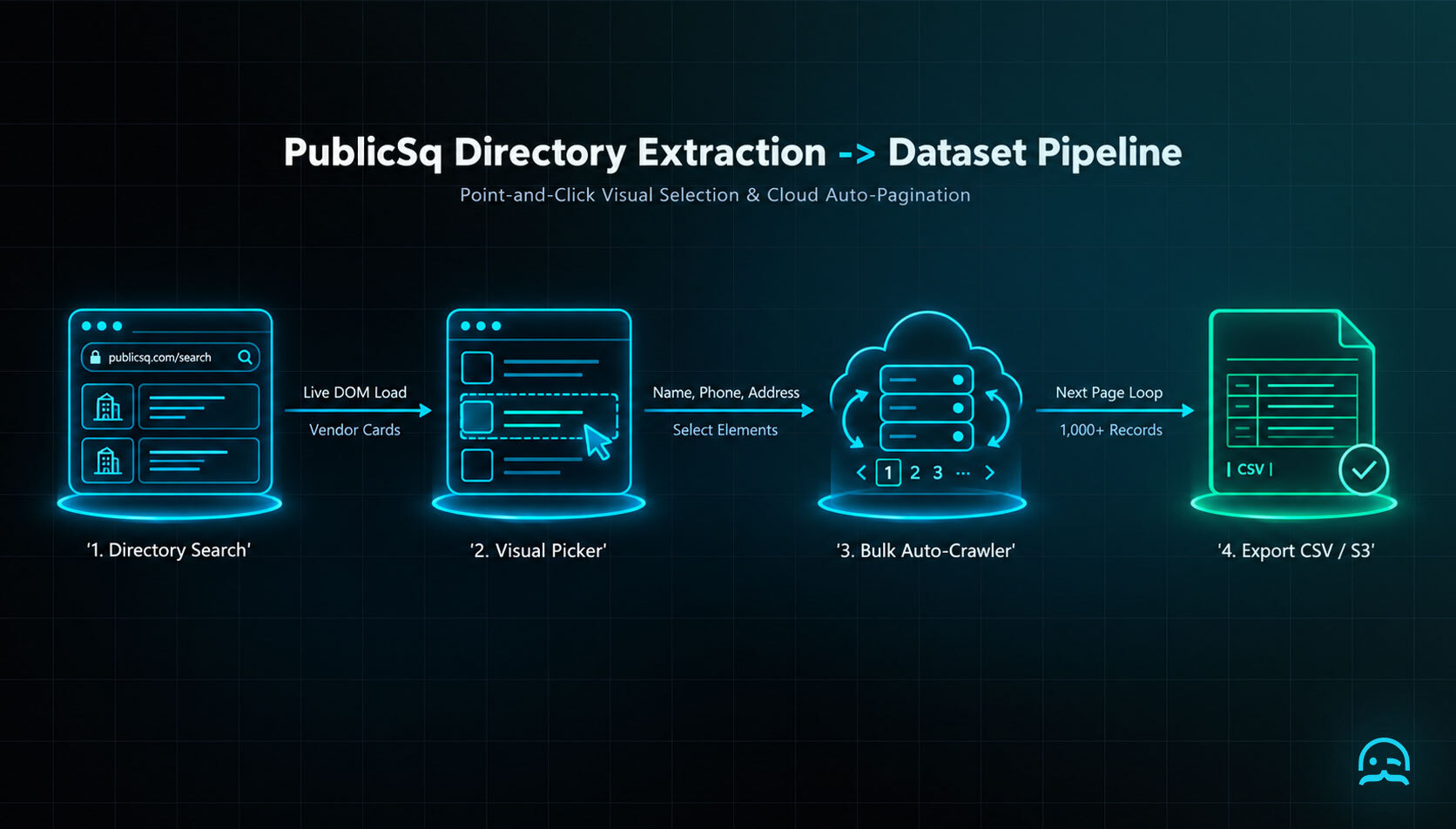
PublicSq Data Extraction: A Beginner's Guide to Using MrScraper explains the setup steps. It covers account access and exporting the data you collect. Follow these steps to configure a scraper for PublicSq and save the results for analysis.
- Open MrScraper.com and sign in to your account. After logging in, open the sidebar menu to access the available scraper tools.
- Open the Scrapers menu and select New Scraper. Enter the PublicSq website as the target URL. Then set up the scraper to collect what you need. This may include business listings or public records.
- Select the PublicSq pages you want to collect. Use the scraper to identify the required data fields, review the selected configuration, and start the scraping process. Monitor progress in the dashboard while the requested PublicSq data is collected.
- When the scrape is complete, open the data export section. Choose a format like CSV or Excel. Then save the exported file to your computer. Use it for further analysis of the PublicSq data.
Common Challenges and Troubleshooting Tips
- Challenge 1: Captchas and site restrictions. Use the browser's anti-captcha feature to bypass captcha challenges from the PublicSq website automatically.
- Challenge 2: Dynamic content. For pages that load content dynamically, use the JavaScript rendering option so the extraction captures all available data.
- Challenge 3: Data overload. Apply filters to narrow the results to the fields or records you need. This reduces both processing time and the volume of data returned.
Rendering Infinite-Scroll Pages
from playwright.sync_api import sync_playwright

URL = "https://www.publicsquare.com/"

with sync_playwright() as p:
    browser = p.chromium.launch(headless=True)
    page = browser.new_page()
    page.goto(URL, wait_until="domcontentloaded")

    unchanged = 0
    last_height = 0
    for _ in range(40):
        page.wait_for_timeout(1500)
        page.evaluate("window.scrollTo(0, document.body.scrollHeight)")
        height = page.evaluate("document.body.scrollHeight")
        unchanged = unchanged + 1 if height == last_height else 0
        last_height = height
        if unchanged >= 3:
            break

    links = page.locator("a[href]").evaluate_all(
        "els => [...new Set(els.map(e => e.href))]"
    )
    print("\\n".join(links))
    browser.close()
Benefits of Using MrScraper for PublicSq Data
PublicSq Data Extraction: A Beginner's Guide to Using MrScraper highlights three key benefits. It offers a user-friendly workflow, faster data collection, and customizable scraping settings.
- User-friendliness: The interface is designed for people without programming skills. Its dashboard includes a step-by-step guide that helps beginners work through the extraction process.
- Efficiency: Automating PublicSq data extraction saves time and reduces errors associated with manual collection. This lets you focus on analyzing the data instead of gathering it.
- Customization: You can adjust the scrape parameters to match your needs. Whether you need full details or focused content from the PublicSq website, you can adjust settings for your needs.
Conclusion
After following this guide, you can explore PublicSq using web scraping. You can use the extracted data in your analysis. This helps if you are testing a first workflow. It also helps if you are extending an established one. It provides a practical starting point for making PublicSq data extraction more approachable.
What We Learned
That checklist turns a one-time scrape into a dependable starting point for analysis.
Ready to put this into practice?
Try MrScraper and see how simple collecting web data can be.
Get 1,000 free tokens here.
Summarize this post
Open it in your assistant of choice with the prompt ready to send.
Take a Taste of Easy Scraping!

Find more insights here

Claude Code Competitor Pricing Research
Use Claude Code and MrScraper MCP to refresh public competitor pricing, normalize billing periods an…

Use MrScraper MCP to Compare Public SaaS Pricing and Plan Limits
Build a source-backed SaaS plan comparison using MrScraper MCP. Preserve prices, quotas, billing ter…

Build a Product Attribute Classifier with LangChain and MrScraper
Build a LangChain workflow that extracts product evidence with MrScraper, normalizes attributes and…