Mapping and Auditing Entire Websites with Web Scraping Tools
Web ScrapingLearn how to scrape dynamic websites to perform comprehensive audits. Discover how to map site architecture, detect orphan pages, and extract metadata for SEO.
To scrape dynamic websites for audits, use automated scrapers to systematically crawl domains. These tools extract URLs, map site structure, and capture metadata. This helps you find orphan pages and assess content quality at scale.
Using MrScraper for Comprehensive Website Audits
These audits systematically identify orphan pages and visualize complex site architectures to improve internal linking. By automating metadata and content extraction, you can quickly assess SEO performance and quality across thousands of pages.
def run_website_audit(start_url, headless_mode=True):
    # Initialize the scraper to handle dynamic content via JavaScript
    scraper = ScraperConfig(browser_type='chromium', headless=headless_mode)

    # Crawl the domain to map site architecture and find orphan pages
    site_map = scraper.crawl_domain(start_url, depth_limit=5)

    audit_results = []
    for page in site_map.pages:
        # Extract SEO metadata and performance metrics
        data = page.extract({
            'title': 'head > title',
            'meta_description': 'meta[name="description"]',
            'load_time': 'performance_metrics.ttfb'
        })
        audit_results.append(data)

    return audit_results
Handling JavaScript Rendering with Headless Browsers
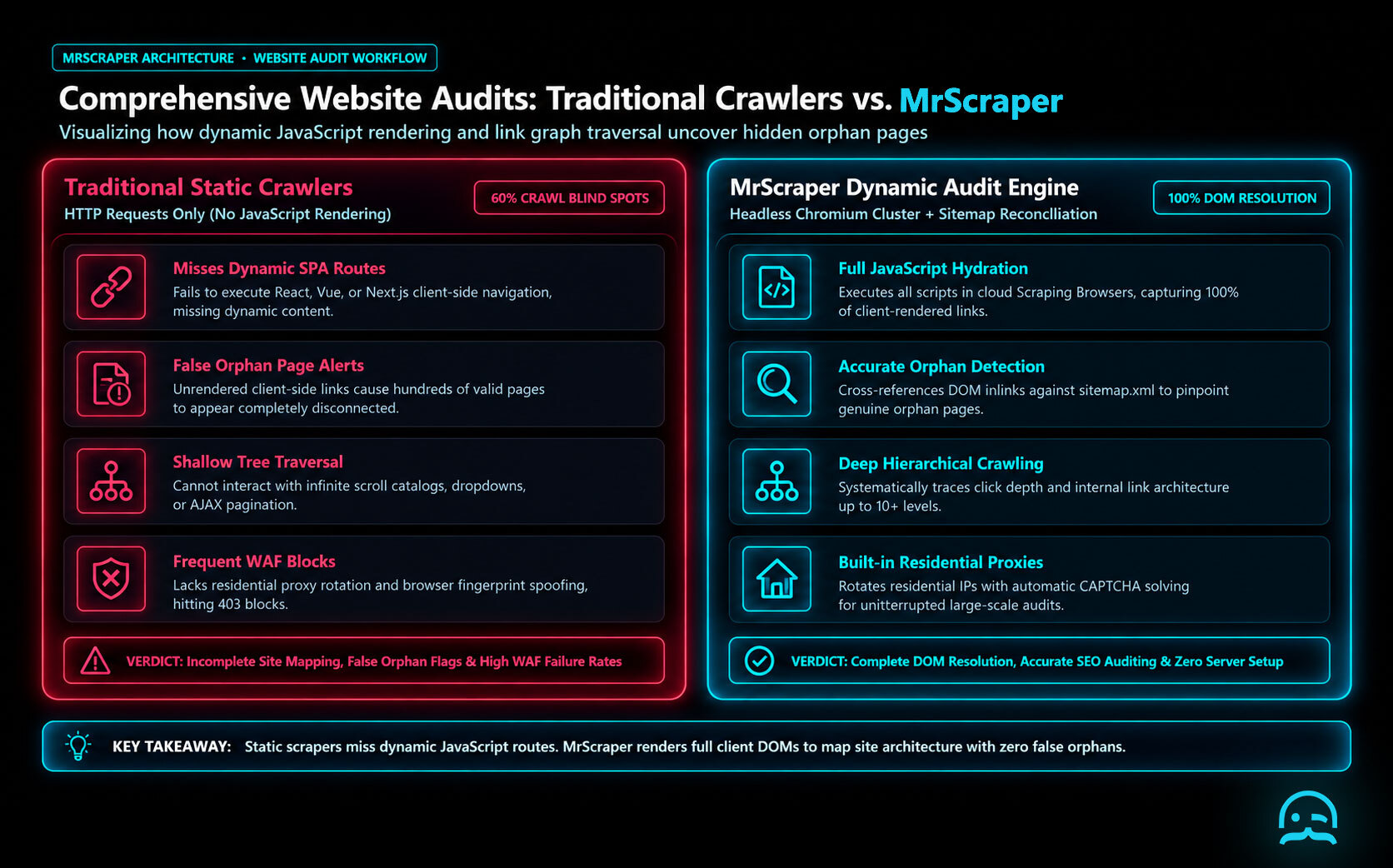
To accurately scrape dynamic websites during a full audit, the crawler must handle pages that rely on JavaScript to render content. Standard HTTP requests often fail to capture data hidden behind client-side scripts. Simply loading the page is not always enough.
const { chromium } = require('playwright');

(async () => {
  const browser = await chromium.launch();
  const page = await browser.newPage();
  await page.goto('https://example.com/dynamic-audit');

  // Wait for the specific data container to ensure JS has rendered
  await page.waitForSelector('.inventory-list-item', { timeout: 5000 });

  const links = await page.$$eval('a', el => el.map(a => a.href));
  console.log(links);
  await browser.close();
})();
Managing this infrastructure at scale can become resource-intensive. Tools like Apify, ScrapingBee, or Bright Data provide managed browser environments that handle these rendering complexities. These methods are essential for capturing every internal link on modern, single-page application architectures.
Conclusion
Web scraping tools provide a systematic methodology for performing comprehensive audits. By mapping whole sites and checking content scope, these tools create data needed for smart redesigns and planned updates. To scrape dynamic websites well, developers often use tools like ScraperAPI, ScrapingBee, Bright Data, Apify, or Oxylabs. These tools handle JavaScript rendering and proxy rotation. Utilizing these resources ensures your digital assets remain organized and optimized for search engine visibility while enhancing overall management capabilities.
What We Learned
Auditing modern architectures requires the ability to scrape dynamic websites where content is rendered via JavaScript after the initial page load. While static crawlers capture raw HTML, comprehensive audits of interactive elements and single page applications depend on headless browser technology to execute scripts. This ensures that hidden menus, lazy loaded images, and client side metadata are correctly mapped during the crawl. Scaling this process often involves offloading the browser overhead to external infrastructure providers such as ScrapingBee, Bright Data, Apify, Oxylabs, or ScraperAPI.
const { chromium } = require('playwright');

(async () => {
  const browser = await chromium.launch();
  const page = await browser.newPage();
  // Navigate and wait for dynamic content to render
  await page.goto('https://example.com', { waitUntil: 'networkidle' });

  const links = await page.evaluate(() => {
    return Array.from(document.querySelectorAll('a')).map(a => a.href);
  });

  console.log('Discovered URLs:', links);
  await browser.close();
})();
- Deploy headless browsers to execute JavaScript for dynamic audits.
- Verify internal link structures by crawling deep into nested SPAs.
- Monitor performance metrics after full DOM rendering is complete.
- Utilize proxy rotation to maintain high success rates during large crawls.
Handling Dynamic Content and Single Page Applications
Modern single page apps and JavaScript-heavy sites make site mapping harder. Their content is not in the initial HTML source. To scrape dynamic websites effectively, scrapers must execute scripts to reveal the full DOM. This often requires using headless browsers or browser automation frameworks. These tools can wait for specific elements to load before they capture data. Managing these resources at scale is typically handled by specialized providers like ScrapingBee, Bright Data, Apify, Oxylabs, or ScraperAPI.
const puppeteer = require('puppeteer');

(async () => {
  const browser = await puppeteer.launch();
  const page = await browser.newPage();
  await page.goto('https://example.com/spa-audit', { waitUntil: 'networkidle0' });

  const links = await page.evaluate(() => {
    return Array.from(document.querySelectorAll('a')).map(a => a.href);
  });

  console.log('Discovered URLs:', links);
  await browser.close();
})();
Implementing these techniques helps audits capture the full user experience. This includes content shown through AJAX calls or user actions. Static crawlers might miss this content.
Frequently asked questions
How do web scrapers help in website audits?
Web scrapers systematically crawl a domain to capture all URLs and associated content. This process lets you map site architecture, see the page hierarchy, and find pages that need optimization or updates.
What kind of data can be extracted during a site audit?
Scrapers can extract page metadata for SEO analysis, perform content quality assessments, and gather performance metrics. They are also effective at finding orphan pages that are not linked within the main site navigation.
Can scrapers assist with website redesigns?
Yes. By showing a clear view of the site’s current scope and structure, web scraping tools provide data to guide redesign changes.
You have the websites. We help you get the data.
Skip the complicated setup and start extracting the information you need with MrScraper.
Get 1,000 free tokens and start collecting data here.
Summarize this post
Open it in your assistant of choice with the prompt ready to send.
Take a Taste of Easy Scraping!

Find more insights here

Claude Code Competitor Pricing Research
Use Claude Code and MrScraper MCP to refresh public competitor pricing, normalize billing periods an…

Use MrScraper MCP to Compare Public SaaS Pricing and Plan Limits
Build a source-backed SaaS plan comparison using MrScraper MCP. Preserve prices, quotas, billing ter…

Build a Product Attribute Classifier with LangChain and MrScraper
Build a LangChain workflow that extracts product evidence with MrScraper, normalizes attributes and…