How to Use a No-Code Web Scraper for Google SERPs
Web ScrapingLearn how to scrape Google Search Results Pages (SERPs) without writing code. Use a no-code web scraper to collect organic listings, ads, and snippets for SEO and competitor research.
No-code Google SERP scraping allows you to extract search engine data like organic rankings and ads without programming. Using tools like MrScraper, you can automate data collection by simply entering keywords or URLs, bypassing technical hurdles like CAPTCHAs.
What Are Google SERPs?
Based on Backlinko, Google SERPs (Search Engine Results Pages) are Google’s response to a user’s search query. SERPs tend to include organic search results, paid Google Ads results, Featured Snippets, Knowledge Graphs, and video results. SERPs play a crucial role in everything from SEO strategies to competitor research.
Each page element, like organic results, paid ads, and featured snippets, gives useful information to businesses and individuals. However, gathering this data by hand can take a lot of time. That is why scraping SERPs is a useful way to automate the process.
Does Scraping Google Search Results Require Programming?
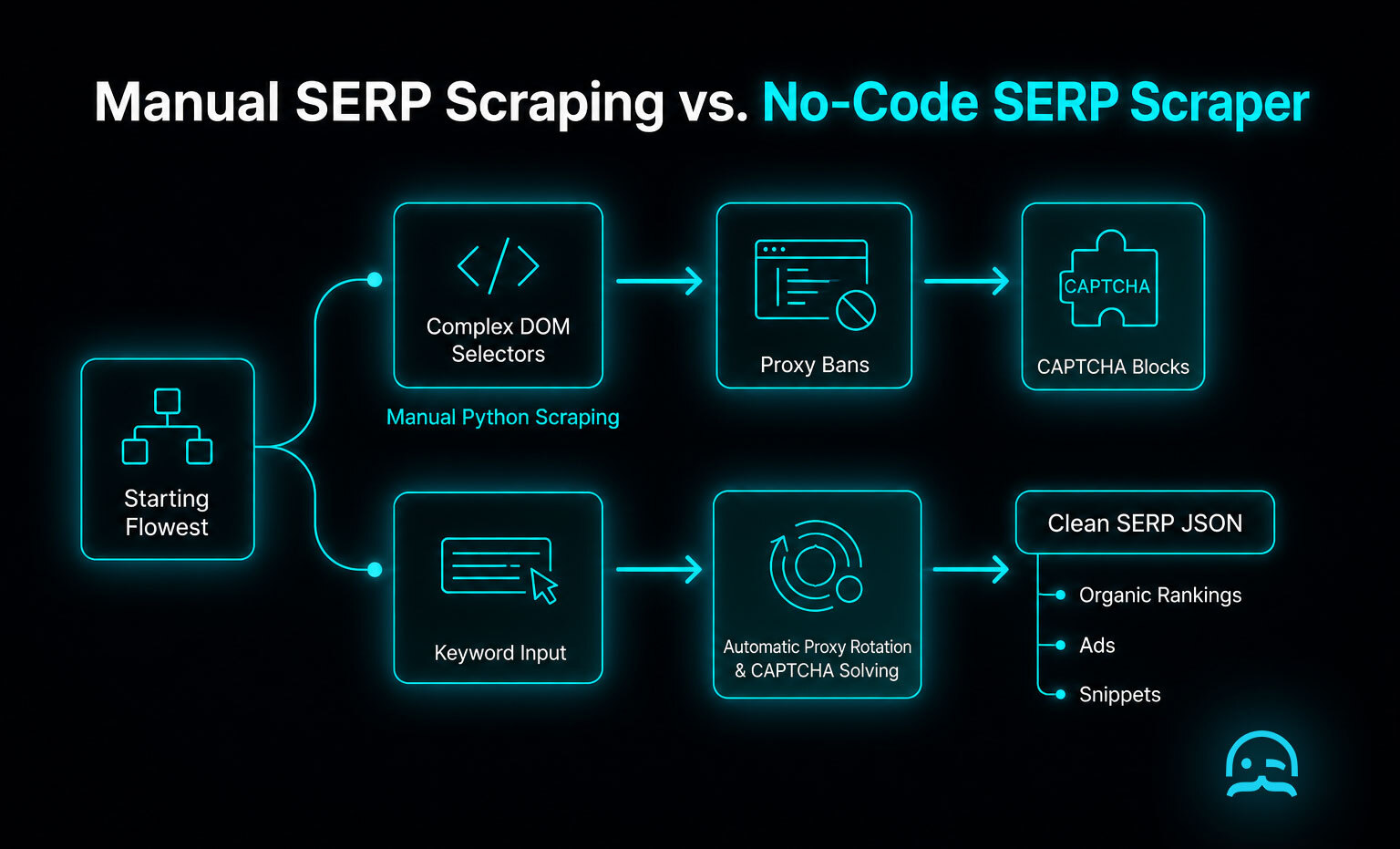
Many people believe that scraping Google Search Results requires programming skills, and traditionally, they would be correct. Conventionally, scraping involves utilizing languages like Python and frameworks like BeautifulSoup or Scrapy. Users must typically understand how to manage HTTP requests, coordinate proxies, and solve complex CAPTCHA challenges. These technical requirements can feel intimidating for professionals who lack a formal coding background. They can also be hard for those without a dedicated development team.
The emergence of a no-code web scraper simplifies this entire process through automation. Instead of writing manual scripts or managing fragile infrastructure, users can use platforms that do the heavy lifting. This technical abstraction allows you to focus entirely on gathering and analyzing search data rather than struggling with the underlying implementation details.
Comparing Cloud Platforms and Browser Extensions
Selecting a no-code web scraper typically involves choosing between local browser extensions and cloud-based platforms. These cloud services, like ScraperAPI, ScrapingBee, Bright Data, Apify, and Oxylabs, handle the infrastructure. So you can focus on the data.
Below is a simple example of how these tools turn a no-code request into a working data retrieval command. They use a standard API format.
curl "https://api.scraper-service.com?api_key=YOUR_KEY&url=https://www.google.com/search?q=no-code+scraper&render=true"
| Feature | Browser Extensions | Cloud-Based Platforms |
|---|---|---|
| Setup Speed | Instant installation | Account configuration required |
| Scalability | Limited to one tab | High (thousands of concurrent requests) |
| Proxy Management | Manual or basic | Automated and rotating |
| Maintenance | Updates with browser | Managed by the provider |
For a deeper look at the design differences in these tools, the book Web Scraping with Python by Ryan Mitchell adds context. It explains how automated systems copy human browsing behavior to keep data accurate.
Benefits of Scraping Google Search Results
Scraping Google SERPs comes with a wide range of benefits, especially for marketers, businesses, and SEO experts. Here are some of the biggest advantages:
- Competitor Analysis: Keep an eye on your competitors’ rankings, content strategies, and advertising.
- Keyword Tracking: Monitor how your website or products rank for specific keywords over time.
- Market Research: Stay on top of industry trends by analyzing popular searches, featured snippets, and trending topics.
- SEO Insights: Identify which types of content are ranking well and understand how you can improve your SEO strategy.
- Ad Monitoring: Scrape paid ads to see what your competitors are promoting and optimize your own ad campaigns.
Scraping helps turn data from Google’s SERPs into actionable insights, which you can use to refine your strategy.
Navigating Anti-Bot Security and Geo-Targeting
Managing the response to automated triggers like CAPTCHAs is essential for maintaining high success rates during large-scale runs.
- Proxy Rotation: Distributes requests across thousands of IP addresses to avoid rate limits.
- Geo-Targeting: Configures requests to originate from specific cities or countries for localized results.
- CAPTCHA Evasion: Uses browser fingerprinting and solving services to bypass security checks.
- Header Optimization: Mimics real user-agent strings to look like a legitimate web browser.
For users who prefer a programmatic way to fine-tune request settings, automated features can help. This JSON example shows how the proxy and location settings are structured.
{
  "search_query": "no-code web scraper",
  "location": "New York,United States",
  "device": "desktop",
  "proxy_type": "residential",
  "solve_captcha": true,
  "num_results": 50
}
For a deeper technical dive into how search engines detect automated browsers, the study titled A Comprehensive Analysis of Bot Detection Techniques by researchers at various cybersecurity firms offers significant insights into the evolving landscape of web security.
How to Scrape Google Search Results Using MrScraper
Here’s the best part: scraping Google Search results with MrScraper is very simple and needs no technical skills. Just follow these easy steps:
Sign up for MrScraper and log into your account. When you are on the home page, click "New Task" in the lead generator section as shown in the image.
Create a scraper. Enter the name of what you want to scrape in the “name” field. Fill in the “tags” field. Set the scraper type to “leads generator.” Then select Google.
There are two ways to proceed. Paste the URL from the Google SERP you want to scrape. Or enter the keyword you want to search on Google.
- Run the scraper: Hit the button and let MrScraper gather the data for you.
Run the scraper
- Review and Export the results: The tool will provide you with the search results data, including organic listings, paid ads, and more in a clean, easy-to-read format.
Review and Export the results
With MrScraper, you don’t need to worry about the complexities of coding or setting up a server. The tool does everything for you, allowing you to scrape data in just a few clicks.
Automating Data Exports and Webhook Integrations
While a no-code web scraper lets you collect rankings and snippets, the raw data needs a place to go. Users can choose between static formats for one-off reports or dynamic integrations for ongoing monitoring.
{
  "webhook_event": "task.completed",
  "data": [
    {
      "position": 1,
      "title": "Best SEO Practices",
      "link": "https://example.com/seo-guide",
      "snippet": "Learn how to improve your rankings..."
    }
  ],
  "export_format": "json",
  "timestamp": "2026-08-24T14:30:00Z"
}
For a deeper technical exploration of how these automated pipelines function in enterprise environments, the book Web Scraping with Python by Ryan Mitchell serves as a helpful reference on data lifecycle management.
Conclusion
Scraping Google SERPs can give you powerful insights, but it doesn’t have to be complicated. With MrScraper, you can easily gather Google Search Results without any programming knowledge. Whether you’re tracking keywords, analyzing competitors, or monitoring ads, this tool makes the process quick and simple. If you're curious to learn more about how MrScraper makes scraping other types of websites easy-like remote job platforms-you can check out our previous guide on scraping remote job data.
Ready to get started? Try MrScraper today and start scraping Google Search Results effortlessly.
Launch Your First Search Scraper
Discover how to make your data extraction projects easier. Use our clear guide to no-code automation. Learn about fast scraping tools.
Frequently asked questions
Is programming required to scrape Google search results?
No. Traditional methods often need Python or other technical tools. A no-code web scraper like MrScraper handles the backend for you. It automates proxy rotation and CAPTCHA handling. You do not need coding skills.
What kind of data can be extracted from Google SERPs?
You can scrape many types of data, like organic results, paid Google Ads, Featured Snippets, Knowledge Graphs, and videos. Use this data to guide your marketing or SEO plan.
What are the benefits of using a no-code web scraper for SERP data?
Using a no-code tool simplifies competitor analysis, keyword tracking, market research, and ad monitoring. It turns complex search page data into useful insights, without manual data entry or server management.
How do you handle CAPTCHAs and proxies when scraping Google?
When using a specialized no-code tool like MrScraper, these technical challenges are handled automatically. The platform manages rotating proxies and headers in the background to ensure reliable data extraction.
Reliable web data collection shouldn't be complicated.
MrScraper helps enterprise teams collect data at scale, including from websites that are difficult to extract. Now it's your turn to put it to the test.
Get 1,000 free tokens and try MrScraper here.
Summarize this post
Open it in your assistant of choice with the prompt ready to send.
Take a Taste of Easy Scraping!

Find more insights here

Claude Code Competitor Pricing Research
Use Claude Code and MrScraper MCP to refresh public competitor pricing, normalize billing periods an…

Use MrScraper MCP to Compare Public SaaS Pricing and Plan Limits
Build a source-backed SaaS plan comparison using MrScraper MCP. Preserve prices, quotas, billing ter…

Build a Product Attribute Classifier with LangChain and MrScraper
Build a LangChain workflow that extracts product evidence with MrScraper, normalizes attributes and…