How to Scrape Dynamic Websites with Crawl4AI
AI & Machine LearningLearn how to scrape dynamic websites with Crawl4AI using browser rendering, asynchronous crawling, adaptive discovery, and structured AI-ready output.
Crawl4AI helps developers scrape dynamic websites. It renders JavaScript-based pages in a headless browser. It extracts content into Markdown, JSON, or HTML for AI and data workflows.
What Crawl4AI Is and Who It’s For
This hands-on guide to Crawl4AI shows how to scrape dynamic sites, extract structured content, and prep data for AI workflows. Published on December 16, 2025, it starts with the crawler. Reliable web data supports many modern projects. These include large language model inputs, search indexes, and site-based content extraction.
Traditional crawlers and HTTP-based scraping tools can handle simple pages. But they are harder to manage when JavaScript controls what visitors see. Dynamic rendering and partial content loading can also affect what appears. Crawl4AI is an open-source web crawling and scraping framework built for those more complex extraction tasks. It combines a headless browser, often Playwright, with fast async architecture. This lets pages render before their content is processed.
- AI data ingestion
- Knowledge base generation
- Structured data pipelines
Crawl4AI is for developers and data engineers who need reliable crawlers for dynamic websites. It provides structured output for indexing or model training. It also supports workflows that can grow from simple crawls to deep, multi-page harvesting. It also supports integration with advanced extraction strategies. Its open-source codebase allows deep customization without proprietary license limits. This gives teams control over how crawling and extraction fit their downstream workflow.
Core Features and Capabilities
Crawl4AI offers tools and patterns for fast crawling and structured extraction. It helps developers scrape dynamic websites and produce organized data for later use.
Asynchronous Crawling and Browser Control
Crawl4AI uses Python’s asyncio framework to scrape dynamic websites while running multiple crawling tasks concurrently. This asynchronous model can improve throughput and resource efficiency when a crawl spans many pages or domains. Its built-in headless browser renders pages like a real user would see them. It also shows content made by modern, JavaScript-heavy web apps. This setup supports crawling many pages at once. It also keeps browser-based rendering for pages where the initial HTML lacks useful content.
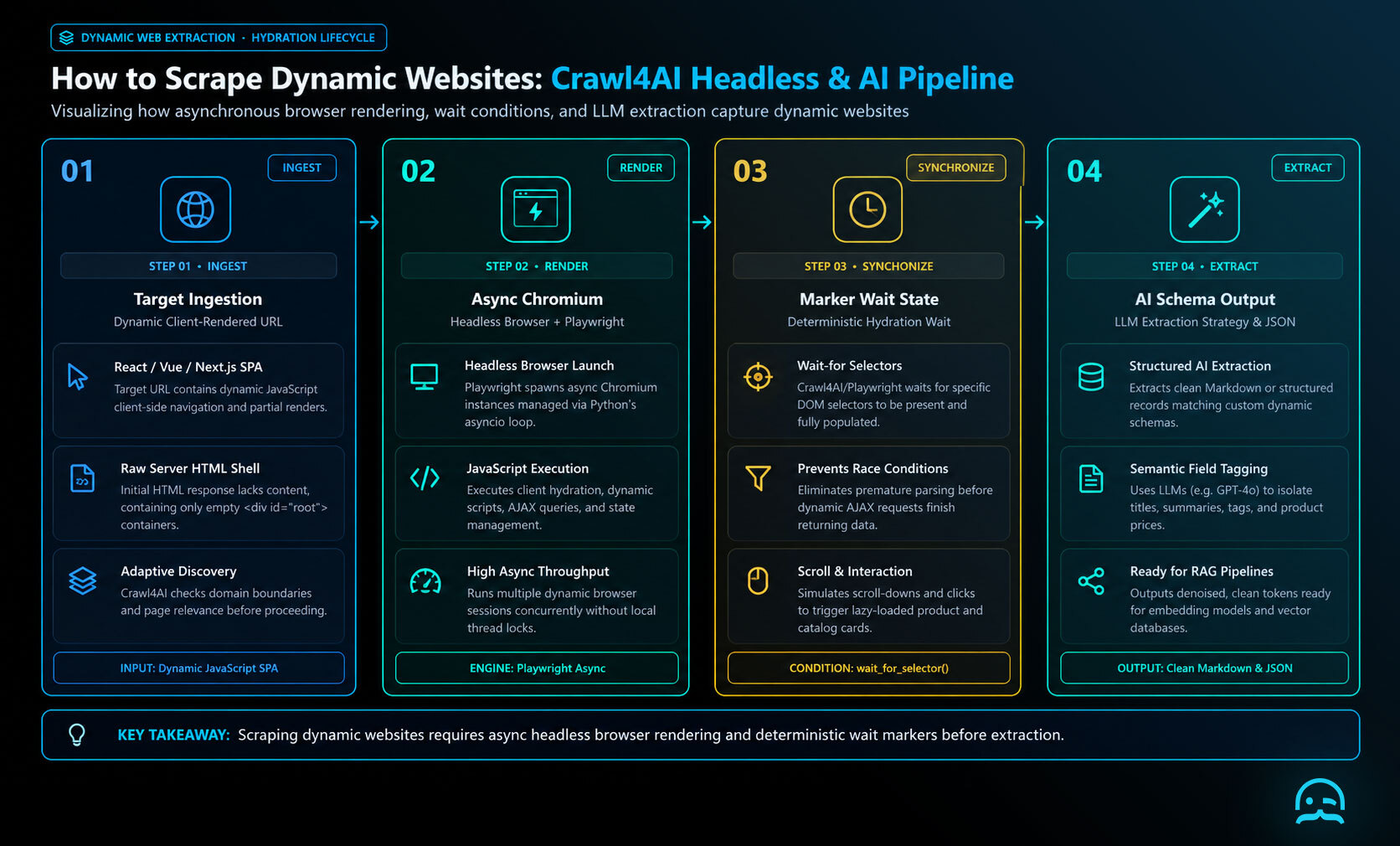
How to Scrape Dynamic Websites with Crawl4AI
To scrape dynamic websites, wait for the React-rendered content before extracting it. Crawl4AI’s quickstart pattern combines an asynchronous browser with a wait_for condition, preventing extraction from racing ahead of the application.
import asyncio
from crawl4ai import AsyncWebCrawler, BrowserConfig, CrawlerRunConfig

async def main():
    browser = BrowserConfig(headless=True)
    run = CrawlerRunConfig(wait_for="css:main")

    async with AsyncWebCrawler(config=browser) as crawler:
        result = await crawler.arun(
            url="https://react.dev/learn",
            config=run,
        )
        print(result.markdown)

asyncio.run(main())
For an application with a known data marker, replace main with a selector that appears only after rendering, such as .product-card. The adaptive crawling documentation is useful when the rendered page also reveals links that require further discovery.
Flexible Extraction Output
To scrape dynamic websites, Crawl4AI can return clean Markdown, structured JSON, or safe HTML. This output is ready for AI pipelines, search indexes, and analytics systems. These formats reduce the need for post-processing while supporting different downstream requirements. Extraction can start with simple CSS selectors. It can also use advanced semantic grouping methods. This lets workflows shift from selecting elements to organizing structured content when needed.
Scrape Dynamic Websites with LLM Extraction
To scrape dynamic websites into consistent records, pair browser rendering with Crawl4AI’s LLMExtractionStrategy. Define a schema and extraction instruction, then inspect extracted_content rather than parsing the page manually. The Crawl4AI quickstart documents the surrounding crawler configuration.
import asyncio
import os
from pydantic import BaseModel
from crawl4ai import AsyncWebCrawler, CrawlerRunConfig
from crawl4ai.extraction_strategy import LLMExtractionStrategy

class Article(BaseModel):
    title: str
    summary: str
    tags: list[str]

async def main():
    strategy = LLMExtractionStrategy(
        provider="openai/gpt-4o-mini",
        api_token=os.environ["OPENAI_API_KEY"],
        schema=Article.model_json_schema(),
        extraction_type="schema",
        instruction="Extract the article title, a concise summary, and topical tags."
    )
    config = CrawlerRunConfig(extraction_strategy=strategy)
    async with AsyncWebCrawler() as crawler:
        result = await crawler.arun("https://example.com/article", config=config)
        print(result.extracted_content)

asyncio.run(main())
For production runs, keep the schema narrow, validate returned JSON, and record failures for retry or human review. The complete SDK reference is useful when tuning strategy and crawler options.
Adaptive Crawling
When you scrape dynamic websites, Crawl4AI’s adaptive crawling checks each new page for relevance. It does not keep crawling to a set depth or page limit. After it collects sufficient relevant content, the crawl can stop early, saving time and reducing unnecessary requests. This approach is especially useful for workflows that feed crawled content into AI summarization or embedding systems. The adaptive crawling documentation explains the configuration options.
Media and Link Extraction
Media and Link Extraction
Crawl4AI can extract images, audio and video references, metadata, and lists of internal and external links. This makes it suitable for workflows that scrape dynamic websites and require multiple content types from a single domain.
Typical Use Cases
The use cases below show how Crawl4AI helps teams scrape dynamic websites for AI data, research, and monitoring. It also supports other structured extraction workflows.
1. Feeding AI Models with High-Quality Data
Crawl4AI helps teams scrape dynamic websites for RAG systems and training datasets. It provides structured, clean output that cuts down on later preprocessing. Its native Markdown and JSON formats support a direct path from crawling to embedding or indexing.
2. Research and Market Intelligence
To scrape dynamic websites, researchers can automate large-scale collection from documentation, news portals, and industry databases. Custom extraction strategies capture only the relevant fields and sections for focused research and market-intelligence analysis.
3. Product Monitoring and Competitive Intelligence
When you scrape dynamic websites across multiple web properties, Crawl4AI can track pricing updates, product descriptions, and positioning. Its asynchronous architecture and fine-grained configuration help maintain efficiency as monitoring scales.
Advanced Options and Deployment
To scrape dynamic websites, Crawl4AI supports adaptive crawling with scoring rules. It also supports multiple extraction methods per crawl. It can generate screenshots and PDFs for archiving. It also supports deep crawling with set depth and filters. These options provide precise control over crawl behavior and scope. Recent releases also added real-time monitoring dashboards and webhook integrations. This makes Crawl4AI suitable for production and enterprise deployments.
When to Choose Crawl4AI
Choose Crawl4AI when you need to scrape dynamic websites rather than handle simple HTML scraping. It is a strong fit for projects requiring the following capabilities:
- Dynamic page rendering
- Adaptive content discovery
- AI-ready structured output
- Fine-grained crawling control
- Open-source flexibility and extensibility
For small or static scraping tasks, a lightweight library may be sufficient. As complexity and scale increase, Crawl4AI’s architecture becomes a major advantage.
Conclusion
Crawl4AI offers a modern way to scrape dynamic websites. It combines browser-based rendering, async crawling, and flexible extraction methods. The resulting data is immediately usable in AI and analytics pipelines.
Its open-source foundation lets teams adapt the framework to meet project needs. Ongoing development also continues to expand its capabilities. The official quickstart and SDK reference offer practical starting points for evaluating and integrating the framework.
For research, analytics, or model-training projects that require reliable extraction from dynamic websites, Crawl4AI is worth exploring. Teams that need a managed solution can also use managed crawling platforms. These platforms include built-in proxy support. They also provide anti-bot protection. They can scale with your infrastructure needs.
What We Learned
To scrape dynamic websites with Crawl4AI, use browser rendering, async crawling, and structured extraction. Then use adaptive crawling to stop when the content is relevant enough. The practical pattern is render, extract, validate, and hand off Markdown or JSON to the next workflow.
Use the Crawl4AI quickstart to establish a working crawl, then refine scope with the adaptive crawling documentation. The key takeaway is to match crawl depth, extraction format, and stopping rules to the task. Don’t treat every page as the same scraping job.
Explore a Scalable Data Extraction Starting Point
See how MrScraper’s infrastructure can support automated data extraction workflows as you evaluate options for modern web crawling.
Summarize this post
Open it in your assistant of choice with the prompt ready to send.
Take a Taste of Easy Scraping!

Find more insights here

The Ultimate Web Crawlers List: 15 Tools for Every Data Need
Compare the best web crawlers for 2026. Learn the difference between open-source, managed APIs, and…
Web Scraping MCP Server: Giving AI Agents Direct Access to Live Web Data
Learn how a Web Scraping MCP Server gives AI agents live web access while reducing token costs by 87…
Scaling E-commerce Competitive Intelligence with Automated Data Harvesting
Scale e-commerce data harvesting with residential proxies and AI. Learn how modern data extraction s…