MrScraper: A No-Code Visual Web Scraper for Easier Data Extraction
Web ScrapingLearn how MrScraper helps users extract website data with an AI-powered, no-code visual scraper, plus API and Zapier integrations for automation.
MrScraper is an AI-powered, no-code visual web scraper for extracting website data without writing extraction code. This guide explains what the tool does, what users report, and how to evaluate a web scraping API. It also covers built-in proxies before you choose one.
What people think about MrScraper
Users describe MrScraper as a no-code tool for extracting website data without technical skills. They also connect it to APIs and Zapier. This moves data from collection to delivery. The recurring themes in their feedback are quick setup, fast support, large-scale collection, and sites that are hard to scrape.
- Adnan Sher is listed as a Product Hunt user in the testimonial panel. His reaction is shown as strongly positive.
- Harper Perez, a Product Hunt user, praises the white-glove service offered to every user. Harper describes the support as generous and customer-focused.
- Jayesh Gohel says the tool can handle annoying captchas. It can also collect lots of data at once. This reduces the time and effort involved.
- Kim Moser, a computer consultant, says it is very useful to collect large amounts of data without captcha blockers. Kim also highlights the efficient collection of the data users need.
- Nicola Lanzillot is included as another Product Hunt user in the testimonial panel. This reinforces the section’s focus on practical user reactions.
Support
Head to the community to connect directly with the team and other users. For questions, contact the team via live chat, available 24 hours a day, five days a week. You can also reach out through the official X account or the founder. The team is happy to help with questions, feedback, and getting started.
The community is available through Slack. The site also provides a homepage for learning more about the visual web scraper, which is designed to extract data from websites easily and without getting blocked.
- Community: Join the Slack community to talk with the team and other users.
- Live chat: Ask questions through the website’s live chat during its stated 24/5 availability.
- X: Follow the official account for updates or contact the team there.
- Feedback: Submit questions, feature requests, and other feedback through the feedback portal.
- Founder contact: Reach out to the founder when direct contact is helpful.
Support resources include the Help Center, API Documentation, the Feature Request page, the Changelog, and the Status page. Together, these resources provide product guidance, documentation, updates, a place to suggest improvements, and current service information.
Choosing a Scraper for the Job
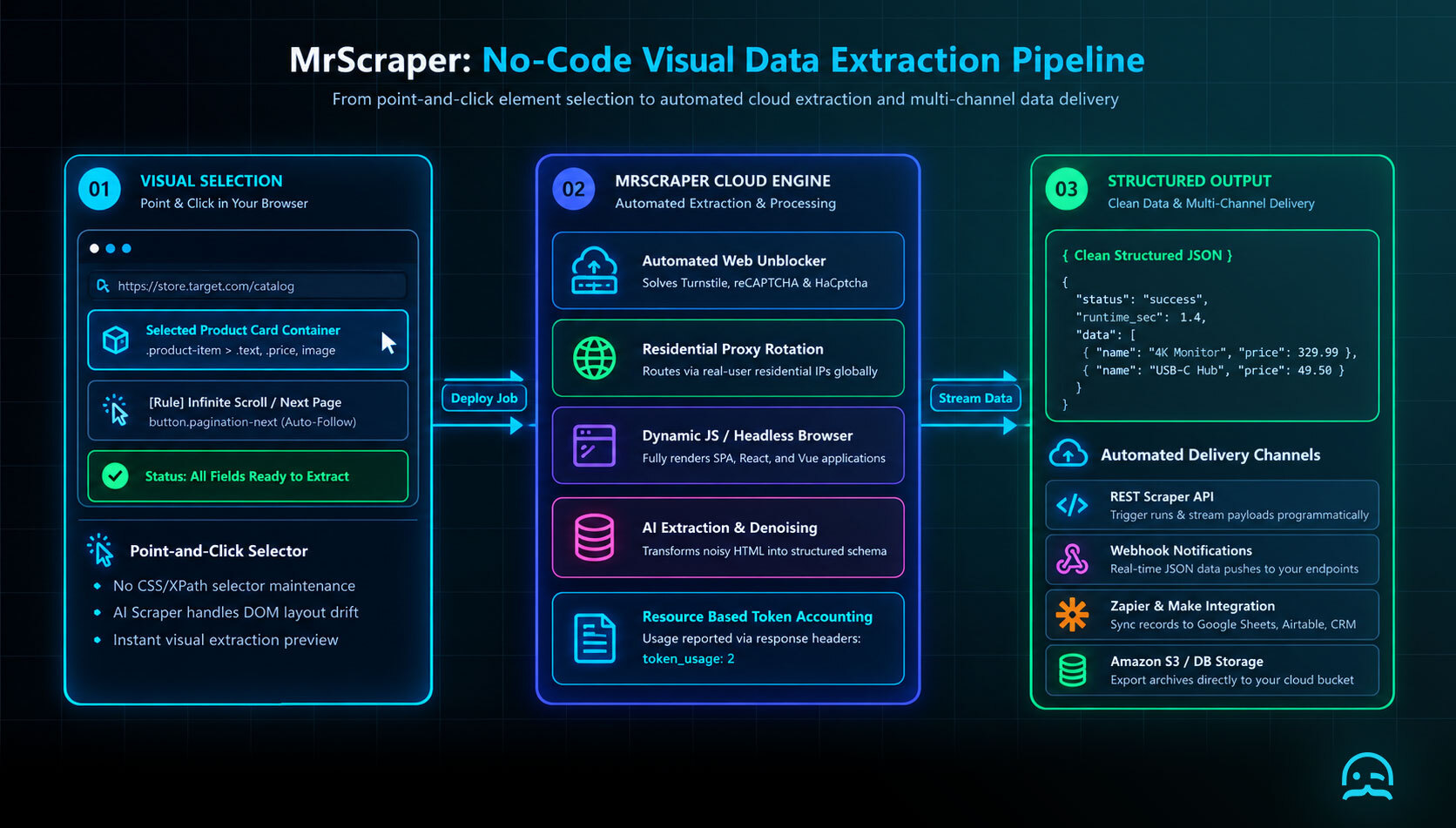
MrScraper's central promise is not a complex scraping framework but a shorter path from a website to usable results. An AI-assisted workflow can help people build scrapers without writing traditional extraction code. The visual setup is meant to make a first project easier.
A practical way to test that promise is the capability-to-workflow check. Start with the data you need, then trace how each capability helps you obtain and use it. Captcha handling matters when a target site presents access challenges. Bulk collection matters when the same fields must be gathered across many pages. API access matters when extracted results need to enter another application instead of staying in a dashboard.
- Choose a small target and confirm that the required fields can be selected reliably.
- Use the visual builder to define the extraction flow before attempting a large collection.
- Check whether the output can move into the next step through an API or Zapier integration.
- Test difficult pages separately instead of assuming that one successful page represents every target.
- Use documentation, live chat, or the community when the workflow needs troubleshooting.
A one-time collection has different requirements from a recurring workflow that must deliver data to another system. In the second case, the handoff is part of the solution. So, the API documentation and available integrations need the same attention as the scraper setup. A tool that is easy to configure but difficult to connect can still create manual work later.
Proxy API Selection Criteria
If you pair a no-code scraper with a proxy or scraping API, these features decide if each run stays consistent. This holds true when a target site changes responses or sets rate limits.
- Location control: Confirm that a request can target the country, region, or city relevant to the data you need. Do not assume that a generic country parameter produces a local result.
- Session control: Find a documented way to keep one proxy identity across related requests. Also provide an option to rotate identities between checks.
- Failure visibility: Require an HTTP status, provider error code, target response status, and request identifier. A successful API response that contains a block page is not a successful collection.
- Usage accounting: Compare the billable unit with your workflow. A rendered request, retry, or proxy transfer may be counted differently from a basic request.
- Policy fit: Make sure the provider allows the search engine, query volume, and target region you plan to use. Follow the target site’s terms and all applicable laws.
import os
import requests

api_url = os.environ["SCRAPING_API_URL"]
api_key = os.environ["SCRAPING_API_KEY"]

params = {
    "api_key": api_key,
    "url": "https://www.bing.com/search?q=example+product",
    "country": "us",
    "render_js": "false",
    "session": "collection-run-2026-09-10",
}

response = requests.get(api_url, params=params, timeout=30)
response.raise_for_status()

request_id = response.headers.get("x-request-id", "not-provided")
content_type = response.headers.get("content-type", "")
body = response.text

if "captcha" in body.lower() or "access denied" in body.lower():
    raise RuntimeError(f"Target response requires review; request_id={request_id}")

print({
    "provider_status": response.status_code,
    "request_id": request_id,
    "content_type": content_type,
    "bytes": len(response.content),
})
This small contract test is useful before comparing vendors such as ScraperAPI, ScrapingBee, Bright Data, Apify, or Oxylabs. Set the endpoint and credentials from the provider's current documentation. Run the same query across the locations you need. Save both the returned page and the metadata.
It clarifies the status codes, redirects, caching, and request behavior that affect how a collector interprets API responses. A proxy API is suitable only when its observable responses, controls, and cost remain predictable for that workload.
Bing SERP API Shortlist
A shortlist is a starting point, not a final choice. The best comparison is not the number of proxies advertised. The example below targets Bing, but this method works with any search engine or site. First, confirm the service allows your planned workflow and retention period. Then, test it.
- ScraperAPI is a candidate to evaluate for a managed scraping endpoint and Bing result collection.
- ScrapingBee is a candidate to evaluate when the workflow needs an API rather than browser automation maintained in-house.
- Bright Data is a candidate to evaluate when proxy configuration, geography, and request controls are central requirements.
- Apify is a candidate to evaluate when SERP extraction needs to sit alongside reusable actors or scheduled jobs.
- Oxylabs is a candidate to evaluate for a managed data-collection workflow with documented access and usage limits.
Treat those names as a shortlist, not a substitute for testing. Send the same small set of keywords to each service. Then compare rank, result URL, title, ad treatment, latency, failure rate, and total cost. Keep the query set stable. Record the requested location and language. Changing either can change the SERP, even if the provider stays the same.
import os
import requests
from bs4 import BeautifulSoup

API_ENDPOINT = os.environ["SERP_API_ENDPOINT"]
API_KEY = os.environ["SERP_API_KEY"]

params = {
    "api_key": API_KEY,
    "url": "https://www.bing.com/search?q=site%3Aexample.com+web+scraping",
    "country": "us",
}
response = requests.get(API_ENDPOINT, params=params, timeout=30)
response.raise_for_status()

soup = BeautifulSoup(response.text, "html.parser")
results = []
for item in soup.select("li.b_algo"):
    link = item.select_one("h2 a")
    if link:
        results.append({"title": link.get_text(" ", strip=True), "url": link.get("href")})

for position, result in enumerate(results, start=1):
    print(position, result["title"], result["url"])
What We Learned
MrScraper is a no-code visual scraper. It helps people get data from websites without building their own extractor. Users often praise its quick setup, captcha handling, bulk collection, and responsive support. If you are considering a scraping or proxy API, judge it on location control and session control. Also check failure visibility, usage accounting, and policy fit. Then send the same small fixture through each option before you commit. Start narrow, verify what comes back, and expand only once the whole path from collection to delivery works.
Tired of blocked requests, broken scrapers, or inconsistent data collection?
MrScraper is built to handle challenging websites, so you can spend less time troubleshooting and more time working with your data.
Get 1,000 free tokens to test it here.
Summarize this post
Open it in your assistant of choice with the prompt ready to send.
Take a Taste of Easy Scraping!

Find more insights here

Claude Code Competitor Pricing Research
Use Claude Code and MrScraper MCP to refresh public competitor pricing, normalize billing periods an…

Use MrScraper MCP to Compare Public SaaS Pricing and Plan Limits
Build a source-backed SaaS plan comparison using MrScraper MCP. Preserve prices, quotas, billing ter…

Build a Product Attribute Classifier with LangChain and MrScraper
Build a LangChain workflow that extracts product evidence with MrScraper, normalizes attributes and…