API Calls 101: Understanding How the Web Communicates
Web ScrapingHow API calls work: HTTP methods, endpoints, headers, status codes, authentication and retries, plus what changes when you call a developer scraping API.
An API call is a structured request from a client to an endpoint, asking a server to fetch, create, update or delete something. It carries an HTTP method, optional headers and parameters, and sometimes a body. The server returns a status code and usually JSON. Everything else - authentication, rate limits, retries - is detail layered on top of that one exchange.
This guide covers the basics first. Then it explains what most 101 guides skip. It shows what changes when the API is a scraping API, not a standard one.
What Does API Mean?
API stands for Application Programming Interface. An API defines a set of rules for how one piece of software talks to another.
Instead of accessing a database or service directly, an application sends a structured request and receives a structured response. That separation is the whole point: it lets each side change internally without breaking the other.
What Is an API Call?
An API call is a request sent from a client to an API endpoint. It asks the endpoint to perform an action. It may return data, create a record, or change something that exists.
Every call has four parts:
- A destination, the endpoint
- A method, such as GET or POST
- Optional data, as parameters or a body
- A response, containing a status code and usually data
A Simple Example of an API Call
Here is a basic example using Python and the requests library:
import requests

response = requests.get("https://api.example.com/users/123", timeout=15)

if response.status_code == 200:
    data = response.json()
    print(data)
else:
    print(f"Request failed with status {response.status_code}")
The client sends a GET request to retrieve user data, and the server responds with JSON.
Two habits worth forming early. Always pass a timeout, because without one a hung connection blocks indefinitely. And always handle the non-200 branch — the version of this snippet that only handles success is the most common bug in production API code.
Common HTTP Methods Used in API Calls
The method tells the API what kind of action you are requesting.
| Method | Purpose | Safe to retry? |
|---|---|---|
| GET | Retrieve data without modifying it | Yes |
| POST | Create a new resource | No, may duplicate |
| PUT | Replace an existing resource entirely | Yes, same result each time |
| PATCH | Update part of a resource | Usually, depends on implementation |
| DELETE | Remove a resource | Yes, already-deleted is still deleted |
The retry column is the one people learn the hard way. GET, PUT and DELETE are idempotent — running them twice produces the same end state as running them once. POST is not, which is why a naive retry wrapper around a payment or signup call can create two records.
API Endpoints and URLs
An endpoint is a specific URL that accepts API calls:
https://api.example.com/products
https://api.example.com/products/42
The first addresses a collection, the second a single member of it. That convention is near-universal and it is why you can usually guess an endpoint's behaviour from its shape.
Request Headers and Parameters
Headers carry metadata about the request. Common ones include authentication tokens, the content type, and client identification.
Query parameters refine what you are asking for:
GET /products?category=books&limit=10&offset=20
limit and offset here are pagination parameters, and they are worth recognising because they appear constantly. See handling pagination across multiple pages for how to walk them properly.
Request Bodies
For POST, PUT and PATCH, the data usually goes in the request body as JSON:
{
  "name": "Wireless Mouse",
  "price": 29.99,
  "in_stock": true
}
In Python, pass it with the json parameter rather than serialising it yourself. It sets the Content-Type header for you:
response = requests.post(
    "https://api.example.com/products",
    json={"name": "Wireless Mouse", "price": 29.99, "in_stock": True},
    headers={"Authorization": "Bearer YOUR_ACCESS_TOKEN"},
    timeout=15,
)
API Responses and Status Codes
Every call returns a status code indicating what happened.
| Code | Meaning | What to do |
|---|---|---|
| 200 OK | Succeeded | Parse the response |
| 201 Created | Resource created | Store the returned ID |
| 400 Bad Request | Your input was invalid | Fix the request. Retrying will not help |
| 401 Unauthorized | Authentication failed | Check the token. Retrying will not help |
| 403 Forbidden | Authenticated but not permitted | Check permissions, or you have been blocked |
| 404 Not Found | Resource does not exist | Retrying will not help |
| 429 Too Many Requests | Rate limited | Back off and retry |
| 500 / 502 / 503 / 504 | Server-side problem | Retry with backoff |
The useful division is not by number range but by whether retrying can succeed. 429 and 5xx are transient, so retry them. 400, 401, 403, and 404 are not temporary errors. So failing fast is correct. A wrapper that retries a 401 five times is just a slower failure.
Handling Rate Limits and Retries
Any API you call often will eventually rate-limit you. How you respond decides if it is a short pause or an outage.
The correct pattern is exponential backoff with jitter. Double the wait after each failure. Then pick a random delay between zero and that maximum. Randomness matters because without it, workers retry together. The server then sees the same traffic spike, just later. The canonical reference is Marc Brooker’s Exponential Backoff And Jitter on the AWS Architecture Blog. The answer is not to remove backoff. It is to add jitter.
import random
import time

import requests

RETRYABLE = {429, 500, 502, 503, 504}

def call_with_retries(url: str,
                      headers: dict | None = None,
                      max_retries: int = 5,
                      base_delay: float = 1.0,
                      max_delay: float = 30.0) -> requests.Response:
    """GET with exponential backoff and full jitter on transient failures."""
    for attempt in range(max_retries):
        response = requests.get(url, headers=headers, timeout=30)

        if response.ok:
            return response

        if response.status_code in RETRYABLE:
            retry_after = response.headers.get("Retry-After", "")
            if retry_after.isdigit():
                delay = float(retry_after)   # The server knows; you are guessing
            else:
                ceiling = min(max_delay, base_delay * (2 ** attempt))
                delay = random.uniform(0, ceiling)
            time.sleep(delay)
            continue

        response.raise_for_status()   # Non-retryable. Fail fast.

    raise RuntimeError(f"Gave up on {url} after {max_retries} attempts")
Always prefer Retry-After over your own arithmetic when the server sends it. And note that raise_for_status() sits outside the retryable branch deliberately — putting it inside a generic exception handler is how non-retryable errors end up being retried.
Authentication in API Calls
Most APIs require authentication. The common mechanisms:
- API keys - a single static secret. Simple, and the whole key is compromised if leaked.
- Bearer tokens - usually short-lived, so exposure has a time limit.
- OAuth access tokens - for acting on behalf of a user rather than your own application.
Credentials go in headers, never in the URL:
Authorization: Bearer YOUR_ACCESS_TOKEN
Query strings get logged by servers, proxies and browser history. A key in a URL is a key in a log file. Read credentials from environment variables rather than hardcoding them:
import os

headers = {"Authorization": f"Bearer {os.environ['API_TOKEN']}"}
Where API Calls Are Used
- Frontend applications fetching data from backends
- Mobile apps syncing user state
- Payment systems processing transactions
- Data pipelines pulling from third-party services
- Scraping APIs retrieving content from sites that have no API of their own
That last one is worth separating out, because it behaves differently from the rest.
Scraping APIs: what changes for developers
A conventional API is a cooperative interface. The provider built it so you would call it, documented the schema, and returns predictable JSON.
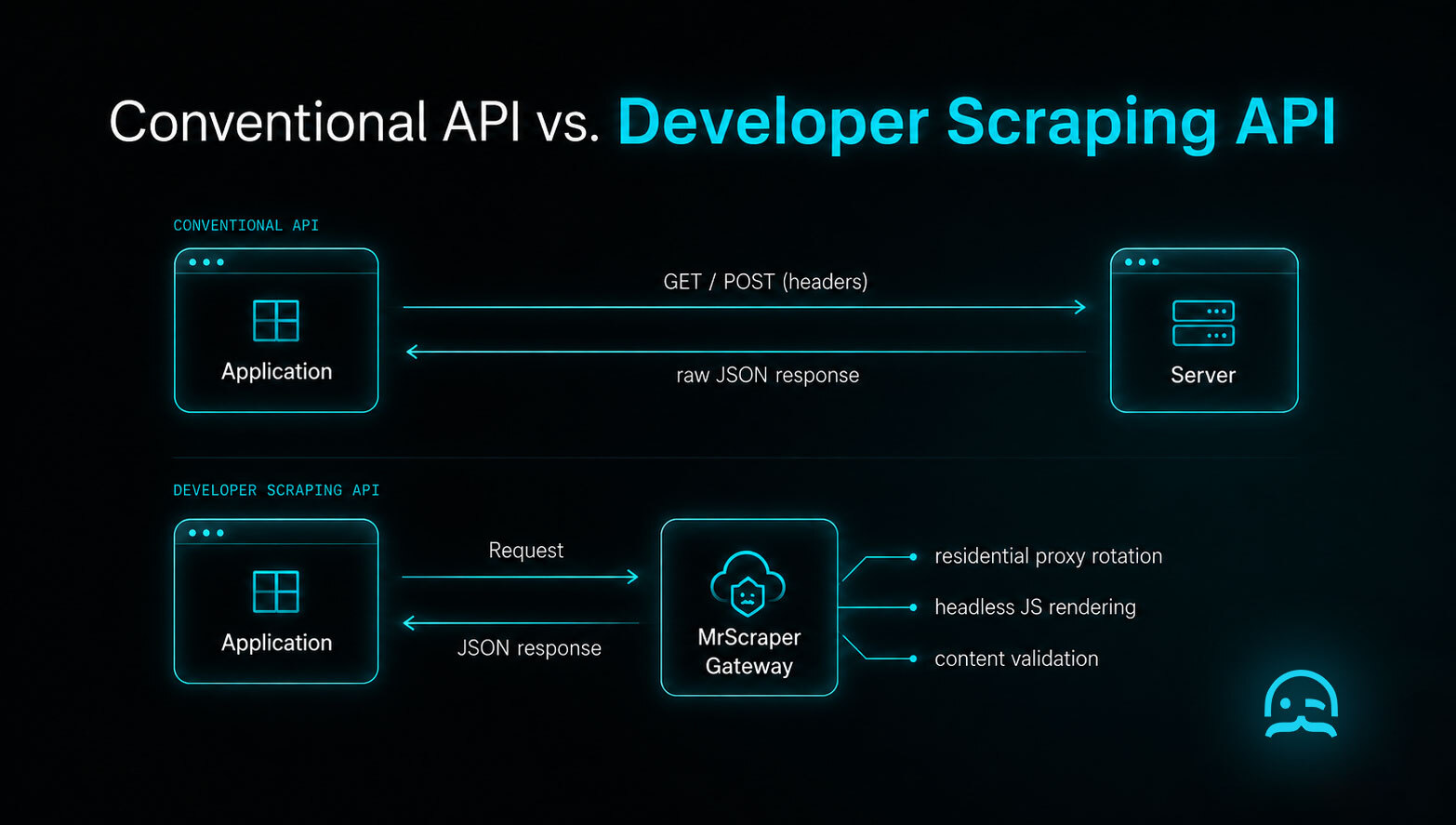
A developer scraping API exists because the data you want has no such interface. The target site was not built for your queries. It may block automated access. It can change its structure without notice. The API call itself looks familiar; the failure modes do not.
Four differences that matter in your code:
1. Success is not the same as usable data. A conventional 200 means the data is there. A scraping API that returns 200 may have fetched a challenge page. It may have fetched a consent interstitial. Or it may have fetched a thin page made for bots. Assert on the content, not the status code:
def looks_usable(payload: dict, min_fields: int = 3) -> bool:
    """A 200 from a scraping API does not guarantee real data."""
    data = payload.get("data") or {}
    populated = [k for k, v in data.items() if v not in (None, "", [], {})]
    return len(populated) >= min_fields
2. Latency is an order of magnitude higher. A conventional API responds in tens of milliseconds. A scraping API rendering JavaScript through a residential proxy may take 10 to 60 seconds. Set timeouts accordingly, and design for asynchronous jobs rather than blocking calls at volume.
3. Requests are metered on resources, not just count. Rendering and bandwidth cost real money, so scraping APIs often track runtime and data use. That changes how you optimise: fetching fewer, more targeted pages matters more than batching.
4. The response schema is yours to define. With a conventional API the schema is fixed. With prompt-based extraction, you choose the fields you want. This makes the contract yours. It also makes you responsible for validating it.
import asyncio
import os

from mrscraper import MrScraper

client = MrScraper(token=os.environ["MRSCRAPER_API_TOKEN"])

async def main():
    result = await client.create_scraper(
        url="https://example.com/product/123",
        message=(
            "Extract product_name (string), price (number, no currency symbol), "
            "in_stock (boolean). Return null for missing fields."
        ),
        agent="general",
        proxy_country="US",
    )

    if result["status"] != "Finished":
        raise RuntimeError(result.get("error") or result["status"])

    print(result["data"])

asyncio.run(main())
Note the status check. The job status and the HTTP status are different things: a failed run can still return HTTP 200 with a populated envelope, so raise_for_status() alone will hand you an empty payload and no error.
If you are reviewing scraping APIs, see the Web Scraper API documentation. It covers endpoints and response formats. The side-by-side comparison explains how the main options differ.
API Calls vs Direct Database Access
Direct database access couples systems tightly and widens your security surface. An API adds a layer that controls access and validates input. It also enforces business rules. This lets internal implementations change without breaking external clients.
The same logic explains why scraping APIs exist. Rather than every consumer maintaining browser infrastructure and proxy pools, one interface absorbs that complexity and returns structured data.
Conclusion
An API call is a structured request and a structured response. The concept is simple, and almost everything else builds on it. Authentication controls who may call. Status codes report what happened. Rate limits govern how often. Retries decide what happens when something goes wrong.
Three things to carry forward. Divide status codes by whether retrying can succeed, not by number. Use exponential backoff with jitter, not fixed delays. And when the API is a scraping API, validate the content. Do not trust the status code. A 200 response can still be a challenge page. That is the most costly false positive.
Ready to work with a scraping API? Try MrScraper free with no credit card, or compare the options first.
Frequently asked questions
What is the difference between an API and an API call?
An API is the interface - the set of rules defining how software communicates. An API call is one event. A client sends a request to the interface. This triggers an action or retrieves data.
Which HTTP methods are most common in API calls?
GET for retrieving, POST for creating, PUT or PATCH for updating, DELETE for removing. GET, PUT and DELETE are idempotent, meaning running them twice produces the same end state, so they are safe to retry. POST is not, which is why retrying a POST can create duplicate records.
What information is typically included in an API request?
An endpoint URL, an HTTP method, headers for authentication and metadata, and either query parameters or a request body carrying data. Credentials belong in headers rather than the URL, because query strings are logged by servers and proxies.
Why are API status codes important?
They tell you what happened, but the useful division is whether retrying can succeed. 429 and 5xx codes are transient, so retry them with backoff. 400, 401, 403 and 404 will not succeed on retry, so fail fast instead.
What is a developer scraping API and how is it different?
A scraping API retrieves content from sites that have no API of their own. In practice, four things differ. A 200 response may return a challenge page, not data. Validate the content, not the status. Latency can reach tens of seconds because pages are rendered. Billing is metered on runtime and bandwidth, not request count. With prompt-based extraction, you define the response schema yourself.
How should I handle rate limits when calling an API?
Exponential backoff with full jitter. Double the wait after each failure, then pick a random delay between zero and that ceiling. The randomness prevents concurrent workers from retrying in lockstep and recreating the traffic spike. Always prefer the server's Retry-After header over your own calculation.
Is an API call more secure than direct database access?
Yes. An API provides a controlled abstraction layer allowing centralised authentication, input validation and business rule enforcement, without exposing the underlying database structure to clients.
Reliable web data collection shouldn't be complicated.
MrScraper helps enterprise teams collect data at scale, including from websites that are difficult to extract. Now it's your turn to put it to the test.
Get 1,000 free tokens and try MrScraper here.
Summarize this post
Open it in your assistant of choice with the prompt ready to send.
Take a Taste of Easy Scraping!

Find more insights here

Claude Code Competitor Pricing Research
Use Claude Code and MrScraper MCP to refresh public competitor pricing, normalize billing periods an…

Use MrScraper MCP to Compare Public SaaS Pricing and Plan Limits
Build a source-backed SaaS plan comparison using MrScraper MCP. Preserve prices, quotas, billing ter…

Build a Product Attribute Classifier with LangChain and MrScraper
Build a LangChain workflow that extracts product evidence with MrScraper, normalizes attributes and…