
Fast Web Scraper in PHP: A Developer’s Guide
Web ScrapingLearn how to build a fast web scraper in PHP with cURL, DOMDocument, Guzzle, DOMCrawler, CSS selectors, and practical parsing examples.
A fast web scraper in PHP can fetch pages with cURL or Guzzle. It can parse HTML with DOMDocument or DOMCrawler. It can extract structured data using XPath or CSS selectors.
What Is Web Scraping in PHP?
Web scraping in PHP means writing scripts that:
- Send HTTP requests to target web pages
- Receive the HTML response from the server
- Parse the resulting HTML to locate specific elements
- Extract structured data such as text, links, or attributes
Unlike APIs built for machine-readable data, PHP scrapers retrieve content meant for human browsers. With the right tools, you can automate extraction and turn unstructured HTML into usable structured data.
Setting Up a Basic Scraper Using cURL
PHP’s built-in cURL extension is the most common way to perform HTTP requests when scraping.
Here’s a simple scraper that uses cURL to fetch a web page and display the response:
<?php
// Initialize a cURL session
$ch = curl_init();

// Target URL
curl_setopt($ch, CURLOPT_URL, "http://www.example.com");

// Return the response instead of printing it
curl_setopt($ch, CURLOPT_RETURNTRANSFER, true);

// Follow HTTP redirects automatically
curl_setopt($ch, CURLOPT_FOLLOWLOCATION, true);

// Execute the request
$response = curl_exec($ch);

// Check for errors
if ($response === false) {
    echo "cURL Error: " . curl_error($ch) . "\\n";
} else {
    echo "Response length: " . strlen($response) . "\\n";
}

// Close the session
curl_close($ch);
This script:
- Initializes a cURL session
- Sends a GET request to the specified URL
- Returns the HTML as a string
- Prints the length of the response
These methods are foundational in PHP scraping.
Parsing and Extracting Content with DOMDocument
Once you fetch HTML, you need an efficient way to parse and extract data. PHP’s DOMDocument and DOMXPath classes allow you to load raw HTML into a DOM tree and run XPath queries.
Example: extracting all <h1> text from a page.
<?php
// Fetch HTML with cURL
$ch = curl_init();
curl_setopt($ch, CURLOPT_URL, "http://www.example.com");
curl_setopt($ch, CURLOPT_RETURNTRANSFER, true);
$html = curl_exec($ch);
curl_close($ch);

// Suppress parsing errors
libxml_use_internal_errors(true);

// Load into DOMDocument
$doc = new DOMDocument();
$doc->loadHTML($html);

// Create XPath to query the DOM
$xpath = new DOMXPath($doc);

// Extract all <h1> tags
$headings = $xpath->query("//h1");

foreach ($headings as $heading) {
    echo "Heading: " . $heading->textContent . "\\n";
}
This approach uses standard PHP objects and XPath expressions, making it effective when HTML structure is predictable.
Using Guzzle for HTTP Requests
For cleaner syntax and more flexibility than raw cURL, many developers use Guzzle, a popular PHP HTTP client.
<?php
require 'vendor/autoload.php';

use GuzzleHttp\\Client;

$client = new Client([\
    'headers' => [\
        'User-Agent' => 'Mozilla/5.0 (Windows NT 10.0; Win64; x64) AppleWebKit/537.36 (KHTML, like Gecko) Chrome/120.0.0.0 Safari/537.36'\
    ]\
]);

$response = $client->get('https://www.example.com');

echo 'Status code: ' . $response->getStatusCode() . "\\n";
echo 'Body length: ' . strlen($response->getBody()) . "\\n";
Guzzle simplifies request configuration, headers, timeouts, and error handling.
Fast Web Scraper with Guzzle Pool
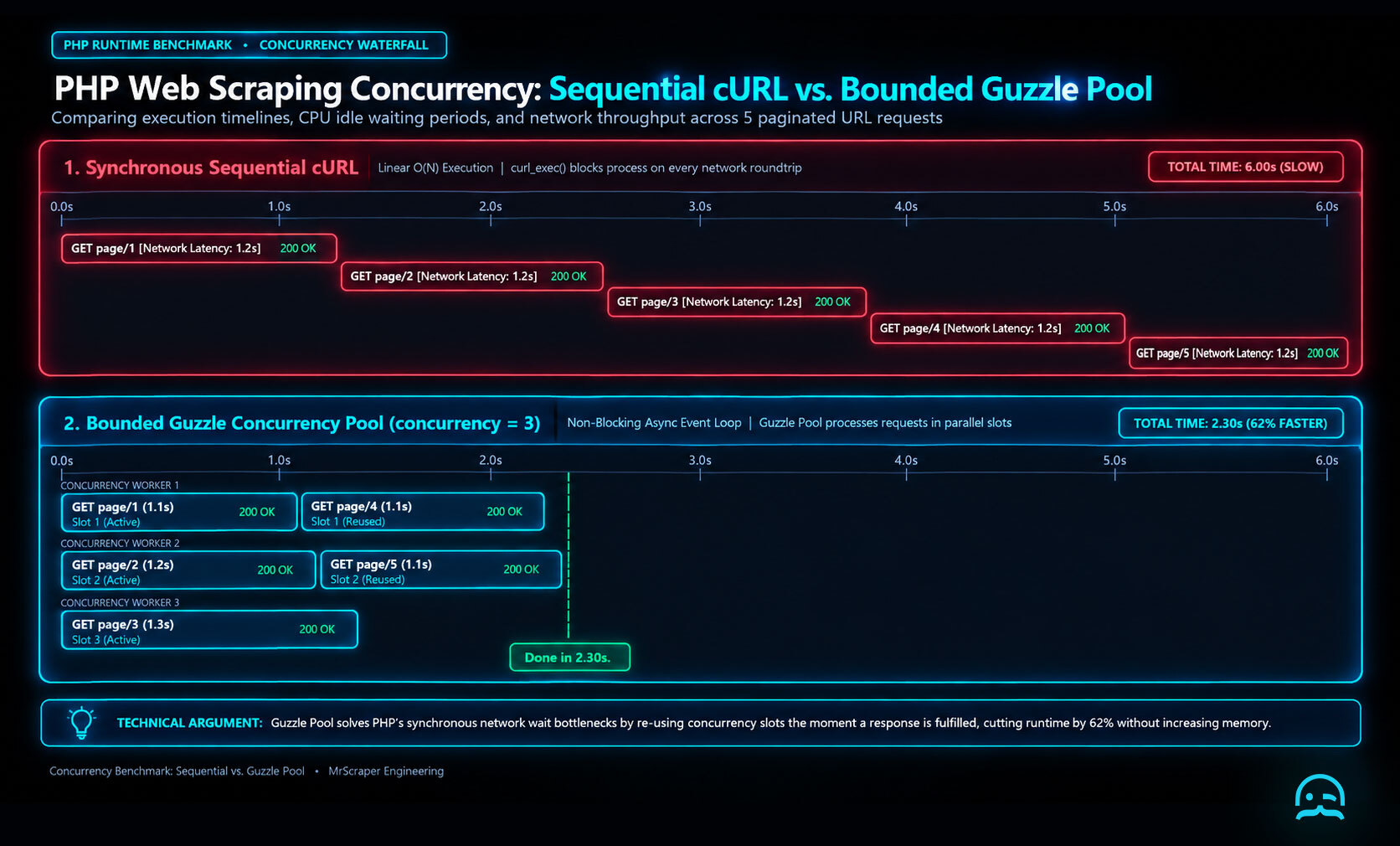
Set concurrency on purpose. Then measure runtime and memory for the target workload. Do not assume a larger pool is faster. This pattern fits paginated URLs that can be fetched independently.
<?php

require __DIR__ . '/vendor/autoload.php';

use GuzzleHttp\Client;
use GuzzleHttp\Pool;
use GuzzleHttp\Psr7\Request;

$client = new Client(['timeout' => 15]);
$urls = [
    'https://example.com/page/1',
    'https://example.com/page/2',
    'https://example.com/page/3',
];

$failed = [];
$requests = static function () use ($urls): Generator {
    foreach ($urls as $url) {
        yield new Request('GET', $url);
    }
};

$pool = new Pool($client, $requests(), [
    'concurrency' => 3,
    'fulfilled' => static function ($response, $index) use ($urls): void {
        file_put_contents(
            __DIR__ . '/page-' . ($index + 1) . '.html',
            (string) $response->getBody()
        );
    },
    'rejected' => static function ($reason, $index) use (&$failed, $urls): void {
        $failed[] = ['url' => $urls[$index], 'reason' => (string) $reason];
    },
]);

$pool->promise()->wait();

file_put_contents(__DIR__ . '/failed.json', json_encode($failed, JSON_PRETTY_PRINT));
Replace the file-writing step with DOMCrawler parsing when the fetched HTML needs structured extraction.
Parsing with DOMCrawler and CSS Selectors
If XPath feels verbose, Symfony’s DOMCrawler lets you extract content using familiar CSS selectors.
Install dependencies
composer require symfony/http-client symfony/dom-crawler symfony/css-selector
Example usage
<?php
require 'vendor/autoload.php';

use Symfony\\Component\\HttpClient\\HttpClient;
use Symfony\\Component\\DomCrawler\\Crawler;

// Create HTTP client
$client = HttpClient::create();

// Send GET request
$response = $client->request('GET', 'https://example.com');
$content = $response->getContent();

// Parse HTML
$crawler = new Crawler($content);

// Extract text from <h1> tags
$h1Text = $crawler->filter('h1')->text();
echo "H1 Text: " . $h1Text . "\\n";
This approach is concise and easy to maintain for complex HTML structures.
Additional Tools and Libraries
Additional Tools and Libraries
Popular PHP scraping libraries include:
- Simple HTML DOM Parser for CSS-style querying.
- voku/simple_html_dom, a modern, actively maintained fork.
- Php-WebDriver for browser automation on JavaScript-heavy pages.
- Symfony Panther for headless browser scraping in PHP.
These tools support workflows ranging from basic scrapers to advanced crawlers.
Building a Fast Web Scraper with ReactPHP
The Oxylabs web-scraping PHP example provides a useful companion reference.
<?php

require __DIR__ . '/vendor/autoload.php';

use React\EventLoop\Loop;
use React\Http\Browser;
use React\Promise\all;
use Psr\Http\Message\ResponseInterface;
use Throwable;

$urls = [
    'https://example.com/one',
    'https://example.com/two',
];

$browser = new Browser();
$requests = array_map(function (string $url) use ($browser) {
    return $browser->get($url)->then(
        fn (ResponseInterface $response) => [
            'url' => $url,
            'html' => $response->getBody()->getContents(),
            'error' => null,
        ],
        fn (Throwable $error) => [
            'url' => $url,
            'html' => null,
            'error' => $error->getMessage(),
        ]
    );
}, $urls);

all($requests)->then(function (array $results): void {
    foreach ($results as $result) {
        if ($result['error'] !== null) {
            fwrite(STDERR, $result['url'] . ': ' . $result['error'] . PHP_EOL);
            continue;
        }

        echo $result['url'] . ': ' . strlen($result['html']) . " bytes\n";
    }
});

Loop::run();
Add parsing inside the successful branch, and keep the request set bounded for larger crawls.
Best Practices and Challenges
Best Practices and Challenges
A fast web scraper should follow these practices:
- Use a realistic User-Agent to avoid simple bot detection.
- Respect robots.txt and the site's terms of service.
- Use a headless browser for JavaScript-rendered content.
- Prepare for rate limits, CAPTCHAs, and IP blocking at scale.
Larger scraping projects usually require proxy management and anti-bot strategies.
MrScraper: Improve Your PHP Web Scraping Workflows
Building scrapers yourself means managing headers, proxies, pagination, and anti-bot defenses. A managed scraping service like MrScraper helps simplify this:
- Automatic proxy rotation to reduce IP bans
- Anti-bot handling for protected websites
- JavaScript rendering support for dynamic pages
- Structured outputs like JSON for faster data usage
This allows your PHP code to focus on extracting data, not fighting infrastructure issues.
Conclusion
PHP remains a practical and powerful choice for web scraping, especially for teams already working in PHP-based environments. From raw cURL requests to advanced parsing with DOMCrawler or Guzzle, PHP offers flexible tools for data extraction.
As scraping needs grow, using PHP with proxy management can keep reliability and performance at scale. You can also add browser automation or managed scraping services to support growth.
What We Learned
A fast web scraper in PHP uses a three-stage pipeline. First, it retrieves pages with cURL or Guzzle. Next, it parses them with DOMDocument or DOMCrawler. Then, it formats the chosen fields for storage. Keeping those stages separate makes changes easier to locate when a request or selector stops working.
<?php
require 'vendor/autoload.php';

use GuzzleHttp\Client;
use Symfony\Component\DomCrawler\Crawler;

$url = 'https://example.com';
$client = new Client(['timeout' => 10]);
$response = $client->request('GET', $url);
$crawler = new Crawler((string) $response->getBody(), $url);
$title = trim($crawler->filter('h1')->first()->text(''));

var_dump($title);
- Check the HTTP response before parsing its body.
- Keep selectors narrow and map extracted values into a defined structure.
- Respect each site’s terms, robots.txt guidance, and request limits.
Continue Your PHP Scraping Workflow
Explore a practical starting point for applying the guide’s PHP scraping techniques to your data extraction workflow.
Summarize this post
Open it in your assistant of choice with the prompt ready to send.
Take a Taste of Easy Scraping!

Find more insights here

The Ultimate Web Crawlers List: 15 Tools for Every Data Need
Compare the best web crawlers for 2026. Learn the difference between open-source, managed APIs, and…
Web Scraping MCP Server: Giving AI Agents Direct Access to Live Web Data
Learn how a Web Scraping MCP Server gives AI agents live web access while reducing token costs by 87…

Scaling E-commerce Competitive Intelligence with Automated Data Harvesting
Scale e-commerce data harvesting with residential proxies and AI. Learn how modern data extraction s…