Wget vs Curl: Which Tool Is Better for Web Scraping?
Web ScrapingDiscover the key differences between Wget and Curl for web scraping. Learn their strengths, limitations, and why a tool like MrScraper can streamline your scraping tasks.
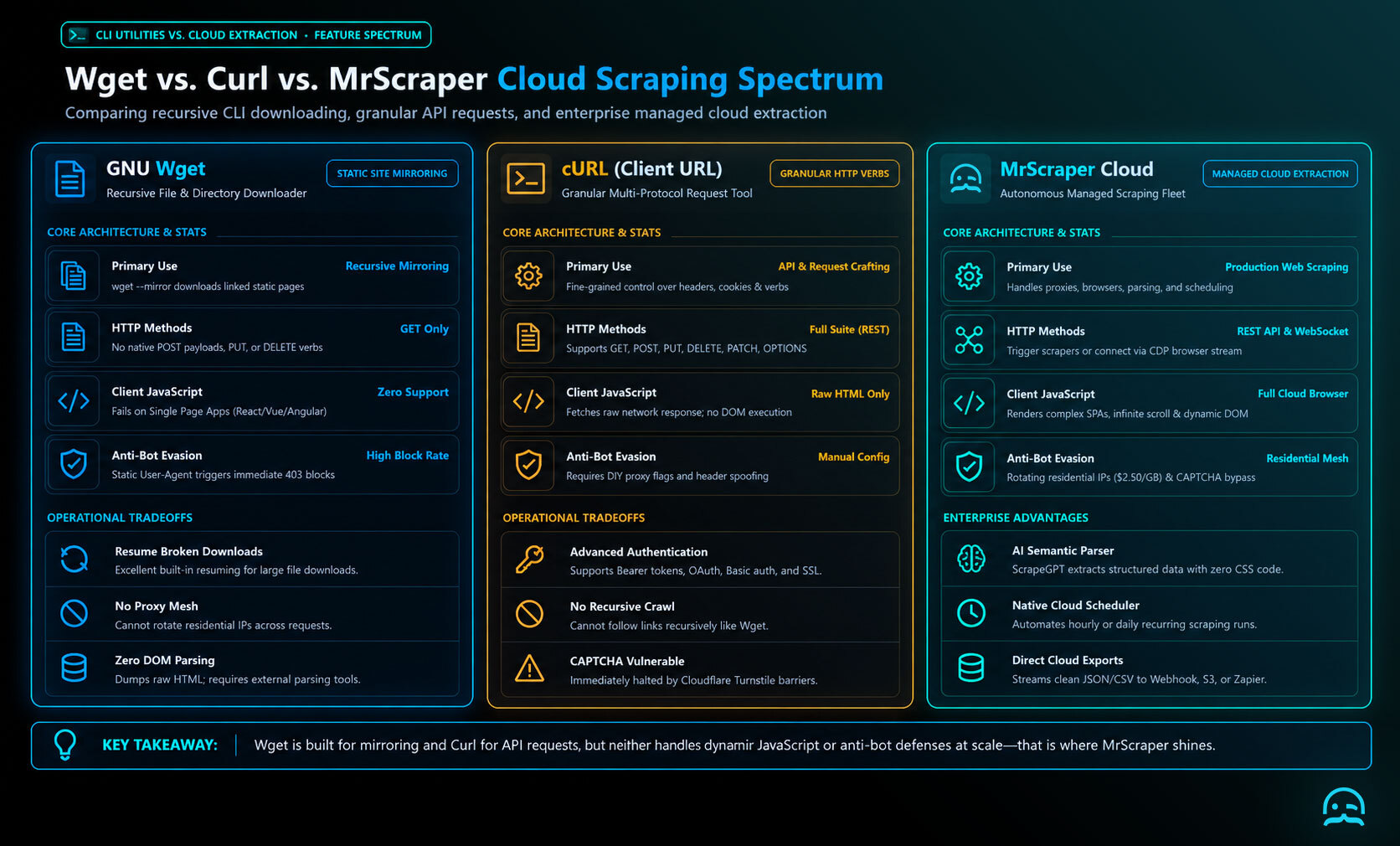
Wget vs curl depends on the task: Wget suits recursive downloads and website mirroring, while curl is better for custom HTTP requests, APIs, headers, cookies, and authentication.
What is Wget?
Wget is a free utility for downloading files from the web. It's particularly good at downloading files recursively, making it perfect for mirroring websites or downloading entire directories. Wget is simple, efficient, and capable of handling HTTP, HTTPS, and FTP protocols.
Example Wget Command:
To download an entire website recursively, you could use:
wget --mirror --convert-links --adjust-extension --page-requisites --no-parent http://example.com
What is Curl?
Curl (Client URL) is a command-line tool and library. It lets you send or get data from servers. It supports many protocols, like HTTP, HTTPS, and FTP. Unlike Wget, Curl is great for specific HTTP requests like GET, POST, PUT, and DELETE. This makes it more useful for APIs and complex requests.
Example Curl Command:
To send a GET request to fetch a webpage’s content, you could use:
curl http://example.com
Wget vs Curl: Key Differences
While both Wget and Curl have overlapping use cases, here are the major differences:
| Feature | Wget | Curl |
|---|---|---|
| Primary Purpose | Downloading files recursively | Making HTTP requests (GET/POST) |
| Recursive Download | Yes | NO |
| Protocols Supported | HTTP, HTTPS, FTP | HTTP, HTTPS, FTP, many more |
| Resuming Downloads | Yes | Yes |
| HTTP Methods | GET only | GET, POST, PUT, DELETE, etc. |
| Handling APIs | Limited | Advanced API interactions |
| File Downloads | Excellent for file downloads | File download supported but not optimized |
When to Use Wget:
- Downloading Full Websites: Use Wget if you want to download a whole website. It can download HTML, images, CSS, and JavaScript files.
- Resuming Large Downloads: When you download large files or have an unstable connection, Wget’s resume feature helps a lot.
When to Use Curl:
- API Interactions: If you scrape API data or need custom HTTP requests like POST, PUT, or DELETE, use Curl.
- Flexibility with Headers and Cookies: Curl is a better choice when you need custom headers. It also helps you manage cookies. It can handle complex login flows.
Which One is Better for Web Scraping?
The right choice in wget vs curl depends on the kind of web scraping you are doing. For simple scraping, like downloading static pages or whole websites for offline analysis, Wget is a strong fit. Its recursive download feature can fetch linked content. For API-based scraping, especially with dynamic content or custom requests, cURL is usually a better choice. It can create HTTP requests, send data, handle authentication, and manage session cookies. Either tool can join other components in a scraping pipeline. Neither removes challenges involving complex websites, rate limiting, or anti-scraping mechanisms.
Challenges of Using Wget and Curl in Web Scraping
With wget vs curl, the main web-scraping limitations are operational rather than basic request syntax.
- CAPTCHAs and anti-scraping are hard to handle. Neither tool can reliably solve CAPTCHAs. Neither tool can reliably bypass advanced anti-scraping methods. Neither tool can reliably process dynamic content loaded by JavaScript.
- Rate limiting: Both tools may trigger website rate-limiting mechanisms, resulting in blocked IP addresses.
- As scraping volume grows, manually managing hundreds or thousands of HTTP requests with either tool becomes impractical. These constraints complicate reliable, large-scale extraction.
Why Use MrScraper Instead?
While Wget and Curl are great for small or one-time scraping tasks, they are hard to use for large-scale scraping. This is where MrScraper comes in. Our service handles all the complexities for you, offering:
- Automated IP Rotation: We ensure you won’t get blocked by rotating proxies seamlessly.
- CAPTCHA Handling: Our system bypasses CAPTCHAs and other anti-scraping mechanisms.
- API Integrations: We make it easy to scrape both websites and APIs, offering flexible request configurations like Curl.
With MrScraper, you don’t need to worry about the limitations of using Wget vs Curl. Our solution handles the technical work, so you can focus on the data you need. You won’t get bogged down in scraping details.
What We Learned
- Wget is well suited to recursively downloading full websites, their resources, and large files that may need to be resumed.
- Curl is better for custom HTTP requests, API interactions, and managing headers, cookies, authentication, and session data.
- The better choice depends on the task: Wget fits static or offline website downloads, while Curl fits dynamic, API-driven scraping.
- Both tools have limitations with CAPTCHAs, JavaScript-loaded content, rate limiting, anti-scraping measures, and large-scale request management.
Why spend time and resources maintaining your own scraping infrastructure?
Let MrScraper handle the complexity so your team can focus on using the data. No setup fees, and you only pay for successful usage.
Get 1,000 free tokens to test it here.
Summarize this post
Open it in your assistant of choice with the prompt ready to send.
Take a Taste of Easy Scraping!

Find more insights here

Claude Code Competitor Pricing Research
Use Claude Code and MrScraper MCP to refresh public competitor pricing, normalize billing periods an…

Use MrScraper MCP to Compare Public SaaS Pricing and Plan Limits
Build a source-backed SaaS plan comparison using MrScraper MCP. Preserve prices, quotas, billing ter…

Build a Product Attribute Classifier with LangChain and MrScraper
Build a LangChain workflow that extracts product evidence with MrScraper, normalizes attributes and…