Apify Alternatives: Managed Scraping Made Simple
Web ScrapingCompare Apify alternatives. Discover why data teams switch from Apify Actor container maintenance and Compute Unit billing to MrScraper's managed API and AI scraper.
The right Apify alternative depends on which Apify workflow you are actually leaving: MrScraper (managed REST APIs, AI prompt extraction, auditable token billing, $2.50/GB proxies), Bright Data (enterprise proxy catalog and Web Unlocker), Oxylabs (global proxy networks), Zyte (automated unblocking strategy selection), ScrapingBee (simple HTML API), and Firecrawl (LLM markdown ingestion).
Nobody leaves "Apify" as a whole. They leave a specific Apify workflow that has stopped scaling. The alternative you need depends on which of the three common Apify usage patterns is breaking for your team:
| Apify usage pattern | What typically breaks | The alternative path |
|---|---|---|
| Marketplace Actor consumer | Community Actor breaks, author abandons maintenance, production pipeline halts | Managed API with built-in AI extraction (MrScraper, Zyte) |
| Custom Actor developer | Container memory tuning, Compute Unit cost spikes, Docker rebuild cycles | Direct REST API or SDK without container overhead (MrScraper, ScrapingBee) |
| Hybrid pipeline builder | Juggling CU billing + proxy charges + storage fees across multiple Actors | Unified billing surface with per-request auditability (MrScraper, Bright Data) |
Understanding which workflow is causing friction narrows the search significantly. This guide analyzes each pattern, details Apify's Compute Unit pricing, and compares six alternatives with honest trade-offs for every platform. For overall provider architectures, visit our web scraper comparison hub or read our head-to-head MrScraper vs Apify comparison.
Understanding Apify's Actor architecture
Apify is a cloud platform built around serverless applications packaged as Docker images, called Actors. Scripts run in Node.js (via Crawlee, Playwright, or Puppeteer) or Python. The platform includes a marketplace where developers publish pre-built scrapers for popular websites or deploy custom Actors for internal workflows.
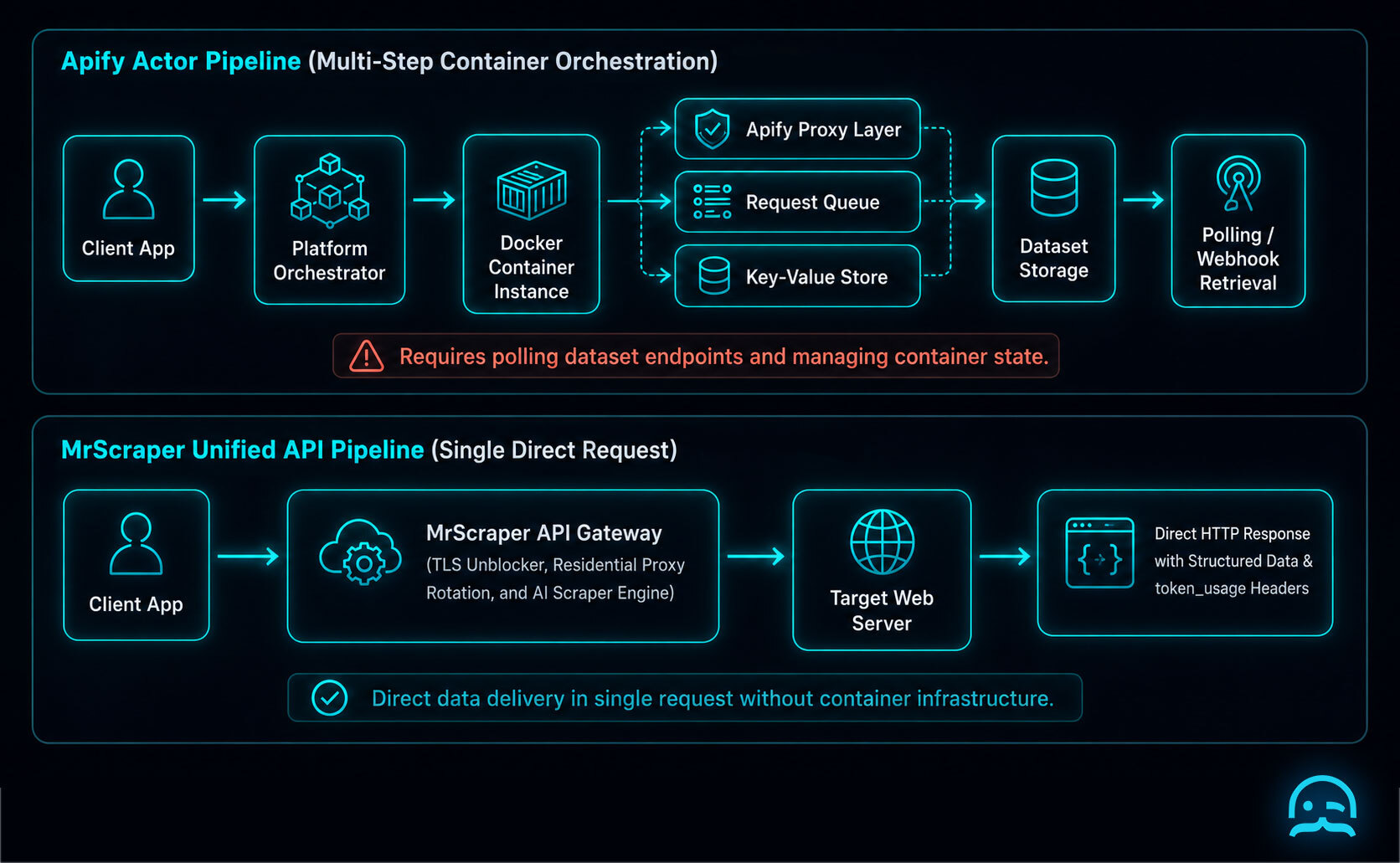
Serverless containers offer flexibility for custom multi-step crawls, but they introduce DevOps friction for teams that need structured data from standard REST endpoints:
- Infrastructure provisioning: Every run spins up a virtualized container with allocated CPU and RAM.
- State management: Crawling requires initializing a Request Queue, configuring a Key-Value Store, and routing traffic through Apify Proxy.
- Asynchronous polling: Requests return a run ID. Your application must poll Dataset endpoints or configure webhooks until execution completes.
- Code maintenance: When a target site updates CSS selectors or anti-bot defenses, the Actor container code must be manually updated, rebuilt, and redeployed.
The 4 main bottlenecks of Apify Actors
When evaluating Apify alternatives, teams typically cite four recurring friction points in production environments:
1. Container maintenance and memory overhead
Apify Actors run headless browser instances (Chromium) inside serverless containers. Headless browsers consume 500 MB to 2 GB of RAM per active thread. Container cold starts, memory leaks across long crawling jobs, and browser process crashes require ongoing memory tuning.
2. The marketplace developer dependency
Apify's Actor marketplace is genuinely valuable: thousands of maintained scrapers cover major platforms like LinkedIn, Amazon, Google Maps, Instagram, and YouTube. This catalog is the platform's strongest differentiator and a real head start if your target is already covered.
The bottleneck appears when it is not covered, or when it was covered but the maintainer stops updating. Third-party developers abandon maintenance when target websites change DOM structures or add anti-bot protections. When a community Actor breaks, your production pipeline halts until you fork the code or build a custom replacement.
3. Multi-variable Compute Unit (CU) billing
Apify bills using Compute Units (CUs): a formula of container RAM consumption multiplied by runtime in hours. On top of CUs, you pay separately for proxy bandwidth, Actor rental fees, and data storage. Forecasting monthly budgets is challenging because target site delays or anti-bot challenge execution directly increase container runtime and CU charges.
4. Anti-bot and proxy integration friction
Apify provides proxy services, but integrating stealth mechanisms into custom Actors requires manual header management, fingerprint configuration, and session rotation logic within Crawlee or Puppeteer. Without automated anti-bot handling, requests against protected targets trigger 403 Forbidden or 429 Too Many Requests errors.
Apify Compute Unit (CU) pricing breakdown
Apify's platform pricing combines subscription tiers, Compute Unit (CU) usage, proxy bandwidth, and dataset storage. Published rates (verified via Apify official pricing):
| Apify plan tier | Monthly cost | Included platform usage credits | Compute Unit rate ($/CU)* | Included proxy access |
|---|---|---|---|---|
| Free | $0/mo | $5/month | $0.40/CU | Datacenter proxies |
| Starter | $49/mo | $49/month | $0.40/CU | Datacenter and Residential proxies |
| Scale | $499/mo | $499/month | $0.35/CU | Priority Residential and Datacenter |
| Business | $999/mo | $999/month | $0.30/CU | Premium Residential and Dedicated support |
Pricing verified August 2026 via official public documentation.
Note
1 Compute Unit (CU) = 1 GB of container RAM running for 1 hour. A 2 GB RAM Actor running for 1 hour consumes 2 CUs.*
CU billing vs. resource token billing
Calculating Apify expenses requires estimating multiple variables:
- Container RAM allocation: 0.5 GB, 1 GB, 2 GB, or 4 GB per worker thread.
- Execution duration: Variable per page based on JavaScript complexity and anti-bot challenge time.
- Proxy bandwidth: Additional per-GB data transfer charges.
- Actor rental fees: Monthly or per-result fees for paid marketplace scrapers.
MrScraper's Web Scraper API uses a resource token model with per-request auditability:
- Manual Scraper and Web Unblocker: 1 token per 30s runtime + 1 token per 0.2 MB bandwidth.
- AI Scraper: 1 token per 30s runtime + 1 token per ~1,000 input tokens + 1 token per ~200 output tokens + 5 fixed trace tokens per run.
- Per-request telemetry: Every response returns
token_usage,bandwidth_usage,runtime, andx-status-codeheaders.
The advantage is not lower cost per byte, since MrScraper's token model also meters bandwidth. The advantage is auditability: you can attribute exact token cost to each URL, each project, and each team member, without reconstructing container RAM-hours from invoices after the fact.
For raw proxy bandwidth, MrScraper Residential Proxies start at $2.50/GB, compared to Apify's residential proxy rates which depend on the plan tier and the proxy type selected.
Six Apify alternatives compared
1. MrScraper
Replaces: Custom Actor containers, proxy configuration, and CSS selector maintenance under a managed API surface.
MrScraper unifies headless browser rendering, residential proxy rotation, anti-bot handling, and AI prompt extraction into managed cloud endpoints. Instead of maintaining Docker environments or debugging community Actors, developers make API or SDK calls. Plans include 1,000 Plan Tokens/month on Scraper Free ($0/mo, no credit card required) and 200,000 Plan Tokens/month on Scraper Pro ($199/mo), with flat $0.001/token overages.
For raw IP rotation, MrScraper Residential Proxies start at $2.50/GB. The cloud-hosted Scraping Browser connects Playwright or Puppeteer via WebSocket (wss://browser.mrscraper.com) without self-hosting browser nodes.
Gives up: MrScraper does not operate a community marketplace of pre-built scrapers. Apify's Actor Store has thousands of maintained scrapers for popular targets (LinkedIn, Amazon, Google Maps, Instagram). If your target is already well covered by a maintained Actor, that catalog offers a genuine head start that MrScraper cannot match today.
2. Bright Data
Replaces: Enterprise proxy management and pre-built domain scrapers.
Bright Data offers a comprehensive proxy network alongside pre-built Scraping APIs and a Web Unlocker billed at $1.50/1K requests on Pay-as-You-Go. Residential proxy bandwidth starts at $4.00/GB on Pay-as-You-Go, scaling down with monthly commits.
Gives up: Account setup requires manual business verification (KYC). Managing separate proxy, unlocker, and scraper invoices adds administrative overhead for small teams.
3. Oxylabs
Replaces: Global proxy networks and enterprise scraping APIs.
Oxylabs provides a large proxy infrastructure with residential pricing starting at $6/GB for Pay-as-You-Go, scaling down on committed plans. Web Unblocker and Scraper API are billed separately.
Gives up: Focused on enterprise proxy bandwidth and pre-parsed target APIs. Multi-product account management remains complex, and committed tiers require annual agreements.
4. Zyte
Replaces: Custom unblocking infrastructure for automated request strategy selection.
Zyte (formerly Scrapinghub) automatically selects the optimal proxy tier and unblocking strategy per target domain. Deep integration with Python's Scrapy framework and mature headless browser management.
Gives up: Custom enterprise pricing models can be difficult to forecast prior to sales onboarding, and initial API integration requires more setup than simple REST endpoints.
5. ScrapingBee
Replaces: Web unblocking for low-to-medium volume developer pipelines.
ScrapingBee provides a developer-friendly single-endpoint HTML API using credit multipliers (1x basic, 5x JS, 10x to 25x residential proxies).
Gives up: Returns raw HTML rather than structured JSON, requiring custom parser maintenance. High credit multipliers reduce effective request volume on protected targets.
6. Firecrawl
Replaces: Web Scraper API when extracting web content for LLM ingestion.
Firecrawl crawls target websites and converts raw HTML into clean Markdown for RAG applications, vector databases, and AI agent knowledge bases.
Gives up: Optimized specifically for document and content extraction rather than heavily protected e-commerce targets requiring form interaction or session management.
Feature comparison: MrScraper vs. Apify
| Capability | MrScraper | Apify | Which platform wins |
|---|---|---|---|
| Architecture | Managed REST API and AI Engine | Serverless Docker Containers (Actors) | MrScraper: zero container maintenance or memory tuning |
| Pre-built scraper catalog | No community marketplace | Thousands of community Actors for major platforms | Apify: unmatched breadth of pre-built target coverage |
| Billing model | Resource Tokens with per-request token_usage headers |
Compute Units ($/GB-hour) + Proxies + Storage | MrScraper: per-request auditability without RAM-hour conversions |
| Execution flow | Web Unblocker returns HTML synchronously; AI Scraper and bulk operations use async SDK | Asynchronous polling via Run ID and Datasets | Trade-off: sync is simpler for single pages, async is necessary for bulk |
| Anti-bot handling | Built-in Web Unblocker manages TLS fingerprints, headers, and proxy routing to reduce challenge rates | Optional Apify Proxy add-on with manual configuration | MrScraper: native integration with no additional setup |
| AI extraction | Native AI Scraper with prompt and JSON Schema input, more resilient against routine DOM shifts | Custom code required per Actor | MrScraper: reduces selector maintenance frequency |
| LLM output | Native clean Markdown and JSON | Raw HTML (requires post-processing) | MrScraper: feeds clean Markdown directly into AI models |
Code walkthrough: Apify Actor vs. MrScraper Python SDK
The Apify approach: running an Actor container
Executing a scrape with Apify requires initializing the client, triggering an Actor container run, waiting for execution to finish, and fetching records from a dataset:
# Apify Python SDK: requires Actor execution and dataset polling
from apify_client import ApifyClient

# Initialize client with API token
client = ApifyClient("YOUR_APIFY_TOKEN")

# Define inputs for the container run
run_input = {
    "startUrls": [{"url": "<https://example.com/products>"}],
    "maxItems": 50,
    "proxyConfiguration": {"useApifyProxy": True}
}

# 1. Trigger container run (incurs Compute Unit charges)
run = client.actor("apify/web-scraper").call(run_input=run_input)

# 2. Fetch dataset items after execution completes
dataset_items = client.dataset(run["defaultDatasetId"]).list_items().items

for item in dataset_items:
    print(item.get("title"), item.get("price"))
The MrScraper approach: managed async SDK with AI extraction
With MrScraper, you install mrscraper-sdk and execute an asynchronous call. MrScraper handles browser rendering, residential proxy rotation, and header management automatically:
# MrScraper Python SDK: async execution with zero container management
import asyncio
import os
from mrscraper import MrScraper

async def main():
    # Initialize client using environment token
    client = MrScraper(token=os.getenv("MRSCRAPER_API_TOKEN"))

    # Extract structured JSON using AI prompt instructions
    result = await client.create_scraper(
        url="<https://example.com/products>",
        message="Extract all product titles, prices, and stock statuses as a JSON array.",
        agent="listing",
        proxy_country="US"
    )

    print("MrScraper AI Result:", result)

if __name__ == "__main__":
    asyncio.run(main())
Direct REST API invocation via cURL
For synchronous unblocking, send requests directly to MrScraper's Web Unblocker endpoint (https://api.mrscraper.com):
# Web Unblocker REST API Call (synchronous HTML response)
curl -X GET "<https://api.mrscraper.com/?token=YOUR_MRSCRAPER_API_TOKEN&url=https%3A%2F%2Fexample.com%2Fproducts&html=true>"
For AI prompt extraction via REST API, target the AI Scraper endpoint (https://api.app.mrscraper.com/api/v1/scrapers-ai):
# AI Scraper REST API Call (async, returns run ID for polling)
curl -X POST "<https://api.app.mrscraper.com/api/v1/scrapers-ai>" \
  -H "x-api-token: YOUR_MRSCRAPER_API_TOKEN" \
  -H "Content-Type: application/json" \
  -d '{
    "url": "<https://example.com/products>",
    "prompt": "Extract all product titles, prices, and stock statuses as a JSON array."
  }'
Migration guide: moving from Apify to MrScraper
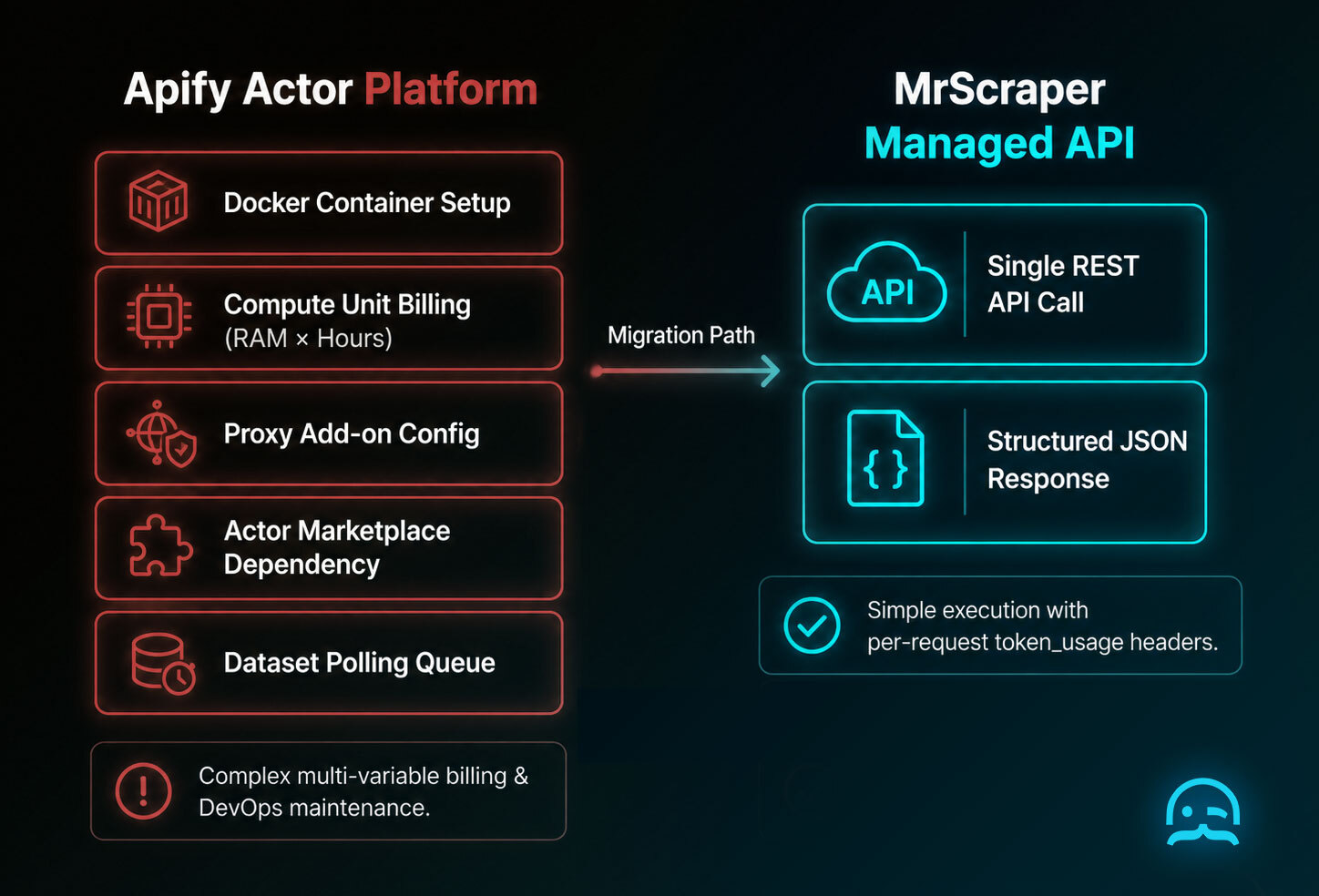
Migrating data pipelines from Apify Actors to MrScraper involves three steps. Timeline depends on the complexity and number of Actors in your pipeline.
Step 1: Audit Apify workflows and map to Plan Tokens
Review active Apify Actors and map their monthly crawling volume and runtime to MrScraper Plan Token allocations:
- Scraper Free: $0/mo (1,000 Plan Tokens/month, no credit card required).
- Scraper Pro: $199/mo (200,000 Plan Tokens/month, 100 concurrent requests, priority residential proxies).
- Per-request telemetry: Monitor exact token usage returned in HTTP response headers (
token_usage: 2) or API result payloads (tokenUsage: 5).
Step 2: Replace container calls with REST or SDK endpoints
Replace Apify dataset polling logic with direct HTTP calls. Update Python applications to import mrscraper-sdk and call client.create_scraper(), or send POST requests to https://api.app.mrscraper.com/api/v1/scrapers-ai.
Step 3: Replace fragile CSS selectors with AI Scraper prompts
For scrapers requiring constant selector updates, replace custom DOM parsing logic with natural language prompts. Define your JSON schema once, and MrScraper's AI engine handles DOM variation with greater resilience than pure selector approaches, although major page restructurings may still require prompt updates.
Frequently asked questions (FAQ)
Do I need to maintain Docker containers when using MrScraper?
No. Unlike Apify's Actor ecosystem, MrScraper operates as a fully managed cloud service. You make standard HTTP REST API or SDK calls, and MrScraper handles headless browser rendering, proxy rotation, and scaling automatically.
How does MrScraper pricing compare to Apify Compute Units (CUs)?
MrScraper uses a resource token system based on actual compute runtime (1 token per 30s) and bandwidth (1 token per 0.2 MB). AI Scraper adds tokens for text processing and run tracking. The primary advantage is auditability, not necessarily lower cost per byte: every response includes exact token_usage in HTTP headers, so you can attribute costs to specific URLs and projects instead of reconstructing expenses from container RAM-hour invoices.
Does MrScraper handle anti-bot protection?
MrScraper's Web Unblocker manages browser TLS fingerprints, user agents, headers, and IP proxy routing natively within API requests. This reduces challenge rates significantly, though heavily protected enterprise targets (DataDome, PerimeterX) may still present occasional challenges depending on request patterns and IP reputation.
How does MrScraper AI Scraper compare to Apify Actors for selector maintenance?
MrScraper's AI Scraper accepts natural language prompts and optional JSON Schemas, making data extraction more resilient against routine CSS class updates or HTML layout changes compared to hardcoded selectors. Major page restructurings may still require prompt adjustments, but the maintenance frequency is significantly lower than selector-based approaches.
Tired of blocked requests, broken scrapers, or inconsistent data collection?
MrScraper is built to handle challenging websites, so you can spend less time troubleshooting and more time working with your data.
Get 1,000 free tokens to test it here.
Summarize this post
Open it in your assistant of choice with the prompt ready to send.
Take a Taste of Easy Scraping!

Find more insights here

Claude Code Competitor Pricing Research
Use Claude Code and MrScraper MCP to refresh public competitor pricing, normalize billing periods an…

Use MrScraper MCP to Compare Public SaaS Pricing and Plan Limits
Build a source-backed SaaS plan comparison using MrScraper MCP. Preserve prices, quotas, billing ter…

Build a Product Attribute Classifier with LangChain and MrScraper
Build a LangChain workflow that extracts product evidence with MrScraper, normalizes attributes and…