SOCKS vs Proxy: Key Differences for Web Scraping
ProxiesCompare SOCKS vs proxy options for web scraping, including protocols, anonymity, speed, cost, availability, and practical JavaScript and Python examples.
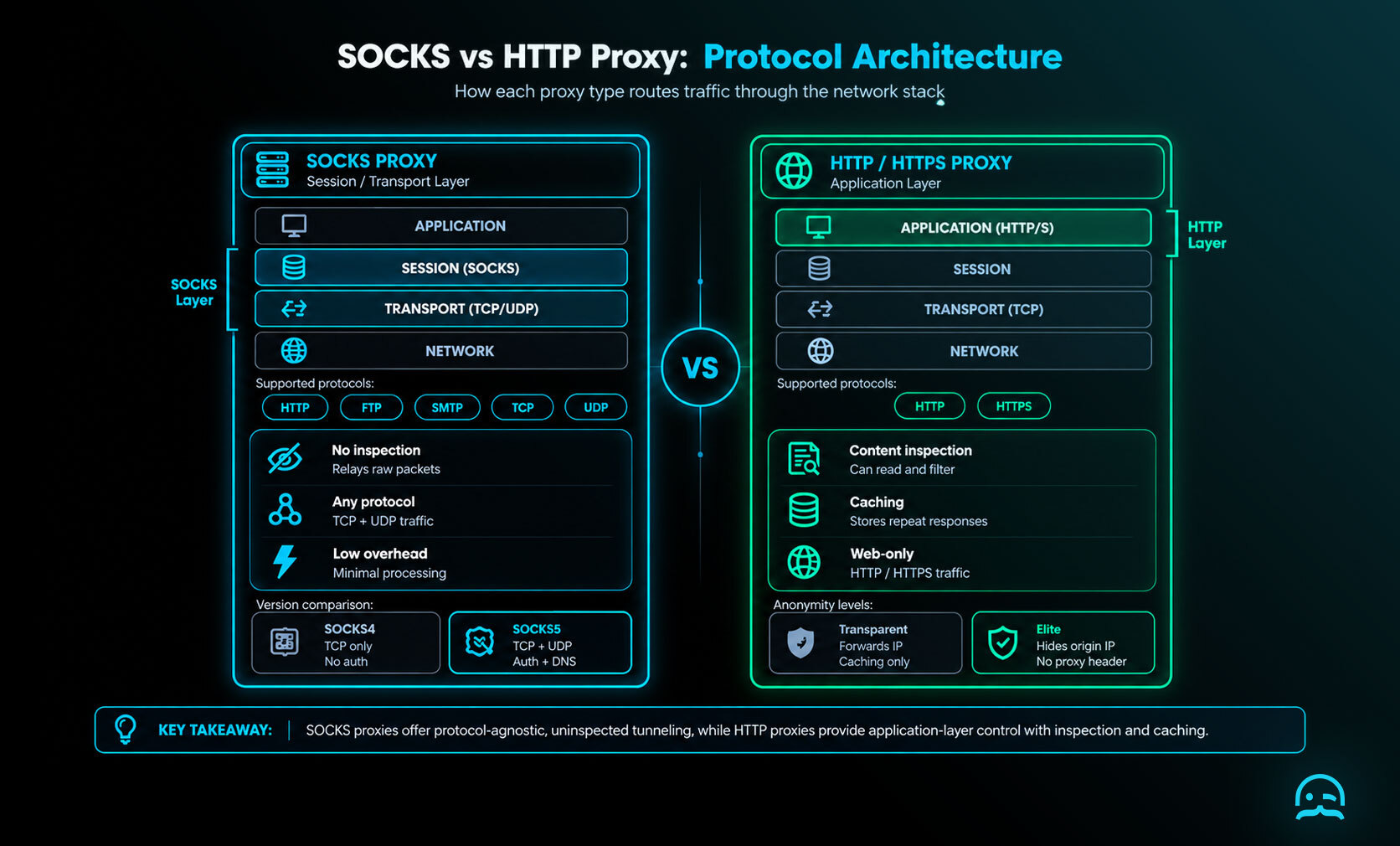
SOCKS vs proxy comes down to traffic handling. SOCKS supports more protocol types. HTTP and HTTPS proxies are made for web traffic. They may also provide filtering or caching.
What is SOCKS?
The socks vs proxy comparison starts with SOCKS, short for Socket Secure, an internet protocol that routes network packets between a client and a server through a proxy server. It works at a lower network level than most standard proxies. It relays packets from almost any protocol or app. It does not need to change or inspect their contents. This design makes SOCKS versatile for different traffic types, including HTTP, HTTPS, FTP, and SMTP. In practice, a SOCKS5 proxy server can route app traffic. It can also keep the expected protocol behavior. Privacy still depends on your setup and settings.
For web scraping, this flexibility matters when your traffic is not plain HTTP, or when the network path needs a lower-level route. The sections below compare SOCKS to other proxy types. They explain scraping trade-offs. They also include working JavaScript and Python examples.
Key features of SOCKS:
- Versatility: SOCKS supports multiple protocols, not just HTTP.
- Speed: It typically has fewer performance bottlenecks because it doesn’t handle the traffic in the same way as HTTP proxies.
- Traffic handling: SOCKS relays packets without inspecting or rewriting them, so protocol behaviour is preserved end to end.
What is a Proxy?
A proxy acts as an intermediary between your client and a target website, forwarding requests and returning responses. HTTP and HTTPS proxies are designed for web traffic, as explained in HTTP proxy fundamentals.
Key features of Proxies:
Protocol-Specific: Regular proxies are typically designed to handle specific protocols, such as HTTP or HTTPS.
Data Filtering: Proxies can inspect and filter traffic based on various rules, which can be useful for security or monitoring but could slow down the connection.
Caching: HTTP proxies can store copies of previously accessed web pages, speeding up repeated requests but affecting performance in dynamic scraping scenarios.
SOCKS vs Proxy: Which One Should You Use?
1. SOCKS vs Proxy for Web Scraping
When choosing between SOCKS and Proxy for web scraping, the main factor is the type of data you're accessing and the protocols you require. SOCKS is more versatile, making it suitable for non-HTTP traffic or more complex scraping projects. Regular proxies are more commonly used for scraping simple web content via HTTP/HTTPS.
2. Traffic handling and speed
SOCKS typically relays data without inspecting or modifying it, which keeps processing overhead low. Standard proxies may offer caching and filtering, but those features add processing time and can slow requests. Where a scraping project needs minimal overhead and protocol fidelity, SOCKS is the better fit. Note that HTTP proxies can also be configured as high-anonymity (elite) proxies, so SOCKS is not inherently more private — the configuration matters more than the protocol.
3. Cost and Availability
Proxies tend to be more widely available and are cheaper than SOCKS proxies. SOCKS is often the better choice for high-traffic scraping or non-HTTP protocols, because it handles a wider range of traffic types at lower overhead.
Example: Using SOCKS vs Proxy in Web Scraping
JavaScript Example with SOCKS Proxy (Using Axios and SocksProxyAgent)
const axios = require('axios');
const SocksProxyAgent = require('socks-proxy-agent');

const agent = new SocksProxyAgent('socks5://127.0.0.1:1080');

axios.get('https://example.com', { httpsAgent: agent })
  .then(response => {
    console.log(response.data);
  })
  .catch(error => {
    console.error('Error fetching the page:', error);
  });
Python Example with SOCKS Proxy (Using Requests and PySocks)
import requests
import socks
import socket

#Set up SOCKS proxy
socks.set_default_proxy(socks.SOCKS5, "127.0.0.1", 1080)
socket.socket = socks.socksocket

#Send request via SOCKS proxy
response = requests.get('https://example.com')
print(response.text)
JavaScript Example with HTTP Proxy
const axios = require('axios');

axios.get('https://example.com', {
  proxy: {
    host: '127.0.0.1',
    port: 8080
  }
}).then(response => {
  console.log(response.data);
}).catch(error => {
  console.error('Error fetching the page:', error);
});
Python Example with HTTP Proxy
import requests

#Send request via HTTP proxy
proxies = {
    'http': 'http://127.0.0.1:8080',
    'https': 'http://127.0.0.1:8080',
}
response = requests.get('https://example.com', proxies=proxies)
print(response.text)
How MrScraper Handles This Comparison
At MrScraper, we understand the complexities of web scraping and the challenges that come with it. While SOCKS and HTTP proxies are essential tools, MrScraper provides a much more robust solution with added features:
Key Advantages of MrScraper:
- Seamless Proxy Management: MrScraper integrates proxy management into the platform. It supports SOCKS and HTTP proxies with automatic rotation, and offers regional targeting for location-accurate results.
- No Manual Setup Required: With MrScraper, you don't need to worry about configuring proxies or handling SSL/TLS issues. Everything is managed on our end.
- Reliable retrieval at scale: MrScraper's proxy infrastructure and AI-based extraction are built to maintain high success rates on dynamic, JavaScript-heavy sites.
- Proactive Monitoring: MrScraper actively monitors IPs and proxy servers for performance issues and blocks, ensuring uninterrupted data extraction.
Why Choose MrScraper?
- Efficiency: Instead of manually handling SOCKS vs proxy configurations, MrScraper automates this process, ensuring optimal performance.
- Reliability: With integrated proxy rotation and residential IPs, MrScraper maintains consistent success rates and returns region-accurate results.
- Support: MrScraper offers 24/7 customer support, with experts ready to help you get the data you need.
In conclusion, it helps to know the differences between SOCKS and proxies. Using a dedicated scraping platform like MrScraper can save time, effort, and resources. It also lets you focus on gathering the data you need with ease.
What We Learned
- SOCKS works at a lower level, supports many protocols, and usually does not change traffic. This makes it useful for complex scraping projects.
- HTTP/HTTPS proxies work well for standard web traffic. They can filter and cache content, though these features may impact performance.
- SOCKS relays traffic without modifying it, which keeps overhead low. HTTP proxies can be configured for equivalent privacy, so the configuration matters more than the protocol. Regular proxies are often easier to find and cost less.
- The best choice depends on the data, protocols, and scraping requirements involved.
Simplify Your Scraping Proxy Setup
Move from manual SOCKS and proxy setup to a managed scraping workflow, with AI-powered extraction and built-in routing that keeps success rates consistent at scale.
Summarize this post
Open it in your assistant of choice with the prompt ready to send.
Take a Taste of Easy Scraping!

Find more insights here

Build an Agent Harness for Repeatable Web Research
Build a small agent harness in Python that saves job state, enforces tool and page budgets, and chec…
Authenticate Web Data Tools for AI Agents Without Exposing Secrets
Learn when to use API keys or OAuth for AI agent tools, where credentials should live, how to separa…

Design Reliable Web Data Tools for AI Agents
Learn how to define clear inputs, structured results and honest errors for the web data tools your A…