Understanding Residential Proxies: How They Work
ProxiesLearn how to use residential proxies for scraping to bypass detection and geo-restrictions. Discover how these ISP-assigned IPs provide legitimacy for automated data extraction.
To use residential proxies for scraping, configure your scraper to route requests through a proxy provider's gateway. This masks your IP with a legitimate ISP-assigned address, allowing you to bypass bot detection and access geo-restricted content effectively.
How Are Residential Proxies Sourced?
Residential proxies are IP addresses assigned by an Internet Service Provider (ISP) to real homeowners. These IP addresses link to a real physical location. Websites view them as more legitimate because they look like normal user traffic. There are a few main methods for sourcing residential proxies:
- Partnerships with ISPs: Proxy service providers can partner with ISPs to rent IP addresses from their pool of residential users.
- Peer-to-Peer (P2P) Networks: In this model, proxy providers create a P2P network. They reward users for sharing their internet connection. These users may be rewarded with free software or VPN services, and in exchange, their connection becomes part of a proxy pool.
- Proxy Farms: Some providers may build networks of devices that use home internet connections. These networks are made to work as residential proxies.
How Do Residential Proxies Work?
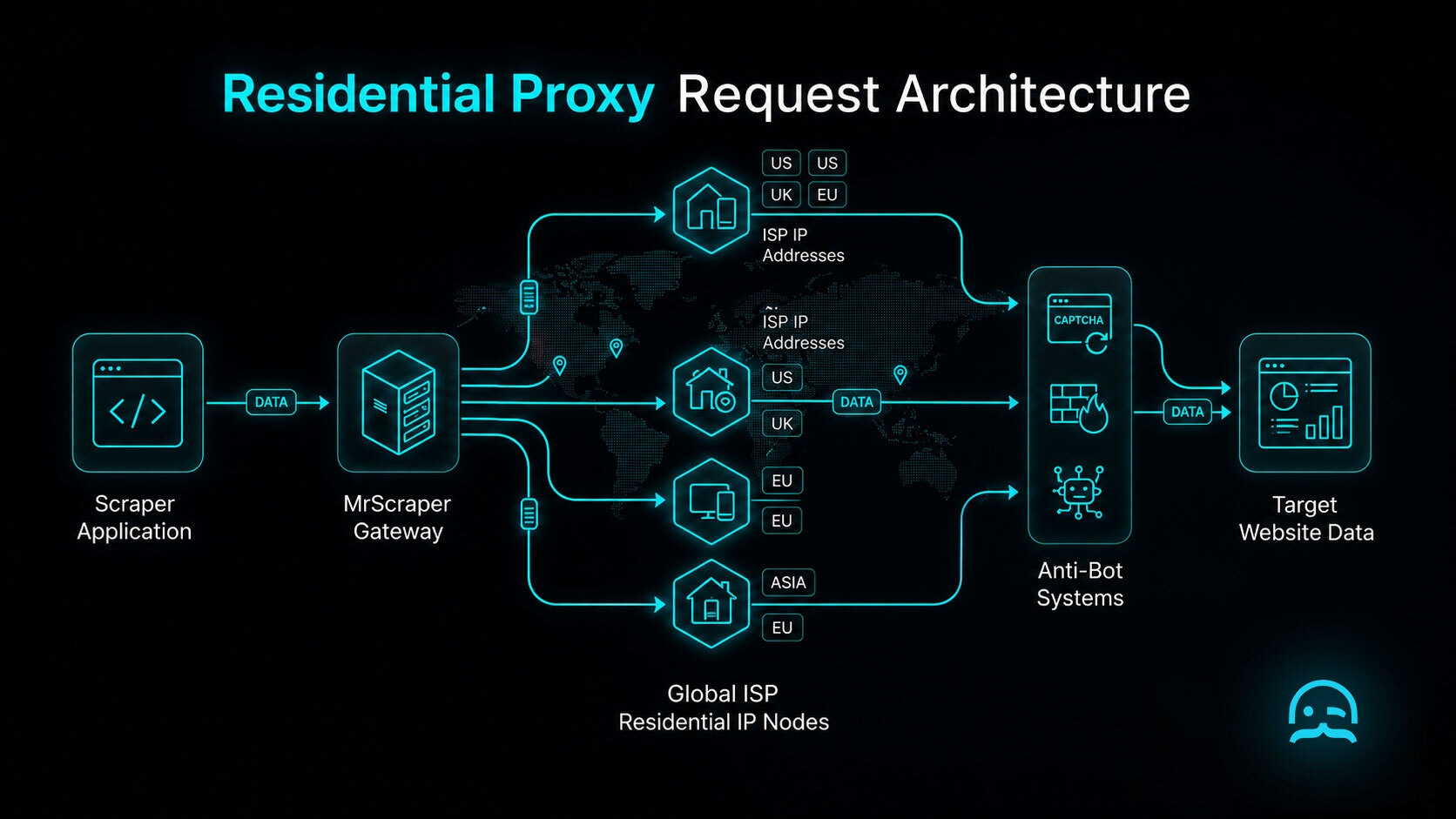
Residential proxies function as intermediate nodes that relay traffic between your scraping server and the destination website. When you start a request, the proxy intercepts it and replaces your server IP with a residential IP. This IP is assigned by an Internet Service Provider to a real home device. This change makes the target website see the connection as a real home user. It does not look like a coordinated automated process. This helps your scraper pass security systems. These systems often flag and block datacenter IP ranges.
The operational flow of a residential proxy follows a three-step cycle. It helps ensure anonymity and reliability during large-scale data extraction tasks.
- Request Routing: Your web scraper sends a request to a proxy gateway. The gateway routes the traffic through a residential device in the target location.
- IP Rotation: The proxy provider manages a pool of IP addresses. It rotates them by time or request count. This helps prevent the target server from spotting patterns and adding rate limits.
- Data Delivery: The home device gets the HTML or API response from the target site. It then sends the data back through the proxy network to your local app.
Managing Sticky Sessions and Rotation Logic
Effective management of residential proxies requires a choice between two primary session strategies: rotating IPs or sticky sessions. Most providers, like Oxylabs or Bright Data, support this. They do this by using specific port settings. They can also add session ID strings to the proxy credentials.
import requests

# Using a session ID to create a sticky session (10-minute persistence)
proxy_host = "proxy.provider.com"
proxy_port = "8000"
session_id = "user1234_session_99"

proxies = {
    "http": f"http://user-name-session-{session_id}:password@{proxy_host}:{proxy_port}",
    "https": f"http://user-name-session-{session_id}:password@{proxy_host}:{proxy_port}"
}

# All subsequent requests using this session ID will route through the same residential IP
response = requests.get("https://api.ipify.org", proxies=proxies)
print(f"Current IP: {response.text}")
- Use rotating IPs for high-volume stateless crawling to maximize throughput.
- Implement sticky sessions when navigating sites that utilize cookies or session tokens.
- Always include authentication in the proxy URL format to avoid 407 Proxy Authentication Required errors.
- Monitor TTL (Time To Live) for sticky IPs, as residential nodes may go offline unexpectedly.
Benefits of Residential Proxies
Residential proxies offer several advantages over other types of proxies, such as datacenter or shared proxies. Here are the key benefits:
- Higher Trust Level: Residential proxies use IP addresses from real ISPs. They are less likely to be flagged as bots. This lets you scrape with fewer interruptions.
- Bypassing geo-restrictions: Many residential proxies are in many locations. This makes it easier to access region-specific content that may be blocked.
- Reduced Risk of Blocking: Websites frequently block datacenter IPs but are more lenient toward residential IPs. This makes residential proxies ideal for web scraping, particularly for websites with aggressive anti-scraping measures.
- Anonymity: Residential proxies add privacy to your scraping activities by hiding your real IP address.
How to Get Residential Proxies
Accessing residential proxies typically involves choosing between two distinct acquisition strategies depending on your technical infrastructure and budget requirements.
- Proxy Service Providers are specialized vendors. Examples include Oxylabs, Bright Data, Apify, ScraperAPI, and ScrapingBee. They maintain large pools of residential IP addresses. These providers simplify integration by managing the network, rotation, and session persistence through one gateway or API endpoint.
- Private Peer-to-Peer Networks: A more complex option is to build a proprietary network. You can encourage users to share bandwidth through an app or SDK. While this approach gives direct control of the IP source, it needs major engineering work and strict legal rules. It also must protect user consent and traffic security.
Code Implementation Example
Integrating residential proxies into your scraping workflow is essential for maintaining high success rates. The following Python example demonstrates how to route traffic through a residential proxy using the popular requests library. This method allows you to mask your local IP address by authenticating with the proxy provider gateway.
import requests

# Configure the residential proxy credentials and endpoint
# Most providers use the format: http://username:password@gateway-address:port
proxy_config = {
    'http': 'http://username:password@residential-proxy.com:port',
    'https': 'http://username:password@residential-proxy.com:port'
}

# The specific endpoint you intend to scrape
target_url = 'https://httpbin.org/ip'

try:
    # Execute the GET request with the defined proxy settings
    response = requests.get(target_url, proxies=proxy_config, timeout=10)

    # Verify the request status
    if response.status_code == 200:
        print("Successfully routed through residential proxy!")
        print(f"Response Data: {response.text}")
    else:
        print(f"Request failed with status: {response.status_code}")
except Exception as e:
    print(f"An error occurred: {e}")
For modern websites that require JavaScript execution, you can integrate residential proxies with automation tools like Puppeteer. This approach is highly effective because it mimics a real user browsing from a home connection, especially when paired with a custom User-Agent string to prevent browser fingerprinting detection.
const puppeteer = require('puppeteer');

(async () => {
  const proxyServer = 'http://residential-proxy.com:port';
  const username = 'your_username';
  const password = 'your_password';

  const browser = await puppeteer.launch({
    headless: true,
    args: [`--proxy-server=${proxyServer}`]
  });

  try {
    const page = await browser.newPage();

    // Authenticate with the residential proxy gateway
    await page.authenticate({ username, password });

    // Set a realistic browser User-Agent to avoid detection
    await page.setUserAgent('Mozilla/5.0 (Windows NT 10.0; Win64; x64) AppleWebKit/537.36 (KHTML, like Gecko) Chrome/115.0.0.0 Safari/537.36');

    const url = 'https://httpbin.org/ip';
    await page.goto(url, { waitUntil: 'networkidle2', timeout: 30000 });

    // Extract the visible text from the page content
    const content = await page.evaluate(() => document.body.innerText);
    console.log('Scraped Data:', content);

  } catch (err) {
    console.error('Scraping error:', err.message);
  } finally {
    await browser.close();
  }
})();
Utilizing residential proxies provides superior anonymity and grants access to geo-restricted content. However, building a production-grade scraping infrastructure involves overcoming several technical hurdles that go beyond simple script implementation.
- Proxy Rotation: Use logic to change IP addresses often. This helps avoid rate limits and long-term IP bans.
- Geo-targeting: Effective scraping often requires specific regional IPs to access localized content or pricing data correctly.
- Failure Handling: Reliable systems need strong failover methods to find timed-out proxies and retry requests through healthy nodes.
- Ethical Compliance: Make sure proxy sourcing protects user privacy. Follow the laws in every jurisdiction.
Managing these complexities manually requires significant engineering resources and ongoing maintenance. Professional scraping services streamline this process by providing built-in proxy rotation, geo-targeting, and automated failover management. These platforms let you focus on data analysis, not fixing infrastructure issues. They provide steady access to the web data you need. You also avoid the work of running a private proxy network.
Optimizing TLS Handshakes and Proxy Headers
import httpx

# Using httpx to customize the HTTP/2 and TLS profile
# to match a standard residential browser session
proxies = {"all://": "http://user:pass@residential-provider.com:8000"}

with httpx.Client(proxies=proxies, http2=True) as client:
    headers = {
        "User-Agent": "Mozilla/5.0 (Windows NT 10.0; Win64; x64) AppleWebKit/537.36",
        "Accept-Language": "en-US,en;q=0.9"
    }
    # The client will now perform a handshake that better
    # aligns with residential browser patterns
    response = client.get("https://target-website.com/data", headers=headers)
    print(response.status_code)
- Align TLS ciphers with the User-Agent string to prevent stack mismatch detection.
- Disable automated proxy headers that might reveal the scraper's internal network IP.
- Use HTTP/2 prioritized streams to mimic real user interaction patterns on modern sites.
- Ensure consistent cookies across a single residential session to maintain state without triggering security challenges.
Master Your Scraping Infrastructure
Explore our full set of resources to learn how to set up reliable proxy rotation. Manage geo-targeted data extraction without added technical work.
Frequently asked questions
What is the difference between residential and datacenter proxies?
Residential proxies are IP addresses assigned by ISPs to homeowners, making them appear as genuine user traffic. Datacenter proxies are created in bulk by secondary providers and are easier for websites to identify and block.
How does proxy rotation work in web scraping?
Proxy rotation involves changing the IP address used for requests after a specific time or number of actions. This prevents rate-limiting and blocks by ensuring no single IP address sends an unnatural volume of traffic.
Are residential proxies effective for geo-blocked content?
Yes. Residential proxies use real, physical locations. They let scrapers look like they browse from specific regions. This helps access content restricted to those areas.
Summarize this post
Open it in your assistant of choice with the prompt ready to send.
Take a Taste of Easy Scraping!

Find more insights here

The Ultimate Web Crawlers List: 15 Tools for Every Data Need
Compare the best web crawlers for 2026. Learn the difference between open-source, managed APIs, and…
Web Scraping MCP Server: Giving AI Agents Direct Access to Live Web Data
Learn how a Web Scraping MCP Server gives AI agents live web access while reducing token costs by 87…

Scaling E-commerce Competitive Intelligence with Automated Data Harvesting
Scale e-commerce data harvesting with residential proxies and AI. Learn how modern data extraction s…