What Is a CAPTCHA Solver? How Automatic Solving Works
Web ScrapingA CAPTCHA solver automatically clears challenges that block bots. Learn the types, how accuracy is measured, and where they fail.
A CAPTCHA solver is a service or tool that automatically completes the challenges websites use to check whether a visitor is a human or a bot. CAPTCHA stands for "Completely Automated Public Turing test to tell Computers and Humans Apart," coined by Carnegie Mellon researchers in 2003.
If your web scraper, automation suite, or browser agent hits a checkbox or image grid and stops, you have encountered the problem a CAPTCHA solver addresses. This guide explains how automatic CAPTCHA solving works, details every major challenge type, and outlines accuracy, costs, limitations, and legal considerations.
What is a CAPTCHA solver?
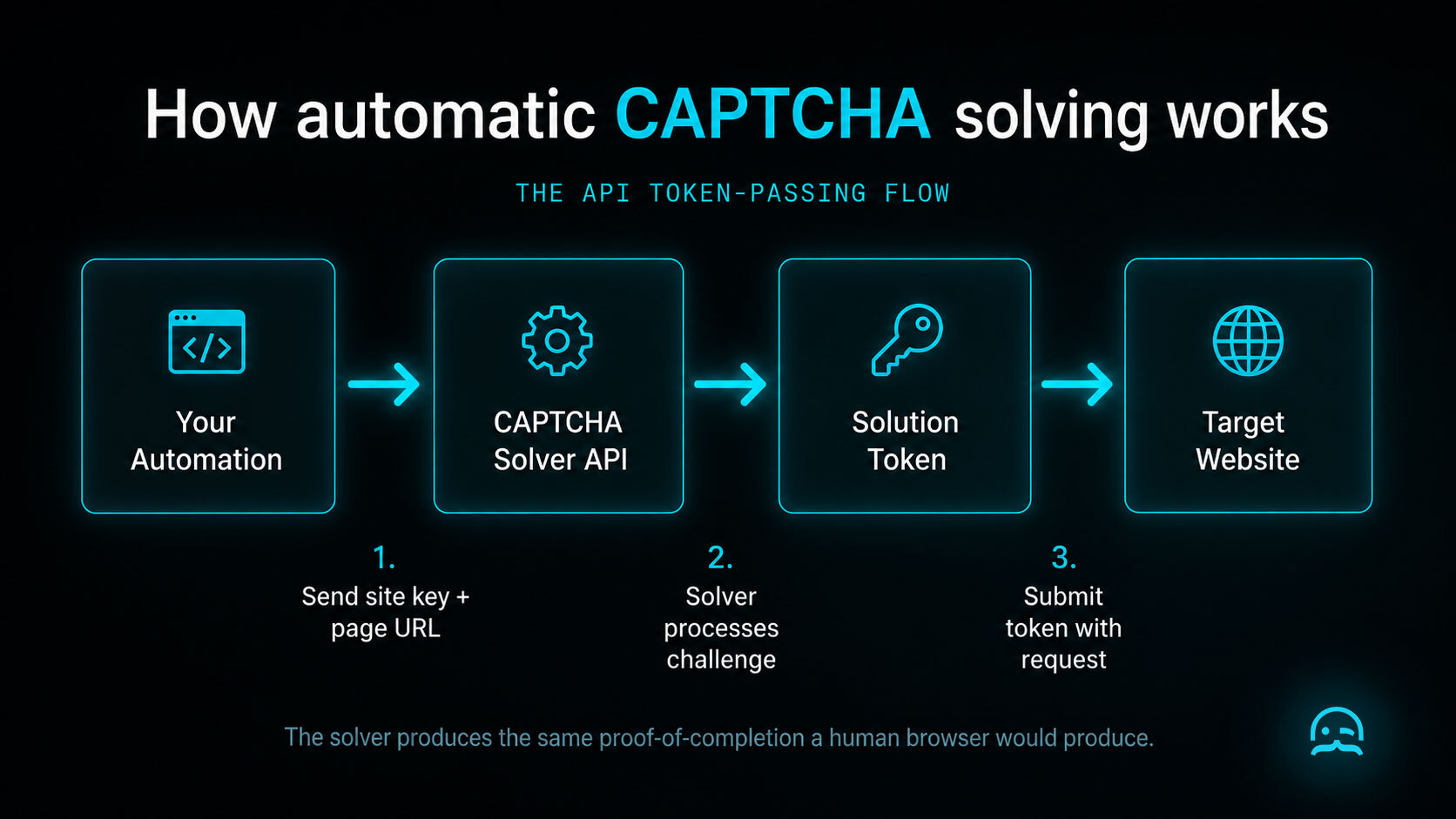
A CAPTCHA solver is a software tool or third-party API service that returns the solution to a challenge on behalf of your automation. The CAPTCHA solver meaning is straightforward: it receives a challenge that stops your bot and provides the proof-of-completion token expected by the target site.
The three-step flow:
- Your automation loads a page and hits a CAPTCHA challenge.
- Your script sends challenge parameters (site key and page URL) to the solving service.
- The solver returns a response token, which your automation submits to complete the request.
Solvers do not "hack" or breach site security. They simply generate valid completion proofs identical to what a human browser submits.
Solving vs. preventing: two different jobs
Developers frequently confuse challenge solving with challenge prevention, but they address separate operational layers:
- A CAPTCHA solver answers a challenge after it appears on screen.
- An anti-detection tool or web unblocker (stealth browser, proxy rotation, fingerprint management) prevents challenges from appearing in the first place.
Understanding the difference between solving a challenge and preventing one prevents wasting budget on symptoms rather than causes.
Why websites use CAPTCHAs in the first place
CAPTCHAs exist because unmanaged automated traffic creates real security risks:
- Credential stuffing: Bots testing stolen passwords against login forms.
- Spam signups: Scripts creating fake accounts for phishing or link spam.
- Ticket bots: Automated scripts purchasing limited stock before real buyers.
- Aggressive scraping: Crawlers overloading servers and degrading performance.
- Card testing: Scripts checking stolen credit cards through payment fields.
Websites deploy CAPTCHAs because unchecked bot traffic costs more than user friction.
The types of CAPTCHA (and how each one is solved)
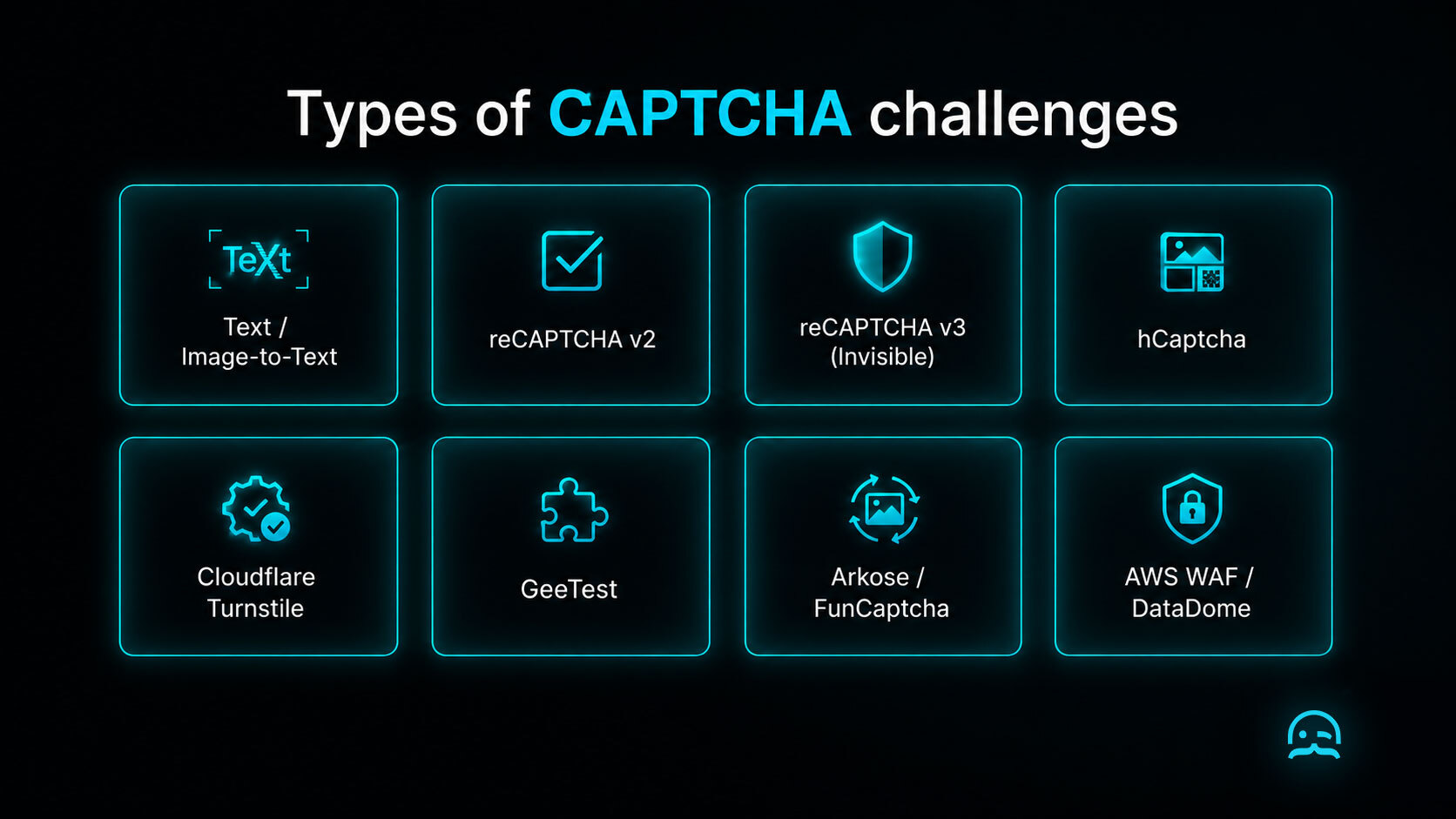
Understanding how each challenge works explains why some are trivial for an automatic CAPTCHA solver while others demand complex environment simulation.
Text and image-to-text CAPTCHAs
The classic CAPTCHA requires typing distorted letters from an image. Solvers use optical character recognition (OCR) models trained on distorted fonts. They solve in 1 to 3 seconds with >95% accuracy. Text CAPTCHAs are largely obsolete because AI reads distorted text better than humans.
Google reCAPTCHA v2
Presents the "I'm not a robot" checkbox, often expanding into image selection grids ("select all traffic lights"). Google runs background risk analysis on cookies and mouse movement. Low-risk users pass instantly; high-risk users get grids. Solvers handle reCAPTCHA v2 via computer vision or human farms in 10 to 30 seconds. Consult the Google reCAPTCHA v3 documentation for risk scoring details.
Google reCAPTCHA v3
reCAPTCHA v3 is invisible. It collects telemetry (mouse velocity, click timing, scroll patterns) and returns a score from 0.0 (bot) to 1.0 (human). This changes the problem completely. There is no puzzle to solve. Passing requires browser simulation: running automation inside a realistic browser environment with a clean IP.
hCaptcha
An image-selection puzzle commonly deployed on Cloudflare-protected sites. Users click objects like motorcycles or buses. An AI captcha solver uses computer vision classifiers to identify tiles in 10 to 25 seconds. Accuracy fluctuates as hCaptcha rotates image categories.
Cloudflare Turnstile
Cloudflare's Turnstile replaces image puzzles with non-interactive environment checks. It inspects browser APIs, WebGL renderers, and TLS fingerprints. Bypassing it requires browser stealth; see how Cloudflare detects automated traffic for detection details.
GeeTest
A slider puzzle common on Asian platforms where users drag a puzzle piece into a slot. GeeTest evaluates drag trajectory: linear, constant-speed movement flags a bot. Solvers find gap coordinates via image analysis and simulate human drag curves in 5 to 15 seconds.
Arkose Labs / FunCaptcha
Presents 3D object rotation or directional matching puzzles. Designed specifically to resist automated classification, FunCaptcha automated challenges are among the hardest puzzles to solve. Solve times take 15 to 40 seconds, with higher failure rates and premium solver pricing.
AWS WAF CAPTCHA and DataDome
Enterprise security products embed proprietary challenges into web application firewalls. These represent the hardest challenges for any automatic CAPTCHA solver. They combine visual puzzles with session fingerprinting. A solved challenge is still rejected if request headers or IP reputation trigger firewall rules.
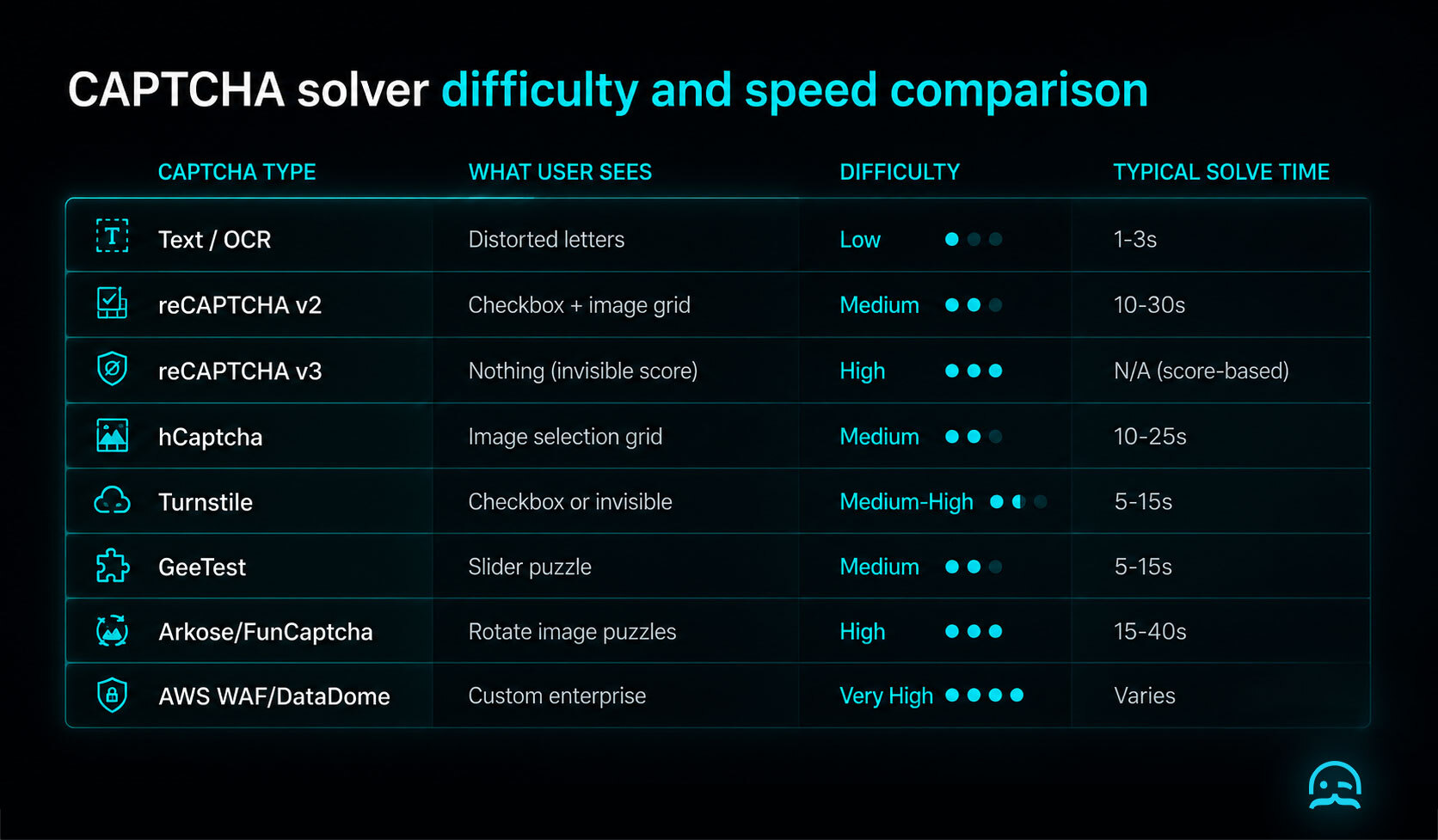
| CAPTCHA type | What the user sees | Difficulty to solve | Typical solve time |
|---|---|---|---|
| Text / OCR | Distorted letters | Low | 1–3s |
| reCAPTCHA v2 | Checkbox + image grid | Medium | 10–30s |
| reCAPTCHA v3 | Nothing (invisible score) | High | N/A (score-based) |
| hCaptcha | Image selection grid | Medium | 10–25s |
| Cloudflare Turnstile | Checkbox or invisible | Medium-High | 5–15s |
| GeeTest | Slider puzzle | Medium | 5–15s |
| Arkose / FunCaptcha | Rotate 3D image puzzles | High | 15–40s |
| AWS WAF / DataDome | Custom enterprise challenge | Very High | Varies |
How automatic CAPTCHA solving actually works
Human solving farms
Human farms route challenges to human workers via API queues. It is slower (10 to 30 seconds) and costs $1.00 to $3.00 per 1,000 solves, but yields high accuracy on novel visual puzzles. There are real labour-ethics questions here, as pay rates and working conditions vary widely among global providers.
Machine learning and computer vision
Neural networks classify images (identifying crosswalks, reading text) without human intervention. Machine learning solvers process challenges faster (2 to 5 seconds) and cheaper, but require continuous model retraining when CAPTCHA providers update visual styles.
Browser and behaviour simulation
For score-based systems like reCAPTCHA v3 and Turnstile, solvers cannot pass a puzzle. Instead, automation frameworks simulate user behaviour: matching browser fingerprints, generating natural mouse trajectories, and using unflagged residential IPs.
Token-passing and how the API flow works
Commercial solving services expose REST APIs following a standard token-passing flow. Here is a vendor-neutral Python example:
import time
import requests

SOLVER_API_KEY = "YOUR_SOLVER_API_KEY"
SOLVER_BASE_URL = "https://api.example-solver.com"

# 1. Submit challenge parameters to the solver API
task_res = requests.post(f"{SOLVER_BASE_URL}/createTask", json={
    "clientKey": SOLVER_API_KEY,
    "task": {
        "type": "RecaptchaV2TaskProxyless",
        "websiteURL": "https://example.com/login",
        "websiteKey": "6Le-EXAMPLE-SITE-KEY"
    }
})
task_id = task_res.json()["taskId"]

# 2. Poll until the solver returns a token
while True:
    result = requests.post(f"{SOLVER_BASE_URL}/getTaskResult", json={
        "clientKey": SOLVER_API_KEY,
        "taskId": task_id
    }).json()

    if result["status"] == "ready":
        captcha_token = result["solution"]["gRecaptchaResponse"]
        break
    time.sleep(5)

# 3. Submit the token with your form request
login_res = requests.post("https://example.com/login", data={
    "username": "user@example.com",
    "password": "password123",
    "g-recaptcha-response": captcha_token
})
print("Status:", login_res.status_code)
The returned token is identical to what a human browser generates.
How accuracy and speed are measured
When evaluating a captcha solving service, track four core metrics:
Solve rate vs. acceptance rate: Solve rate measures how often the service returns a token. Acceptance rate measures how often the target site accepts it. The gap between these metrics reveals hidden costs.
Average solve time: 95th-percentile solve times matter more than averages for production scaling.
Cost per 1,000 solves: Prices range from $1.00 to $3.00 per 1,000 for reCAPTCHA v2 up to $10.00+ for enterprise puzzles. Most services charge for failed attempts.
Consistency over time: CAPTCHA providers deploy frequent updates. Benchmark accuracy measured months ago does not guarantee current performance.
Where CAPTCHA solvers fail
CAPTCHA solvers treat visible symptoms. They routinely fail in several scenarios:
- Score-based systems on flagged IPs: Blacklisted datacenter IPs fail reCAPTCHA v3 regardless of token validity.
- Enterprise multi-signal stacks: Security layers like DataDome reject valid tokens if TLS fingerprints or header structures fail, returning a 403 Forbidden status.
- Infinite CAPTCHA loops: Inconsistent browser fingerprints cause new challenges to trigger immediately after solving.
- Pre-CAPTCHA rate limits: Firewalls issue 429 rate limit errors before CAPTCHAs render.
Note
If you are seeing CAPTCHAs constantly, solving them one by one treats the symptom. The real fix is usually the IP, the browser fingerprint and the request rate.
Are CAPTCHA solvers legal?
Using a CAPTCHA solver is not by itself a crime in most places, but it is usually against the target website's terms of service.
Legal risk depends on what you do with access: credential stuffing, account takeover, automated spam, and ticket scalping carry statutory liability. Legitimate uses, such as accessibility tools (like a captcha solver for humans), automated QA testing, or contracted data collection, are legally uncontroversial. Terms of service violations create civil contract liability rather than criminal exposure. Rules vary by jurisdiction, so consult legal counsel for specific advice.
Alternatives to solving CAPTCHAs
Before integrating solving APIs, evaluate architectural alternatives that avoid challenges entirely:
- Use official APIs or data exports that provide structured access without bot filters.
- Reduce request velocity and concurrency so traffic remains below detection thresholds.
- Rotate clean residential IPs instead of flagged datacenter subnets.
- Fix browser fingerprints to eliminate headless automation signals.
If CAPTCHAs are appearing constantly, the cause is usually the IP address and browser fingerprint rather than the challenge itself. MrScraper's Web Unblocker runs a full browser with realistic fingerprints and handles anti-bot checks, so most challenges never appear.
For more on web rendering and crawler mechanics, read our guide to JavaScript crawling.
Frequently asked questions
Are CAPTCHA solvers illegal?
Using a CAPTCHA solver is not illegal by itself in most jurisdictions. What you do with access determines risk. It violates most site terms of service, creating contractual liability rather than criminal exposure.
Are there free CAPTCHA solvers?
Browser extensions like Buster act as a captcha solver for humans, offering limited free solving for accessibility. Commercial APIs provide small testing tiers, but production volume requires paid plans.
How accurate are CAPTCHA solvers?
Accuracy varies by type. Text OCR reaches 95%+. Image grids average 80% to 95%. Score-based CAPTCHAs have no fixed accuracy because acceptance depends on browser fingerprint trust.
How much does CAPTCHA solving cost?
Standard CAPTCHAs cost $1.00 to $3.00 per 1,000 solves. Complex enterprise challenges cost $5.00 to $10.00+. Services usually charge for both successful and failed attempts.
Can AI solve CAPTCHAs better than humans?
For common image categories, AI captcha solver models solve challenges faster (2 to 5s) and more accurately than humans. Novel 3D puzzles still favour human solvers until models are retrained.
What is the difference between a CAPTCHA solver and an anti-detect browser?
A CAPTCHA solver answers a challenge that has already appeared. An anti-detect browser presents realistic fingerprints and IP reputation to prevent challenges from appearing in the first place.
Why do I keep getting CAPTCHAs even after solving one?
Repeated CAPTCHAs mean the security system still flags your traffic. The solution is improving IP reputation and browser fingerprints, not solving challenges faster.
A CAPTCHA solver automates the answers to bot-detection challenges, but constant CAPTCHAs are a symptom of deeper detection signals: IP reputation, browser fingerprint consistency, and request pacing. Solving challenges one by one is a captcha bypass that is expensive, brittle, and treats the wrong layer of the problem. For an understanding of how modern websites render content, read our guide to JavaScript crawling.
Summarize this post
Open it in your assistant of choice with the prompt ready to send.
Take a Taste of Easy Scraping!


Find more insights here

Scaling E-commerce Competitive Intelligence with Automated Data Harvesting
Scale e-commerce data harvesting with residential proxies and AI. Learn how modern data extraction s…

Scaling Data Extraction via AI-Driven Dynamic Selectors
Learn how AI-driven dynamic selectors and residential proxies reduce web scraping maintenance costs…

Why MrScraper is the Best ScraperAPI Alternative for No-Code Users
Compare ScraperAPI alternatives and discover why visual, AI-powered extraction is better for no-code…