How to Scrape Google Shopping: A Complete Guide
Web ScrapingExtract product and pricing data from Google Shopping with working Python code, locale control, price normalisation, and a comparison of the three tool categories.
Google Shopping has no public API for third-party developers. Product and pricing data must be collected from rendered pages. The three viable approaches are a headless browser you run yourself, a managed scraping API, or a low-code platform. Google renders listings with JavaScript and blocks automated traffic. So the key factor is not extraction logic. It is whether you want to manage proxy rotation and anti-bot measures.
Google Shopping is one of the most useful pricing datasets on the web and one of the harder ones to collect. Prices, sellers, and availability vary by region. The page uses JavaScript to render. Google has some of the most aggressive detection.
This guide covers what is extractable, the workflow, working code, the three tool categories with honest trade-offs, and where the legal line sits.
What It Means to Scrape Google Shopping
Google Shopping scraping is the automated collection of structured data from Google Shopping result pages.
The reason it requires scraping at all is a gap in Google's own offering. Merchant APIs let sellers manage their own product feeds, but there is no public API exposing all listings and search results to third parties. Anyone who wants a market-wide view rather than a view of their own catalogue has to work from the rendered page.
What is typically available:
- Product titles and descriptions
- Prices and currency
- Merchant or seller names
- Product and image URLs
- Ratings and review counts, where displayed
- Promotional badges and availability indicators
That output normally lands as CSV or JSON, Excel, or straight into a database.
Typical Steps in Scraping Google Shopping
Step 1: Construct the search request
A Google Shopping URL is a search URL with the shopping vertical selected, plus parameters that control locale. The locale parameters matter more than anything else here, and most tutorials skip them:
from urllib.parse import urlencode

def shopping_url(query: str,
                 domain: str = "www.google.com",
                 gl: str = "us",     # country of the search
                 hl: str = "en",     # interface language
                 start: int = 0) -> str:
    """Build a Google Shopping search URL with explicit locale control."""
    params = {
        "q": query,
        "tbm": "shop",   # the shopping vertical
        "gl": gl,
        "hl": hl,
        "start": start,
    }
    return f"https://{domain}/search?{urlencode(params)}"

print(shopping_url("wireless headphones", gl="gb", hl="en-GB",
                   domain="www.google.co.uk"))
Set gl and hl explicitly on every request. If you leave them out, results are inferred from the exit IP, which means a proxy rotation can silently change your dataset's locale mid-run.
Step 2: Retrieve the rendered page
A plain HTTP GET returns partial HTML with no product data, because listings are injected by JavaScript after load. You need something that executes it:
from playwright.sync_api import sync_playwright

def fetch_shopping_page(url: str, timeout_ms: int = 45_000) -> str:
    """Load a Google Shopping page and return the rendered HTML."""
    with sync_playwright() as pw:
        browser = pw.chromium.launch(headless=True)
        context = browser.new_context(
            locale="en-GB",
            timezone_id="Europe/London",   # keep this aligned with your proxy region
            viewport={"width": 1920, "height": 1080},
        )
        page = context.new_page()
        page.goto(url, wait_until="domcontentloaded", timeout=timeout_ms)

        # Wait for actual listings rather than a fixed sleep
        try:
            page.wait_for_selector("div.sh-dgr__content", timeout=20_000)
        except Exception:
            pass   # May be a consent wall or a challenge page. Check the HTML.

        html = page.content()
        browser.close()
    return html
Two details. Use domcontentloaded rather than networkidle for navigation, because Google keeps connections open and networkidle frequently times out. And keep timezone_id aligned with your proxy's country: a Frankfurt exit IP reporting a New York timezone is a contradiction that gets flagged.
Step 3: Parse and extract
from bs4 import BeautifulSoup

def parse_listings(html: str) -> list[dict]:
    """Extract product records from a rendered Google Shopping page."""
    soup = BeautifulSoup(html, "html.parser")
    records = []

    for card in soup.select("div.sh-dgr__content"):
        title = card.select_one("h3")
        price = card.select_one("span.a8Pemb")
        seller = card.select_one("div.aULzUe")
        link = card.select_one("a.shntl")

        records.append({
            "title": title.get_text(strip=True) if title else None,
            "price_raw": price.get_text(strip=True) if price else None,
            "seller": seller.get_text(strip=True) if seller else None,
            "url": link["href"] if link and link.has_attr("href") else None,
        })

    return records
Treat those class names as disposable. Google rotates obfuscated CSS classes regularly, sometimes within weeks. Any selector-based approach against Google needs monitoring. If a run suddenly returns zero records, a class name likely changed. It rarely means the category is empty.
Step 4: Normalise before you store anything
This is the step most often skipped and the one that ruins the dataset. Prices arrive as display strings, and they vary by locale in ways that break naive parsing:
import re
from decimal import Decimal

CURRENCY_SYMBOLS = {"$": "USD", "£": "GBP", "€": "EUR", "¥": "JPY"}

def normalise_price(raw: str | None) -> dict:
    """Turn a display price string into a currency code and a Decimal."""
    if not raw:
        return {"currency": None, "amount": None}

    currency = next(
        (code for sym, code in CURRENCY_SYMBOLS.items() if sym in raw),
        None,
    )

    digits = re.sub(r"[^\d.,]", "", raw)

    # European format uses . for thousands and , for decimals
    if "," in digits and "." in digits:
        if digits.rindex(",") > digits.rindex("."):
            digits = digits.replace(".", "").replace(",", ".")
        else:
            digits = digits.replace(",", "")
    elif "," in digits:
        # Ambiguous: 1,234 could be thousands, 12,34 could be decimal
        digits = digits.replace(",", ".") if len(digits.split(",")[-1]) == 2 else digits.replace(",", "")

    try:
        return {"currency": currency, "amount": Decimal(digits)}
    except Exception:
        return {"currency": currency, "amount": None}
Store the raw string alongside the parsed value. When a price looks wrong three months later, the raw string is the only way to tell whether the site changed or your parser did.
Tools and Techniques You Can Use
Three categories, and the choice is mostly about what you want to own rather than what you can build.
| Approach | Best when | What you own | What it costs you |
|---|---|---|---|
| Headless browser (Playwright, Puppeteer, Selenium) | Low volume, full control needed, you already have the engineering | Proxies, fingerprints, CAPTCHAs, retries, browser infrastructure | Several engineer-weeks, then permanent maintenance |
| Managed scraping API | Recurring collection, protected targets, volume | The extraction schema only | Per-request cost |
| Low-code platform | Non-technical users, one-off or small recurring jobs | Nothing technical | Ceiling on volume and customisation |
| Open-source scrapers | Learning, prototyping | Everything, plus someone else's abandoned code | Rarely production-viable against Google |
Headless browsers
Full control, and genuinely the right choice at low volume or where the logic is unusual. The problem is that the extraction is the easy part. Against Google, you will also handle consent walls, CAPTCHA checks, TLS fingerprinting, and IP reputation. None of this is extraction work.
Managed scraping APIs
These move rendering, proxy rotation and anti-bot handling server-side. You send a request and get structured data. The trade is a per-request cost against removing an entire maintenance stream from your codebase.
For a deeper technical breakdown of a purpose-built approach, see Google Shopping Scraper: What It Is and How to Use It for Ecommerce Insights.
MrScraper renders JavaScript and uses residential IPs. It routes traffic with a proxy_country parameter. This matters a lot here. Locale is a core setting in Google Shopping, not an afterthought. Prompt-based extraction also avoids the rotating CSS class problem in step three. This is the biggest maintenance cost when scraping Google. For how that compares to the alternatives, see the side-by-side comparison.
Where it does not help: It will not make collection compliant. It will not give you fine-grained browser control. A custom Playwright script offers that control. This matters if your workflow needs unusual interaction.
Open-source projects
Community scrapers on GitHub are useful for understanding the shape of the problem. Against a target that rotates class names and defends itself, scrapers go stale fast. An unmaintained Google scraper is often worse than no scraper. It can fail quietly.
Geographic Variation and Localization
This is the part specific to Google Shopping and the part most implementations get wrong.
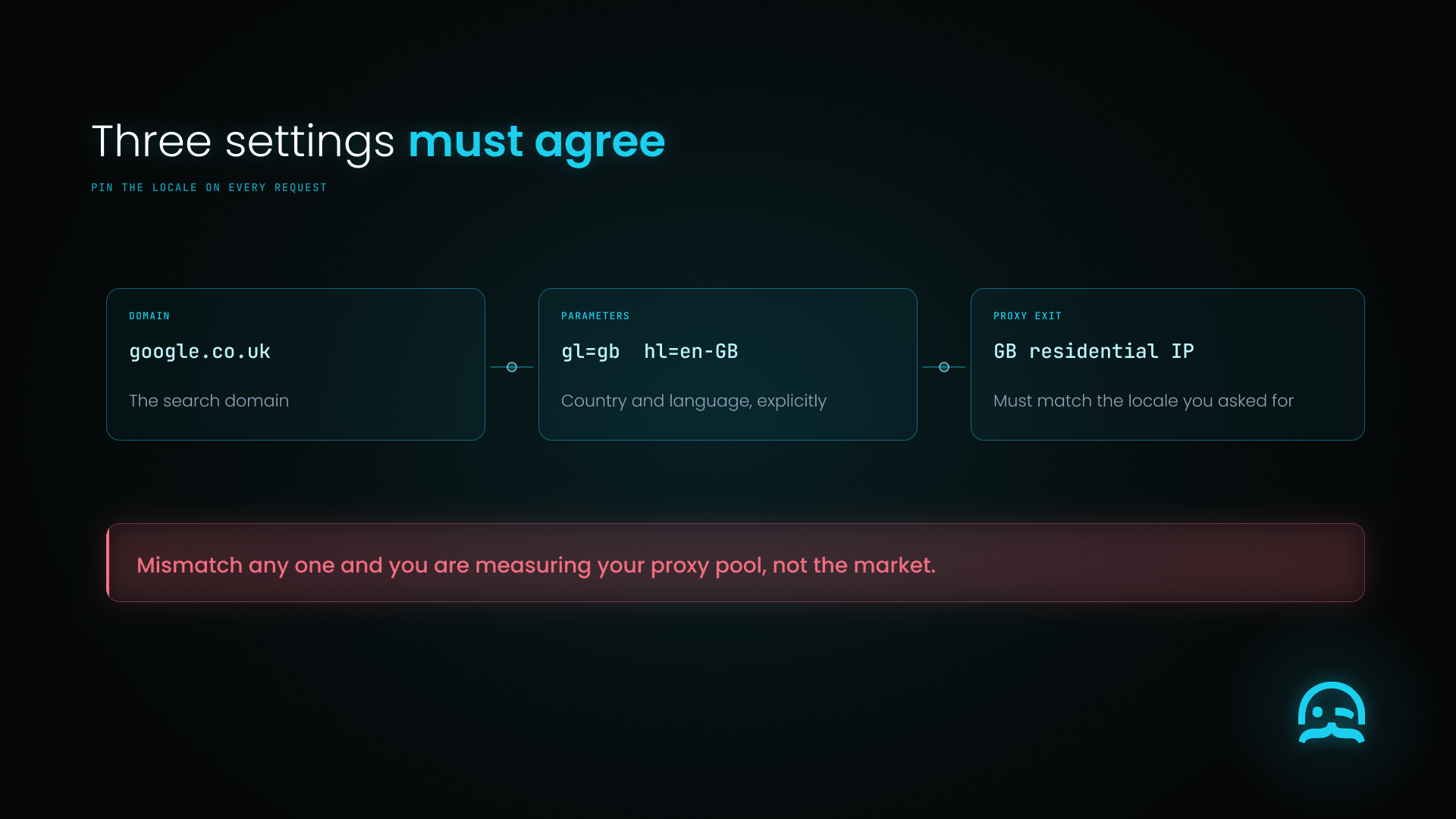
Domain, gl and hl parameters, and proxy exit country must all agree or the data misleads.
Two people searching the same product in different countries see different sellers, different prices, different currencies and different availability. That is not noise, it is the dataset. Any pricing intelligence built on unpinned locale is measuring your proxy pool rather than the market.
Three things to control:
- The domain.
google.co.uk,google.de,google.com.au. The domain alone does not determine results but it is part of the signal. - The
glandhlparameters. Explicit country and language on every request, as in step one. - The proxy exit country. Must match the locale you asked for. A German IP requesting
gl=usproduces results that reflect neither market cleanly.
Get one of the three wrong and the data looks plausible while being wrong, which is the worst failure mode available.
Challenges in Scraping Google Shopping
Google's detection is among the most aggressive of any target. This is not a site with a bot-fight setting someone forgot to enable. Volume triggers challenges quickly, and datacenter IP ranges are scored poorly before anything else is inspected. For what the detection layers inspect, see how to bypass Cloudflare when web scraping. The layer model applies broadly, though Google runs its own stack.
Consent walls interrupt collection in some regions. EU and UK requests frequently land on a cookie consent interstitial rather than results. A scraper that does not handle it stores the consent page as if it were data.
JavaScript rendering is mandatory, which makes every request more expensive in both time and bandwidth than a static target.
Class names rotate. Covered above, and the reason prompt-based extraction is worth considering here specifically.
Silent degradation. Google may return a valid-looking page with no listings rather than an obvious block. Assert on record count, not on HTTP status.
The legal position
Worth stating plainly rather than gesturing at "legal and ethical considerations."
Google's terms of service prohibit automated access to its services. That is a contract issue, not a crime. It is clear, and anyone who collects in volume should know it. Enforcement in practice tends to be technical - blocking - rather than legal.
Public factual data sits on firmer ground than the terms question suggests. Prices and product names are facts, and facts are generally not copyrightable. Wholesale reproduction of Google's page compilation is a different matter.
Practical guardrails: collect at a respectful rate, and do not try to bypass authentication. Do not collect personal data by accident. Get advice from counsel if the output will drive automated pricing at commercial scale. None of this is legal advice, and the position varies by jurisdiction.
Practical Use Cases
Competitive price monitoring. The most common use, and the one where locale discipline matters most. Track price by seller by region over time.
Product feed validation. Compare how your own listings appear in Google Shopping against what you submitted. Discrepancies between feed and display are common and invisible without this.
Market and assortment research. Which sellers carry a category, how saturated it is, how pricing spreads across merchants.
Seasonal demand analysis. Requires a time series, which is why scheduling matters more than one-off collection for this use case.
Conclusion
Google Shopping is a high-value dataset behind a genuinely hard target. The extraction logic is straightforward; everything around it is not.
If you take three things from this guide: set your locale on every request. Do not inherit it from the exit IP. Normalize prices when you collect them, and keep the raw string. Assert on record count, not HTTP status. This stops silent blocks from adding empty categories to your dataset.
Whether you use Playwright or buy a managed API depends on your choice. Do you want to handle proxy and anti-bot maintenance yourself? For a one-off study, build it. For a recurring pricing feed against a target that defends itself this actively, the maintenance is the cost, not the code.
Ready to skip the anti-bot engineering? Try MrScraper free with no credit card, or compare the managed options first.
A locale dial with four currency nodes, one selected, above a projector pad.
Frequently asked questions
What is the best method for scraping Google Shopping without getting blocked?
A managed scraping API is often the most reliable choice. Rendering, proxy rotation, and challenge handling run on the server. You do not need to maintain them yourself. If you build it yourself, you need residential IPs, not datacenter ranges. You also need a real browser to run JavaScript. Use request pacing with jittered backoff. Set a timezone that matches your proxy’s country.
Can I scrape Google Shopping data using Python or JavaScript?
Yes. Playwright, Puppeteer and Selenium all render the JavaScript that Google Shopping listings depend on. A plain requests call returns partial HTML with no product data. Expect to spend most of your effort on proxies and anti-bot handling rather than on extraction.
Why do Google Shopping search results change based on my location?
Because sellers, prices, currency and availability are all locale-dependent. Google infers locale from the exit IP unless you set the gl and hl parameters explicitly. This is why an unpinned scraper produces data that reflects its proxy pool rather than any real market.
What types of data can be extracted from Google Shopping?
Product titles and prices with currency are included. Merchant names, product URLs, and image URLs are included. Star ratings and review counts are included. Promotional badges and availability indicators are included when shown.
Is an official API available for Google Shopping data extraction?
No public API exposes all listings and search results to third parties. Merchant APIs let sellers manage their own feeds. So, a market-wide view needs data collected from rendered pages.
Is scraping Google Shopping legal?
Google’s terms of service ban automated access. This is a contract issue, not a criminal one. Enforcement is usually done through technical blocking. The underlying data-prices and product names-are facts and are generally not protected by copyright. Reproducing Google’s full compilation, however, is a separate question. Consult counsel if this will drive commercial pricing decisions at scale.
Why did my Google Shopping scraper suddenly return zero results?
Almost always one of two things. Google changed its hidden CSS class names, so your selectors broke. Or you got a challenge or consent page, which looked empty. Assert on record count rather than HTTP status so this surfaces as an error rather than an empty dataset.
Summarize this post
Open it in your assistant of choice with the prompt ready to send.
Take a Taste of Easy Scraping!

Find more insights here
HTML to Markdown: Converting Scraped Web Pages for LLM Training
Learn how to convert html to markdown for LLM training. Reduce token usage by 90% and improve RAG ac…
What is Scraping? A Complete Beginner's Guide for 2026
Learn what a web scraper is in 2026 and how AI-powered tools are replacing brittle CSS scripts for r…

The Ultimate Web Crawlers List: 15 Tools for Every Data Need
Compare the best web crawlers for 2026. Learn the difference between open-source, managed APIs, and…