
Proxy 101: What Is a Proxy in Web Scraping?
ProxiesDiscover how proxy servers act as intermediaries to enable anonymity, bypass geo-restrictions, and improve web scraping workflows through IP rotation and detection avoidance.
A proxy is an intermediary server that routes your internet requests on your behalf. By hiding your real IP address, proxies help you stay anonymous. They also let you access geo-restricted content. They can help you avoid IP bans during web scraping.
What Is a Proxy (or Proxy Server)?
A proxy server is an intermediary between your device and the internet. Instead of connecting directly to a website, your request goes through the proxy. The proxy forwards your request, retrieves the response, and sends it back to you.
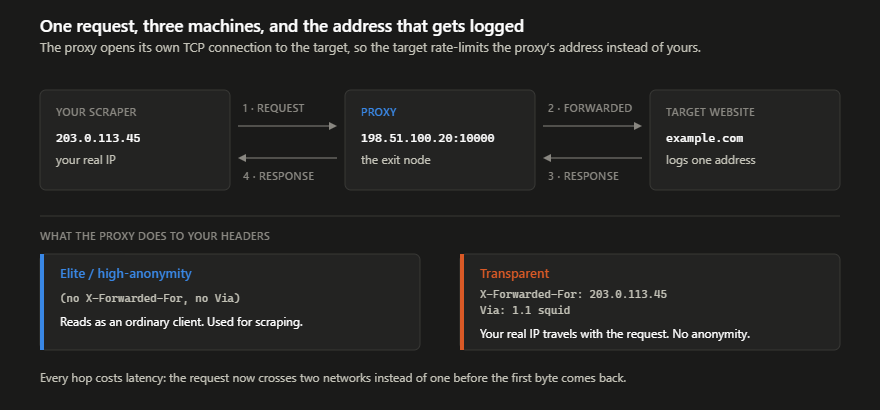
In simple terms:
A proxy is a “middleman” that talks to the internet on your behalf: hiding your real IP.
This simple mechanism enables anonymity, geo-targeting, and safer scraping workflows.
Why People Use Proxies: Main Benefits & Typical Use Cases
1. Privacy & Anonymity
Your real IP is hidden, helping protect your identity and avoid tracking or IP-based restrictions.
2. Bypassing Geo-Restrictions
Proxies can be in many countries. This lets you access content or scrape sites that act differently by region.
3. Network Control & Security (Organizations)
Proxies can:
- Monitor or filter traffic
- Block malicious sites
- Cache resources for faster access
- Enforce corporate internet policies
4. Web Scraping, Automation & Data Collection
Proxies help:
- Avoid rate limits and bans
- Rotate IPs to mimic multiple users
- Access geo-specific data
- Enhance anonymity
Different Types of Proxies
| Proxy Type | Description / Typical Use |
|---|---|
| Anonymous / Forward Proxy | Hides your IP from websites. Good for basic tasks. |
| High-Anonymity (Elite) Proxy | Hides both your IP and the fact you’re using a proxy. |
| Datacenter Proxy | Fast & cheap, but easier to detect. |
| Residential / ISP / Mobile Proxy | Real user IPs from ISPs; hardest to detect; best for scraping. |
| Caching Proxy | Used in corporate networks to save bandwidth. |
| Reverse Proxy | Used by companies to protect servers, load balance, and cache responses. |
Managed APIs Versus Manual Proxy Management
import requests

# Example of routing a request through a managed API endpoint
api_endpoint = "https://api.example-provider.com/scrape"
params = {
    "api_key": "YOUR_API_KEY",
    "url": "https://example.com/data",
    "proxy_type": "residential",
    "location": "us"
}

response = requests.get(api_endpoint, params=params)
print(response.json())
| Feature | Raw Proxy Lists | Managed Scraping API |
|---|---|---|
| IP Rotation | Manual Implementation | Automatic |
| Failure Handling | Custom Retry Logic | Auto-retry on Ban |
| Setup Complexity | High | Low |
While providers like ScraperAPI, ScrapingBee, Bright Data, Apify, and Oxylabs offer various managed solutions, the decision typically rests on whether your workflow requires granular control over specific IPs or the convenience of a managed gateway. For a deeper technical review of these trade-offs, see the white paper, The Economics of Web Data Acquisition. It is by Kevin Sahin and offers strong benchmarks on operating costs.
Important Proxy Trade-Offs
- No encryption (unlike VPNs)
- May be detectable or blocked
- Must trust the proxy provider
- Performance varies depending on IP type
- Not a complete security solution
Essential Scraping API Features for Data Reliability
const axios = require('axios');

// Example using a scraping API to handle JS rendering and auto-retries
const SCRAPING_API_URL = 'https://api.scrapingprovider.com/v1';

async function fetchDynamicContent(targetUrl) {
  const response = await axios.get(SCRAPING_API_URL, {
    params: {
      api_key: 'YOUR_TOKEN',
      url: targetUrl,
      render_js: true,
      proxy_type: 'residential',
      wait_until: 'networkidle'
    }
  });
  return response.data;
}
- Automatic retries: The system attempts the request again if a proxy fails or a rate limit is triggered.
- JavaScript rendering: Built in headless browsers execute scripts to reveal content hidden behind single page applications.
- Smart rotation logic: Algorithms select the best IP from residential or mobile pools to maximize success rates.
When choosing a provider, evaluate how they handle these technical layers. For a deeper technical analysis of these patterns, read the documentation from ScraperAPI, ScrapingBee, Bright Data, Apify, or Oxylabs.
When Should You Use a Proxy?
Use a proxy if you need to:
- Scrape websites at scale
- Avoid rate limits or bans
- Access geo-specific data
- Increase privacy and anonymity
- Run automation or multi-account workflows
If your project involves high volume or geographic diversity: a proxy is almost essential.
Why MrScraper’s Built-In Proxy Feature Is Worth Considering
This internal system reduces the need for users to use external proxy services. It is a good tool for small to medium scraping workflows.
Benefits:
- Fully integrated and easy to use
- Optimized for small to medium scraping workflows
- Consolidated billing without external dashboards
- Reduced architectural dependencies
- Hybrid flexibility to combine with external proxies as needed
The best web scraping API with built-in proxies lets you start simple with native features. You can scale to external providers only when your needs change.
Conclusion
Proxies act as a middleman between you and the internet: enabling anonymity, geo-diversity, and scalable web scraping.
Not all proxies are the same:
- Datacenter proxies = fast, cheap, but easier to detect
- Residential/mobile proxies = highly anonymous, ideal for scraping
- Reverse proxies = protect servers
If you're using MrScraper, built-in proxies are a great starting point. For heavy scraping or region-specific tasks, you can upgrade to external proxy networks later.
Choosing the right proxy setup depends on your goals. When set up well, proxies enable safer, stronger, and more flexible scraping workflows.
Comparing Scraping APIs with Integrated Proxy Pools
Providers like ScraperAPI, ScrapingBee, Bright Data, Apify, and Oxylabs offer various specialized tiers for these requirements.
| Provider | Primary Proxy Type | Best Use Case |
|---|---|---|
| ScraperAPI | Datacenter/Residential | General purpose scraping |
| ScrapingBee | Residential | Headless browser rendering |
| Bright Data | Mobile/Residential | Global geo-targeting |
| Oxylabs | Residential | Enterprise scale data |
The use of these providers allows developers to focus on data parsing rather than managing IP pools manually.
import requests

# Example of using a scraping API with integrated proxies
api_url = "https://api.example-provider.com/scrape"
payload = {
    "api_key": "YOUR_KEY",
    "url": "https://example.com",
    "proxy_type": "residential",
    "country": "us"
}

response = requests.get(api_url, params=payload)
print(response.text)
For more on the technical architecture of these systems, read the paper, "Measuring the Ecosystem of Managed Proxy Services." It gives an academic overview of how these commercial pools are built and maintained.
Optimize Your Data Collection Costs
Explore our flexible plans to find the right mix of proxy support and extraction tools. Choose what fits your project needs.
Frequently asked questions
What is the main difference between datacenter and residential proxies?
Datacenter proxies are fast and cost-effective but originate from secondary servers, making them easier for websites to detect. Residential proxies use real IP addresses assigned by ISPs, making them appear like genuine users and harder to block.
Does a proxy provide the same security as a VPN?
No. Proxies can hide your IP address and add some anonymity. But they usually do not have the end-to-end encryption a VPN provides. Proxies are better suited for specific tasks like web scraping rather than total network security.
When should I use a proxy for web scraping?
You should use a proxy when you scrape at scale. It helps you avoid rate limits and IP bans. It can access data limited to certain regions. It also helps you stay anonymous and avoid detection.
Summarize this post
Open it in your assistant of choice with the prompt ready to send.
Take a Taste of Easy Scraping!

Find more insights here
HTML to Markdown: Converting Scraped Web Pages for LLM Training
Learn how to convert html to markdown for LLM training. Reduce token usage by 90% and improve RAG ac…
What is Scraping? A Complete Beginner's Guide for 2026
Learn what a web scraper is in 2026 and how AI-powered tools are replacing brittle CSS scripts for r…

The Ultimate Web Crawlers List: 15 Tools for Every Data Need
Compare the best web crawlers for 2026. Learn the difference between open-source, managed APIs, and…