Node-Unblocker for Web Scraping: What It Is and How It Works
Web ScrapingLearn what Node-Unblocker is, how to set it up with Express, and how to use it with HTTP clients and browser automation for web scraping.
Node-Unblocker for Web Scraping: What It Is and How It Works. Node-Unblocker is open-source proxy middleware for Node.js and Express. It forwards requests to target sites. It does not parse scraped data.
What Node-Unblocker Is and How It Works
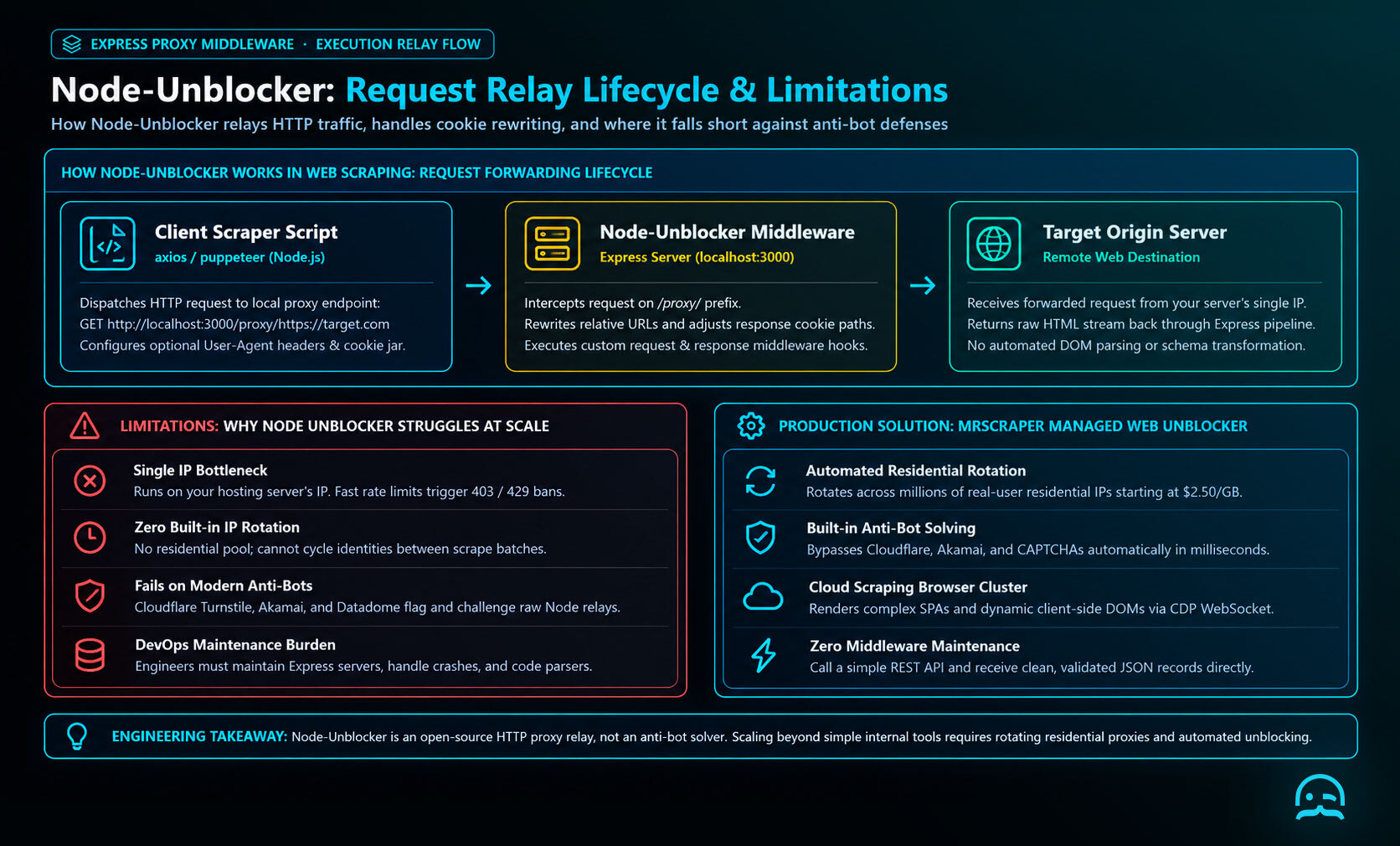
Node-Unblocker is an npm package originally designed as a web proxy for circumventing blocks and censorship. In the context of scraping, it forwards incoming requests to a remote target and streams the response back to your client. Internally it handles things like relative URL rewriting and cookie path adjustments to keep proxied pages functional.
You pull it into an Express server and attach it as middleware so that requests made to a route prefix (such as /proxy/) get relayed to the target site.
Setting Up Node-Unblocker in Express
Here’s how to build a basic proxy server using Node-Unblocker:
# Initialize a new project mkdir node-unblocker-proxy cd node-unblocker-proxy npm init -y # Install dependencies npm install express unblocker |
|---|
| :-- |
Create proxy-server.js with the following:
| const express = require("express"); const Unblocker = require("unblocker"); const app = express(); // Unblocker will handle all routes under /proxy/ const unblocker = new Unblocker({ prefix: "/proxy/" }); app.use(unblocker); // Start the proxy server const PORT = process.env.PORT || 3000; app.listen(PORT, () => { console.log(`Proxy server running at ); }).on("upgrade", unblocker.onUpgrade); | |:---- |
Now, if you start this server:
node proxy-server.js |
|---|
| :-- |
You can fetch pages through your proxy like this in a browser:
http://localhost:3000/proxy/https://example.com |
|---|
| :-- |
The server will forward the request for example.com and serve back the proxied content.
Using the Proxy in a Web Scraper
Node-Unblocker for Web Scraping: What It Is and How It Works describes a reverse proxy, not a scraper or parser. You still need to fetch the proxied content in your scraper script. This example uses axios in Node.js to request a local proxy endpoint for a target page. The proxy path combines its base path with the target URL.
http://localhost:3000/proxy/https://example.com
Create scraper.js with the following code. During the request, an optional User-Agent header can emulate a real browser. The proxy forwards the request externally and streams the resulting HTML back to axios. Your scraper can then inspect response.data or parse it with Cheerio or another tool.
const axios = require("axios");

// Base of your proxy server
const PROXY_BASE = "http://localhost:3000/proxy/";

// Target URL to scrape
const TARGET_URL = "https://www.example.com";

(async () => {
  try {
    // Fetch via the local Node-Unblocker proxy
    const response = await axios.get(PROXY_BASE + TARGET_URL, {
      headers: {
        // Optional: emulate a real browser
        "User-Agent": "Mozilla/5.0 (compatible; Node Scraper)"
      }
    });

    console.log("HTML length:", response.data.length);
    // Parse response.data with Cheerio or another tool here.
  } catch (err) {
    console.error("Error scraping through proxy:", err.message);
  }
})();
Advanced Request and Response Middleware
Node-Unblocker supports middleware hooks that modify requests before forwarding and responses before returning them to your scraper. In Node-Unblocker for Web Scraping: What It Is and How It Works, you can add or change headers. You can do this only for selected API URLs.
For example, you can add an authentication token. The examples assume that app and Unblocker come from the Express setup shown earlier.
function addAuthHeaders(data) {
  if (/^https?:\/\/api\.example\.com/.test(data.url)) {
    data.headers = data.headers || {};
    data.headers["x-scrape-token"] = "my_token_value";
  }
}

const unblockerConfig = {
  prefix: "/proxy/",
  requestMiddleware: [addAuthHeaders]
};

app.use(new Unblocker(unblockerConfig));
Response middleware can also transform returned content. For example, this middleware removes script elements from HTML streams before the response reaches the scraper.
const through = require("through");

function stripScripts(data) {
  if (typeof data.contentType === "string" && data.contentType.includes("text/html")) {
    data.stream = data.stream.pipe(
      through(function (chunk, enc, next) {
        this.push(chunk.toString().replace(/<script\b[^>]*>[\s\S]*?<\/script>/gi, ""));
        next();
      })
    );
  }
}

const unblockerWithMiddleware = new Unblocker({
  responseMiddleware: [stripScripts]
});

app.use(unblockerWithMiddleware);
These hooks let you adjust proxy behavior for scraping tasks like authentication and cleanup. They also add to server complexity.
Persisting Proxy Sessions
Node-Unblocker for Web Scraping depends on how you manage cookies between requests.
const axios = require("axios");
const { CookieJar } = require("tough-cookie");

const jar = new CookieJar();
const proxy = "http://localhost:3000/proxy/";
const target = proxy + "https://example.com/";

async function get(url) {
  const headers = {};
  const cookieHeader = await jar.getCookieString(url);
  if (cookieHeader) headers.Cookie = cookieHeader;

  const response = await axios.get(url, { headers });
  for (const cookie of response.headers["set-cookie"] || []) {
    await jar.setCookie(cookie, url);
  }
  return response.data;
}

(async () => {
  await get(target); // receives the session cookie
  const html = await get(target + "account");
  console.log(html.length);
})();
Integrating with Browser Automation (Puppeteer/Playwright)
Node-Unblocker’s proxy also works with headless browsers like Puppeteer and Playwright. Some advanced sites use Cloudflare or strong bot protection. These sites may still block simple proxies. The Puppeteer example below launches headless Chrome, opens a local proxy endpoint for example.com, and captures the returned page HTML. This approach may help when a target needs some client-side code to run, but it won’t bypass strong anti-bot controls.
const puppeteer = require("puppeteer");

(async () => {
  const browser = await puppeteer.launch();
  try {
    const page = await browser.newPage();
    await page.goto("http://localhost:3000/proxy/https://example.com");
    const html = await page.content();
    console.log("Page HTML:", html.substring(0, 500));
  } finally {
    await browser.close();
  }
})();
Limitations of Node-Unblocker in Scraping
Node-Unblocker is useful for basic content fetching and experiments, but it has limitations:
- No built-in proxy rotation or IP pool: If your proxy server uses one IP, you can still get blocked at scale.
- Struggles with anti-bot defenses: Sites behind Cloudflare, sophisticated rate limits, or dynamic bot detection may still block proxied requests.
- Not specialized for scraping: It acts as a generic relay rather than a scraping API with structured outputs.
This makes Node-Unblocker great for development, testing, or small scrapes. It is less suitable for large production scraping without added infrastructure.
MrScraper’s Proxy Feature for Scalable Scraping
If you are building larger scraping systems, MrScraper’s proxy feature offers managed proxy handling.
It can also help you build more resilient scraping systems. It is built into its scraping API:
- Automated proxy rotation: MrScraper routes requests through a pool of proxies without manual middleware or server setup.
- Anti-blocking intelligence: Built-in techniques reduce the chances of IP bans, even on targets with moderate bot protection.
- Unified scraping and proxy API. You do not need to set up separate proxy servers or manage middleware. Instead, you call MrScraper’s API. You get structured output.
This makes MrScraper useful when you want to focus on data parsing and business logic, not proxy infrastructure.
Conclusion
Using Node-Unblocker for web scraping lets you quickly spin up your own proxy server and fetch remote content through a Node.js-based middleware. It integrates tightly with Express, supports middleware hooks for transforming requests and responses, and can work with both HTTP clients like axios and headless browsers like Puppeteer.
For simple scraping tasks or internal projects, this approach gives you direct control over how requests are routed. But when your scraping demands grow, whether you need proxy rotation, anti-block handling, or a managed scaling solution, integrating a platform like MrScraper with integrated proxy support can help reduce maintenance overhead and improve reliability.
What We Learned
Node-Unblocker for web scraping uses one simple pattern. Place an Express proxy between the scraper and the target site. Then measure what the proxy can solve and what it cannot. Node-Unblocker forwards requests and responses, while your client or browser handles fetching, parsing, and JavaScript execution.
- Use it for controlled experiments, internal tools, and smaller workflows where owning the proxy server is useful.
- Treat middleware as a checklist for each request path. Confirm the target URL, headers, cookies, response type, and error status before parsing.
- Do not confuse relaying traffic with overcoming every anti-bot system. Rotation, scaling, and stronger defenses require additional infrastructure.
- Choose the architecture according to operational needs, including observability, retries, compliance, and maintenance.
The practical takeaway is straightforward: Node-Unblocker gives a flexible foundation, not a complete scraping platform. Start with a narrowly scoped target, validate responses, and expand only after measuring failures and resource costs.
Explore the Next Step for Your Scraping Workflow
Review the MrScraper quickstart resources to explore a managed alternative when maintaining your own proxy setup becomes impractical.
Summarize this post
Open it in your assistant of choice with the prompt ready to send.
Take a Taste of Easy Scraping!

Find more insights here
Use MrScraper MCP to Compare Public SaaS Pricing and Plan Limits
Build a source-backed SaaS plan comparison using MrScraper MCP. Preserve prices, quotas, billing ter…
Build a Product Attribute Classifier with LangChain and MrScraper
Build a LangChain workflow that extracts product evidence with MrScraper, normalizes attributes and…
Create a Source-Verified Question-and-Answer Dataset From Web Pages
Build a question-and-answer dataset from your own documentation pages. Every answer is an exact span…