Captcha Automated Queries: Causes and Fixes
Web ScrapingLearn why websites trigger CAPTCHA for automated queries and how to reduce interruptions with responsible scraping, browser, session, and traffic practices.
Captcha Automated Queries: Causes and Fixes focuses on why websites flag automated-looking traffic and how legitimate workflows can reduce CAPTCHA interruptions through slower requests, varied traffic, realistic headers, persistent sessions, and responsible automation.
What Does “Captcha Automated Queries” Actually Mean?
When a site detects traffic that looks automated, it labels it as automated queries. This doesn’t necessarily mean anything malicious: it can simply mean:
- Too many fast requests
- Repeated queries from the same IP
- Missing human-behavior signals
- Headless browsers
- Scrapers with default headers
- Proxy or VPN usage
- Multiple users sharing the same network
When the site detects these behaviors, it triggers a CAPTCHA challenge to confirm the request is from a human.
Why Websites Trigger CAPTCHA for Automated Queries
Websites use CAPTCHA to prevent:
- Bots scraping protected information
- Abuse, fraud, or spam
- Resource overload
- Unauthorized automation
- Non-human interactions
CAPTCHA systems analyze browsing activity across signals such as:
- Mouse movement
- Time spent on page
- User-agent and fingerprint
- Cookie behavior
- IP reputation
- Browser JavaScript execution
If these patterns do not match typical human behavior, the system assumes automated queries and blocks access with a CAPTCHA.
Examples of Situations That Trigger CAPTCHA
Here are realistic cases where CAPTCHA often appears:
1. Web Scrapers / Crawlers
Scrapers may send many requests too fast or use non-human browser signatures.
2. SEO Tools and Monitoring Scripts
Rank trackers, uptime monitors, and keyword scrapers frequently trigger automated detection.
3. API Abuse or Oversized Traffic
Even legitimate high-volume automated workflows can look abusive.
4. Shared Office Networks
Many people accessing the same website from the same IP can trigger a CAPTCHA.
5. Proxy or VPN Connections
Datacenter proxies often have low or suspicious IP reputation.
How to Reduce or Avoid CAPTCHA When Automating
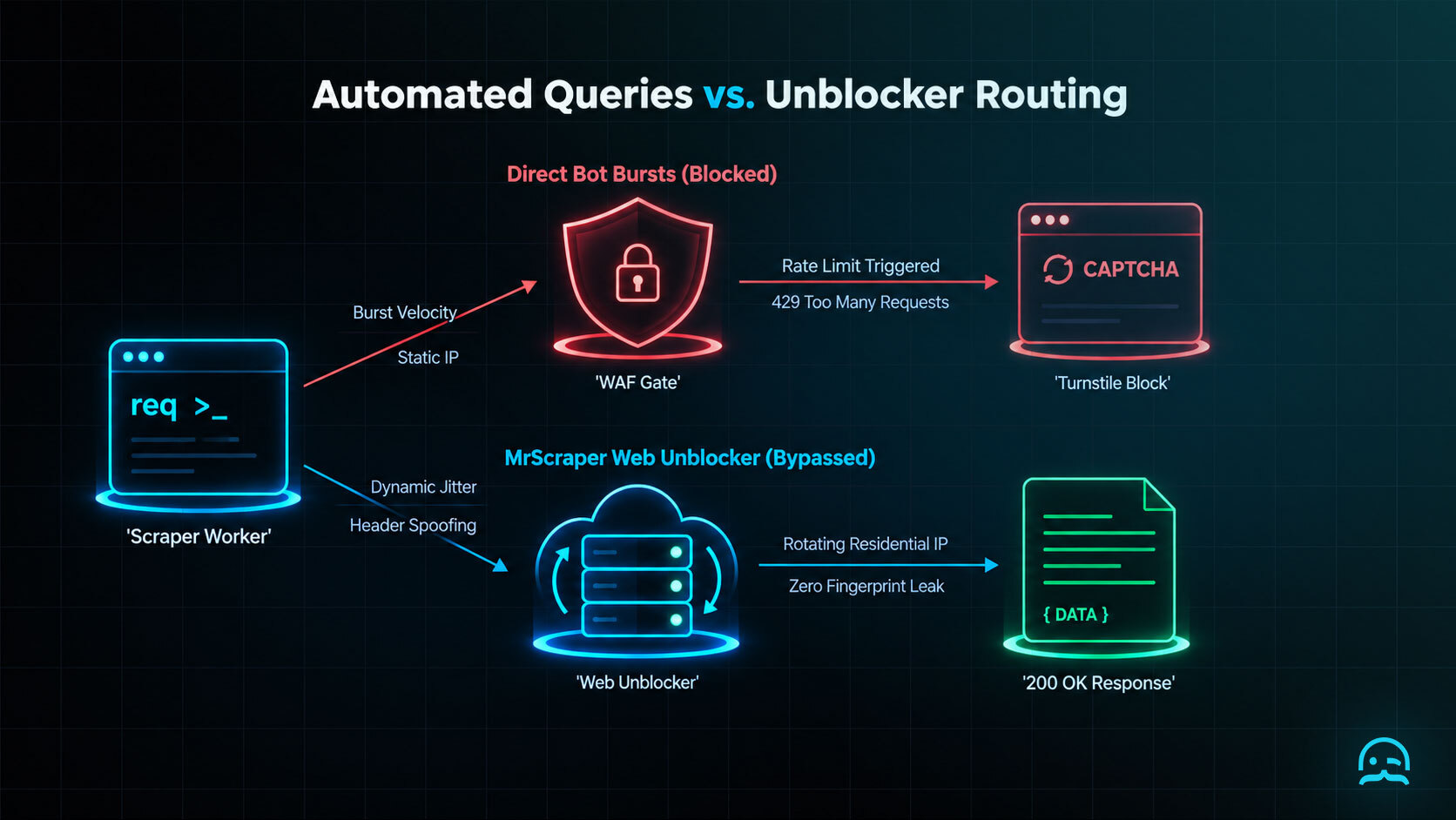
Below are practical methods to minimize CAPTCHA interruptions, suitable for Python, Node.js, or any scraping framework.
1. Add Human-like Behavior Simulation
When using Playwright, Puppeteer, or Selenium:
- Add slight random delays.
- Trigger genuine scrolling.
- Move the mouse naturally.
- Load assets rather than blocking them.
- Avoid headless mode when possible.
2. Rotate IP Addresses
To prevent rate-limit blocks:
- Use residential proxies
- Use rotating proxies
- Avoid sending too many requests from a single IP
3. Respect Rate Limits
Slowing down requests drastically reduces detection:
- 1–2 seconds between requests → safer
- 50 requests per second → almost guaranteed CAPTCHA
4. Mimic Real Browser Headers
Use realistic User-Agent, Accept-Language, Accept-Encoding, and Referer headers, not scripting-library defaults.
Captcha Automated Queries: Playwright Headers
const { chromium } = require('playwright');

(async () => {
  const browser = await chromium.launch({ headless: true });
  const context = await browser.newContext({
    locale: 'en-US',
    timezoneId: 'America/New_York',
    viewport: { width: 1366, height: 768 },
    extraHTTPHeaders: {
      'Accept-Language': 'en-US,en;q=0.9'
    }
  });

  const page = await context.newPage();
  await page.goto(process.env.TARGET_URL || 'https://example.com', {
    waitUntil: 'domcontentloaded'
  });

  console.log(await page.title());
  await browser.close();
})();
5. Preserve Cookies and Sessions
Websites track users through cookies. Using a fresh session every request looks suspicious.
6. Use JavaScript-Capable Tools
Many CAPTCHA systems rely on JavaScript.
Tools like Playwright and Puppeteer naturally execute JS, reducing detection.
Captcha Automated Queries: Fingerprint Controls
import { chromium } from "playwright";

const browser = await chromium.launch({ headless: true });
const context = await browser.newContext({
  locale: "en-US",
  timezoneId: "UTC",
  colorScheme: "light"
});
const page = await context.newPage();

const fingerprint = await page.evaluate(() => {
  const canvas = document.createElement("canvas");
  canvas.width = 280;
  canvas.height = 60;
  const canvasContext = canvas.getContext("2d");
  canvasContext.font = "16px Arial";
  canvasContext.fillText("automation consistency check", 8, 32);

  const gl = document.createElement("canvas").getContext("webgl");
  const debugInfo = gl?.getExtension("WEBGL_debug_renderer_info");

  return {
    canvas: canvas.toDataURL(),
    webglVendor: debugInfo
      ? gl.getParameter(debugInfo.UNMASKED_VENDOR_WEBGL)
      : "unavailable",
    webglRenderer: debugInfo
      ? gl.getParameter(debugInfo.UNMASKED_RENDERER_WEBGL)
      : "unavailable",
    userAgent: navigator.userAgent,
    language: navigator.language,
    timezone: Intl.DateTimeFormat().resolvedOptions().timeZone
  };
});

console.log(JSON.stringify(fingerprint, null, 2));
await browser.close();
Google’s reCAPTCHA documentation explains why browser and network signals can contribute to a challenge, while this check helps make legitimate automation internally consistent.
7. Distribute Workload
Split scraping tasks across:
- Multiple IPs
- Multiple time windows
- Multiple machines
This avoids traffic spikes that trigger CAPTCHA.
Optional: Solving CAPTCHA Programmatically
If automation must handle CAPTCHA directly, Captcha Automated Queries: Causes and Fixes include OCR-based image recognition for simple CAPTCHAs, generic third-party solvers, browser-based human-like interaction, or manual fallback. The choice depends on your use case, technology stack, and legal considerations.
Legal & Ethical Considerations
Before automating at scale:
- Check the target site’s Terms of Service
- Ensure you have legal rights to access the data
- Avoid scraping personal or sensitive information
- Use automation responsibly
CAPTCHA exists to protect websites: bypass them ethically.
Final Thoughts
Captcha automated queries are not errors: they are signals that your automation looks suspicious.
By understanding why they appear and applying the techniques above, you can:
- Reduce interruptions
- Make your scraper more stable
- Build long-running automation
- Avoid unnecessary CAPTCHA challenges
What We Learned
Treating a challenge as a stop signal, rather than an obstacle to defeat, is a key consideration for automated queries.
This approach prevents a temporary detection event from becoming a repeated retry storm. Google’s reCAPTCHA Help describes challenges as part of an abuse-prevention system, so responsible automation should respect that boundary.
import json
import time
from pathlib import Path

CHECKPOINT = Path("progress.json")
MAX_CHALLENGES = 2

def load_checkpoint():
    if CHECKPOINT.exists():
        return json.loads(CHECKPOINT.read_text())
    return {"completed": [], "challenges": 0}

def save_checkpoint(state):
    CHECKPOINT.write_text(json.dumps(state, indent=2))

def fetch_record(record_id):
    # Replace with an authorized request in your own integration.
    return {"id": record_id, "status": "ok"}

state = load_checkpoint()
for record_id in ["a", "b", "c"]:
    if record_id in state["completed"]:
        continue
    if state["challenges"] >= MAX_CHALLENGES:
        print("Paused for review; no further retries will be sent.")
        break

    try:
        result = fetch_record(record_id)
        state["completed"].append(result["id"])
        save_checkpoint(state)
        time.sleep(1)
    except Exception as error:
        state["challenges"] += 1
        save_checkpoint(state)
        print(f"Paused after an access failure: {error}")
        break
- Recognize the challenge as feedback about traffic, not as permission to evade controls.
- Use checkpointed progress so a pause does not discard completed work.
- Stop bounded retries and request review when challenges recur.
- Resume only when the workflow remains authorized and its request pattern is acceptable.
Start planning a more reliable extraction workflow
Explore practical starting resources for applying responsible CAPTCHA-reduction techniques to your data extraction workflow.
Frequently asked questions
What does “captcha automated queries” mean?
It describes a website identifying requests that resemble automated traffic and presenting a CAPTCHA challenge. Fast or repeated requests, headless browsers, default headers, proxy use, and shared IP addresses can contribute to that signal.
Why do websites trigger CAPTCHA for automated queries?
CAPTCHA helps websites distinguish people from automated traffic and limit scraping, abuse, fraud, spam, resource strain, or unauthorized automation. Detection may consider request patterns, browser signals, cookies, JavaScript execution, and IP reputation.
How can you reduce CAPTCHA interruptions during web scraping?
Use safe request rates. Avoid traffic spikes. Rotate or spread requests responsibly. Send realistic browser headers. Keep sessions. Use JavaScript-ready tools when needed. Always follow the target site’s rules.
How should you handle CAPTCHA programmatically?
Choose an approach based on your use case and legal requirements. You can use a manual fallback or an approved CAPTCHA-solving method. Do not use automation to evade access controls or violate a site’s terms.
Are captcha automated queries always a sign of malicious activity?
No. Legitimate scraping, monitoring, testing, API workflows, shared networks, and proxy connections can also resemble automated traffic. A CAPTCHA is a signal that the request pattern appears unusual to the website.
Summarize this post
Open it in your assistant of choice with the prompt ready to send.
Take a Taste of Easy Scraping!


Find more insights here

Scaling E-commerce Competitive Intelligence with Automated Data Harvesting
Scale e-commerce data harvesting with residential proxies and AI. Learn how modern data extraction s…

Scaling Data Extraction via AI-Driven Dynamic Selectors
Learn how AI-driven dynamic selectors and residential proxies reduce web scraping maintenance costs…

Why MrScraper is the Best ScraperAPI Alternative for No-Code Users
Compare ScraperAPI alternatives and discover why visual, AI-powered extraction is better for no-code…