What is data harvesting? Uses and a Step-by-Step Guide
Web ScrapingLearn what data harvesting is, explore its e-commerce market research use case, and follow a practical process for collecting, cleaning, analyzing, automating, and managing data responsibly.
What is data harvesting? It collects and pulls large amounts of data. The data can come from websites, APIs, and databases. People use this data for analysis and decision-making.
Use Case: Market Research for E-commerce
Scenario
A growing e-commerce company wants to analyze competitor pricing, customer reviews, and trending products to improve its offerings. By using data harvesting, the company can collect real-time data. The data comes from competitor websites and social media platforms. This helps them spot market trends and adjust pricing strategies as needed.
Benefits
- Gain insights into competitor pricing strategies.
- Identify high-demand products and customer preferences.
- Improve inventory management and marketing campaigns.
Step-by-Step Guide to Data Harvesting
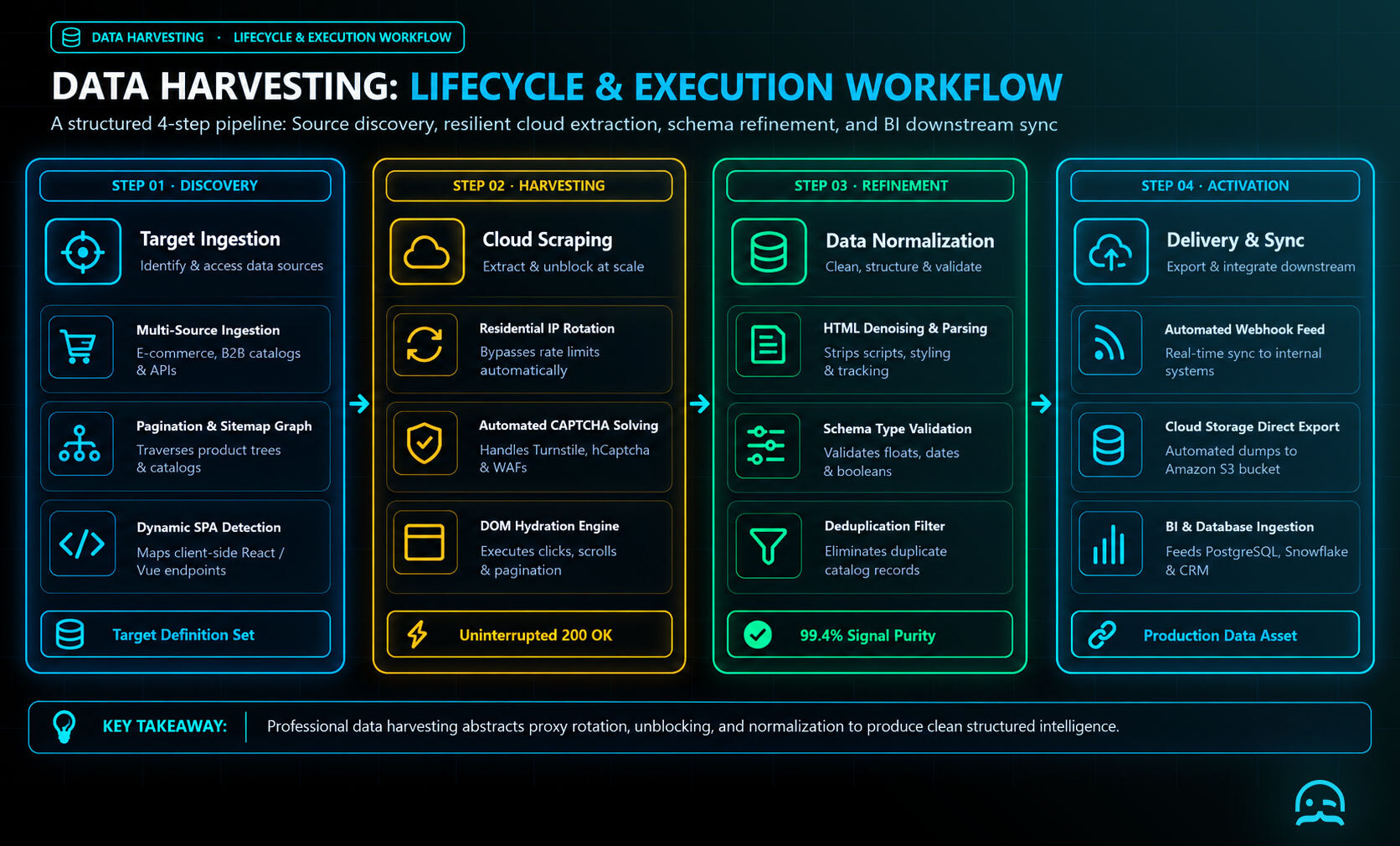
Step 1: Define Your Data Requirements
Before collecting data, identify what information you need, where it is available, and how it will be used. Common data points include prices, reviews, social media mentions, and product descriptions.
Step 2: Choose the Right Tools
Select tools that match the source and workflow.
- Web scrapers: BeautifulSoup, Scrapy, and Selenium.
- APIs: Twitter API, Google Maps API, and OpenWeather API.
- Automation platforms: Zapier and UiPath.
Step 3: Extract Data
Use web scraping techniques or APIs to extract the required data. If scraping, first identify the website's structure, then use a scraping library to extract specific elements. Store the extracted data in a structured format such as CSV or JSON. The example below uses Requests and Beautiful Soup to get product titles from an e-commerce product page. Adjust the URL or selector for your target site.
import requests
from bs4 import BeautifulSoup

def extract_product_titles(url, selector="h2.product-title"):
    response = requests.get(url, timeout=30)
    response.raise_for_status()
    soup = BeautifulSoup(response.text, "html.parser")
    return [node.get_text(strip=True) for node in soup.select(selector)]

for title in extract_product_titles("https://example-ecommerce.com/products"):
    print(title)
Step 4: Clean and Process Data
Raw data may contain duplicates, errors, or missing values. Use data cleaning techniques to refine the dataset, ensuring accuracy and consistency.
Step 5: Analyze and Visualize Data
Once the data is clean, use tools like Pandas (Python), Excel, or Power BI to find insights. Visualizing data through charts and graphs helps in better interpretation and decision-making.
Step 6: Automate Data Harvesting
To keep the data updated, automate the harvesting process using scheduled scripts or automation tools. Regular updates help in maintaining the relevance and accuracy of the data.
Step 7: Ensure Compliance with Legal and Ethical Standards
When collecting information, follow applicable privacy laws, including GDPR and CCPA. Obtain required permissions, respect each website’s terms of service, and avoid unauthorized or prohibited collection.
What We Learned
- Data harvesting collects and extracts large amounts of information from sources such as websites, APIs, and databases.
- Effective harvesting starts with clear data requirements, followed by extraction, cleaning, processing, analysis, and visualization.
- Automation helps keep harvested data updated, relevant, and accurate.
- Organizations should follow data privacy laws, obtain proper permissions, and respect website terms of service.
- Used responsibly, data harvesting can support market research, business insights, and better decision-making.
Build a more structured harvesting workflow
Explore an AI-powered scraper with built-in unblocking tools to help collect structured data for your harvesting workflow.
Summarize this post
Open it in your assistant of choice with the prompt ready to send.
Take a Taste of Easy Scraping!

Find more insights here

Build a Source-Led Deep Research Workflow With MrScraper
Build a deep research workflow that turns a question into a source plan, collects evidence from appr…
Choose an Agent Framework for a Web Data Application
Compare LangGraph, the OpenAI Agents SDK, Google ADK, CrewAI, Mastra and the Claude Agent SDK on too…

Design AI Research Loops That Stop, Recover and Produce Evidence
Learn how to build an AI research loop with clear states, firm stop conditions, safe retries after f…