Walmart Price Tracker: Tools & Tips for Smarter Shopping
Web ScrapingLearn how to monitor Walmart prices with browser extensions, dedicated trackers, manual checks, and web scraping for smarter shopping and price analysis.
Walmart Price Tracker: Tools & Tips for Smarter Shopping covers browser extensions and dedicated apps. It also covers manual monitoring and web scraping. These methods help you track Walmart prices and analyze changes. They can also help you find better times to buy.
Why Track Walmart Prices?
Whether you're a savvy shopper or a data analyst, tracking prices has its perks:
- Save Money – Know the best time to buy
- Monitor Deals – Be the first to catch discounts
- Analyze Trends – Understand seasonal pricing or stock movement
- Competitor Research – Great for ecommerce or retail strategy
Tools You Can Use to Monitor Walmart Prices
There are several tools (and methods) for keeping an eye on price changes:
1. Browser Extensions
- Honey and Rakuten offer deal alerts and cash back.
- Some extensions track price history and notify you about drops.
2. Dedicated Price Trackers
There are apps built specifically to watch Walmart product pages. They often:
- Show historical price graphs
- Let you set price-drop alerts
- Support multiple retailers, not just Walmart
3. Manual Monitoring
Old-school but effective. Bookmark your favorite products and check regularly. But this gets tiring quickly for multiple items.
Automate with Web Scraping
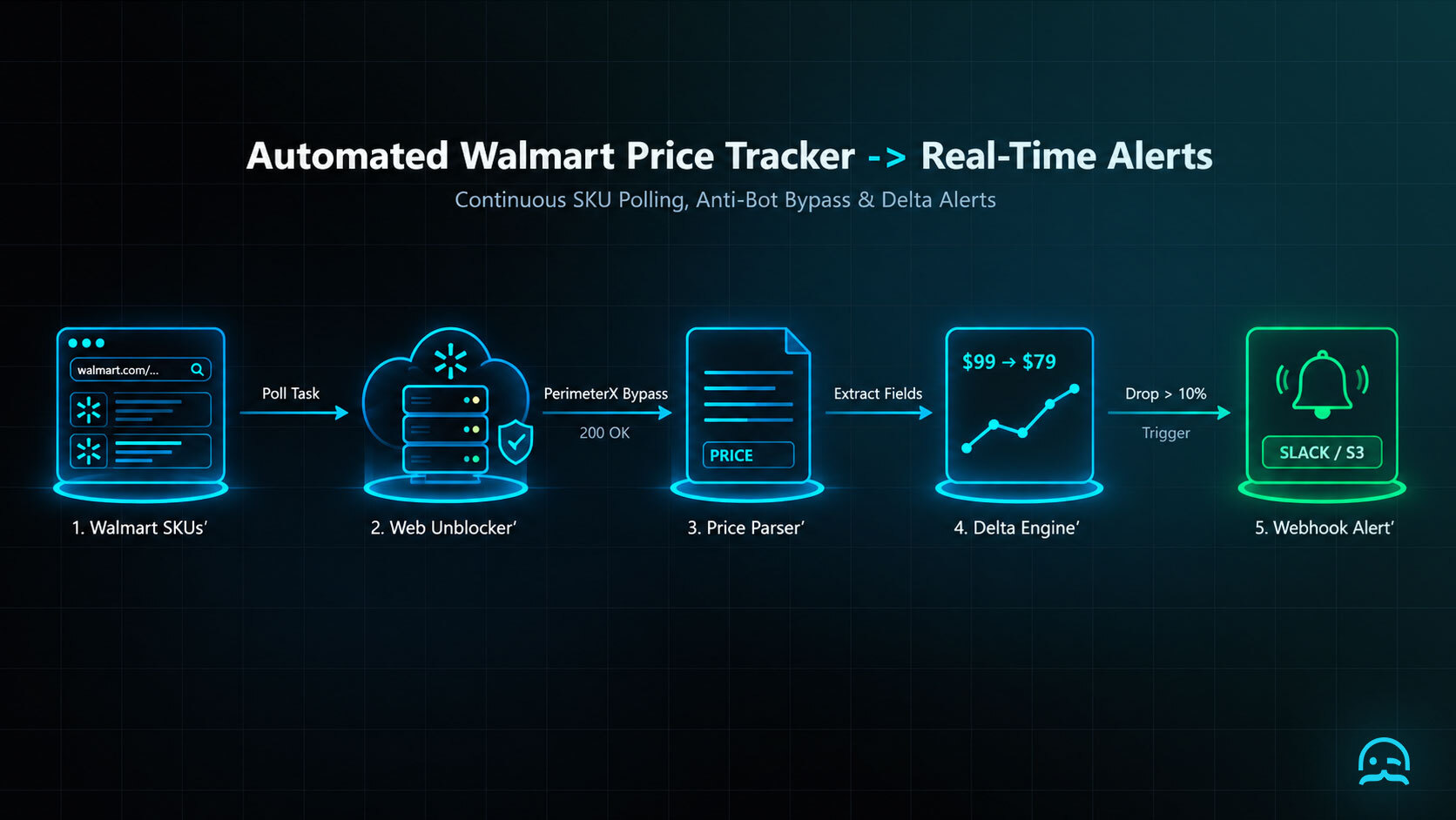
For Walmart Price Tracker: Tools & Tips for Smarter Shopping, web scraping provides control when monitoring prices at scale. A scraping tool can collect real-time prices from Walmart product pages. It can monitor thousands of SKUs across categories. It can export data for pricing analysis. It can run automatically each day or week. It can also run on demand.
Sample Fields You Might Track:
- Product name
- Current price
- Original price
- Availability
- Ratings and reviews
- Shipping options
- Seller name
This is perfect for ecommerce sellers, researchers, and deal hunters alike.
Is It Legal to Track Walmart Prices?
Yes: as long as you're scraping public data responsibly and within Walmart’s terms of use. Here are a few quick tips:
- Don’t overload their servers: throttle your requests
- Avoid logging in or bypassing authentication
- Use rotating proxies if needed to prevent blocks
Better yet, let a managed solution like MrScraper handle the compliance and infrastructure.
Walmart Price Tracker: Tools & Tips for Smarter Shopping
import time
from playwright.sync_api import sync_playwright, TimeoutError as PlaywrightTimeoutError

URL = "https://www.walmart.com/ip/example/123"
PRICE_SELECTOR = '[data-automation-id="product-price"]'
CHALLENGE_MARKERS = ("captcha", "verify you are human", "access denied")

with sync_playwright() as playwright:
    browser = playwright.chromium.launch(headless=True)
    page = browser.new_page()

    for attempt in range(3):
        try:
            page.goto(URL, wait_until="domcontentloaded", timeout=30_000)
            body = page.locator("body").inner_text(timeout=10_000).lower()
            if any(marker in body for marker in CHALLENGE_MARKERS):
                raise RuntimeError("Challenge page detected; stop and review access rules.")
            price = page.locator(PRICE_SELECTOR).first.text_content(timeout=10_000)
            if not price:
                raise RuntimeError("Price element was empty.")
            print(price.strip())
            break
        except PlaywrightTimeoutError:
            if attempt == 2:
                raise
            time.sleep(2 ** attempt)

    browser.close()
Tips for Effective Price Monitoring
- Schedule scrapes daily or weekly for consistency
- Track multiple sellers (some Walmart listings are 3rd-party)
- Combine with alerting tools for real-time deal emails
- Use historical data to predict when prices will drop
MrScraper: Your Walmart Price Tracker Powerhouse
For Walmart Price Tracker: Tools & Tips for Smarter Shopping, comparing a TV or blender stays simple. No code is needed. No scraper maintenance is required. Customizable templates support Walmart price tracking, with automatic scrolling or pagination. Casual shoppers and data-driven entrepreneurs can track price changes for many items. They can download the results. They can also send price data to an app. They can stay updated with minimal manual work.
Conclusion
Tracking Walmart prices doesn’t need to be a guessing game. With the right tools and methods, from browser extensions to full web scraping, you can make smarter buying choices. You can track retail trends and stay one step ahead of competitors.
Whether you track one product or thousands, MrScraper can help. It does so automatically, efficiently, and accurately.
What We Learned
The Walmart Price Tracker: Tools & Tips for Smarter Shopping approach uses a clear goal. It also uses consistent checks and saved price history. Use the results to separate a genuine opportunity from a temporary change.
- Define the decision: buy now, wait, or keep watching.
- Capture comparable observations for the same product and seller.
- Review patterns before acting, rather than relying on one price.
- Choose a tracker that matches your scale, from one item to many SKUs.
Reliable web data collection shouldn't be complicated.
MrScraper helps enterprise teams collect data at scale, including from websites that are difficult to extract. Now it's your turn to put it to the test.
Get 1,000 free tokens and try MrScraper here.
Summarize this post
Open it in your assistant of choice with the prompt ready to send.
Take a Taste of Easy Scraping!

Find more insights here

Claude Code Competitor Pricing Research
Use Claude Code and MrScraper MCP to refresh public competitor pricing, normalize billing periods an…

Use MrScraper MCP to Compare Public SaaS Pricing and Plan Limits
Build a source-backed SaaS plan comparison using MrScraper MCP. Preserve prices, quotas, billing ter…

Build a Product Attribute Classifier with LangChain and MrScraper
Build a LangChain workflow that extracts product evidence with MrScraper, normalizes attributes and…