Proxy SwitchyOmega: Manage and Switch Between Proxies Quickly
ProxiesLearn how to install Proxy SwitchyOmega, configure proxy profiles, switch between settings, and use rule-based proxy management in Chrome and Firefox.
Proxy SwitchyOmega: Manage and Switch Between Proxies Quickly with browser-based profiles, proxy details, and switching options. This guide covers installation and configuration steps for Google Chrome and Firefox.
What is Proxy SwitchyOmega?
Proxy SwitchyOmega is a powerful and user-friendly proxy management extension for Google Chrome and Firefox. It simplifies the process of switching between different proxy settings, allowing you to manage multiple proxies with ease. Whether you are a casual user who wants to access a geo-blocked website, Proxy SwitchyOmega can help. It is also useful for professionals who scrape web data. Proxy SwitchyOmega is a valuable tool for both.
Features of Proxy SwitchyOmega
- Easy configuration: Use an intuitive interface to set up and manage proxies.
- Profile management: Create and switch between multiple proxy profiles.
- Rule-based switching: Automatically switch proxies according to URL patterns.
- Backup and restore: Save settings and restore them when needed.
Setting Up Proxy SwitchyOmega
Step-by-Step Guide for Google Chrome
- Install the Extension
- Go to the Chrome Web Store and search for "Proxy SwitchyOmega".
- Click "Add to Chrome" and then "Add extension".
- Initial Configuration
- After installation, open Proxy SwitchyOmega by clicking on its icon in the extension bar and select Options.
- Create a new profile by clicking on the "New Profile" button.
- Name your profile and select the proxy type (HTTP, HTTPS, SOCKS4, SOCKS5).
- Adding Proxy Details
- Enter the proxy server details: IP address, port number, and, if necessary, username and password.
- Save your settings.
- Switching Proxies
- To switch between proxies, simply select the desired profile from the Proxy SwitchyOmega icon in the extension bar.
Step-by-Step Guide for Firefox
- Install the Extension
- Go to the Firefox Add-ons website and search for "Proxy SwitchyOmega".
- Click "Add to Firefox" and then "Add".
- Configuration Process
- Open the Proxy SwitchyOmega extension.
- Create and configure your profiles as described for Chrome.
Conclusion
Proxy SwitchyOmega is an essential tool for managing proxies, whether you're bypassing geo-restrictions, enhancing privacy, or ensuring smooth web scraping with tools like MrScraper. Its ease of use and advanced features make it essential for casual and professional users. These features include profile management and rule-based switching. For even more ways to maximize its potential, be sure to read our blog, " 5 Advanced Tips and Tricks for Using Proxy SwitchyOmega".
What We Learned
Proxy SwitchyOmega: Manage and Switch Between Proxies Quickly works best with a controlled profile workflow. Define each endpoint once. Select the matching profile. Verify the connection before you continue.
Switching is repeatable and exposes misconfiguration before a larger task.
Auto-Switch Rule Order
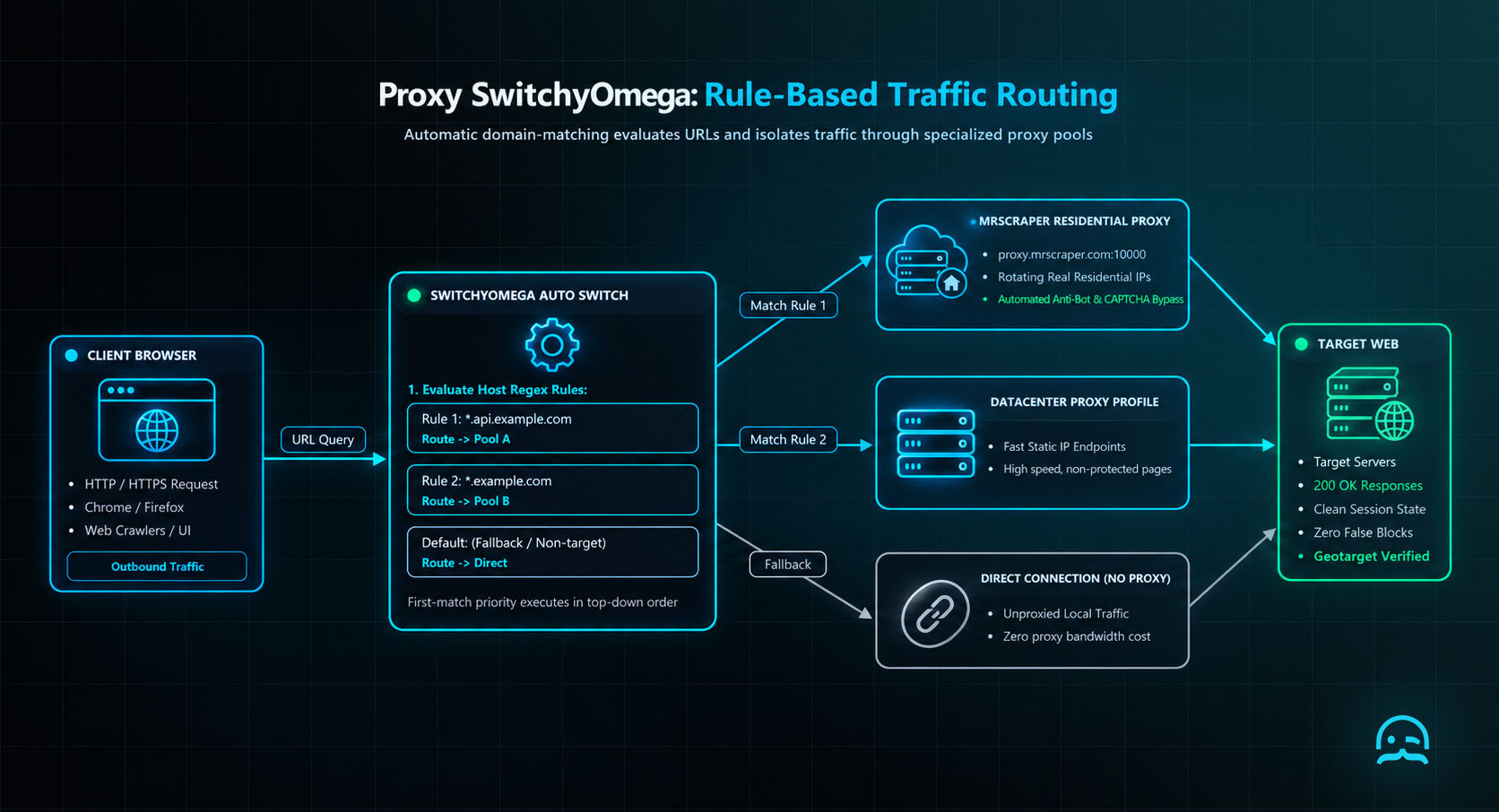
function chooseProfile(url) {
  const rules = [
    { test: /(^|\.)api\.example\.com$/, profile: "api" },
    { test: /(^|\.)example\.com$/, profile: "general" }
  ];
  return (rules.find(rule => rule.test.test(new URL(url).hostname)) ||
    { profile: "direct" }).profile;
}
Start Building Your Proxy Workflow
Use this quickstart resource to move from proxy setup to a more organized data extraction workflow with MrScraper.
Summarize this post
Open it in your assistant of choice with the prompt ready to send.
Take a Taste of Easy Scraping!

Find more insights here
Use Prompt Caching for Repeated Analysis of Web Documents
Use your LLM provider's prompt caching when you analyze many extracted web pages. Keep stable prompt…
Measure and Reduce LLM Token Use in Web Data Applications
Measure how many LLM tokens HTML, Markdown and field-only JSON use for the same pages, check answer…
Build a Knowledge Graph From Web Pages With Source Provenance
Turn permitted web pages into an evidence-backed knowledge graph. Define entities and relationships,…