
Cheap Proxy: Technical Guide for Web Scraping
ProxiesCheap Proxy: Technical Guide for Web Scraping
The best web scraping API with built-in proxies makes data extraction easier. It automatically rotates proxies, handles CAPTCHAs, and manages headers. This eliminates the need for manual proxy management while ensuring high success rates for large-scale scraping projects.
What Are Cheap Proxies?
Cheap proxies are budget-friendly servers that mask your identity by routing traffic through alternative IP addresses. These cost-effective tools allow scrapers to scale operations without high overhead. They are essential for rotating IPs to avoid blocks and for accessing localized content from different geographic regions.
- Automated web scraping and data extraction.
- Bypassing regional restrictions to access locked content.
- Validating application behavior across global markets.
Types of Cheap Proxies:
- Datacenter Proxies: Fast and cost effective solutions ideal for large scale scraping of non protected websites.
- Residential Proxies: Premium options that utilize real consumer IP addresses to bypass sophisticated bot detection.
- Shared Proxies: Budget friendly addresses split between multiple users, offering the lowest price point for basic tasks.
Managed Scraping APIs Versus Manual Proxy Rotation
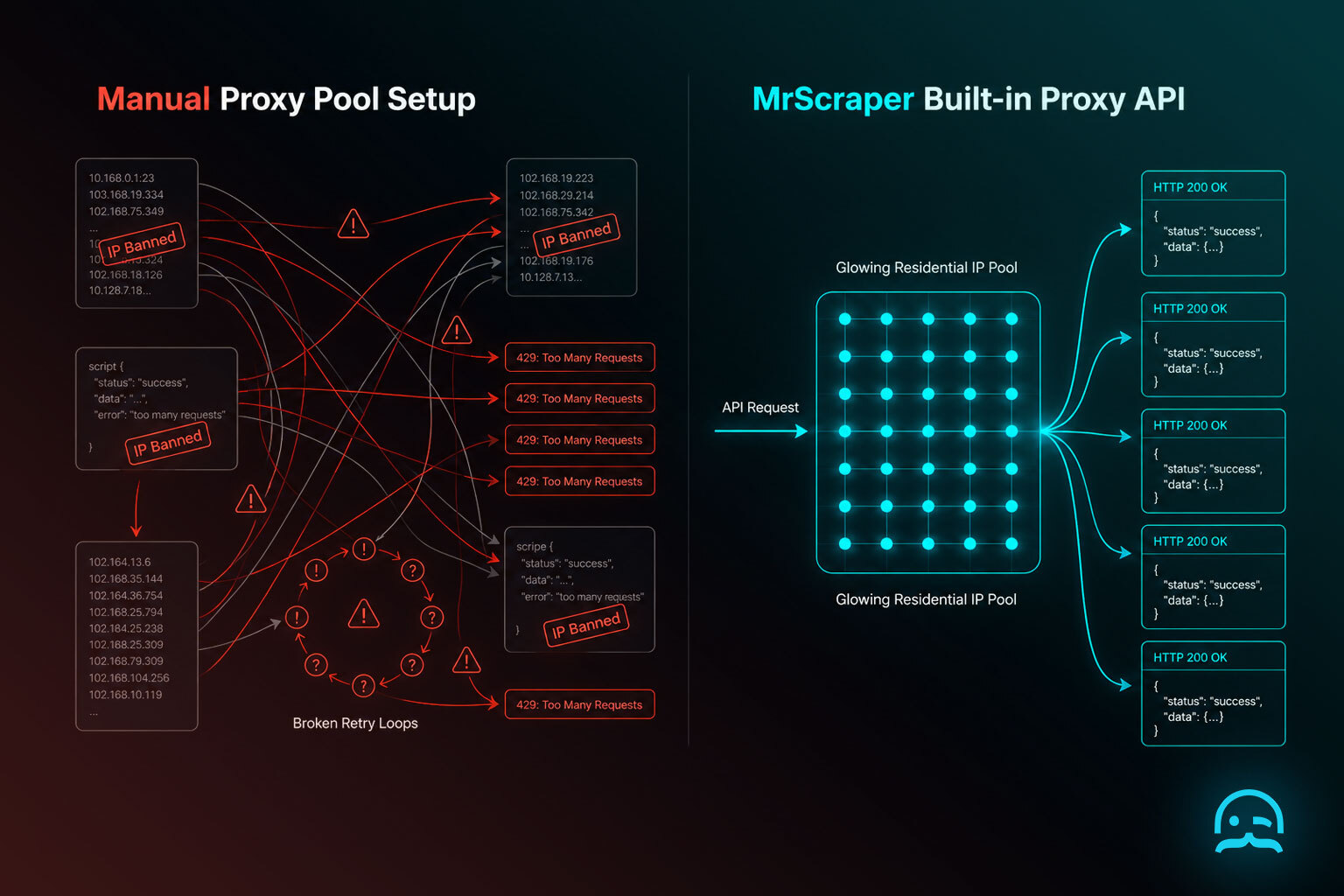
While manual proxy rotation offers granular control, it introduces significant technical overhead in handling retries and user agent synchronization.
import requests

# Direct API integration replaces manual proxy lists
api_endpoint = "https://api.scrapingbee.com/v1/"
params = {
    "api_key": "YOUR_API_KEY",
    "url": "https://example.com/products",
    "render_js": "true",
    "premium_proxy": "true"
}

response = requests.get(api_endpoint, params=params)
print(response.text)
For a deeper technical comparison, the book Hands-On Web Scraping with Python by Seppe Vanden Broucke offers benchmarks. It compares overhead differences between these architectural approaches.
Use Case: Scraping E-commerce Data
Developing a price comparison tool needs you to collect product prices, descriptions, and reviews from major online stores. Do this without causing IP bans. Utilizing an affordable proxy solution allows your scraper to mimic organic user behavior by cycling through different network identities.
The primary objectives for this implementation include rotating IP addresses to bypass anti-bot mechanisms and accessing region-specific catalog data. By integrating these proxies, you keep scraping efficient and deliver data reliably. You also protect your local IP from permanent blacklisting.
Step-by-Step Guide to Using Cheap Proxies for Scraping
This guide shows how to add a proxy API to a Python script. It helps you pull data from target websites. You do not need to manage IP addresses by hand.
Prerequisites
- Python 3.x installed on your local system.
- The requests, BeautifulSoup4, and requests-html libraries for handling HTTP and parsing.
- An active subscription or trial for a proxy provider service.
Steps
- Select a provider that offers residential or datacenter proxies at an affordable price point. Notable options include Proxycheap, Smartproxy, and Stormproxies. Once purchased, secure your credentials including the IP, port, username, and password.
- Set up your local environment by installing the libraries required for HTTP requests and HTML parsing.
- Integrate the proxy credentials into your Python script. This routes your connection through the proxy server to mask your local IP address.
- Implement a rotation strategy. By cycling through a pool of proxies, you reduce the risk of IP bans from frequent requests to the same target domain.
- Finalize the scraping logic by extracting the specific elements you need while monitoring for connection failures or blocked responses.
pip install requests beautifulsoup4 requests-html
import requests
from bs4 import BeautifulSoup
# Define credentials and target
proxies = {
    "http": "http://username:password@proxy_ip:proxy_port",
    "https": "https://username:password@proxy_ip:proxy_port",
}
target_url = "https://www.example.com/products"

# Execute request through proxy
try:
    response = requests.get(target_url, proxies=proxies, timeout=10)
    soup = BeautifulSoup(response.content, "html.parser")

    # Locate and print product data
    products = soup.find_all("div", class_="product")
    for product in products:
        print(product.text.strip())
except Exception as e:
    print(f"Request failed: {e}")
from itertools import cycle

# Define a pool of available proxies
proxy_list = [
    "http://user:pass@proxy1_ip:port",
    "http://user:pass@proxy2_ip:port",
    "http://user:pass@proxy3_ip:port",
]
proxy_pool = cycle(proxy_list)

# Rotate through the pool for multiple requests
for i in range(10):
    current_proxy = next(proxy_pool)
    proxy_config = {"http": current_proxy, "https": current_proxy}
    try:
        response = requests.get(target_url, proxies=proxy_config, timeout=5)
        print(f"Attempt {i+1}: Status {response.status_code}")
    except Exception as e:
        print(f"Proxy {current_proxy} failed")
Technical Tips and Troubleshooting
Technical Tips and Troubleshooting
- Address automated challenges by integrating third party captcha solving services or utilizing headless browsers to render dynamic content that triggers security checkpoints.
- Maintain scraping reliability by monitoring proxy health, filtering out high latency nodes, and removing non functional IP addresses from your rotation immediately.
- Reduce detection risks by rotating User Agent strings. Add random delays between requests to mimic natural human browsing behavior.
- Evaluate the best web scraping API with built-in proxies. Choose a managed solution that handles browser fingerprinting and infrastructure maintenance automatically.
import requests
import random
import time

def fetch_with_retry(url, proxy_list, user_agents):
    """Fetches a URL using randomized headers and proxy rotation."""
    headers = {'User-Agent': random.choice(user_agents)}
    proxy = {'http': random.choice(proxy_list)}

    try:
        # Add a random delay to avoid rate limiting
        time.sleep(random.uniform(1, 3))
        response = requests.get(url, headers=headers, proxies=proxy, timeout=10)
        response.raise_for_status()
        return response.text
    except requests.exceptions.RequestException as e:
        print(f"Request failed: {e}")
        return None
For enterprise requirements, compare professional providers like ScraperAPI, ScrapingBee, Bright Data, Apify, or Oxylabs. These services offer various tiers, including specific pricing for residential proxies to help manage high volume data collection costs.
Conclusion
Cheap proxies provide an effective balance of anonymity and efficiency for developers operating on a limited budget. Implementing these tools correctly ensures your scraping infrastructure remains resilient against blocks while keeping operational costs low. For specific configuration details and advanced integration features, refer to the technical documentation provided by your chosen proxy service provider.
What We Learned
Services such as ScraperAPI, ScrapingBee, Bright Data, Apify, and Oxylabs offer various pricing tiers for residential proxies. For high volume tasks, evaluate the cost per successful request versus monthly bandwidth limits.
import requests

# Example using a unified scraping API endpoint
api_url = "https://api.proxyprovider.com/scrape"
params = {
    "api_key": "YOUR_TOKEN",
    "url": "https://example.com/products",
    "proxy_type": "residential",
    "render": "true"
}

response = requests.get(api_url, params=params)
print(response.status_code)
- Consolidated billing for proxy traffic and headless browser compute
- Automatic retry logic on failed proxy nodes
- Simplified headers management without manual User Agent rotation
- Geographic targeting via simple API parameters
Integrated Proxy API Alternatives
import requests

API_URL = "https://api.scraperapi.com"
params = {
    "api_key": "YOUR_API_KEY",
    "url": "https://example.com/products",
    "render": "true",
    "country_code": "us"
}

response = requests.get(API_URL, params=params)
print(response.text)
For developers seeking specific infrastructure, options like ScraperAPI, ScrapingBee, Bright Data, Apify, and Oxylabs provide various pricing tiers for residential access. For a deeper look at how these systems work, see Hands-On Web Scraping with Python by Seppe Vanden Broucke.
Sources
- rotating IPs to avoid blocks: https://scrapfly.io/blog/posts/introduction-to-proxies-in-web-scraping
- pricing tiers for residential proxies: https://blog.hartleybrody.com/web-scraping-proxies/
Optimize Your Data Extraction Budget
Explore how our infrastructure balances cost and performance to support your scraping needs. Review our plans to find the technical configuration that fits your project requirements.
 Pricing
Frequently asked questions
What is the difference between datacenter and residential proxies for scraping?
Datacenter proxies are fast and cost-effective for most tasks. Residential proxies mimic real users and can bypass advanced detection systems better.
How do you avoid IP bans when using cheap proxies?
To avoid bans, rotate proxies to change IPs for each request. Use random User-Agent strings. Add delays between requests to mimic human behavior.
Summarize this post
Open it in your assistant of choice with the prompt ready to send.
Take a Taste of Easy Scraping!


Find more insights here
Scaling E-commerce Competitive Intelligence with Automated Data Harvesting
Scale e-commerce data harvesting with residential proxies and AI. Learn how modern data extraction s…

Scaling Data Extraction via AI-Driven Dynamic Selectors
Learn how AI-driven dynamic selectors and residential proxies reduce web scraping maintenance costs…
Why MrScraper is the Best ScraperAPI Alternative for No-Code Users
Compare ScraperAPI alternatives and discover why visual, AI-powered extraction is better for no-code…